

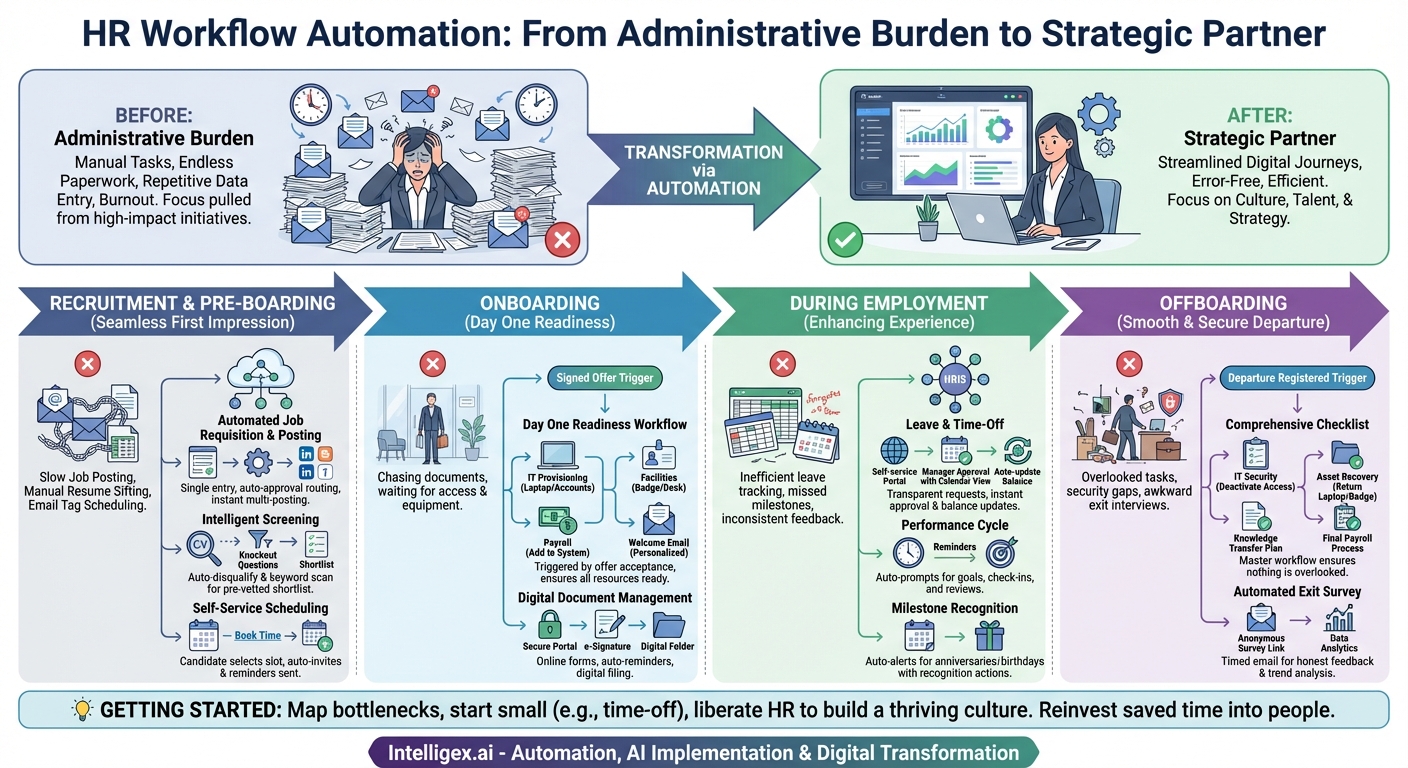
The modern Human Resources department is the strategic heart of any successful organization, responsible for attracting top talent, fostering a positive culture, and driving employee development. Yet, too often, HR professionals find themselves buried under a mountain of administrative tasks—endless paperwork, repetitive data entry, and manual follow-ups that consume valuable time and energy. This administrative burden not only leads to burnout but also pulls focus away from the high-impact, people-centric initiatives that truly matter. The solution isn’t to work longer hours; it’s to work smarter. This is where HR workflow automation comes in, transforming manual, multi-step processes into streamlined, efficient, and error-free digital journeys.
At its core, HR workflow automation uses technology to digitize and automate repetitive tasks based on a set of predefined rules and triggers. Think of it as a digital assistant that handles the predictable, rule-based work, allowing HR teams to concentrate on complex, strategic, and human-focused challenges. When a specific event occurs (the “trigger”), a sequence of automated actions follows. For example, IF a candidate accepts a job offer, THEN the system automatically sends them the onboarding packet, notifies IT to provision a laptop, and alerts the hiring manager to schedule a welcome meeting. This shift from manual to automated not only saves countless hours but also enhances consistency, improves data accuracy, and ensures compliance. Below, we explore a range of powerful HR workflow automation ideas across the entire employee lifecycle that can help your department reclaim its time and maximize its strategic impact.
Recruitment and Pre-boarding: Making a Great First Impression
The race for talent is more competitive than ever. A slow, clunky, or disorganized hiring process can cause you to lose top candidates to competitors. Automation in this phase is crucial for creating a seamless and professional experience from the very first touchpoint.
Automated Job Requisition and Posting
The process of getting a new role approved and posted can be a tangled web of emails and spreadsheets. An automated workflow can standardize this entire sequence. A hiring manager fills out a digital requisition form, which is then automatically routed to the necessary stakeholders (e.g., department head, finance) for approval. Once final approval is granted, the workflow can instantly post the finalized job description to your company’s careers page and multiple external job boards like LinkedIn, Indeed, and others, all from a single entry point. This eliminates manual copy-pasting, reduces the risk of inconsistent job descriptions, and dramatically shortens the time-to-post.
Intelligent Candidate Screening and Shortlisting
Manually sifting through hundreds of resumes is one of the most time-consuming tasks for recruiters. A modern Applicant Tracking System (ATS) can automate the initial screening process. You can configure workflows with “knockout questions” that automatically disqualify candidates who don’t meet essential criteria (e.g., “Do you have the required certification?”). Furthermore, the system can scan resumes for specific keywords, skills, and experience levels, assigning a score to each applicant. This allows recruiters to immediately focus their attention on a pre-vetted shortlist of the most promising candidates, rather than wasting hours on unqualified applicants.
Self-Service Interview Scheduling
The endless email chain of “What time works for you?” is a notorious productivity killer for recruiters, candidates, and hiring managers. Automation completely solves this. When a recruiter decides to move a candidate forward, they can trigger a workflow that sends the candidate an automated email with a link to the hiring manager’s calendar. The candidate can then see available slots and book a time that works for them directly. The system automatically sends calendar invitations to all parties, including links for video conferences if needed. It can also send automated reminders to both the candidate and the interviewer 24 hours before the meeting, reducing no-shows and ensuring everyone is prepared.
Onboarding: From Signed Offer to Productive Employee
Onboarding is a critical moment that sets the tone for an employee’s entire tenure. A disorganized onboarding experience can lead to confusion and early disengagement. Automation ensures every new hire receives a consistent, welcoming, and efficient introduction to the company.
The “Day One Readiness” Workflow
The moment a candidate signs their offer letter should trigger a comprehensive cross-departmental workflow. This single event can set off a cascade of automated actions:
- IT Provisioning: An automatic ticket is created for the IT department to set up the new hire’s email account, order a laptop, and grant access to necessary software and systems.
- Facilities and Admin: A notification is sent to the facilities team to prepare a workspace, create a security badge, and arrange for any necessary office equipment.
- Payroll and Finance: The payroll department is automatically notified to add the new hire to the system for their first paycheck.
- Welcome Communications: A personalized welcome email is automatically sent from the new hire’s manager or a team leader, creating an immediate sense of belonging.
This ensures that on their first day, the new employee has everything they need to get started, avoiding the frustrating experience of waiting for access or equipment.
Automated Document Collection and Management
Chasing new hires for signed tax forms, I-9 verification, and policy acknowledgements is a tedious but necessary task. An automated onboarding portal can digitize this entire process. New hires receive a secure link to a portal where they can electronically fill out and sign all required documents before their first day. The system can send automated reminders for any outstanding forms, and once completed, the documents are automatically filed in the employee’s digital folder within the HRIS. This not only saves HR administrative time but also improves compliance and record-keeping.
During Employment: Enhancing the Employee Experience
Automation isn’t just for hiring and firing. It plays a vital role in simplifying day-to-day HR processes, freeing up managers and employees to focus on their core responsibilities.
Leave and Time-Off Request Management
Manually tracking vacation requests, sick days, and PTO balances using spreadsheets is inefficient and prone to error. An automated workflow is the gold standard. An employee submits a time-off request through a self-service portal. The request is automatically routed to their direct manager for approval. The manager can see a team calendar to check for overlaps before approving or denying the request with a single click. Once approved, the employee’s PTO balance is automatically updated in the HRIS, the team calendar is populated, and the employee receives a confirmation notification. This creates a transparent, fast, and frustration-free process for everyone.
Performance Management Cycle Automation
A consistent performance management process is key to employee development, but it often falls by the wayside due to competing priorities. Automation can keep the cycle on track. Workflows can be set up to automatically send reminders to managers and employees about key deadlines, such as:
- Reminders to set quarterly or annual goals.
- Notifications for upcoming mid-year check-ins.
- Prompts for employees to complete self-evaluations.
- Alerts for managers to complete their reviews before the deadline.
This proactive communication ensures higher participation rates and helps embed a culture of continuous feedback and development.
Automated Employee Milestone Recognition
Recognizing work anniversaries and birthdays is a simple yet powerful way to make employees feel valued. However, it’s easy to forget these dates when tracked manually. An automated workflow can connect to your HRIS data and trigger actions based on employee milestones. For example, on an employee’s work anniversary, the system could automatically send a congratulatory email from the CEO, notify their manager to offer public recognition in a team meeting, or even trigger a small bonus or gift card allocation. This ensures that no milestone is missed and consistently reinforces employee appreciation.
Offboarding: Ensuring a Smooth and Secure Departure
A well-managed offboarding process is just as important as onboarding. It protects the company’s assets and data, ensures a smooth knowledge transfer, and allows the departing employee to leave on good terms. Automation brings much-needed structure and security to this sensitive process.
The Comprehensive Offboarding Checklist Workflow
When an employee’s departure is registered in the HRIS, a master offboarding workflow should be initiated. This workflow creates and assigns tasks to all relevant departments to ensure nothing is overlooked:
- IT Security: A task is created to deactivate all system access, email, and network accounts on the employee’s final day.
- Asset Recovery: A checklist is sent to the manager to ensure the return of all company property, such as laptops, phones, and security badges.
- Knowledge Transfer: The manager is prompted to create and oversee a knowledge transfer plan to ensure business continuity.
- Final Payroll: Payroll is automatically notified to process the final paycheck, including any accrued vacation payout, in compliance with state laws.
- Exit Interview: The departing employee is automatically sent a link to schedule their exit interview with HR.
Automated Exit Survey and Data Collection
Gathering honest feedback from departing employees is invaluable for identifying areas of improvement within the organization. An automated workflow can send an anonymous exit survey to the employee’s personal email address a few days after their last day. This timing often elicits more candid responses than an in-person interview. The aggregated, anonymized data from these surveys can then be analyzed to spot trends in turnover reasons, manager performance, or cultural issues, providing actionable insights for the HR team.
Getting Started with HR Automation
The prospect of automating these processes may seem daunting, but the journey can start with small, manageable steps. First, map out your most repetitive and time-consuming manual processes. Identify the biggest bottlenecks and pain points. You don’t have to automate everything at once. Start with a single, high-impact area like time-off requests or new hire paperwork. Choose the right tools—many modern HRIS and ATS platforms have built-in workflow automation capabilities. As you roll out new automated workflows, be sure to communicate the benefits to employees and managers and provide clear training to ensure smooth adoption.
Ultimately, HR workflow automation is not about replacing the human element of Human Resources. It’s about liberating it. By entrusting the repetitive, administrative tasks to technology, HR professionals can finally dedicate their time and expertise to what they do best: building a thriving workplace culture, developing talent, and serving as true strategic partners to the business. The time saved is reinvested into the people, and that is a return on investment that benefits the entire organization.
Your Next Read:
Get a FREE
Proof of Concept
& Consultation
No Cost, No Commitment!
