

Every organization runs on data, but getting that data out of core systems and into the hands of the people who need it is a constant source of friction. The common approach, a free-for-all where anyone can export anything, is a massive security risk. The alternative, locking everything down and forcing every request through a backlogged IT department, grinds productivity to a halt. Neither of these extremes works in a modern, data-driven business.
The solution is not to eliminate exports but to manage them with precision and intelligence. By implementing a simple, role-based model for data exports, you can strike a critical balance. You can empower your teams with the data they need for timely decisions while simultaneously strengthening security, ensuring compliance, and reducing the manual workload on your technical teams. This isn’t about adding bureaucracy; it’s about building a scalable framework that makes your entire organization faster, smarter, and safer.
Why Ad-Hoc Export Requests Don’t Scale
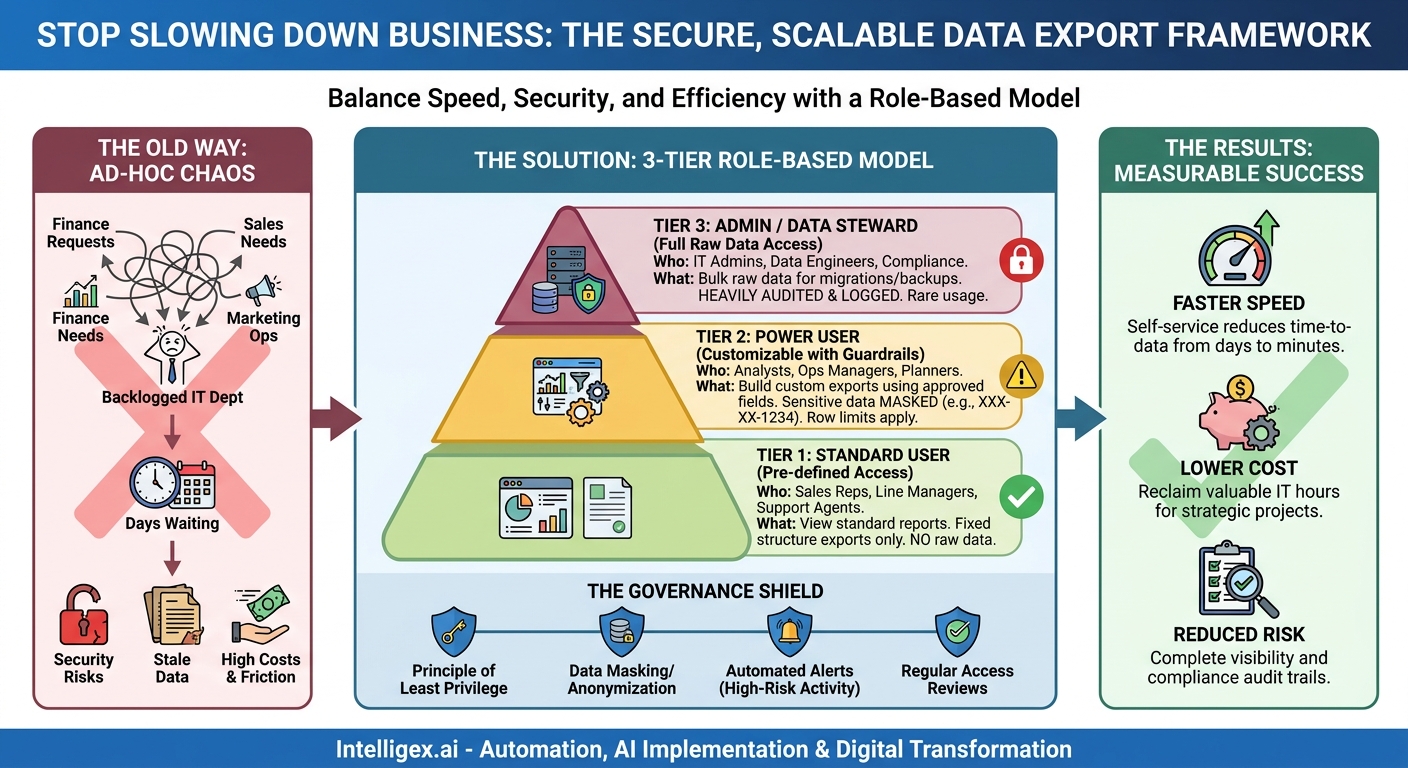
For many companies, the data export process is broken. It often looks something like this: a marketing manager needs a list of recent customers for a new campaign. They can’t pull it themselves, so they create a ticket. The request joins a long queue for the data team, which is already swamped with similar requests from Finance, Sales, and Operations. Days later, after a few back-and-forth emails to clarify the required fields, the marketing manager finally receives a CSV file. By then, the data is already stale, and a market opportunity may have been missed.
This manual, ticket-based system creates significant bottlenecks and introduces unnecessary risks. It directly impacts key business metrics in several negative ways:
- Speed: Business agility is crippled. When teams have to wait days for basic data, their ability to react to market changes, serve customers, and make informed decisions is severely hampered. This delay is a direct tax on innovation and responsiveness.
- Cost: The process is expensive. It consumes valuable hours from highly skilled data and IT professionals, turning them into manual report pullers instead of letting them focus on high-impact strategic projects. Simultaneously, it creates significant opportunity costs for the business teams left waiting for information.
- Quality: Manual data pulls are notoriously prone to human error. The wrong filters, a misunderstood request, or a simple copy-paste mistake can lead to flawed data and poor business decisions. Furthermore, the delay between request and delivery means the data is often outdated the moment it arrives.
- Visibility: Without a structured system, there is no effective audit trail. It’s nearly impossible to track who is exporting what data, when, and for what purpose. This lack of visibility is a major compliance blind spot, especially with regulations like GDPR and CCPA, and it makes investigating a potential data breach incredibly difficult.
This reactive, ad-hoc approach is simply not sustainable. As your data volume and business complexity grow, the problem only gets worse. A proactive, structured framework is essential for growth.
Introducing a Three-Tier Export Model
The foundation of a scalable and secure export strategy is a tiered model based on user roles and their legitimate data needs. Instead of granting permissions on an individual basis, you group users by their job functions and assign them to a pre-defined tier. This approach simplifies administration and ensures consistency. A three-tier model provides a great starting point for most organizations, offering a clear balance of flexibility and control.
Tier 1: Standard User (Pre-defined Exports)
This is the default level of access for the majority of employees. These users need data to perform their daily tasks, but they don’t need to perform complex analysis or access raw, sensitive information.
- Who they are: Sales representatives, marketing coordinators, customer service agents, junior financial analysts, and line managers.
- What they can do: They can view standard, pre-built reports and dashboards. Their export capability is limited to the summarized data presented in these reports. They cannot add or remove fields or access the underlying raw data. The structure of the export is fixed.
- Business Scenario: A sales manager exports the data table from their team’s “Weekly Pipeline” dashboard to prepare for a team meeting. The report contains only the pre-approved fields: opportunity name, stage, amount, and close date.
Tier 2: Power User (Customizable Exports with Guardrails)
This tier is for employees who need to dig deeper into the data. These are often team leads, senior analysts, or operations managers who must analyze trends, create custom reports, and answer specific business questions that standard reports don’t cover.
- Who they are: Business analysts, marketing operations managers, supply chain planners, and HR business partners.
- What they can do: They can use a report builder or analytics interface to create their own exports. They can select from a curated list of approved data fields, apply complex filters, and join data from different, but related, sources. Critically, this access comes with guardrails: sensitive fields (like Social Security Numbers or credit card details) are either masked or completely unavailable, and exports may have row limits to prevent massive data dumps.
- Business Scenario: A supply chain planner builds a custom report to analyze product delivery times. They can select fields like “Product SKU,” “Order Date,” “Ship Date,” and “Region,” but they cannot see the individual customer’s name or home address.
Tier 3: Administrator / Data Steward (Full Raw Data Exports)
This is the highest level of privilege and should be granted to an extremely small and trusted group of users. This access is reserved for technical or governance roles that have an explicit, well-defined need for bulk or raw data access.
- Who they are: IT system administrators, data engineers, data scientists, and senior compliance officers.
- What they can do: They can perform bulk data exports for system migrations, backups, or integrations with other platforms. They may have access to raw, unmasked data, including PII. Every action taken by a Tier 3 user must be heavily audited and logged.
- Business Scenario: A data engineer exports a full, raw customer table from the production database to load it into a secure, isolated data warehouse for a new machine learning project. This action requires justification and generates an automatic alert for the security team.
How to Implement Your Tiered Access Model: A Step-by-Step Guide
Transitioning to a role-based export model requires a methodical approach. It’s not just a technical configuration; it’s a business process change that involves collaboration between IT, security, and business departments. Following a clear process ensures a smooth and effective implementation.
- Inventory Your Data and Systems: You cannot protect what you don’t know you have. Start by identifying your critical systems of record (e.g., CRM, ERP, HRIS) and the types of data they contain. Work with business teams to understand what data they export today and why. This discovery phase is crucial for identifying sensitive data categories like PII, financial data, or intellectual property.
- Define Roles, Not People: The core of Role-Based Access Control (RBAC) is abstracting permissions away from individuals. Instead of creating a permission set for “Jane Doe,” create one for the “Accounts Payable Specialist” role. Group users by their job function and data requirements. A single person may have multiple roles, but permissions should be tied to the function, not the person.
- Map Roles to Tiers: With your roles defined, map each one to one of an export tier. This is where you make critical decisions. Does the “Regional Sales Manager” role need Tier 1 or Tier 2 access? Document these decisions and the justification for each in a central policy document or wiki. This mapping becomes your source of truth for access control.
- Configure Your Platforms: Armed with your role-to-tier map, begin implementing the controls in your key software platforms. Modern enterprise applications like Salesforce or Microsoft Dynamics have robust tools for this, often called “Profiles,” “Permission Sets,” or “Security Roles.” Use these native features to enforce the rules you’ve defined. Avoid creating one-off custom permissions whenever possible.
- Communicate and Train: Don’t let the new model be a surprise. Communicate the changes to your users, explaining the rationale behind them. Focus on the benefits of self-service for Tiers 1 and 2, and the importance of security for the new guardrails. Provide brief training on how to use the pre-built reports or the self-service report builders.
- Audit, Review, and Iterate: Access needs are not static. People change roles, new data types are introduced, and business processes evolve. Establish a regular review cycle (e.g., quarterly or semi-annually) to audit user access. This review should verify that current permissions still align with job roles and the principle of least privilege. Use logs to identify dormant accounts with high privileges and clean them up.
Practical Scenarios Across Business Units
Applying the three-tier model becomes clearer when you look at specific examples from different departments. The principles are the same, but the data and the roles vary.
Finance Department
Finance deals with highly sensitive data, making structured access critical for both internal controls and external audits.
- Tier 1 (Standard User): An Accounts Payable clerk can view and export a pre-defined “Overdue Invoices” report for their assigned vendors. They cannot see payroll data or executive financial summaries.
- Tier 2 (Power User): A financial analyst can build a custom report comparing departmental spending against budget. They can select specific general ledger codes and time periods but cannot export raw payroll data containing employee names and salaries.
- Tier 3 (Administrator): A Finance Systems Administrator can perform a full export of transactional data to provide to external auditors or to migrate to a new accounting system. This action is logged and requires multi-factor authentication.
Human Resources Department
HR data is arguably the most sensitive personal data in any organization. Protecting it is not just a best practice; it is a legal requirement.
- Tier 1 (Standard User): A hiring manager can export a list of active candidates for their own open job requisitions. The export includes candidate names and application status but excludes sensitive demographic information.
- Tier 2 (Power User): An HR Business Partner can create reports on employee turnover rates by department and tenure. The exported data is aggregated and anonymized, showing counts and percentages rather than individual employee records.
- Tier 3 (Administrator): An HRIS Administrator can export full employee records, including PII and salary information, to perform a legally required integration with the company’s benefits provider.
Sales and Marketing Teams
These teams need fast access to customer and prospect data to drive revenue, but uncontrolled exports can lead to data leakage and violations of privacy regulations like CAN-SPAM or GDPR.
- Tier 1 (Standard User): A sales development representative (SDR) can export a list of their assigned leads for the day from a pre-built CRM report to plan their calls.
- Tier 2 (Power User): A marketing operations specialist can build a custom report analyzing email campaign engagement. They can export fields like “Campaign Name,” “Open Rate,” and “Click-Through Rate” alongside anonymized subscriber IDs, but not the actual email addresses from the master list.
- Tier 3 (Administrator): A data analyst on the marketing team might export a large, raw dataset of customer interactions and web behavior to build a predictive lead scoring model in a separate, secure analytics environment.
The Governance Layer: Keeping Data Safe and Compliant
Implementing a tiered model is the first step. To make it truly robust, you need to wrap it in a layer of strong governance practices. These principles ensure that your access controls remain effective and that you can prove your diligence to auditors and regulators.
A strong governance layer isn’t about restriction; it’s about creating a safe environment that enables responsible data use. Consider this a short checklist for your governance framework:
- Principle of Least Privilege: This is the golden rule. Always default to granting the minimum level of access a user needs to perform their job function. It’s easier to grant more access later than to revoke excessive access after an incident.
- Data Masking and Anonymization: For Tier 2 exports, use technology to automatically mask or hide sensitive data fields. For example, an export might show `XXX-XX-1234` instead of a full Social Security Number or `****1111` instead of a full credit card number.
- Comprehensive Auditing and Logging: Every export, especially from Tiers 2 and 3, must be logged. The audit log should capture the “who, what, when, and where” of the export: which user, what data/report, the exact timestamp, and their IP address. These logs are your best defense during a security investigation or compliance audit.
- Automated Alerts: Configure your systems to send automated alerts for high-risk activities. Examples include any Tier 3 export, an unusually large export from a Tier 2 user, or multiple export attempts from a user after hours. This allows your security team to proactively investigate suspicious behavior.
- Regular Access Reviews: Don’t let permissions go stale. Implement a formal process for managers to review and re-certify their team members’ access rights on a regular basis (e.g., every 90 or 180 days). This process should be triggered automatically when an employee changes roles or leaves the company.
Measuring Success: Metrics That Matter
How do you know if your new role-based export model is working? You need to track metrics that connect directly to business value. Moving away from anecdotal evidence to hard numbers helps justify the investment and identify areas for further improvement.
Speed and Efficiency
- Reduction in IT Tickets for Data Exports: This is one of the most direct measures of success. Track the number of manual report requests submitted to your IT or data team. A significant decrease shows that the self-service capabilities of Tiers 1 and 2 are working.
- Time-to-Data for Business Users: Survey your users or use system timestamps to measure the time from when a user needs data to when they have it. Shifting from a multi-day ticket process to an on-demand self-service export should dramatically reduce this metric.
Cost and Resource Allocation
- IT/Data Team Hours Reclaimed: Calculate the time your technical teams previously spent on manual exports. These reclaimed hours can now be reallocated to more strategic initiatives like improving data infrastructure or developing advanced analytics.
Risk and Compliance
- Number of Tier 3 Users: This number should be as low as possible. A decreasing or consistently low number of users with full data access is a strong indicator of a healthy security posture.
- Audit Trail Completeness: Measure the percentage of data exports that are fully logged with user, data, and time details. The goal should be 100% for all Tier 2 and Tier 3 exports.
Your Next Steps: Building a Pragmatic Roadmap
Implementing a comprehensive access control model across an entire organization can feel daunting. The key is to avoid a “big bang” approach. Instead, build momentum by starting with a focused pilot project, demonstrating value quickly, and iterating based on what you learn.
Here is a simple, actionable plan to get started:
- Select a Pilot Group: Choose one department or team to be your pilot. An ideal candidate is a group like Sales Operations or Marketing Analytics; they have clear data needs, are often frustrated by existing bottlenecks, and their work has a direct impact on revenue.
- Define Their Roles and Tiers: Sit down with the team’s manager. Use a whiteboard to map out every person on their team, their primary job functions, and the data they need. Collaboratively assign each role to one of the three export tiers.
- Implement in One Core System: Focus your initial technical efforts on a single, high-impact platform for that team. For a sales team, this would be your CRM. For a finance team, your ERP. Configure the role-based profiles and permissions within that one system.
- Measure, Gather Feedback, and Iterate: Let the pilot run for a full business quarter. Track the key metrics you defined. At the end of the quarter, meet with the pilot team to gather their feedback. What worked well? What was confusing? Use this input to refine your roles and tier definitions.
By starting small and proving the value, you create a powerful case study for rolling out the model to the rest of the organization. This foundational work in data governance does more than just solve the problem of data exports. It builds the operational muscle and security framework necessary to safely unlock more advanced capabilities, from business intelligence and analytics to AI and process automation.
Your Next Read:
Category:
Get a FREE
Proof of Concept
& Consultation
No Cost, No Commitment!
