

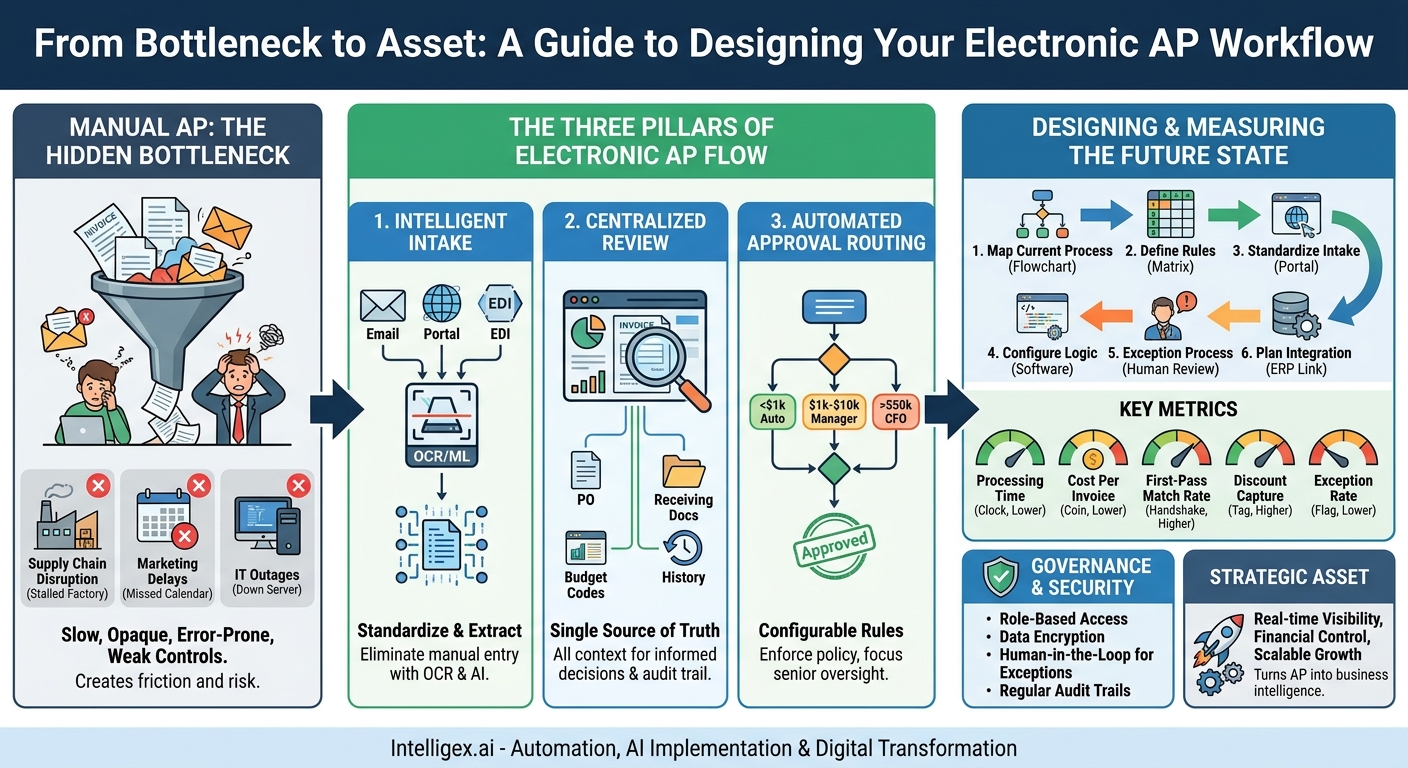
The accounts payable process is often the unsung hero of a well-run business. When it works, nobody notices. When it breaks, the consequences ripple through every department, from stalled marketing campaigns to strained supplier relationships. For many organizations, AP is still a tangle of paper invoices, overflowing email inboxes, and manual data entry. This manual approach isn’t just slow; it’s a significant operational risk that creates financial uncertainty and holds back growth.
Chasing approvals, correcting data entry errors, and manually matching invoices to purchase orders consumes countless hours that could be spent on strategic financial analysis. The lack of visibility means finance leaders are often flying blind, unable to provide an accurate, real-time picture of the company’s cash flow and liabilities. Transitioning to an electronic approval flow isn’t just a minor efficiency gain. It’s a fundamental digital transformation that builds resilience, improves financial controls, and provides the strategic visibility needed to navigate a competitive market.
Why Manual AP Approval Is a Hidden Bottleneck
A slow and opaque accounts payable process acts like a brake on the entire organization. It creates friction where there should be flow, introducing delays and risks that extend far beyond the finance department. The problems of a manual system are not isolated; they trigger a domino effect that impacts operational efficiency, strategic partnerships, and financial health.
Consider these common scenarios where a manual AP process causes significant disruption:
- Supply Chain Disruption: A key supplier, frustrated by consistently late payments, places your account on a credit hold. Suddenly, a critical component for your flagship product is unavailable, halting the production line. The operations team scrambles to resolve the payment issue, but the damage is done, leading to missed deadlines and potential lost sales.
– Marketing Campaign Delays: Your marketing team is ready to launch a major digital advertising campaign. However, the invoice from the creative agency is sitting in a manager’s inbox, awaiting approval. The delay means missing a key seasonal window, reducing the campaign’s impact and wasting the momentum the team has built.
– IT Service Outages: An invoice for a critical software-as-a-service (SaaS) subscription renewal is lost in a paper shuffle. The payment is missed, and the service is suspended, causing a company-wide outage of a vital tool like your CRM or project management platform. The result is lost productivity and a frantic effort to restore service.
These examples highlight the core weaknesses of manual AP: a profound lack of visibility, a high potential for human error, and weak enforcement of internal controls. When you don’t know where an invoice is in the approval process, you can’t forecast cash flow accurately. When data is keyed in by hand, mistakes in amounts or vendor details are inevitable, leading to incorrect payments and painful reconciliation efforts. This environment also opens the door to compliance issues and even potential fraud, as non-standard invoices can slip through the cracks without a systematic review.
The Three Pillars of an Electronic AP Approval Flow
Automating your AP process isn’t about simply buying a piece of software. It’s about redesigning the workflow around three core pillars: how you receive information (Intake), how you process it (Review), and how you act on it (Approve). Optimizing each stage creates a system that is fast, accurate, and transparent.
Pillar 1: Intelligent Intake
The first step is to stop the flood of paper and disorganized emails. Intelligent intake is about creating a standardized, digital-first channel for all incoming invoices and using technology to extract the necessary information automatically. This process typically involves Optical Character Recognition (OCR) and machine learning models trained to identify and capture key data points like invoice number, date, vendor name, line items, and total amount.
The goal is to eliminate manual data entry entirely. Instead of an AP clerk typing details from a PDF into an accounting system, the software does it in seconds. A robust intake system can handle invoices arriving in various formats, whether they are PDF attachments in a dedicated email inbox (like [email protected]), uploads to a vendor portal, or even EDI (Electronic Data Interchange) transmissions. The value is immediate: it drastically reduces the risk of human error, frees up staff for higher-value tasks, and accelerates the start of the entire AP cycle.
Pillar 2: Centralized Review
Once an invoice’s data is captured, it moves into a centralized review environment. This is the end of chasing approvals through email chains or walking paper copies from desk to desk. A centralized system acts as a single source of truth, routing the digitized invoice to the correct approver based on predefined rules. More importantly, it provides the approver with all the context they need to make an informed decision in one place.
Imagine a department head receiving a notification for an invoice. When they open it, they don’t just see the invoice image. They see the corresponding purchase order, the receiving documents confirming delivery of goods, the budget codes it will be applied to, and a complete history of communications about that transaction. This eliminates the time-consuming back-and-forth of searching for information. It also creates an unchangeable, timestamped audit trail, showing who reviewed the invoice, when they approved it, and any comments they made.
Pillar 3: Automated Approval Routing
The final pillar is the logic that drives the entire workflow. Automated approval routing uses a set of configurable business rules to ensure the right people approve the right invoices at the right time. This is where you codify your company’s internal controls and delegation of authority policies directly into the system, ensuring they are followed consistently.
This logic can be simple or complex. For example:
- Invoices under $1,000 that match a PO can be approved automatically.
- Invoices for marketing expenses between $1,001 and $10,000 require approval from the Marketing Director.
- Any invoice over $50,000 requires sequential approval from the department head and the CFO.
By automating this routing, you accelerate the entire process. Senior leaders are no longer burdened with approving minor, recurring expenses, allowing them to focus only on the transactions that require their strategic oversight. The system enforces compliance automatically, reducing the risk of unauthorized spending and providing a clear, auditable path for every single payment.
A Step-by-Step Guide to Designing Your AP Workflow
Transitioning to an automated system requires careful planning. You are not just implementing technology; you are redesigning a core business process. Following a structured approach ensures that the new workflow aligns with your business needs and delivers the expected value.
- Map Your Current “As-Is” Process: Before you can design the future, you must understand the present. Document every step of your existing AP process. Who receives the invoices? How are they entered into the system? Who approves them, and how is that approval communicated? Identify the bottlenecks. Is it waiting for manual data entry? Is it chasing managers for email approvals? This map becomes your baseline for improvement.
- Define Your Business Rules and Approval Matrix: This is the most critical step. Work with finance, operations, and department heads to create a clear approval matrix. Define the rules based on factors like amount, department, project, vendor, or expense type. For example, a rule might state, “All IT hardware invoices over $5,000 must be approved by the VP of IT.” Be specific and cover as many scenarios as possible.
- Standardize Your Intake Channels: To enable automation, you need to control how invoices enter your ecosystem. Discourage vendors from sending invoices to individual employees. Instead, establish one or two official channels, such as a single email address (e.g., [email protected]) or a vendor self-service portal. Communicate this change clearly to all your suppliers.
- Configure Your Routing Logic: Translate the approval matrix from Step 2 into the workflow logic within your chosen AP automation platform. Set up the user profiles for every approver and define the escalation paths. What happens if a primary approver is on vacation? Your workflow should automatically route the invoice to a designated backup after a set period.
- Design Your Exception Handling Process: No automated system is perfect. You need a clear process for handling exceptions. What happens when an invoice arrives with no corresponding purchase order? Or when the quantities on the invoice don’t match the goods receipt note? Define who is responsible for investigating and resolving these discrepancies. The goal is to manage exceptions efficiently, not to have them derail the entire process.
- Plan for System Integration: An AP automation tool should not be an island. To realize its full value, it must connect seamlessly with your core financial system, such as an ERP like Oracle NetSuite or SAP. This integration allows for the automatic syncing of vendor data, payment records, and general ledger codes, eliminating the need for double data entry and ensuring your financial records are always accurate and up-to-date.
Measuring Success: Key AP Automation Metrics
One of the greatest benefits of an electronic AP flow is the move from anecdotal evidence to hard data. You can finally stop guessing where the problems are and start measuring performance with precision. Tracking the right metrics provides a clear picture of your ROI and helps you identify opportunities for continuous improvement.
Focus on these key performance indicators (KPIs) to measure the health and efficiency of your AP process:
- Invoice Processing Time: This is the classic metric. Measure the average time from the moment an invoice is received to when it is fully approved for payment. A significant reduction here is a primary indicator of success.
- Cost Per Invoice: Calculate the fully-loaded cost to process a single invoice. This includes the time spent by AP staff, approvers, and any costs associated with paper, printing, and storage. Automation should dramatically lower this figure.
- First-Pass Match Rate: For companies that use purchase orders, this is a crucial metric. It measures the percentage of invoices that are processed and approved automatically without any human intervention because they perfectly match the PO and receipt data. A high rate indicates a highly efficient, touchless process.
- Exception Rate: This is the percentage of invoices that fall out of the standard workflow and require manual investigation or correction. A high exception rate might point to issues with your PO process or specific vendors. Reducing this rate is key to achieving higher levels of automation.
– Early Payment Discount Capture Rate: Many vendors offer a discount for paying early (e.g., 2% off if paid in 10 days). A manual process is often too slow to take advantage of these offers. Tracking the percentage of discounts you successfully capture is a direct measure of financial value created.
Governance and Security in an Automated World
Automating a critical financial process like accounts payable introduces powerful efficiencies, but it also requires a deliberate focus on governance and security. A well-designed system enhances your financial controls rather than weakening them. The goal is to build a process that is not only faster but also more secure and compliant than its manual predecessor.
The core principle is simple: automation is there to assist human judgment, not to replace it. For high-value transactions or unusual invoices, the system’s job is to flag them and present all the verified information to a human for a final, informed decision.
As you implement your electronic workflow, adhere to these key governance practices:
- Define Clear User Roles and Permissions: Implement strict role-based access control. An AP clerk should be able to process invoices but not approve payments. A department manager should only be able to see and approve invoices relevant to their own budget. This principle of least privilege is fundamental to preventing both errors and fraud.
- Encrypt and Protect Sensitive Data: Your system will handle sensitive vendor information, including bank account details. Ensure this data is encrypted both when it is stored (at rest) and when it is being transmitted (in transit).
- Establish a Human-in-the-Loop for Exceptions: Never allow the system to “guess” on an exception. Create a clear, mandatory workflow that routes any mismatched or non-compliant invoices to a designated person for manual review and resolution.
- Regularly Audit Access and Approval Histories: The digital audit trail is one of the most powerful features of an automated system. Use it. Periodically review logs to ensure that permissions are appropriate and that the approval process is functioning as designed. This is critical for both internal control and external compliance audits.
Your Next Steps to a Smarter AP Process
Making the shift from a manual, paper-based AP process to a streamlined electronic workflow is a journey of continuous improvement. It delivers compounding returns in the form of cost savings, enhanced financial control, and better business intelligence. The key is to start with a clear, deliberate plan.
Here is a practical action plan to get you started:
- Assess Your Current State: You cannot improve what you do not measure. Use the metrics discussed earlier to benchmark your existing AP process. Calculate your current average invoice processing time and estimated cost per invoice. This baseline will be crucial for building a business case and demonstrating success later on.
- Identify a Pilot Project: Don’t try to boil the ocean. Start with a manageable pilot program to prove the concept and build momentum. You could begin with a single, tech-savvy department or focus on a specific category of invoices, such as recurring utility bills or SaaS subscriptions, which are often highly standardized.
- Engage Key Stakeholders: A successful AP transformation requires buy-in from across the organization. Talk to the finance team to understand their daily frustrations. Involve IT to discuss integration requirements. Most importantly, speak with the department heads who approve invoices to ensure the new process will make their lives easier, not harder.
- Explore Your Options: Once you have a clear understanding of your requirements, you can begin to explore potential solutions. Look for platforms that are intuitive, scalable, and can integrate seamlessly with your existing accounting or ERP system. The right partner will work with you to configure a workflow that maps directly to your business rules and objectives.
By taking these deliberate steps, you can transform your accounts payable function from a reactive cost center into a strategic asset that provides real-time financial visibility and supports scalable growth.
Your Next Read:
Category:
Get a FREE
Proof of Concept
& Consultation
No Cost, No Commitment!
