

A critical sales quote sits in a digital limbo, the finance team is waiting for an approval that never comes, and a new hire spends their first day without a laptop. Everyone agrees there’s a problem, but no one can agree on whose problem it is. This is the costly reality of ambiguous workflows. When process ownership is unclear and timelines are merely suggestions, delays, rework, and frustration become standard operating procedure. The solution isn’t more meetings or finger-pointing; it’s creating a clear and shared blueprint for accountability.
This blueprint is a Workflow Service Level Agreement (SLA) Map. It’s a practical tool that moves your operations from a state of organized chaos to one of intentional design. By defining who owns what and when, you create a system of transparent accountability that directly improves speed, reduces operational costs, and enhances the quality of your outcomes. It is the foundational step toward scalable growth and intelligent automation.
What is a Workflow SLA Map (and What It Isn’t)?
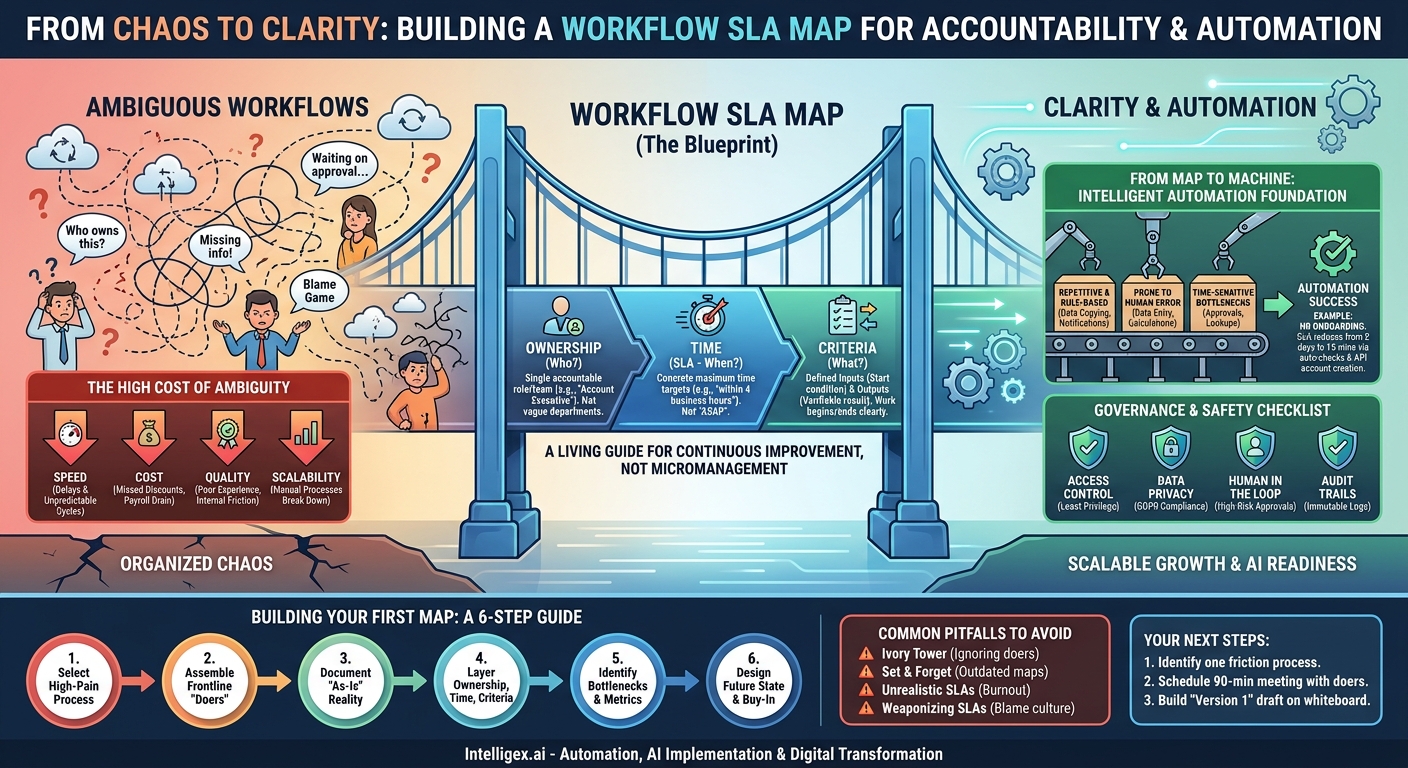
At its core, a Workflow SLA Map is a documented agreement that details every stage of a business process. It goes far beyond a simple flowchart by enriching each step with three critical layers of information: ownership, time, and criteria.
- Ownership: It assigns a specific person, role, or team as the single point of accountability for completing a task. This isn’t “the sales department”; it’s the “Account Executive” or the “Sales Operations Analyst.”
- Time (the SLA): It defines the maximum acceptable time for a task to be completed. This Service Level Agreement transforms vague expectations like “as soon as possible” into concrete targets, such as “within 4 business hours.”
- Criteria: It clarifies the inputs required to start a task and the outputs expected upon completion. The work can’t begin until the criteria are met, and it isn’t finished until the agreed-upon outcome is delivered.
However, it’s just as important to understand what an SLA map is not. It is not a rigid, one-time document designed to micromanage employees. It is a living guide that evolves with your business. It’s not a tool for assigning blame, but rather a diagnostic instrument for identifying systemic bottlenecks. When a step misses its SLA, the first question isn’t “who failed?” but “why did the process fail them?” This shift in perspective is crucial for building a culture of continuous improvement.
The High Cost of Ambiguity: Why You Need This Now
Without defined ownership and timelines, processes naturally degrade. Small inefficiencies compound over time, leading to significant impacts on your bottom line. Ambiguity is a hidden tax on your organization’s performance, and it shows up in several ways.
Consider a common scenario: processing a vendor invoice in the supply chain. The vendor submits an invoice. The accounts payable (AP) clerk sees it’s missing a purchase order (PO) number. They email the procurement manager, who is busy and doesn’t see the email for a day. The manager forwards it to the project lead who originally requested the work, asking them to find the PO. The project lead is on vacation. By the time the PO is found and sent back to AP, a week has passed. The company misses the early payment discount, and the vendor relationship is strained.
Let’s break down the business cost of this ambiguity:
- Speed: A simple 5-minute task (finding a PO number) caused a multi-day delay, holding up payment and cluttering financial reports. The total cycle time for the process became unpredictable.
- Cost: The organization lost a potential 2% discount for early payment. More importantly, multiple high-value employees spent their time chasing down information instead of performing strategic work. This is a direct drain on payroll.
- Quality: The vendor has a poor experience, which could affect future pricing or service levels. Internally, the lack of a smooth process creates friction between departments.
- Scalability: This manual, ad-hoc process cannot scale. If the number of invoices doubles, the chaos and delays will more than double, leading to a complete breakdown of the payables function.
Building Your First Workflow SLA Map: A Step-by-Step Guide
Creating your first map can feel daunting, so the key is to start small with a process that is both highly problematic and strategically important. Do not try to map the entire organization at once. Follow these practical steps to build a map that delivers immediate value.
- Select a High-Pain, High-Impact Process. Choose a workflow known for causing delays, confusion, or customer complaints. Good candidates often include customer support ticket escalations, sales quote approvals, employee onboarding, or marketing content reviews. Pick one where the pain is felt across multiple teams.
- Assemble the Cross-Functional “Doers.” Identify every person who actually touches the process, from start to finish. It is critical to include the frontline staff who perform the day-to-day tasks, not just their managers. Their ground-level insights are invaluable for mapping the process as it truly exists, not as it’s imagined to be.
- Document the Current State (The “As-Is”). In a workshop setting, map out every single step, decision point, and handover. Use a whiteboard or a digital collaboration tool. Ask relentlessly, “What happens next?” Capture everything, including the unofficial workarounds and communication channels (like instant messages or hallway conversations). At this stage, resist the urge to solve problems. Just document reality.
- Layer on Ownership, Timelines, and Criteria. Go back through the mapped process, step by step, and define the key elements for each one:
- Owner: Who is the single role responsible? (e.g., “IT Support Specialist,” not “The IT Team”).
- Trigger/Input: What specific event or piece of information starts this step? (e.g., “Support ticket status changed to ‘Escalated’”).
- Outcome/Output: What is the concrete, verifiable result of this step being completed? (e.g., “User account created in Active Directory”).
- SLA: What is a reasonable time to complete this step? Start by measuring the current average time, then set an initial SLA that is realistic. You can tighten it later.
- Identify Bottlenecks and Key Metrics. With the map complete, the problem areas will become obvious. Look for steps with long SLAs, frequent handoffs between teams, or unclear decision criteria. This is where you decide what to measure. Key metrics include:
- Total Process Cycle Time: The time from start to finish.
- Step-Level Cycle Time: How long each individual stage takes.
- SLA Adherence Rate: The percentage of time a step is completed within its defined SLA.
- Rework Rate: How often a step must be redone due to errors from a previous step.
- Design the Future State and Secure Buy-In. Now, redesign the workflow to eliminate the identified bottlenecks. Can steps be combined? Can a handover be automated? Can a simple checklist prevent common errors? Present this new, optimized map to the stakeholders and get their agreement to adopt it as the new standard operating procedure.
From Map to Machine: A Foundation for Intelligent Automation
A common reason digital transformation and automation projects fail is that they attempt to automate a poorly understood or broken process. Automating chaos only creates faster chaos. The Workflow SLA Map is the single most important prerequisite for successful, intelligent automation because it provides the clear, rules-based logic that automation platforms require.
Once you have a map, you can strategically identify the best opportunities for automation. Look for steps in your workflow that are:
- Repetitive and Rule-Based: Tasks like copying data between systems, checking documents for completeness, or sending standardized notifications.
- Prone to Human Error: Data entry, calculations, or compliance checks where mistakes are common and costly.
- Time-Sensitive Bottlenecks: Approval steps or data lookups that frequently hold up the entire process.
Example: Automating HR Onboarding
Your SLA map for new hire onboarding reveals that the “Create User Accounts” step, owned by IT, has a 2-day SLA but is frequently missed. The reason is that IT often receives incomplete information from HR. The process requires manual data entry into five different systems.
With this clarity, an automation solution becomes obvious. An integration platform can be configured to:
- Trigger automatically when a candidate is marked as “Hired” in the HR system.
- Check the new hire record for completeness. If incomplete, it instantly notifies the HR coordinator with a specific list of what’s missing, short-circuiting a multi-day delay.
- Once the data is complete, use APIs to automatically create user accounts in all required systems (email, core applications, payroll) in minutes.
The SLA for this step can now be reduced from 2 days to 15 minutes. The map not only identified the opportunity but also provides the benchmark to measure the automation’s success.
Governance and Safety: Implementing with Confidence
The process of mapping workflows naturally exposes who has access to what information. This makes it a perfect opportunity to strengthen your data governance and security posture, especially when considering automation or AI.
Before implementing a new or automated process, use your map to ask critical governance questions. Answering them upfront prevents compliance issues, data breaches, and operational risks down the line.
A Simple Governance Checklist
- Access Control: Does the owner of each step have the minimum level of data access required to do their job (the principle of least privilege)? When automating a step, ensure the service account or API key has similarly restricted permissions.
- Data Privacy: If the workflow handles personal identifiable information (PII) or other sensitive data, does each step comply with regulations like GDPR? Is data being transferred or stored securely?
- Human in the Loop: For irreversible or high-risk decisions (e.g., approving a payment over $10,000, deleting customer data), does the map explicitly define a required human review and approval step? Automation can propose, but a human should approve.
- Audit Trails: Does the process generate a clear, immutable log of who did what and when? This is non-negotiable for financial, legal, and IT processes. Ensure your automated tools provide this level of visibility.
Common Pitfalls and How to Avoid Them
While creating a Workflow SLA Map is straightforward, several common traps can undermine its effectiveness. Being aware of them can help you ensure your map becomes a valued tool rather than forgotten documentation.
Pitfall: The “Ivory Tower” Map
This happens when managers or consultants create a map without consulting the frontline employees. The resulting process is theoretical, disconnected from reality, and ultimately ignored by the people doing the work.
Solution: Involve the “doers” from day one. They know the exceptions, the workarounds, and the real-world problems. Their participation is essential for accuracy and adoption.
Pitfall: Setting and Forgetting
The business environment is not static. Processes, tools, and teams change. A map that was accurate six months ago may be obsolete today.
Solution: Assign a “Process Owner” for each major workflow. This person is responsible for reviewing and updating the map on a regular schedule, such as quarterly or whenever a significant change occurs.
Pitfall: Unrealistic SLAs
Setting aggressive SLAs without providing the team with the necessary tools, training, or resources leads to burnout and a perception that the system is designed to make them fail.
Solution: Base your initial SLAs on historical performance data. Focus on improving the process to enable faster times, rather than just demanding them. Celebrate incremental improvements.
Pitfall: Using SLAs as a Weapon
If the map is used primarily to punish individuals who miss an SLA, employees will become defensive and hide problems rather than exposing them.
Solution: Treat a missed SLA as a signal that the process itself is broken. Use it as a starting point for a blameless analysis: Was the input late? Is the tool slow? Does the person need more training? The goal is to fix the system, not blame the operator.
Your Next Steps to Actionable Clarity
Moving from ambiguity to clarity doesn’t require a massive, company-wide initiative. It starts with a single conversation about a single process. The goal of a Workflow SLA Map is to replace assumptions with agreements, creating a foundation of accountability that enables your teams to perform at their best.
Your action plan is simple:
- Identify one process that is a known source of cross-departmental friction or customer-facing delays.
- Schedule a 90-minute meeting with 3 to 5 people who are directly involved in that process every day.
- Use that meeting to build a “version 1” draft of the map on a whiteboard. Focus on capturing the major steps, owners, and pain points.
Do not aim for perfection. Aim for a starting point. This single act of making the invisible work visible is the most powerful step you can take toward building a faster, smarter, and more scalable operation.
Your Next Read:
Category:
Get a FREE
Proof of Concept
& Consultation
No Cost, No Commitment!
