

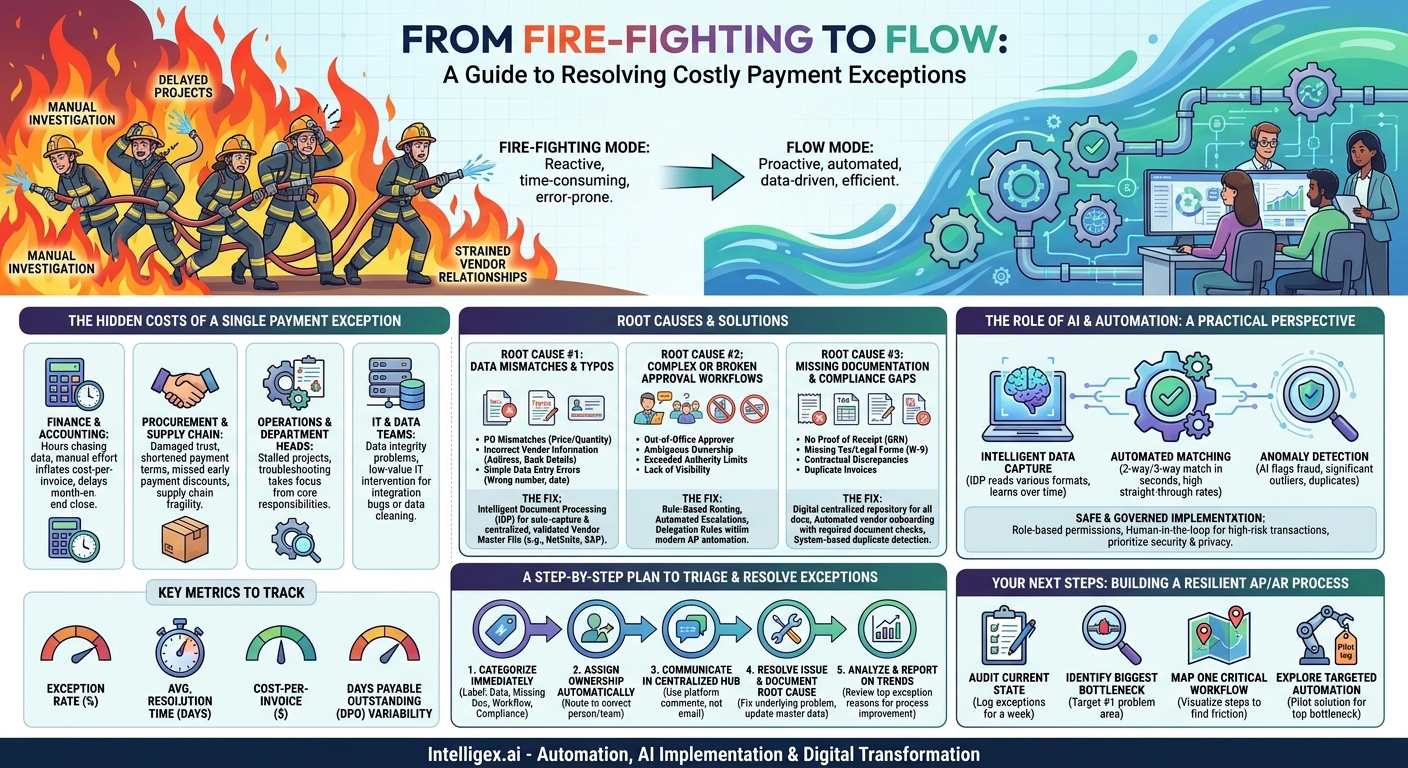
A payment exception isn’t just a delayed transaction. It’s a costly detour that pulls your team away from valuable work. Each time an invoice is flagged, a purchase order doesn’t match, or an approval gets lost in an inbox, a manual, time-consuming investigation begins. This friction doesn’t just live in the finance department. It ripples outward, straining vendor relationships, delaying projects, and obscuring your true financial picture. The cost isn’t measured in late fees alone, but in hours of lost productivity across your entire organization.
In a world where speed and efficiency are competitive advantages, letting payment exceptions dictate your team’s workflow is a silent but significant drain on resources. The good news is that most exceptions are predictable and preventable. By understanding the root causes, you can move from a reactive, fire-fighting mode to a proactive, streamlined operation. This isn’t about working harder; it’s about putting the right systems in place to make payments flow smoothly.
The Hidden Costs of a Single Payment Exception
When an invoice gets stuck, the immediate problem seems simple: a payment is late. But the true business impact is a cascade of hidden costs and operational drags that affect multiple teams. Thinking about exceptions solely as a finance problem misses the bigger picture of how they degrade overall business performance.
Let’s break down the ripple effect:
- Finance & Accounting: This is ground zero. Your AP team spends hours, not minutes, chasing down information, correcting data, and navigating approval chains. This manual effort inflates your cost-per-invoice and delays crucial processes like month-end close. Instead of providing strategic financial analysis, your skilled analysts become data detectives.
- Procurement & Supply Chain: Late payments damage trust. Consistent issues can lead vendors to shorten payment terms, hold back shipments, or even stop doing business with you altogether. This creates supply chain fragility and jeopardizes your ability to negotiate favorable terms. It also means you almost certainly miss out on valuable early payment discounts, leaving money on the table.
- Operations & Department Heads: When a critical vendor for a marketing campaign or an IT project isn’t paid on time, the project stalls. The department head who approved the purchase now has to get involved, pulling them away from their core responsibilities to troubleshoot a payment issue.
- IT & Data Teams: Frequent data errors in invoices or vendor files create data integrity problems. The IT team may be pulled in to fix integration bugs or clean up corrupted data in the ERP, which is a low-value use of their specialized skills.
To understand the scope of the problem, you need to measure it. Key metrics provide a clear view of your process health:
- Exception Rate: What percentage of your total invoices require manual intervention? This is your primary indicator of process friction.
- Average Resolution Time: How many days does it take to resolve an exception from the moment it’s flagged? Long resolution times signal complex or unclear processes.
- Cost-Per-Invoice: Calculate the fully-loaded cost, including labor, for processing a single invoice. You’ll find that invoices with exceptions cost exponentially more to process than straight-through ones.
- Days Payable Outstanding (DPO): While a higher DPO can be good for cash flow, erratic DPO caused by unpredictable exception handling is a sign of poor control and visibility.
Tracking these metrics reveals that fixing AP and AR exceptions isn’t just an accounting task. It’s a strategic initiative that enhances operational speed, reduces costs, improves data quality, and provides the financial visibility needed for scalable growth.
Root Cause #1: Data Mismatches and Typos
The most frequent source of payment exceptions is surprisingly mundane: the data is wrong. A single incorrect digit, a misspelled name, or a mismatched line item is all it takes to grind the process to a halt. These errors force a manual review, creating a bottleneck that is both frustrating and entirely avoidable. These issues typically fall into three main categories.
PO Mismatches
This is the classic “three-way match” failure. The invoice received from the vendor doesn’t align with the purchase order (PO) you issued or the goods receipt note (GRN) confirming delivery. The discrepancy could be in the unit price, quantity of goods, or the total amount. For example, the PO was for 100 units at $10 each, but the invoice arrives for 105 units or for 100 units at $11 each. The system correctly flags this as an exception, but now a person must investigate why, contacting procurement, the warehouse, and possibly the vendor to get answers.
Incorrect Vendor Information
This is one of the most dangerous types of exceptions. The error could be an outdated address, a typo in the vendor’s legal name, or, most critically, incorrect bank account details. Paying the wrong entity or sending money to a fraudulent account is a significant financial risk. This often happens when vendor information is managed decentrally across spreadsheets or when there isn’t a secure, standardized process for updating vendor master data. A marketing team might onboard a new creative agency, but the banking details they enter into the system are incomplete or wrong, stopping the first payment in its tracks.
Simple Data Entry Errors
Even with a valid PO and correct vendor data, human error during manual data entry can introduce problems. An AP clerk might accidentally type the wrong invoice number, enter an incorrect date, or misclassify the expense category. While seemingly small, these errors prevent automated matching and can lead to duplicate payments if the same invoice is entered twice with a slightly different reference number.
The Fix: The solution lies in minimizing manual touches and creating a single source of truth for data. Intelligent Document Processing (IDP) technology can automatically extract and validate information from invoices with a high degree of accuracy, drastically reducing manual keying errors. This should be combined with a centralized and rigorously maintained vendor master file within your ERP or financial system, like Oracle NetSuite or SAP. This ensures that every invoice is checked against pre-validated, accurate vendor information from the start.
Root Cause #2: Complex or Broken Approval Workflows
Even with perfect data, an invoice can get stuck if its path to approval is unclear, illogical, or reliant on manual handoffs. Workflow exceptions are process problems, not data problems. They stem from ambiguity in your internal policies and a lack of automated systems to enforce them. When an invoice lands in someone’s inbox for approval, any hesitation or confusion adds days to the payment cycle.
Common workflow-related scenarios include:
- The Out-of-Office Approver: A manager who needs to approve a $20,000 invoice is on vacation for a week. There is no designated backup or automated delegation rule, so the invoice sits idle until they return, potentially missing its payment window.
- Ambiguous Ownership: An invoice arrives for a cross-functional project involving Marketing, Sales, and IT. It’s not clear who holds the budget or who has the final sign-off authority. The invoice gets forwarded back and forth in a long email chain, with no one taking ownership.
- Exceeded Authority Limits: A department head can approve expenses up to $10,000. An invoice for $12,000 lands on their desk. The system they use doesn’t automatically escalate it to the next level (e.g., a VP or Director). The approver must manually figure out who to send it to, causing delays and potential compliance issues.
- Lack of Visibility: The AP team can see that an invoice is “pending approval” but has no idea who it’s with or how long it’s been there. They have to send emails or instant messages to track it down, which is inefficient and doesn’t scale.
The Fix: The first step is to make the implicit explicit. You need to map your existing approval workflows, identify the bottlenecks, and then design clear, rule-based pathways. A modern AP automation system allows you to build these rules directly into your process. For example:
- Rule-Based Routing: Invoices under $1,000 for office supplies are automatically approved and scheduled for payment. IT-related invoices are automatically routed to the CIO. Invoices over $25,000 are automatically sent to both the department head and the VP of Finance.
- Automated Escalations: If an invoice isn’t approved within 48 hours, the system automatically sends a reminder. After 72 hours, it can automatically escalate the approval request to that person’s manager.
- Delegation and Backups: Set up out-of-office rules so that approvals are automatically rerouted to a pre-assigned delegate, ensuring the process never stops.
By automating your business rules, you remove the guesswork. The system handles the routing, reminding, and escalating, allowing your team to focus on the strategic aspects of their roles.
Root Cause #3: Missing Documentation and Compliance Gaps
The third major category of exceptions relates to compliance and governance. A payment can be held up not because the numbers are wrong or the approval is missing, but because the required supporting documentation is not attached or a compliance checkpoint has failed. These issues are particularly important because they represent financial, legal, and regulatory risks.
Common examples include:
- No Proof of Receipt: For purchases of physical goods, many companies require a signed proof of delivery or a goods receipt note from the warehouse to be attached to the invoice before payment is released. If this document is missing, the AP team has to put the invoice on hold and track it down.
- Missing Tax or Legal Forms: Before paying a new U.S.-based contractor, you are required to have a completed Form W-9 on file. If the vendor onboarding process didn’t capture this, the AP department will be the one to flag it, halting the payment until the form is collected from the vendor. For official information on these forms, you can visit the IRS website at https://www.irs.gov/forms-pubs.
- Contractual Discrepancies: The invoice references a service that isn’t clearly defined in the Master Service Agreement (MSA), or the rates charged don’t match the agreed-upon terms in the contract. This requires a legal or procurement review, causing significant delays.
- Duplicate Invoices: A vendor accidentally sends the same invoice twice. Without an automated system to check for duplicate invoice numbers, amounts, and dates, you risk paying for the same service twice. A robust system will flag the second submission as a potential duplicate and hold it for review.
The Fix: The key is to integrate compliance checks throughout the procure-to-pay lifecycle, not just at the final payment stage. This involves creating a digital, centralized repository for all transaction-related documents. When an invoice arrives, it should be electronically linked to its corresponding PO, contract, and proof of delivery. This creates a complete audit trail and gives the AP team everything they need in one place.
Furthermore, automating vendor onboarding is critical. The system should prevent a new vendor from being created or an invoice from being processed until all required documentation, like tax forms and insurance certificates, has been submitted and verified. This shifts compliance from a reactive, payment-gating activity to a proactive, upfront requirement.
A Step-by-Step Plan to Triage and Resolve Exceptions
When an exception occurs, having a standardized process for resolving it is just as important as preventing it. A chaotic, email-driven approach creates confusion and delays. A systematic triage process ensures that every exception is categorized, assigned, and resolved efficiently. This creates a feedback loop that helps you identify and fix the root causes over time.
Here is a structured, five-step process for managing exceptions:
- Categorize the Exception Immediately: The moment an invoice is flagged, it needs a label. Is it a Data Mismatch (PO/Price), a Missing Document (Proof of Delivery), a Workflow Issue (Approval Needed), or a Compliance Flag (Duplicate Invoice)? Use a clear, simple set of categories in your AP system. This step is critical for tracking and analysis.
- Assign Ownership Automatically: Based on the category, the system should automatically route the exception to the correct person or team. A PO mismatch should go directly to the purchasing agent who created the order. A missing W-9 should create a task for the vendor management team. This eliminates the “who handles this?” question and gets the issue in front of the right person instantly.
- Communicate in a Centralized Hub: Do not manage exceptions over email. Use the comments or collaboration feature within your financial system or AP platform. This creates a single, auditable record of the entire conversation. If you need to communicate with the vendor, do so through a dedicated portal or a clear, templated email. This keeps everyone informed and avoids conflicting information.
- Resolve the Issue and Document the Root Cause: The goal is not just to pay the invoice but to fix the underlying problem. If vendor bank details were wrong, don’t just fix it for this one payment. Update the vendor master file and document why it was wrong in the first place. If a PO was inaccurate, provide that feedback to the procurement team so they can improve their process.
- Analyze and Report on Trends: Use the data from your categorization step. Once a month, run a report on your top five exception reasons. Is one department consistently causing approval delays? Is a specific vendor repeatedly sending non-compliant invoices? This data-driven insight is your most powerful tool for making targeted process improvements. It turns your exception management from a cost center into a source of business intelligence.
The Role of AI and Automation: A Practical Perspective
The term “AI” can often feel abstract, but in the context of AP/AR, its application is concrete and practical. Automation and AI are not about replacing human expertise; they are about eliminating the repetitive, low-value tasks that consume your team’s time, freeing them to focus on work that requires critical thinking and judgment.
Here are specific capabilities where modern tools can make a significant impact:
- Intelligent Data Capture: This is more than just basic OCR. AI-powered Intelligent Document Processing (IDP) can read and understand a wide variety of invoice formats, even low-quality scans. It identifies key fields like invoice number, date, amount, and line items, and it learns from corrections over time to become more accurate. This nearly eliminates the need for manual data entry, which is the source of many errors.
- Automated Matching: A system can perform a two-way (invoice to PO) or three-way (invoice, PO, and goods receipt) match in seconds. It can handle complex invoices with thousands of line items without manual intervention. The system only flags the true exceptions for human review, allowing 90% or more of invoices to flow straight through, dramatically increasing processing speed and scalability.
- Anomaly Detection: AI models can be trained to recognize patterns in your payment data. They can flag potentially fraudulent or erroneous invoices that a human might miss. Examples include a sudden change in a vendor’s bank account details, an invoice amount that is a significant outlier from historical averages for that vendor, or an exact duplicate invoice number from a different supplier.
A Note on Safe and Governed Implementation
Implementing automation, especially AI, in a sensitive financial process requires a thoughtful approach to governance. This is not a “set it and forget it” technology. To ensure safe and effective use, you must prioritize security, privacy, and human oversight.
First, access to any system handling financial data must be strictly controlled through role-based permissions. Not everyone needs to see all vendor bank details or payment histories. Second, any AI solution should operate on a “human-in-the-loop” principle. The AI can suggest a coding for an expense or flag a potential duplicate, but a qualified human should always have the ability to review and provide the final approval for complex or high-risk transactions. The goal is to augment your team’s judgment, not to bypass it. This ensures you get the efficiency benefits of automation without sacrificing financial control and accountability.
Your Next Steps: Building a Resilient AP/AR Process
Tackling payment exceptions can feel like a daunting task, but you don’t need a massive, multi-year transformation project to start seeing results. A focused, incremental approach that targets your most significant pain points will deliver value quickly and build momentum for broader change. The key is to move from theory to action.
Here is a practical action plan to get you started:
- Audit Your Current State: For one full week, have your team manually log every single invoice exception. For each one, record the reason, the vendor, the amount, the people involved in fixing it, and the total time to resolution. This will give you a baseline data set that replaces assumptions with facts.
- Identify Your Biggest Bottleneck: Look at the data you collected. Is 40% of your pain coming from PO mismatches from the operations team? Or is it a small group of vendors who consistently submit invoices with no PO number? Pick the single biggest problem and make it your first target.
- Map One Critical Workflow: Choose one common but problematic invoice journey (e.g., a high-value invoice from a key supplier). Visually map every single step, touchpoint, and system involved from receipt to payment. This visualization will immediately highlight unnecessary delays and points of friction.
- Explore Targeted Automation: Instead of trying to automate everything at once, look for a tool that can solve your #1 bottleneck. If manual data entry is the problem, investigate an IDP solution. If approval delays are the issue, explore a simple workflow automation tool. A small, successful pilot project is the best way to prove the business case for further investment.
By taking these deliberate steps, you can begin to transform your AP and AR functions from reactive cost centers into streamlined, data-driven engines that support business agility and growth.
Your Next Read:
Get a FREE
Proof of Concept
& Consultation
No Cost, No Commitment!
