

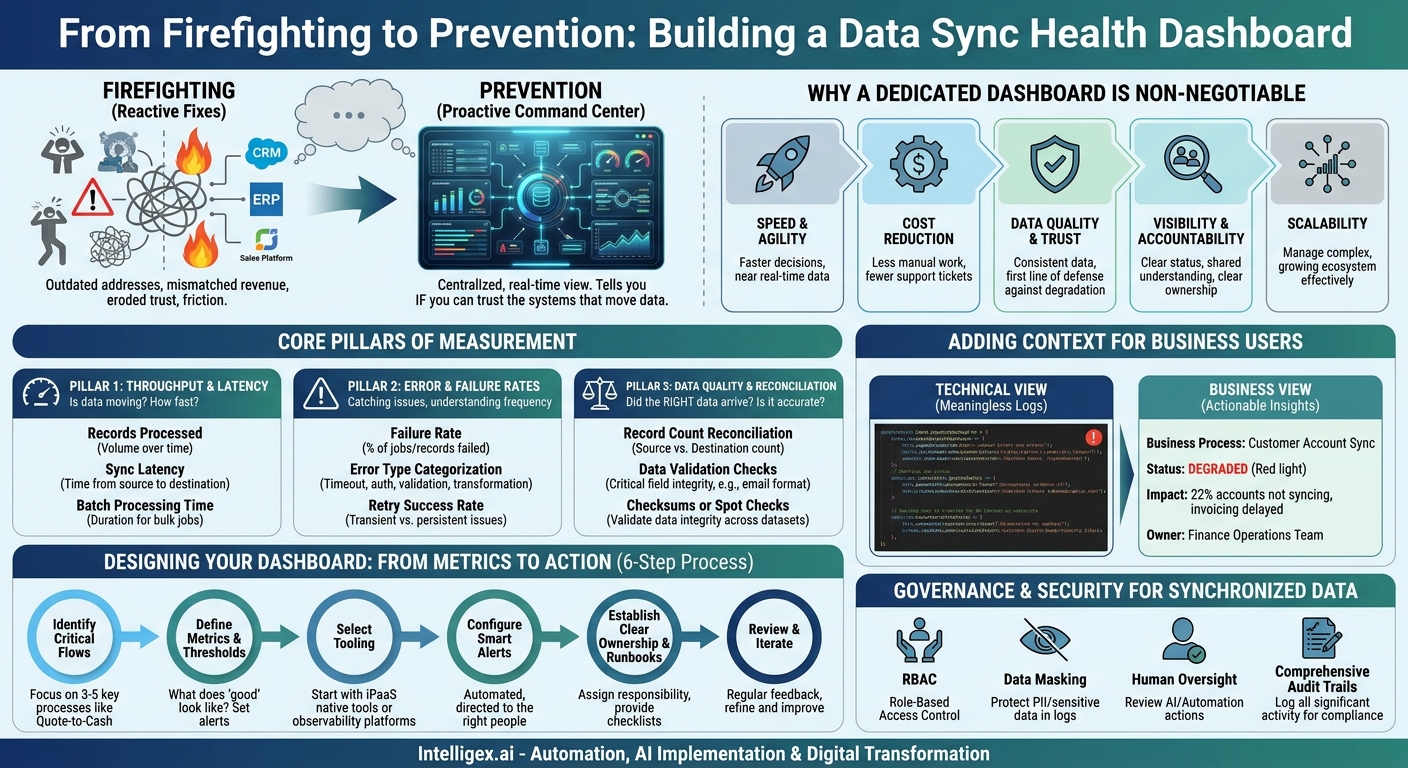
A sales representative opens a customer record in your CRM only to find an outdated shipping address, causing a critical delivery to go to the wrong location. A finance analyst pulls a quarterly report and spends hours manually reconciling mismatched revenue numbers between the ERP and the sales platform. These are not isolated IT glitches. They are symptoms of unhealthy data synchronization, and they create friction, erode trust, and lead to poor business outcomes. When data doesn’t flow reliably between your critical applications, your teams are forced to work with a fragmented, distorted view of reality.
The solution isn’t another round of frantic, reactive fixes. It’s moving from firefighting to prevention. A Data Sync Health Dashboard provides a centralized, real-time view into the performance of your data pipelines. It’s the command center that tells you not just what your data says, but whether you can trust the systems that move it. This visibility empowers both technical and business teams to proactively identify issues, diagnose root causes, and ensure the data powering their decisions is timely, accurate, and complete.
Why a Dedicated Sync Dashboard is Non-Negotiable
In a modern enterprise, data integrations are the central nervous system connecting disparate applications like Salesforce, NetSuite, Workday, and Marketo. When these connections are treated like a “set it and forget it” utility, they inevitably fail in subtle, damaging ways. A dedicated dashboard isn’t just a technical nice-to-have; it’s a strategic asset that delivers tangible business value across several key areas.
Speed and Agility: When teams trust the data, they make decisions faster. A dashboard provides at-a-glance confidence that the information is current. For a supply chain manager, knowing that inventory levels from the warehouse management system (WMS) are syncing to the e-commerce platform in near real-time is critical for preventing stockouts and managing customer expectations. Without this visibility, they operate with a time lag that introduces risk.
Cost Reduction: Unhealthy data syncs create expensive manual work. Think of the hours your finance team spends reconciling transactions or your sales operations team spends cleaning duplicate contacts created by a faulty integration. A health dashboard flags the source of these problems, allowing you to fix the root cause instead of repeatedly paying for the symptoms. This also reduces the burden on IT support, freeing them to focus on high-value projects instead of investigating “bad data” tickets.
Data Quality and Trust: Consistency is the foundation of data quality. A dashboard that actively monitors for discrepancies and failures is your first line of defense against data degradation. When everyone, from an HR business partner to a marketing analyst, knows there is a system for monitoring data integrity, their confidence in the data grows. This trust is essential for driving data-driven culture and adoption of new analytics initiatives.
Visibility and Accountability: A common source of friction between departments is the data blame game. “The sales numbers are wrong.” “No, the finance data isn’t updated.” A dashboard replaces accusation with information. It clearly shows the status of data flows between systems, pinpoints where a failure occurred, and identifies the responsible process. This creates shared understanding and clear accountability for resolving issues.
Scalability: As your business grows, so does your application ecosystem. The complexity of managing ten integrations is vastly different from managing a hundred. A dashboard is the only scalable way to maintain control. It allows a small team to effectively monitor a large, complex network of data flows, ensuring that as you add new tools and processes, you aren’t creating a fragile, unmanageable web of connections.
Core Pillars of a Data Sync Health Dashboard
An effective dashboard does more than show a simple “success” or “fail” status. It provides a multi-faceted view of your data pipelines, allowing you to understand not just if they are working, but how well they are working. Your dashboard should be built around three core pillars of measurement.
Pillar 1: Throughput and Latency
This pillar answers the fundamental questions: Is data moving? How much is moving, and how fast is it arriving? These metrics are your early warning system for performance degradation or system outages.
- What to Measure:
- Records Processed: The volume of records (e.g., new contacts, invoices, support tickets) successfully synced over a period (per minute, hour, or day). A sudden, sharp drop in this number for a “New Web Leads” sync could signal a broken web form or an API connection issue.
- Sync Latency: The time elapsed between a record being created or updated in the source system and it appearing in the destination system. For an “Order to Fulfillment” process, a latency of minutes is acceptable, but a latency of hours could severely delay shipping.
- Batch Processing Time: For integrations that run in batches (like a nightly financial data load), track how long each batch takes to complete. If the processing time starts creeping up, it may indicate growing data volumes that require you to optimize the job or scale your resources.
Pillar 2: Error and Failure Rates
No integration is perfect. Errors will happen. This pillar is about catching them, categorizing them, and understanding their frequency. It helps you distinguish between minor, transient hiccups and systemic problems.
- What to Measure:
- Failure Rate: The percentage of sync jobs or individual record transfers that fail. A consistently high failure rate (e.g., over 5%) points to a fundamental problem with the integration’s logic, data mapping, or credentials.
- Error Type Categorization: Grouping errors by type is crucial for diagnostics. Common categories include API connection timeouts, authentication failures (e.g., expired passwords), data validation rule failures (e.g., a record is missing a required field), and transformation errors. Seeing a spike in validation failures after a new field was made mandatory in Salesforce tells you exactly where to look.
- Retry Success Rate: Many integrations are designed to automatically retry a failed transfer. Tracking the success rate of these retries helps you understand if failures are transient (e.g., a temporary network blip) or persistent.
Pillar 3: Data Quality and Reconciliation
This is the ultimate measure of an integration’s success. It answers the question: Did the right data arrive, and does it match the source? This goes beyond simple success/fail metrics to validate the integrity of the data itself.
- What to Measure:
- Record Count Reconciliation: The simplest form of data validation. If the source system sent 1,000 records, did the destination system receive 1,000 records? This check is essential for financial and compliance-related data flows.
- Data Validation Checks: For critical fields, perform automated checks to ensure data integrity. For example, verify that an `order_total` field is always a positive number or that an `email_address` field contains an “@” symbol. These checks can be built into the integration logic or run as a separate post-sync process.
- Checksums or Spot Checks: For large datasets, it may be impractical to compare every field on every record. Instead, you can generate a checksum (a unique signature) for a dataset at the source and destination to ensure they match. Alternatively, you can programmatically sample a small percentage of records (e.g., 1%) and perform a full field-by-field comparison to spot-check for discrepancies.
Designing Your Dashboard: From Metrics to Action
A dashboard that isn’t connected to a clear response plan is just a collection of charts. The goal is to make your monitoring actionable. You can start building a valuable dashboard by following a pragmatic, step-by-step process that focuses on business criticality first.
- Identify Your Most Critical Data Flows. Do not try to monitor every single data flow from day one. You will create too much noise and get overwhelmed. Start by identifying the 3-5 integrations that are most critical to your core business operations. Good candidates are processes like Quote-to-Cash (CRM to ERP), Lead-to-Opportunity (Marketing Automation to CRM), or Hire-to-Retire (HRIS to IT/Payroll systems).
- Define Key Metrics and Thresholds for Each Flow. For each critical flow, decide what “good” looks like. For the Quote-to-Cash process, a latency of more than 15 minutes might be unacceptable, and a failure rate above 1% could signal a serious problem. For a nightly bulk data load, a 20% increase in processing time might be the threshold that triggers an investigation. These thresholds are what turn your dashboard from a passive report into an active monitoring system.
- Select Your Tooling. You don’t necessarily need a brand new, expensive tool. Start with what you have. Many integration platforms (iPaaS) like MuleSoft or Workato have built-in monitoring and dashboarding capabilities. For more advanced needs, you might feed logs into an observability platform like Datadog or build custom views in a BI tool like Power BI using the integration logs as a data source.
- Configure Smart Alerts. Your dashboard should work for you, not the other way around. Configure automated alerts based on the thresholds you defined in step two. Crucially, direct the alerts to the right people. An API authentication error should go to the IT integration team. A high number of data validation failures related to missing sales territory information should go to the Sales Operations team.
- Establish Clear Ownership and Runbooks. An alert is useless if no one knows what to do with it. For each critical data flow, you must assign clear ownership for monitoring and resolution. Support this with simple “runbooks” or checklists that outline the first steps to take when a specific alert is triggered. This ensures a consistent and efficient response.
- Review and Iterate. Your first dashboard will not be perfect. Treat it as a version one. Hold regular reviews (e.g., monthly) with stakeholders to assess its effectiveness. Are the alerts too noisy? Is there a key metric you are missing? Is the dashboard providing real business value? Use this feedback to continuously refine your monitoring practice.
Beyond the Numbers: Adding Context for Business Users
For a dashboard to be truly effective, it must speak the language of the business. A technical log entry like “Job `CUST_UPSERT_01` failed: `INVALID_FIELD_FOR_INSERT_UPDATE`” is meaningless to a finance manager. They need to know the impact on their work. The key is to translate technical events into business context.
Imagine a dashboard that shows two views of the same failure:
Technical View:
Job ID: `SFDC_NS_ACCT_SYNC_V3`
Status: Failed (1,203 of 5,488 records)
Error Message: `Validation Error: Custom field ‘Billing_Tier__c’ not found.`
Business View:
Business Process: Customer Account Sync (Salesforce to NetSuite)
Status: DEGRADED
Impact: Approximately 22% of new and updated customer accounts are not syncing to the finance system. This will delay invoicing for these customers.
Owner: Finance Operations Team
The business view provides immediate clarity on the “so what?” factor. To achieve this, follow a few best practices when designing your dashboard displays:
- Use Plain Language: Name your data flows based on the business process they support (e.g., “New Hire Onboarding”) not the technical job name (`HRIS_AD_USER_CREATE`).
- State the Business Impact: Whenever possible, programmatically define or manually annotate the impact of a failure. For example, a failed product catalog sync means “new products will not be visible on the company website.”
- Provide Clear Next Steps: Include contact information or a link to a knowledge base article for the team responsible for investigating the issue.
- Implement a “Traffic Light” System: Use high-level Green/Yellow/Red indicators for your most critical end-to-end business processes. This allows executives and non-technical leaders to get a quick, understandable overview of system health.
Governance and Security for Synchronized Data
Data synchronization pipelines often handle your most sensitive information: customer Personally Identifiable Information (PII), employee records, and confidential financial data. The dashboard that monitors these flows is itself a sensitive asset and must be designed with security and governance in mind from day one.
Role-Based Access Control (RBAC): Not everyone needs to see everything. The marketing team should be able to see the health of the lead sync from their automation platform, but they should not have access to the details of an HR payroll integration. Implement strict RBAC to ensure users can only view the dashboards and logs relevant to their specific business function. This minimizes the risk of unauthorized data exposure.
Data Masking in Logs and Alerts: Error logs are a common source of data leakage. A failed record might dump its entire payload, including sensitive data like a social security number or credit card information, into a log file. Ensure that your logging processes automatically mask or omit sensitive fields. Your dashboard and its associated alerts should show that a record failed, and why it failed, without exposing the sensitive data within that record.
Human Oversight for AI and Automation: As you mature, you may use AI to detect anomalies or predict sync failures. You might even build automation to correct certain issues. When doing so, it is critical to maintain human oversight. Before allowing an automated process to re-run a failed batch of financial transactions or allowing an AI model to alter data mappings, ensure there is a clear review and approval workflow. This “human-in-the-loop” approach prevents a faulty algorithm from causing widespread data corruption.
Maintain Comprehensive Audit Trails: Your dashboarding system should log all significant user activity. This includes who viewed which dashboard, when they viewed it, and any actions they took (such as acknowledging an alert or re-running a job). These audit trails are essential for security investigations and for demonstrating compliance with regulations like GDPR or SOX.
Next Steps: Building Your Monitoring Practice
Building a comprehensive data sync health dashboard is a journey, not a one-time project. The key is to start small, demonstrate value quickly, and build momentum. Avoid the temptation to boil the ocean by monitoring everything at once. Instead, adopt an iterative approach focused on business impact.
This Week: Assemble a small, cross-functional team of stakeholders from IT, and one or two key business units like Finance or Sales Operations. Together, identify and agree on your top three most business-critical data synchronizations. These are the processes that cause the most pain when they fail.
This Month: For those three flows, define the core metrics you need to track: latency, failure rate, and a key data quality check. Investigate the native monitoring features of your existing integration platform or logging tools. You may find that you can build a rudimentary V1 dashboard with the tools you already own.
This Quarter: Build a pilot dashboard for just one of those critical syncs. Configure alerts for your defined thresholds and assign clear ownership to the relevant team. Work closely with the business users who depend on this data to gather feedback. Use their insights to refine the dashboard and prove its value, creating a strong business case for expanding the practice to other critical integrations.
Your Next Read:
Get a FREE
Proof of Concept
& Consultation
No Cost, No Commitment!
