

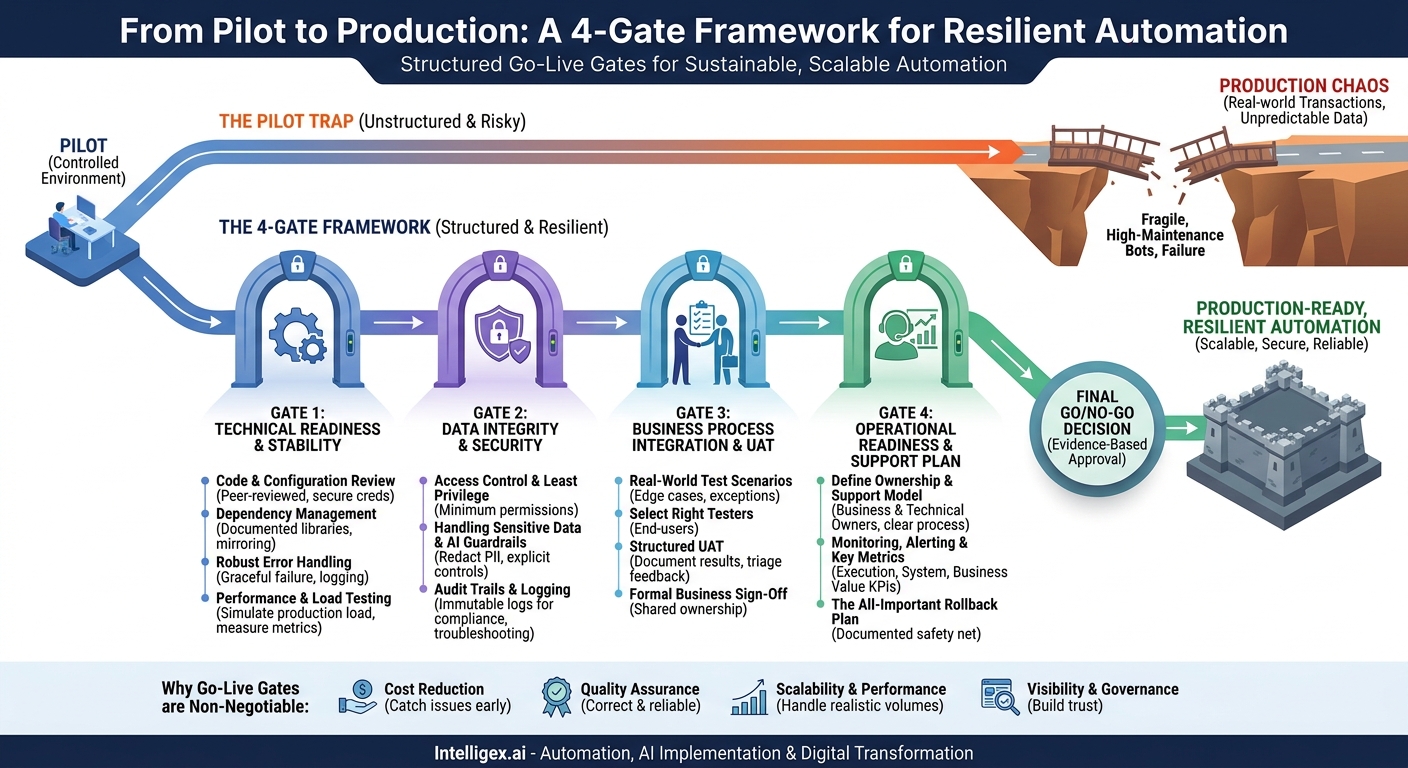
A successful automation pilot feels like a breakthrough. Your team has proven that a tedious, manual process can be streamlined, promising significant returns in efficiency and accuracy. But the journey from a controlled pilot to a resilient, production-ready workflow is where many automation initiatives stumble. The path is littered with solutions that worked perfectly for ten test cases but failed catastrophically under the weight of a thousand real-world transactions. This is the “pilot trap,” and escaping it requires discipline.
The solution is not more technology, but a more structured process: a series of Go-Live Gates. Think of these gates as a formal quality assurance framework for your automated workflows. They are predefined checkpoints that a project must pass before it can be deployed into a live environment. By implementing go-live gates, you transform deployment from a hopeful “flip of a switch” into a confident, evidence-based decision. This discipline is what separates sustainable, scalable automation programs from a collection of fragile, high-maintenance bots.
Why a Formal Go-Live Process is Non-Negotiable
In the rush to show results, teams often skip the rigorous validation steps that bridge the gap between a proof-of-concept and an enterprise-grade solution. A pilot environment is clean, predictable, and forgiving. A production environment is the opposite. It’s a dynamic ecosystem of interconnected systems, unpredictable user behavior, and messy data. Without a formal gating process, you are essentially betting that your carefully constructed pilot will survive this chaos unscathed.
The business value of a gated process is clear and direct, protecting against common failure points and ensuring the automation delivers on its promise:
- Cost Reduction: A gate review catches critical bugs, security flaws, and scalability issues before they cause system downtime, data corruption, or compliance breaches. The cost of fixing an issue in a pre-production stage is exponentially lower than the cost of emergency repairs, lost revenue, and reputational damage after a public failure.
- Quality Assurance: The process validates that the automation not only works but works correctly and reliably. For a finance team, this means an automated invoicing workflow doesn’t just run, it posts to the correct general ledger accounts every single time. For HR, it means an onboarding bot correctly provisions system access without creating security gaps.
- Scalability and Performance: A workflow that handles 50 items per day in a pilot may crumble when faced with 5,000. Go-live gates enforce performance and load testing, ensuring the solution is architected to handle realistic and peak volumes without degrading system performance.
- Visibility and Governance: A documented, transparent deployment process builds trust with stakeholders across the business. They can see that the solution has been thoroughly vetted for technical stability, security, and business alignment. This governance is crucial for building a scalable Center of Excellence (CoE) for automation.
Consider a supply chain automation designed to process advance shipping notices (ASNs) from suppliers. In the pilot, it worked perfectly with five key suppliers who provided clean, structured data. In production, it was flooded with hundreds of different ASN formats, many with missing or incorrect data fields. The automation failed, creating a massive backlog at the receiving dock and delaying inventory processing. A proper go-live gate would have included testing against a diverse and messy data set, flagging the need for more robust data validation and error handling logic long before it impacted operations.
Gate 1: Technical Readiness and Stability
The first gate is the foundational technical review. Before you can even consider the business impact, you must ensure the automated workflow is well-built, stable, and maintainable. This gate is typically owned by the development or IT team and focuses on the “nuts and bolts” of the solution.
Passing this gate requires moving beyond “it works on my machine.” It demands proof that the solution adheres to established engineering best practices. The goal is to create a workflow that is not a “black box,” but a transparent, manageable asset.
Key Technical Readiness Checklist
- Code and Configuration Review: Has the code been peer-reviewed? Is it well-documented with comments explaining complex logic? Crucially, are all environment-specific configurations, such as usernames, passwords, and API keys, managed securely through a vault or configuration store, not hard-coded into the script? Hard-coded credentials are a significant security risk and a maintenance nightmare.
- Dependency Management: Are all required software libraries, packages, and system dependencies explicitly documented? The production environment must perfectly mirror the tested environment. A mismatch in library versions is a common and difficult-to-diagnose cause of production failures.
- Robust Error Handling: The workflow must be designed to anticipate failure. What happens if a network connection drops, an API is unavailable, or a file is in the wrong format? The automation should not simply crash. It must fail gracefully by logging a detailed error message, sending a notification to a support queue or administrator, and, if necessary, pausing the transaction for human review.
- Performance and Load Testing: The workflow needs to be tested under conditions that simulate a real production load. If an HR workflow is designed to process new hire paperwork, test it with a batch of 100 new hires, not just one. Measure the CPU and memory consumption. Monitor the processing time per transaction to ensure it meets the business requirements and doesn’t degrade as volume increases.
Passing this gate provides confidence that the automation is not a fragile script but a robust piece of software ready for the rigors of a live environment.
Gate 2: Data Integrity and Security
Once an automation is technically sound, the focus shifts to what it interacts with: your data. This gate is arguably the most critical, especially when workflows handle sensitive customer, employee, or financial information. A security breach or data corruption event caused by a poorly designed automation can have severe consequences. This gate is a joint responsibility of IT security, compliance, and the business data owner.
Access Control and Least Privilege
A core principle of security is the principle of least privilege. The service account or user profile that the automation runs under should have the absolute minimum permissions required to perform its task. For example, an automated workflow that reads sales opportunities from your CRM to create a daily report does not need permission to delete or modify customer records. By strictly limiting access, you drastically reduce the potential damage if the automation’s credentials are ever compromised or if a bug causes it to behave unexpectedly.
Handling Sensitive Data and AI Guardrails
If your workflow involves AI or Large Language Models (LLMs), this gate becomes even more important. You must establish clear guardrails to prevent the misuse of data. For instance, an AI-powered tool that summarizes customer support tickets for analysis must be configured to identify and redact Personally Identifiable Information (PII) like names, addresses, and credit card numbers before the data is processed or logged. The raw, sensitive data should never be stored in verbose logs or passed to a third-party model without explicit controls. For more on building secure applications, resources like the Open Web Application Security Project (OWASP) provide foundational guidelines.
Audit Trails and Logging
For compliance and troubleshooting, every significant action taken by the automation must be logged in an immutable, accessible format. The logs should answer three questions: What happened? Who (or what process) did it? When did it happen? For a financial automation subject to Sarbanes-Oxley (SOX) compliance, this audit trail is not optional; it’s a legal requirement. These logs are also the first place a support team will look when something goes wrong, making detailed, understandable logging essential for rapid issue resolution.
Gate 3: Business Process Integration and User Acceptance
A technically perfect and secure automation is useless if it doesn’t solve the right business problem or if the people who depend on it don’t know how to use it. This gate ensures the workflow is aligned with the real-world business process and has been validated by the end-users themselves. It is owned by the business process owner.
The most common pitfall here is the “over-the-wall” handoff, where a technical team builds a solution in isolation and then presents it to the business as a finished product. This almost never works. True success requires continuous collaboration and formal validation through User Acceptance Testing (UAT).
A Step-by-Step Guide to Effective UAT
- Define Real-World Test Scenarios: Work directly with the business users to document the test cases. Don’t just test the “happy path.” Include common exceptions and edge cases. For an accounts payable automation, this means testing invoices with different currencies, invoices that are missing a PO number, and invoices from a brand new vendor.
- Select the Right Testers: The testers should be the actual employees who perform the process manually today or will rely on the automation’s output. Their hands-on experience is invaluable for spotting subtle process gaps or usability issues that developers might miss.
- Conduct and Document Structured Testing: Provide testers with clear instructions for each scenario and a simple mechanism to log their results. A shared spreadsheet or a simple form is often sufficient. For each test case, they should record the outcome (Pass/Fail) and provide detailed comments, including screenshots, for any failures or unexpected behavior.
- Triage and Prioritize Feedback: Not all UAT feedback is created equal. The project team and business owner must review every item and categorize it. Is it a critical bug that prevents the process from completing (a “showstopper”)? Is it a usability issue that makes the process confusing? Or is it a request for a new feature that can be added to a future backlog?
- Secure Formal Business Sign-Off: The process is not complete until the primary business stakeholder formally signs off on the UAT results. This sign-off confirms that the business agrees the automated workflow meets the agreed-upon requirements and is ready for production. This act of signing off creates crucial shared ownership and accountability.
Gate 4: Operational Readiness and a Support Plan
The work isn’t over at deployment. An automation entering production is like a new employee starting their first day. It needs a manager, a job description, and a support system for when it runs into trouble. This gate ensures that a comprehensive plan is in place to monitor, manage, and support the workflow after go-live. It is typically a shared responsibility between the business owner and the IT operations or automation support team.
Defining Ownership and the Support Model
Clear ownership is essential. You must define a Business Process Owner, who is responsible for the outcomes and performance of the workflow, and a Technical Owner, who is responsible for the underlying code and infrastructure. Furthermore, you need a defined support process. Who gets the alert when the workflow fails at 2:00 AM? Is it a centralized help desk, the development team, or a dedicated automation support team? This must be documented and understood by everyone involved.
Monitoring, Alerting, and Key Metrics
You cannot manage what you do not measure. A monitoring and alerting strategy is critical for proactively managing the health of your automations. You need a dashboard that provides at-a-glance visibility into performance. Key metrics to track include:
- Execution Metrics: Success/failure rate, average processing time per item, and total transactions processed per day. A sudden spike in failures or a gradual increase in processing time is an early warning sign of a problem.
- System Metrics: CPU, memory, and disk usage of the servers or systems running the automation. This helps identify performance bottlenecks.
- Business Value Metrics: Most importantly, is the automation delivering the intended business outcome? This could be “reduction in average invoice approval time,” “decrease in order entry error rate,” or “number of hours saved per week.” These are the KPIs that justify the investment and should be tracked over time.
The All-Important Rollback Plan
Even with the most rigorous testing, unforeseen issues can arise in production. A rollback plan is your safety net. It is a documented and, ideally, tested procedure to quickly and safely disable the automation and revert to the previous manual or semi-automated process. Knowing you have a well-defined plan B provides the confidence to move forward with plan A.
The Final Go/No-Go Decision
With all prior gates successfully passed, the final step is a formal Go/No-Go meeting. This is not a casual email exchange; it’s a dedicated session where key stakeholders convene to give their final approval. Attendees should include the project manager, the lead developer, the business process owner, and representatives from IT operations, security, and any other impacted departments.
The purpose of this meeting is to review the evidence from each gate. The team presents the results of the technical reviews, security scans, UAT sign-off, and the operational support plan. The final question is simple: based on all the available evidence, are we confident in deploying this workflow into our live environment? This meeting formalizes accountability and ensures that the deployment is a collective, informed decision, not the isolated action of a single team.
Your Next Steps: Making Go-Live Gates a Reality
Implementing a formal go-live process may seem like it adds overhead, but it is one of the most effective ways to de-risk your automation initiatives and ensure they deliver lasting value. Here is how you can get started.
- Scale the Rigor to the Risk: You don’t need a heavyweight, 50-item checklist for every automation. The level of scrutiny should match the complexity and criticality of the workflow. An automation that updates an internal marketing contact list requires less rigorous gating than one that processes customer payment transactions. Start by creating a “lite” and a “full” version of your gate checklist.
- Create a Reusable Template: Document your go-live criteria in a shared location, like a wiki or a document repository. Turn your gate requirements into a checklist template that teams can copy and use for every new automation project. This standardization makes the process repeatable, transparent, and easier to manage.
- Communicate the Value: Frame the go-live process not as a bureaucratic hurdle but as a quality-enforcement tool that benefits everyone. For developers, it reduces late-night support calls. For business owners, it ensures the solution is reliable and delivers on its promise. For the company, it transforms automation from a series of one-off projects into a scalable, enterprise-wide capability.
By shifting the focus from simply launching pilots to successfully deploying production-hardened solutions, you build a foundation for an automation program that can truly scale and drive meaningful digital transformation.
Your Next Read:
Category:
Get a FREE
Proof of Concept
& Consultation
No Cost, No Commitment!
