

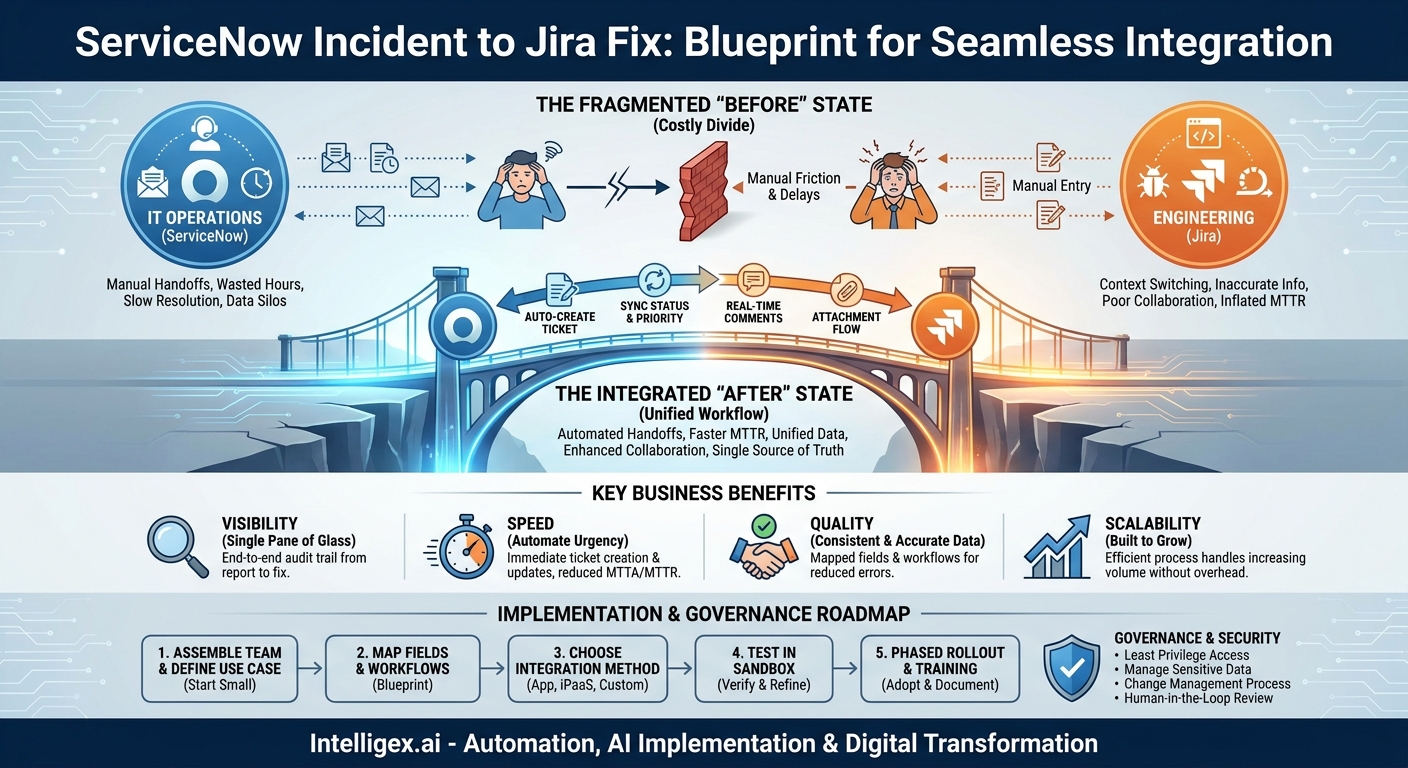
In many organizations, the IT operations team and the engineering team operate in different worlds, speaking different languages through different platforms. IT lives in ServiceNow, managing incidents, service requests, and operational health. Engineering lives in Jira, tracking bugs, features, and development sprints. This digital divide is more than an inconvenience; it’s a bottleneck that slows down incident resolution, frustrates teams, and directly impacts customer satisfaction. When a critical service fails, the last thing you need is a game of telephone played over email and Slack, with valuable time lost manually copying information from an incident ticket into a development bug report.
The solution isn’t to force one team onto the other’s platform. It’s to build a seamless bridge between them. Integrating ServiceNow and Jira transforms a fragmented, manual process into a single, automated workflow. It creates a unified system of record for the entire incident lifecycle, from initial report to final code fix. This isn’t just a technical fix; it’s a strategic move to improve speed, visibility, and collaboration when it matters most.
Why the Disconnect Between IT and Engineering Is Costing You More Than You Think
The gap between ServiceNow and Jira introduces friction at every stage of the incident management process. This friction manifests as tangible costs that often fly under the radar until a major outage exposes the weakness. Without a direct line of communication between these systems, you are accumulating operational debt that impacts your bottom line, your teams, and your customers.
Consider a common scenario: a customer-facing application is experiencing performance degradation. The IT service desk logs a high-priority incident in ServiceNow. To fix it, they need engineering. This is where the manual, error-prone process begins. A support manager emails the engineering lead, who then asks a developer to create a corresponding bug ticket in Jira. The developer has to switch contexts, find the relevant information in the email, and manually recreate the ticket. Every update, question, or log file attached in one system needs to be manually ported to the other.
This inefficiency leads to several direct and indirect costs:
- Wasted Hours: Highly skilled engineers and IT professionals spend time on administrative tasks like data entry and status updates instead of problem-solving. This context switching kills productivity and morale.
- Increased Time to Resolution: The lag time between a ServiceNow incident being created and a Jira ticket being actioned can be hours. This delay directly extends outage windows, impacting revenue and customer trust. Mean Time to Resolution (MTTR), a critical operational metric, becomes unnecessarily inflated.
- Inaccurate Reporting: With data siloed in two systems, generating a cohesive report on incident trends, root causes, and resolution efforts is a nightmare of spreadsheet merges. This lack of a single source of truth prevents leadership from seeing the full picture and identifying systemic issues.
- Poor Cross-Team Collaboration: When teams work from different information, it fosters a culture of “us versus them.” The IT team may feel engineers are unresponsive, while engineers feel they are being bombarded with poorly documented requests. This erodes trust and makes collaborative problem-solving nearly impossible during a high-stress outage.
Ultimately, the customer pays the price for this internal friction. Longer downtimes, vague status updates, and repeat issues stemming from incomplete post-mortems all degrade the customer experience and can lead to churn.
The Business Case for Integration: Beyond a Simple Connector
Connecting ServiceNow and Jira is fundamentally about removing friction to unlock business value. The goal is to create a system where information flows as freely as communication, enabling teams to focus on resolution rather than process. An effective integration delivers clear, measurable benefits across four key areas.
Visibility: A Single Pane of Glass
When systems are integrated, you create a complete, auditable timeline of an incident. A business leader can see the entire journey from the initial customer report in ServiceNow to the specific code commits in Jira that resolved the issue. This end-to-end visibility is crucial for understanding process bottlenecks. You can finally answer questions like: Where do incidents get stuck? How long does it take for engineering to acknowledge a P1 ticket? Are support teams providing enough information for developers to act?
Speed: Automate the Urgency
Automation is the most immediate and impactful benefit. An integration can be configured to automatically create and populate a Jira issue the moment a high-priority incident is logged in ServiceNow. There is no manual handoff. Status changes can be synchronized in real-time. When a developer moves a Jira ticket to “In Progress,” the corresponding ServiceNow incident can be updated automatically, keeping all stakeholders informed without anyone needing to send an email. This drastically reduces the Mean Time to Acknowledge (MTTA) and Mean Time to Resolution (MTTR).
Quality: Consistent and Accurate Data
Manual data entry is a recipe for error. A typo in a server name or a miscategorized priority level can send an engineering team down the wrong path, wasting precious time. An integration ensures data consistency. The priority, description, affected services, and other critical fields are mapped and mirrored perfectly between systems. This guarantees that both the IT and engineering teams are working from the same facts, leading to higher-quality diagnostics and more effective solutions.
Scalability: Building a Process That Grows with You
Manual processes are brittle. A workflow that relies on one person to remember to email another team will break down under pressure or as your company grows. An automated integration is built to scale. Whether you handle ten incidents a day or a thousand, the process remains consistent, reliable, and efficient. This allows your teams to grow without the corresponding growth in administrative overhead.
What to Measure
The impact of this integration isn’t just theoretical. You can track its success by measuring key performance indicators (KPIs) before and after implementation. Focus on metrics like:
- Mean Time to Resolution (MTTR): The most direct measure of speed.
- Ticket Escalation Rate: A reduction may indicate better initial data quality.
- First Contact Resolution (FCR): Improved data flow may help the service desk resolve more issues without escalation.
- Engineer Time on Ticket Administration: Survey your developers to gauge the reduction in time spent on non-coding tasks related to incidents.
Designing Your Integration: Key Decisions and Pitfalls to Avoid
A successful integration is more than just flipping a switch. It requires careful planning and a clear understanding of your processes. Before you write a single line of code or configure a connector, your team needs to make several key decisions to avoid common pitfalls.
Decision 1: Unidirectional vs. Bidirectional Synchronization
The first major decision is how data should flow. In a unidirectional sync, information flows one way, typically from ServiceNow to Jira. For example, a new incident in ServiceNow creates a new issue in Jira, but any updates in Jira are not reflected back. This is simple but limited.
A bidirectional sync is far more powerful and almost always the right choice for incident management. In this model, changes in one system are updated in the other. A comment added by a developer in Jira appears in the ServiceNow incident timeline. A status change in Jira updates the incident state in ServiceNow. This creates a living connection between the two tickets, ensuring both teams have real-time context.
Decision 2: What Data to Synchronize?
The temptation is to sync everything, but this can create unnecessary complexity and noise. A better approach is to start with a minimum viable data set and expand only when a clear need arises. Over-syncing can lead to confusion, performance issues, and broken workflows if one side changes a field the other depends on. Begin by mapping only the most critical fields.
Here is a starting checklist for essential data to synchronize:
- Title / Summary: The core description of the problem.
- Description: The detailed context, including steps to reproduce and initial findings.
- Priority / Severity: Ensures both teams understand the urgency.
- Status: To track the lifecycle of the incident and the fix.
- Reporter / Submitter: To know who initiated the ticket.
- Assignee: To see who is actively working on the issue.
- Comments: For real-time collaboration and discussion between teams.
- Attachments: For sharing log files, screenshots, and other diagnostic information.
Common Pitfalls and How to Avoid Them
Pitfall: Mismatched Workflows and Statuses. ServiceNow and Jira have different default workflows. Trying to force a one-to-one mapping for every single status (e.g., “Awaiting Vendor,” “On Hold”) is a common mistake. It creates a rigid system that doesn’t reflect how teams actually work.
Solution: Instead of a direct match, focus on mapping key transition points. For instance, map several “In Progress” type statuses in Jira to a single “Work in Progress” state in ServiceNow. The goal is clear communication, not identical workflows.
Pitfall: Ignoring Custom Fields. Your teams likely rely on custom fields to capture essential information. Forgetting to include these in your field mapping plan is a primary cause of integration failure. If engineering needs a specific “Component” or “Service Tier” field to route a bug, that data must come from the ServiceNow ticket.
Solution: Before you begin, audit the custom fields used in both systems for your incident management process. Identify which ones are critical for routing, reporting, or resolution and include them in your mapping document from day one.
Pitfall: No Error Handling or Monitoring. Integrations can fail. An API may be temporarily unavailable, or a change in one system may cause a sync to break. Without proper error handling and alerts, these failures can go unnoticed, silently re-creating the data silo you sought to eliminate.
Solution: Ensure your integration tool or custom solution has robust logging. It should also have an automated notification mechanism (like an email or Slack alert) to inform an administrator when a synchronization fails, so the issue can be addressed quickly.
A Practical Step-by-Step Guide to Implementation
Implementing a ServiceNow-Jira integration is a project that requires a structured approach. It’s not just a technical task for an administrator; it’s a cross-functional initiative that involves process definition, stakeholder alignment, and careful testing. Following a clear plan ensures you deliver value quickly while minimizing disruption.
- Assemble the Right Team. This is not a solo project. Your implementation team should include a project lead, a ServiceNow administrator, a Jira administrator, and key stakeholders from both IT Operations and Engineering. These stakeholders are crucial for defining the workflow and ensuring the final product meets the needs of the end-users.
- Define and Document the Core Use Case. Don’t try to boil the ocean. Start with a single, high-impact workflow. A great candidate is your “P1 Major Incident” process. Document the current state: how does a P1 incident move from IT to engineering right now? Then, map out the desired future state with the integration in place. This clarity of purpose will guide all subsequent technical decisions.
- Map Your Fields, Statuses, and Workflows. This is the blueprint for your integration. Create a simple spreadsheet that explicitly defines the mappings. For example:
- ServiceNow Field Priority (Value: 1 – Critical) → Jira Field Priority (Value: Highest)
- ServiceNow Field State (Value: In Progress) ←→ Jira Field Status (Value: In Progress)
- ServiceNow Field Comments ←→ Jira Field Comments
This document becomes the single source of truth for the configuration and prevents ambiguity.
- Choose Your Integration Method. You have several options for connecting the two platforms, each with its own trade-offs:
- Marketplace Apps: Both the ServiceNow Store and the Atlassian Marketplace offer pre-built connectors. These are often the fastest way to get started and typically offer user-friendly configuration interfaces.
- Integration Platforms as a Service (iPaaS): Tools like Workato, MuleSoft, or Celigo provide powerful platforms for building custom integrations with visual workflows. They offer more flexibility than off-the-shelf apps but require more configuration.
- Custom Development: Building a direct integration using the ServiceNow and Jira REST APIs offers maximum flexibility but also carries the highest cost in terms of development time, maintenance, and expertise. This should be a last resort.
- Configure and Test in a Sandbox. Never build and test in your production environment. Use your ServiceNow and Jira sandbox or development instances to configure the integration. Create test tickets and run them through the entire lifecycle. Verify that fields are mapping correctly, statuses are syncing, comments appear on both sides, and attachments transfer as expected.
- Develop a Phased Rollout Plan. Once testing is complete, avoid a “big bang” launch. Start with a pilot group of users, perhaps a single engineering team and their IT counterparts. Let them use the integration for a week or two and gather their feedback. This allows you to iron out any kinks in the process or configuration before rolling it out to the entire organization.
- Train Teams and Document the New Process. The integration changes how people work, so training is essential. Host short sessions to demonstrate the new automated workflow. Create simple documentation that explains what is automated, what still requires manual input, and where to find information. Clear communication prevents confusion and drives adoption.
Integration in Action: Scenarios Across the Business
While the primary beneficiaries are IT and Engineering, a well-executed integration creates a ripple effect of efficiency that touches many other parts of the business. The value of a single, reliable source of truth for incident data extends far beyond the technical teams.
For Finance and Compliance: Every incident has a cost, measured in downtime, SLA penalties, and engineering hours. An integrated system provides a crystal-clear, auditable record of every major incident. Finance can more accurately calculate the cost of poor quality (CoPQ) and justify investments in infrastructure or tooling to prevent future occurrences. For compliance teams, the unified log of all activities, comments, and resolutions from both ServiceNow and Jira simplifies audits and demonstrates a mature, controlled incident management process.
For Sales and Customer Success: When a key customer is impacted by an outage, the customer success manager (CSM) needs accurate, up-to-the-minute information. Without an integration, they are forced to ask for updates, distracting the teams working on the fix. With an integration, the status of the ServiceNow ticket reflects the real-time progress of the Jira issue. The CSM can see that the issue has been assigned, is being worked on, and is nearing resolution. This enables proactive, confident communication with the customer, turning a negative event into an opportunity to build trust.
For Product Management: Product managers need to understand the sources of instability in their products. Are most incidents related to a recent feature release? Is a particular microservice causing a disproportionate number of problems? By linking ServiceNow incidents directly to Jira issues, product managers can easily run reports to identify trends. This data-driven approach allows them to prioritize technical debt, advocate for architectural improvements, and make more informed decisions on the product roadmap.
Governance and Security: Integrating with Confidence
Connecting two business-critical systems requires a thoughtful approach to security and governance. An integration is a powerful tool, but it also creates a new pathway for data to flow between environments. Establishing clear rules and controls from the outset is essential for maintaining security, compliance, and operational stability.
Implement the Principle of Least Privilege. The integration should run using dedicated service accounts in both ServiceNow and Jira, not a named user’s admin account. These service accounts must be configured with the absolute minimum permissions required to perform their functions. For example, the account should only be able to read, create, and update records in the specific projects and tables relevant to the integration. It should not have broad administrative access.
Be Mindful of Sensitive Data. Not all data should be synchronized. Carefully consider the information being passed between systems, especially in comments and attachments. Avoid syncing personally identifiable information (PII), financial data, or other sensitive information unless it is absolutely necessary and protected by access controls on both sides. Establish clear guidelines for your teams on what information is appropriate to share via synchronized comments.
Establish a Change Management Process. The integration is not a “set it and forget it” solution. As your business processes evolve, you will need to update field mappings, adjust workflows, or change trigger conditions. These changes should be governed by a formal change management process. Any proposed modification should be documented, tested in a sandbox environment, and approved by stakeholders before being deployed to production. Uncontrolled changes are a leading cause of broken integrations.
Keep a Human in the Loop. Automation accelerates processes, but it does not replace human judgment. Design your workflow with clear points for human review and decision-making. For example, while the creation of a Jira ticket can be automated, the final closure of a P1 ServiceNow incident should always require confirmation from an incident manager to verify that service has been fully restored and the customer impact has ended.
Your Next Steps to a Unified Workflow
Bridging the gap between ServiceNow and Jira is one of the highest-impact projects you can undertake to improve your incident management process. It replaces manual toil with intelligent automation, fosters genuine collaboration between IT and engineering, and delivers faster resolutions for your customers. Getting started is a matter of taking a structured, incremental approach.
Here is a simple plan to begin your journey:
- Assess Your Current State. Before you can improve your process, you must understand it. Hold a workshop with your IT and engineering teams to map out your current incident management workflow. Use this session to pinpoint the exact handoffs, communication gaps, and manual steps that cause delays.
- Build the Business Case. Use the pain points identified in your assessment to articulate the value of an integration. Gather metrics, even if they are estimates, on your current MTTR or the engineering time spent on ticket administration. Present this data to leadership to secure the buy-in and resources needed for the project.
- Start Small and Prove Value. Select a single, well-defined workflow for a pilot project, such as escalating critical incidents for a specific product. A successful pilot with a limited scope is the best way to demonstrate value, work out any unforeseen issues, and build momentum for a broader rollout.
- Seek Expertise When Needed. An integration project has technical, process, and people components. If your team lacks experience in this area, partnering with specialists can help you navigate the complexities of platform configuration, process re-engineering, and change management, ensuring you avoid common pitfalls and achieve a faster return on your investment.
Your Next Read:
Category:
Get a FREE
Proof of Concept
& Consultation
No Cost, No Commitment!
