

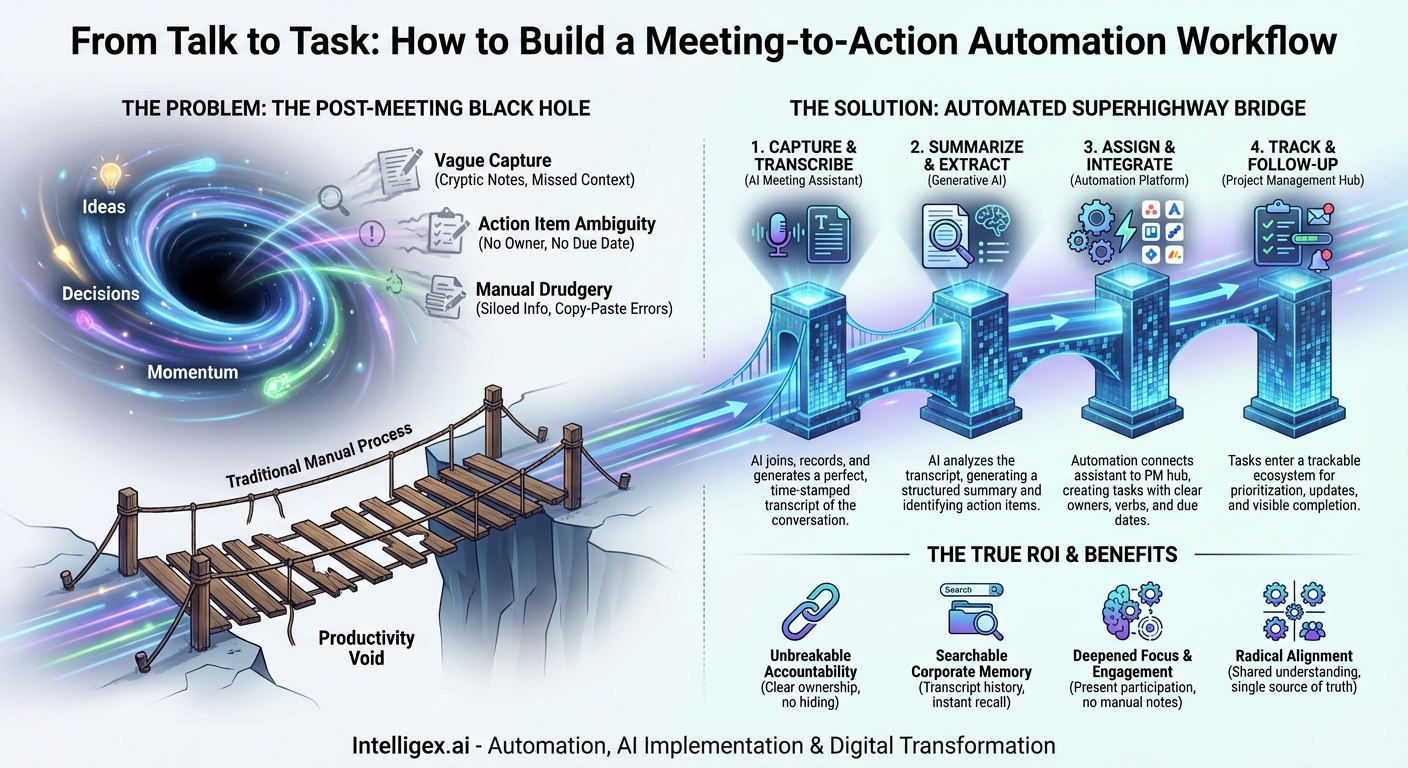
We’ve all been there. You leave a meeting buzzing with energy. Ideas were shared, brilliant strategies were debated, and crucial decisions were made. The team felt aligned, motivated, and ready to conquer the next challenge. Then, a week later, a sense of déjà vu creeps in. Someone asks, “So, what was the final decision on the Q3 marketing push?” or “Who was supposed to follow up with the design team?” The momentum has vanished, replaced by a familiar, frustrating ambiguity. The great ideas and firm handshakes have evaporated into the ether, lost in a productivity black hole.
This phenomenon, “meeting amnesia,” is a silent killer of progress. It happens because the bridge between conversation and execution is often rickety, manual, and prone to human error. Notes are scattered across personal notebooks, action items are vague promises, and the responsibility of translating an hour of talk into a list of trackable tasks falls on one overburdened individual. But what if you could build a permanent, automated superhighway in its place? This is the promise of the Meeting-to-Action Automation Workflow, a systematic approach that uses modern technology to ensure that what’s said in a meeting gets done in the real world.
The Black Hole of Post-Meeting Productivity
Before we build the solution, it’s crucial to understand the anatomy of the problem. The traditional, manual process of converting meeting discussions into actions is fundamentally broken. It suffers from a series of failure points that virtually guarantee inefficiency and lost information.
First is the problem of Vague Capture. When a person is tasked with taking notes while also actively participating, their attention is divided. The result is often a collection of cryptic phrases, half-finished sentences, and personal shorthand that is nearly indecipherable 24 hours later. Key nuances are missed, and the context surrounding a decision is lost forever. Who was supposed to own that task? What was the exact deadline we agreed upon? The notes rarely hold the complete answer.
This leads directly to Action Item Ambiguity. A note might say, “Look into new CRM.” This is not an action item; it’s a vague notion. A true action item requires a clear owner, a specific verb, and a concrete deadline (e.g., “Sarah to research three alternative CRMs and present findings by next Friday.”). Without this structure, “looking into it” becomes a task that lives on a perpetual back-burner, never truly owned and never completed.
Finally, there’s the Communication Void and Manual Drudgery. Even if someone takes meticulous notes, where do they go? They often live in a silo—a private Google Doc, a page in a notebook, or an unread email thread. They aren’t integrated into the place where work actually happens: the team’s project management system. To get them there, someone has to perform the soul-crushing task of manually transcribing their notes, creating tasks one-by-one in Asana, Jira, or Trello, and pasting in relevant details. This manual transfer is not only time-consuming but also another point where errors and omissions can occur. This disconnected, labor-intensive process is precisely what automation is designed to eliminate.
Building the Bridge: The Four Pillars of the Automated Workflow
An effective Meeting-to-Action workflow is not about a single magical app, but rather an interconnected system of tools working in concert. This system is built on four essential pillars that seamlessly move information from verbal discussion to a completed task.
Pillar 1: Capture & Transcribe
The foundation of the entire system is a perfect, unbiased record of the meeting. Human note-taking is flawed, but AI is not. This is where AI meeting assistants (like Fireflies.ai, Otter.ai, or Fathom) come in. These tools can be configured to automatically join your virtual meetings (Zoom, Google Meet, Microsoft Teams) as a participant. Their sole job is to listen and generate a complete, time-stamped transcript of the entire conversation. This immediately solves the problem of “vague capture.” You no longer need a designated note-taker, freeing up every team member to be fully present and engaged in the discussion. The transcript becomes the unimpeachable source of truth for what was said.
Pillar 2: Summarize & Extract
A full transcript is powerful, but it can also be overwhelming. No one wants to read through 10,000 words to find the three key decisions. The second pillar leverages the power of generative AI to make sense of the raw data. Modern meeting assistants use advanced AI models (similar to those powering ChatGPT) to analyze the full transcript and automatically generate a concise, structured summary. This summary typically includes bullet points of key topics discussed, major decisions reached, and, most importantly, a preliminary list of potential action items it has identified based on conversational cues.
Pillar 3: Assign & Integrate
This is where the real automation magic happens. An AI summary is helpful, but if it still requires a human to copy and paste it into a different system, the chain is broken. The third pillar is about integration. Using a “digital glue” service like Zapier or Make, or even a native integration built into the tools, you create a connection between your meeting assistant and your project management hub (Asana, Jira, Monday.com, Trello, etc.). This connection enables the extracted action items to be automatically converted into new tasks in your team’s project board. The automation can be configured to parse the text for names to assign the task to the correct person and listen for phrases like “by next Tuesday” to set a due date.
Pillar 4: Track & Follow-Up
Once an action item has been successfully created as a task in your project management system, it enters a mature ecosystem for execution. This final pillar is about closing the loop. The task is no longer a forgotten note; it’s a visible, trackable unit of work that appears on someone’s to-do list. It can be prioritized, commented on, and marked as complete. Project managers have full visibility into its status. You can even extend the automation to send a follow-up notification to a Slack or Teams channel when a meeting-generated task is created or completed, ensuring accountability is both visible and consistent.
Putting It All Together: Your Step-by-Step Implementation Guide
Setting up this workflow might sound complex, but it’s surprisingly accessible. Here’s a practical guide to building your own automated bridge.
Step 1: Choose Your Core Technology Stack
You need three key components:
- A Meeting Assistant: Choose a tool like Fireflies.ai, Otter.ai, or Fathom. Your primary consideration should be the quality of its transcription and, critically, its ability to integrate with other platforms, either natively or through a service like Zapier.
- A Project Management Hub: This should be the tool your team already uses as its single source of truth for work. Popular choices include Asana, Trello, Jira, Monday.com, and ClickUp. The key is consistency; all work should live here.
- An Automation Platform: If your chosen tools don’t have a direct, native integration, a service like Zapier or Make.com is essential. These platforms act as translators, allowing thousands of different apps to talk to each other.
Step 2: Configure the Capture and Summary
This is the easiest part. Connect your AI meeting assistant to your work calendar (Google Calendar or Outlook). Once connected, you can configure it to automatically join any meeting you schedule that includes a video conferencing link. Be sure to follow best practices for transparency: inform meeting attendees, both internal and external, that the conversation is being recorded for transcription and summarization purposes. Within your meeting tool’s settings, ensure that AI summaries are enabled.
Step 3: Build the Automation “Zap”
Let’s walk through a common example using Zapier to connect Fireflies.ai to Asana.
- Set the Trigger: In Zapier, create a new “Zap.” Your trigger app will be Fireflies.ai. The trigger event will be “New Meeting.” This means the workflow will start every time Fireflies finishes processing a meeting.
- Add a Filter (Optional but Recommended): You may not want to create tasks from every single meeting. Add a Filter step that only allows the Zap to continue if the “Meeting Title” contains a specific keyword, like “[Action]” or “[Project Sync]”.
- Create the Action: Your action app will be Asana. The action event will be “Create Task.” Now, you’ll map the information from Fireflies to the fields in Asana.
- For the Task Name in Asana, you might pull in the “AI-Generated Action Items” from Fireflies. If multiple action items are detected, you might need a more advanced step to loop through and create a task for each one.
- For the Task Assignee, you can use AI to parse the action item text for a name that matches a user in your Asana project.
- In the Task Description, this is where you provide crucial context. Map the “Meeting Summary” from Fireflies and, most importantly, include the “Transcript URL.” This creates a permanent link from the task back to the exact moment in the conversation where it was discussed.
- Test and Activate: Run a test to ensure a task is created correctly in Asana, then turn your Zap on. Your automated workflow is now live.
Step 4: Socialize and Refine the Process
Technology is only half the battle. This is a change in how your team works. Communicate the new process clearly. Teach your team to speak in “automation-friendly” language during meetings. For instance, instead of saying “we should probably do something about the website,” say, “Action item for David: Draft new homepage copy by end of week.” This clear, explicit phrasing makes it much easier for the AI to accurately identify and assign the task. Gather feedback and be prepared to tweak your Zap as the team gets used to the new system.
Beyond Convenience: The True ROI of Meeting Automation
The immediate benefit of this system is saving time on administrative drudgery. But the true return on investment runs much deeper and has a transformative impact on team culture and effectiveness.
- Unbreakable Accountability: When action items are automatically captured, assigned, and placed in a visible project management system, there is nowhere for them to hide. Ownership is clear from the moment the meeting ends. The classic excuse of “I didn’t know that was on me” becomes a thing of the past.
- A Searchable Corporate Memory: Every important decision, every strategic debate, and every project kickoff is now transcribed and archived. Six months from now, when someone asks, “Why did we choose this vendor?” you don’t have to rely on hazy memories. You can search the transcript and find the exact rationale, in the exact words of the people who made the decision.
- Deepened Focus and Engagement: By liberating your team from the burden of manual note-taking, you empower them to do what meetings are actually for: thinking, debating, and collaborating. Your best minds can be fully engaged in problem-solving, not in frantically trying to type while listening.
- Radical Alignment: Miscommunication plummets when everyone receives the same AI-generated summary and can see the same list of action items in the project hub. There are no competing versions of the truth based on different people’s notes. The team moves forward with a single, shared understanding of the plan.
Meetings are not inherently evil; unproductive meetings are. The cycle of talk without action is what drains morale and stalls progress. By implementing a Meeting-to-Action Automation Workflow, you’re not just adopting a new set of tools; you’re fundamentally redesigning your team’s operating system for efficiency and accountability. You’re building a reliable bridge from idea to impact, ensuring that the valuable time spent in conversation translates directly into meaningful, measurable progress.
Your Next Read:
Get a FREE
Proof of Concept
& Consultation
No Cost, No Commitment!
