

Your website says you have 50 units of a product in stock. A customer places an order, your sales team celebrates a win, and an automated confirmation email goes out. Hours later, your warehouse team reports the truth: you have zero. The item was damaged last week, but the system was never updated. Now, your operations team is scrambling, your customer service team is handling an angry client, and your finance team is looking at inventory numbers they can no longer trust. This isn’t a rare mishap; it’s a daily reality for businesses with a disconnected inventory system.
The gap between what happens on the warehouse floor and what your Enterprise Resource Planning (ERP) system reports is a source of significant operational friction and financial loss. Every manual entry, delayed update, and data silo creates opportunities for error, costing you sales, wasting labor, and damaging customer trust. To compete effectively, your inventory data must flow seamlessly and accurately between your Warehouse Management System (WMS) and your ERP. This integration is not just an IT project. It is a fundamental business transformation that impacts every department, from finance to marketing.
Why a Disconnected Inventory System Costs You More Than You Think
When your WMS and ERP operate in silos, they tell two different stories about your business. This disconnect introduces hidden costs and inefficiencies that ripple across the entire organization. Understanding these impacts is the first step toward justifying the investment in a unified system.
For Operations and Supply Chain Teams: The most immediate pain is felt here. Without real-time data, warehouse staff may waste hours searching for “ghost” inventory that the system says exists but is physically absent. This leads to delayed shipments and increased labor costs. It also makes crucial tasks like cycle counting incredibly inefficient, as teams are constantly reconciling two conflicting sets of data. Planning becomes a guessing game, potentially leading to both stockouts on popular items and overstocking of slow-moving goods, which increases carrying costs.
For Finance and Accounting Teams: A company’s inventory is a primary asset on its balance sheet. If the ERP data is wrong, your financial statements are inaccurate. This complicates audits, makes cash flow forecasting unreliable, and can lead to poor capital allocation decisions. The cost of goods sold (COGS) will be miscalculated, distorting your profitability metrics and making it impossible to know which products are truly driving your success.
For Sales and Customer Service Teams: Nothing erodes customer trust faster than a stockout after a purchase has been confirmed. When the sales team and e-commerce platform rely on faulty ERP data, they are making promises the warehouse cannot keep. This results in canceled orders, negative reviews, and a higher workload for customer service representatives who must manage disappointed customers. Ultimately, it leads to lost revenue and a tarnished brand reputation.
Mapping the Ideal Inventory Update Flow: From Dock to Ledger
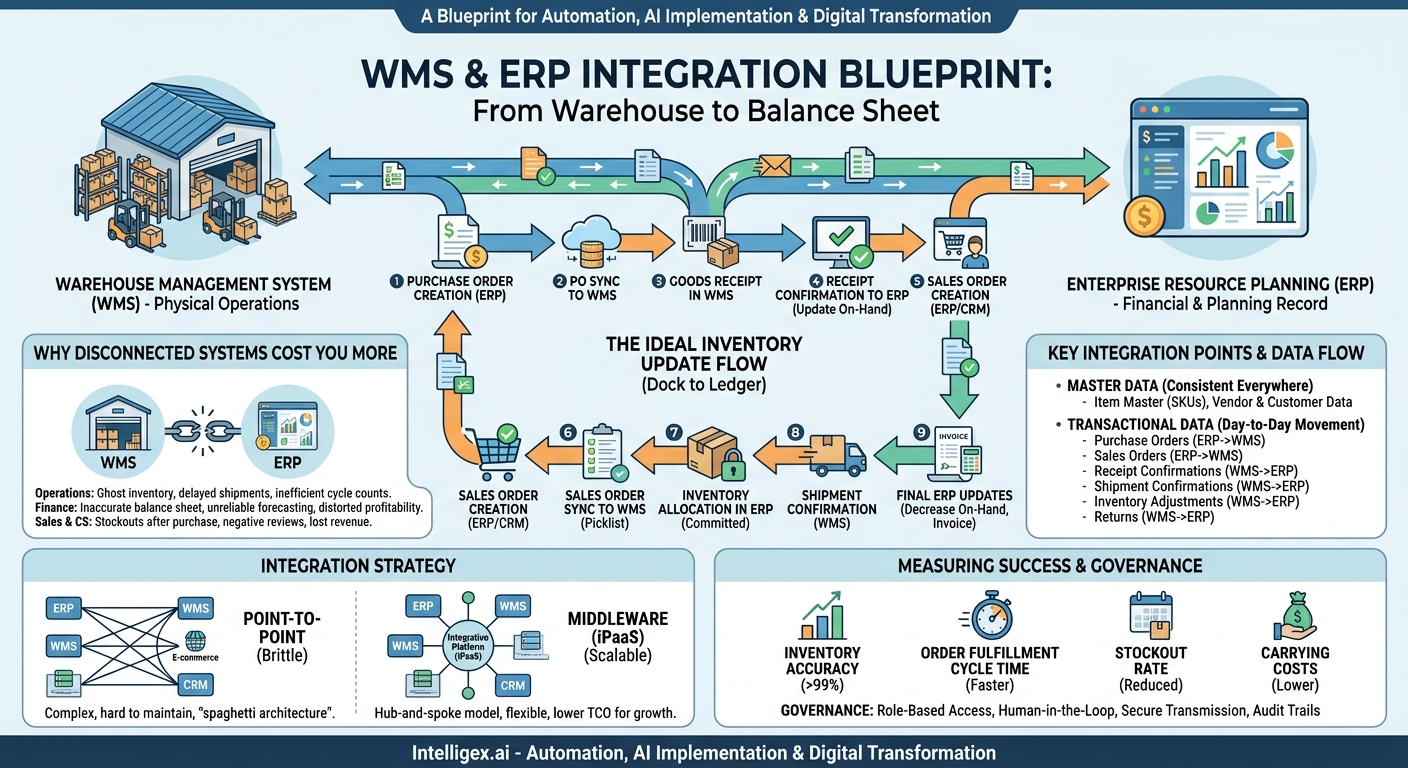
A successful integration is built on a clear, logical, and automated sequence of events. The goal is to ensure that for every physical movement of goods, there is a corresponding and immediate digital transaction that is reflected in all relevant systems. This creates a single, reliable source of truth for your inventory data.
Here is a step-by-step breakdown of an ideal, integrated inventory flow:
- Purchase Order Creation: A purchase order (PO) for new stock is created in the ERP. This is the financial and planning record of the intended purchase.
- PO Sync to WMS: The ERP automatically sends the PO details (SKUs, quantities, expected arrival date) to the WMS. This alerts the warehouse team of an incoming shipment, allowing them to plan labor and space accordingly.
- Goods Receipt in WMS: When the shipment arrives at the warehouse, staff use scanners to receive the goods. They scan barcodes on the products, and the WMS validates the quantities against the open PO. Any discrepancies (e.g., short shipment, damaged items) are noted directly in the WMS at the point of receipt.
- Receipt Confirmation to ERP: As soon as the goods are received and put away, the WMS sends an automated receipt confirmation back to the ERP. The ERP updates the inventory status from “on-order” to “on-hand” and makes it available for sale. The accounts payable process can also be triggered at this stage.
- Sales Order Creation: A customer places an order through your e-commerce site or a sales representative enters it into the CRM or ERP.
- Sales Order Sync to WMS: The ERP validates that stock is available and sends the sales order (SO) to the WMS for fulfillment. The WMS then generates a picklist and directs a warehouse worker to the exact bin location of the item.
- Inventory Allocation in ERP: Simultaneously, the WMS signals the ERP to move the ordered quantity from “on-hand” to “allocated” or “committed” status. This prevents another customer from buying the same unit.
- Shipment Confirmation: Once the order is picked, packed, and shipped, the warehouse team updates the status in the WMS. The WMS automatically sends a shipment confirmation, including tracking information, back to the ERP.
- Final ERP Updates: The ERP uses the shipment confirmation to formally decrease the on-hand inventory quantity, trigger the invoicing process for the finance team, and send a shipping notification to the customer. The entire lifecycle is now complete and accurately recorded.
This automated flow eliminates manual data entry, dramatically reduces the chance of human error, and provides real-time visibility for every department.
Key Integration Points: Where Your WMS and ERP Must Communicate
Effective integration is about more than just connecting two systems; it’s about ensuring the right data is shared at the right time. The communication between your WMS and ERP is typically handled through Application Programming Interfaces (APIs), which act as secure channels for systems to talk to each other. Below are the critical data objects that must flow between them.
Master Data
This is the foundational data that must be consistent everywhere. It is usually managed in the ERP and synced to the WMS.
- Item Master: Includes SKU numbers, product descriptions, units of measure, weight, dimensions, and barcodes. Inconsistency here is a primary cause of integration failure.
- Vendor and Customer Data: Information needed to process purchase orders and sales orders correctly.
Transactional Data
This data represents the day-to-day movement and status of your inventory.
- Purchase Orders (ERP to WMS): Informs the warehouse what to expect.
- Sales Orders (ERP to WMS): Tells the warehouse what to pick, pack, and ship.
- Receipt Confirmations (WMS to ERP): Confirms that goods have been received and are now on-hand.
- Shipment Confirmations (WMS to ERP): Confirms that an order has been fulfilled and inventory has left the building.
- Inventory Adjustments (WMS to ERP): Updates for cycle counts, damaged goods, or other changes to stock levels identified on the warehouse floor. This is crucial for maintaining accuracy.
- Returns (WMS to ERP): Manages the process for returned goods, updating inventory levels once items are inspected and returned to stock.
Defining the specific data fields for each of these transactions is a critical part of the integration planning process. For example, does a shipment confirmation need to include the shipping carrier, tracking number, and freight cost? Answering these questions upfront prevents costly rework later.
Choosing Your Integration Strategy: Point-to-Point vs. Middleware
Once you know what data needs to move, you must decide how to move it. There are two primary approaches, each with significant implications for scalability and maintenance.
Point-to-Point Integration
This is a direct connection built between two systems. For a simple business with just an ERP and a WMS, this can seem like the fastest and cheapest option. A developer writes custom code that connects the API of the WMS directly to the API of the ERP.
The Pitfall: This approach creates a brittle architecture. If you later decide to add an e-commerce platform, a CRM, and a 3PL partner’s system, you have to build separate point-to-point connections for each. This creates a complex “spaghetti architecture” that is difficult to manage, monitor, and update. When one system is upgraded, multiple connections can break, leading to extensive downtime and maintenance costs.
Middleware (iPaaS)
A more modern and scalable approach involves using a middleware platform, often called an Integration Platform as a Service (iPaaS). This platform acts as a central hub for all your applications. Each system (ERP, WMS, CRM, etc.) connects to the hub, which then manages the data translation and flow between them.
The Advantage: This creates a “hub-and-spoke” model. If you need to add a new application, you only connect it to the middleware, not to every other system. If you need to replace your WMS, you only change the one connection to the hub, and the rest of your systems are unaffected. Platforms like MuleSoft, Dell Boomi, and Celigo provide pre-built connectors and a visual interface for managing these data flows. Cloud providers also offer robust solutions, such as AWS Application Integration services, which provide the tools to build a scalable and resilient integration architecture.
For most businesses planning for growth, investing in a middleware strategy provides far greater long-term value, flexibility, and a lower total cost of ownership.
Common Pitfalls and How to Sidestep Them
An inventory integration project can be complex, but many failures stem from a few common, avoidable mistakes. Proactive planning is key to a smooth implementation.
Pitfall 1: Dirty Data
If your master item data is inconsistent before you begin, your integration will fail. You cannot automate a mess. For example, if the same t-shirt has SKU “TS-BL-LG” in the ERP and “TSHIRT-BLUE-L” in the WMS, the systems will never be able to match the records.
Solution: Conduct a thorough data cleansing and standardization project *before* you start building integrations. Establish a single source of truth for master data (usually the ERP) and enforce strict data governance rules. Using global standards, such as those from GS1 for barcodes and product identifiers, can provide a solid foundation.
Pitfall 2: Neglecting Error Handling
Integrations can fail. A network connection might drop, an API might be temporarily unavailable, or a data record might be malformed. Without a plan for these exceptions, a small glitch can halt your entire fulfillment process.
Solution: Build robust error handling and alerting into your integration flows. If a sales order fails to sync to the WMS, an alert should be automatically sent to the IT and operations teams. The system should also have a mechanism to retry the transaction automatically after a short delay.
Pitfall 3: Lack of Stakeholder Buy-in
This project is not just for the IT department. If the warehouse team is not trained on the new scanner-based workflows or the finance team does not trust the automated data, the project will be undermined by manual workarounds.
Solution: Involve all affected departments from the very beginning. Map out current and future state processes with their input. Provide comprehensive training and clearly communicate the benefits of the new system for their specific roles.
Use this short checklist before going live to ensure you have covered the basics:
- Data Consistency: Is our master data (SKUs, units of measure) 100% identical in both the ERP and WMS?
- Source of Truth: Have we clearly defined which system owns which piece of data (e.g., ERP owns financial data, WMS owns bin locations)?
- Error Protocol: Do we have an automated alert system and a clear runbook for what to do when a data sync fails?
- Team Training: Has every user who interacts with inventory been trained on the new processes and tools?
- Testing: Have we run end-to-end tests for all key scenarios, including receiving, shipping, returns, and inventory adjustments?
Measuring Success: The Metrics That Matter
How do you know if your integration project was successful? The answer lies in the data. By tracking a few key performance indicators (KPIs) before and after the implementation, you can quantify the business value and demonstrate a clear return on investment.
Inventory Accuracy Rate: This is the most direct measure of success. It is calculated by comparing your physical inventory count to what your system reports. An integrated system should push this rate well above 99%. A high accuracy rate is the foundation for all other supply chain improvements.
Order Fulfillment Cycle Time: This measures the time from when a customer places an order to when it is shipped. Automation removes the delays caused by manual order entry and communication gaps, significantly reducing this time. This leads directly to higher customer satisfaction.
Stockout Rate: This is the percentage of orders that cannot be fulfilled from stock. With real-time visibility, you can set more accurate reorder points and reduce the frequency of stockouts, preventing lost sales. An integrated system like the one offered by Oracle NetSuite provides tools to manage these levels effectively.
Carrying Costs: Better visibility allows you to hold less safety stock, reducing the capital tied up in inventory and lowering costs associated with storage, insurance, and obsolescence.
Automation and Governance: Implementing a Smart, Secure Flow
Integrating your WMS and ERP is the first step. The next is leveraging that connection to build smarter, more secure processes. This is where you can introduce automation responsibly, governed by clear rules and human oversight.
For example, you can configure your ERP to automatically generate a purchase order when the on-hand quantity of an item dips below a certain threshold. This is only possible when you have complete trust in the real-time inventory data being sent from the WMS.
However, automation requires strong governance. Consider these principles for safe implementation:
- Role-Based Access Control: Not everyone should be able to manually adjust inventory levels. Restrict this capability in both the ERP and WMS to a few trusted individuals. Most users should only interact with inventory through standard processes like receiving and shipping.
- Human-in-the-Loop for High-Impact Actions: While an automated reorder for a low-cost item is efficient, a system-generated write-off for thousands of dollars in “missing” stock should require human review and approval. Set financial or quantity thresholds that trigger a manual verification step.
- Secure Data Transmission: All communication between your systems, especially if they are cloud-based, must be encrypted. Ensure your API connections use modern security protocols to protect sensitive business data from interception.
- Audit Trails: Every change to inventory, whether made by a user or an automated process, must be logged. This is critical for troubleshooting discrepancies, performing audits, and maintaining accountability.
Your Next Steps: Building a Cohesive Inventory System
Achieving a seamless inventory update flow is a journey, but it delivers compounding returns in efficiency, accuracy, and customer satisfaction. It transforms inventory management from a reactive, problem-solving function into a proactive, strategic asset.
If you are ready to bridge the gap between your warehouse and your back office, the path forward involves a few clear actions:
- Audit Your Current State: Map your existing processes. Identify every point of manual data entry, every delay, and every system where inventory data lives. Be honest about where the friction and errors occur.
- Define Your Single Source of Truth: Formally declare which system is the master record for key data elements. Typically, the ERP is the master for financial and item data, while the WMS is the master for real-time quantities and bin locations.
- Evaluate Your Technology: Assess the API capabilities of your current WMS and ERP. Determine if they can support the real-time, automated flow you need. This is the point to decide between a point-to-point or a more scalable middleware strategy.
- Create a Phased Implementation Plan: You don’t have to do everything at once. Start with the most critical data flows, like sales orders and shipment confirmations. Build, test, and stabilize one flow before moving to the next. This builds momentum and allows your team to adapt incrementally.
By treating this as a strategic business initiative rather than just an IT project, you can finally make your inventory system a source of competitive advantage instead of a constant operational headache.
Your Next Read:
Get a FREE
Proof of Concept
& Consultation
No Cost, No Commitment!
