

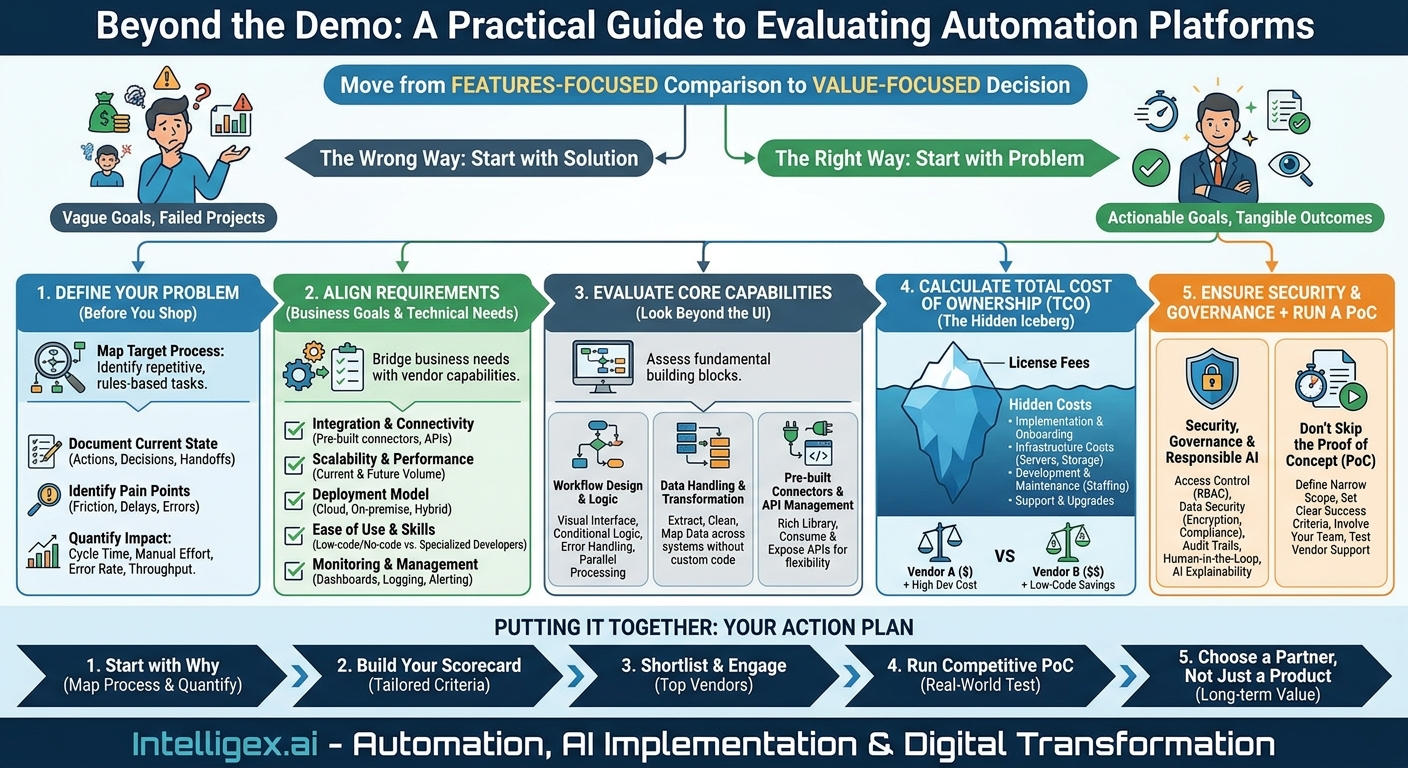
Choosing the right automation and integration platform is a high-stakes decision. The right tool can unlock significant gains in efficiency, reduce costly errors, and give your teams the visibility they need to make better decisions. The wrong one can lead to budget overruns, frustrated employees, and a failed project that drains resources and morale. The market is saturated with options, each promising transformative results. To cut through the noise, you need a structured evaluation process rooted in your specific business challenges.
This guide provides a practical checklist for selecting the vendor that will become a strategic partner, not just another line item on your software budget. It’s about moving from a features-focused comparison to a value-focused decision that aligns technology with tangible business outcomes.
Define Your Problem Before You Shop for a Solution
The most common mistake in technology procurement is starting with the solution. Teams get excited about a specific tool or the promise of “AI-powered automation” without first deeply understanding the problem they need to solve. Before you look at a single vendor website, you must map the business process you intend to improve.
A vague goal like “improve operational efficiency” is not actionable. A specific goal like “reduce the manual effort for processing vendor invoices from 40 hours per week to 5 hours per week” is. Start by documenting the current state of the process you want to automate.
- Identify the Target Process: Choose a single, well-defined process. Good candidates are often repetitive, rules-based, and involve moving data between multiple systems. Examples include customer onboarding in Sales, new hire setup in HR, or purchase order reconciliation in Finance.
- Map Every Step: Document each action, decision point, and handoff. Who does what? What systems are involved (e.g., email, spreadsheets, CRM, ERP)? Where are the delays? Where do mistakes happen? Be brutally honest about the current workflow.
- Identify the Pain Points: Pinpoint the exact sources of friction. Is it the time spent manually re-entering data? The errors caused by copying and pasting information? The lack of visibility for managers into a process’s status?
- Quantify the Impact: Attach real numbers to these pain points. This is critical for building a business case and later measuring your return on investment (ROI). Key metrics to capture include:
- Cycle Time: How long does it take from the start of the process to the end? (e.g., 7 days to approve an invoice).
- Manual Effort: How many person-hours are spent on the process each week or month?
- Error Rate: What percentage of transactions require manual correction? What is the business cost of these errors?
- Throughput: How many transactions can the team handle in a given period?
With this detailed map, you are no longer shopping for a tool. You are shopping for a solution to a well-defined and quantified business problem.
Aligning Technical Requirements with Business Goals
Once you understand the “why” (the business problem) and the “what” (the process steps), you can define your technical requirements. This isn’t about creating a laundry list of every possible feature. It’s about identifying the core capabilities required to solve your specific problem and enabling future growth.
Your requirements list should be a bridge between your business needs and a vendor’s capabilities. Here are the essential categories to consider:
- Integration and Connectivity: Does the tool have pre-built connectors for the systems you already use? This is non-negotiable. If your business runs on Salesforce, SAP, and a custom-built internal database, the platform must be able to communicate with all three seamlessly. Ask about its API capabilities for connecting to bespoke or legacy systems.
- Scalability and Performance: Can the platform handle your current transaction volume and your projected volume in two years? Consider both the number of processes you want to automate and the number of transactions each process will run. For a retail business, can it handle the spike in order processing during the holiday season without performance degradation?
- Deployment Model: Do you need a cloud-native (SaaS) solution, an on-premise installation for maximum data control, or a hybrid model? This decision often depends on your company’s IT strategy, security policies, and regulatory requirements.
- Ease of Use and Skill Requirements: Who will be building and maintaining the automations? Is the platform a low-code or no-code environment designed for business analysts and power users? Or does it require specialized developers with coding expertise? The answer dramatically impacts your total cost of ownership and the speed at which you can deploy new solutions.
- Monitoring and Management: How will you know if an automation fails? The platform must provide robust dashboards, logging, and alerting mechanisms. You need clear visibility into process performance, error handling, and the ability to quickly diagnose and fix issues.
Evaluating Core Automation and Integration Capabilities
With your high-level requirements defined, it’s time to dig into the specific functions of the platform. A slick user interface can hide a lack of underlying power. Focus on how the tool handles the fundamental building blocks of any automation or integration project.
Workflow Design and Logic
This is the heart of the platform. How are automation workflows actually built? Look for a visual, intuitive interface (often drag-and-drop) that allows users to map out business logic clearly. Can the tool handle real-world complexity? This includes conditional logic (if-then-else statements), parallel processing (running multiple steps simultaneously), and the ability to handle exceptions and errors gracefully. For example, if an invoice approval process requires a different workflow for amounts over $5,000, the tool should make it simple to build that rule.
Data Handling and Transformation
Automation is fundamentally about moving and transforming data. A great tool makes this easy. Assess its ability to extract data from various sources (like PDFs, emails, or web pages), clean it up (like removing extra spaces or standardizing formats), and map it between different systems. For instance, your CRM might store a customer’s state as “California,” while your ERP system requires the abbreviation “CA.” The platform should handle this transformation without requiring custom code.
Pre-built Connectors and API Management
As mentioned, pre-built connectors are essential for speed. A vendor with a rich library of connectors for common applications (ERPs, CRMs, HRIS, marketing automation tools) shows a mature and well-supported platform. However, no vendor can connect to everything out of the box. Therefore, its ability to work with APIs (Application Programming Interfaces) is just as important. Can it easily consume a REST or SOAP API from another service? Can it expose its own workflows as APIs, allowing other systems to trigger them? This flexibility is key to creating a truly connected enterprise.
The Hidden Costs: Calculating Total Cost of Ownership (TCO)
The license fee is just the tip of the iceberg. A tool that looks cheap upfront can become incredibly expensive when you factor in all the associated costs. A true TCO analysis is essential for making a sound financial decision.
When evaluating vendors, demand transparency on all potential costs:
- Subscription or Licensing Fees: Is it priced per user, per workflow, per transaction, or a combination? Understand the pricing model and how it will scale as your usage grows.
- Implementation and Onboarding: Do they charge professional services fees for the initial setup and configuration? Is training included, or is it an extra cost?
- Infrastructure Costs: For on-premise solutions, you must factor in the cost of servers, maintenance, and the IT staff required to manage them. For cloud solutions, are there data storage or transfer fees?
- Development and Maintenance: If the platform requires specialized developers, their salaries or consulting fees are part of the TCO. A low-code platform that empowers your existing business analysts can offer huge savings here.
- Support and Upgrades: Is premium support included or is it tiered? What is the cost of upgrading to new versions of the software?
Example Scenario: Vendor A offers a platform for $50,000 per year. Vendor B’s platform is $80,000 per year. Vendor A’s tool, however, requires a team of two specialized developers to build and maintain workflows. Vendor B’s low-code platform can be managed by one of your existing business systems analysts after a short training course. In this case, Vendor B likely has a much lower TCO despite the higher initial license fee.
Security, Governance, and Responsible AI
When you automate processes, you are giving a software platform the keys to your most critical systems and sensitive data. Security and governance cannot be an afterthought. This is especially true when tools incorporate AI, which can introduce new complexities around data privacy and decision-making.
Your evaluation must include a thorough review of the vendor’s security posture and governance features. Ask direct questions:
- Access Control: Does the platform support Role-Based Access Control (RBAC)? Can you create custom roles to ensure that users only have the permissions they need? For example, a business analyst might be able to design a workflow, but only an IT administrator can deploy it to production.
- Data Security: How is data protected both in transit and at rest? What encryption standards are used? Does the vendor comply with major regulations relevant to your business, such as GDPR, CCPA, or HIPAA?
- Audit and Logging: Does the platform provide a comprehensive, unchangeable audit trail? You must be able to see who created or modified an automation, when it ran, and what actions it performed. This is critical for compliance and troubleshooting.
- Human-in-the-Loop Capabilities: Not every process should be fully automated. For high-value or sensitive decisions, the tool must support “human-in-the-loop” workflows. This means the automation can pause and assign a task to a human for review and approval before proceeding, such as approving a wire transfer over a certain threshold.
- AI Explainability: If the tool uses AI or machine learning models (e.g., for document understanding or predictive routing), ask the vendor how these models work. For critical processes, you need to understand why the AI made a particular decision, not just accept a “black box” output.
Don’t Skip the Proof of Concept (PoC)
Vendor demos are designed to show the product in the best possible light. A Proof of Concept (PoC) is your opportunity to test the platform against your real-world requirements, using your data and your systems. Insist on a PoC before signing any contract.
To run an effective PoC:
- Define a Narrow Scope: Don’t try to automate an entire department. Choose one of the processes you mapped earlier, ideally one with a clear and measurable outcome. A good PoC might be automating the creation of a new customer record in your ERP system based on a “Closed-Won” opportunity in your CRM.
- Set Clear Success Criteria: Define what success looks like before you start. These should be binary (yes/no) and measurable. For example: “The workflow must successfully process 100 new customer records with a 98% accuracy rate, pulling data from five specific fields in the CRM.”
- Involve Your Team: The PoC should be executed by the same people who will be using the tool day-to-day. Their feedback on the usability of the platform is more valuable than any sales pitch.
- Test Vendor Support: Use the PoC as a trial for the vendor’s support team. Open a support ticket with a real technical question. Their response time and the quality of their answer will tell you a lot about the partnership you can expect after you become a customer. For reference, great support organizations often provide extensive public documentation, like the kind you’d find at AWS Documentation.
Putting It All Together: Your Next Steps
Selecting the right automation and integration partner is a strategic process that requires diligence and a clear focus on your business goals. By moving beyond feature checklists and focusing on value, security, and partnership, you can make a confident decision that will drive real, measurable results.
Here is your action plan to get started:
- Start with Why: Select one high-impact business process and map it from end to end. Quantify the pain points in terms of time, cost, and errors. This is the foundation of your business case.
- Build Your Scorecard: Use the criteria outlined above (integration, scalability, TCO, security, ease of use) to create a vendor evaluation scorecard tailored to your specific needs.
- Shortlist and Engage: Identify two to three vendors that appear to be a strong fit based on your research and scorecard. Engage their sales and technical teams with your detailed requirements.
- Run a Competitive PoC: Conduct a time-boxed Proof of Concept with your top two vendors using the same real-world use case. Compare the results against your pre-defined success criteria.
- Choose a Partner, Not Just a Product: Make your final decision based on the complete picture. This includes the technology’s performance, the total cost of ownership, and your confidence in the vendor’s ability to support you and grow with you as a long-term partner.
Your Next Read:
Category:
Get a FREE
Proof of Concept
& Consultation
No Cost, No Commitment!
