

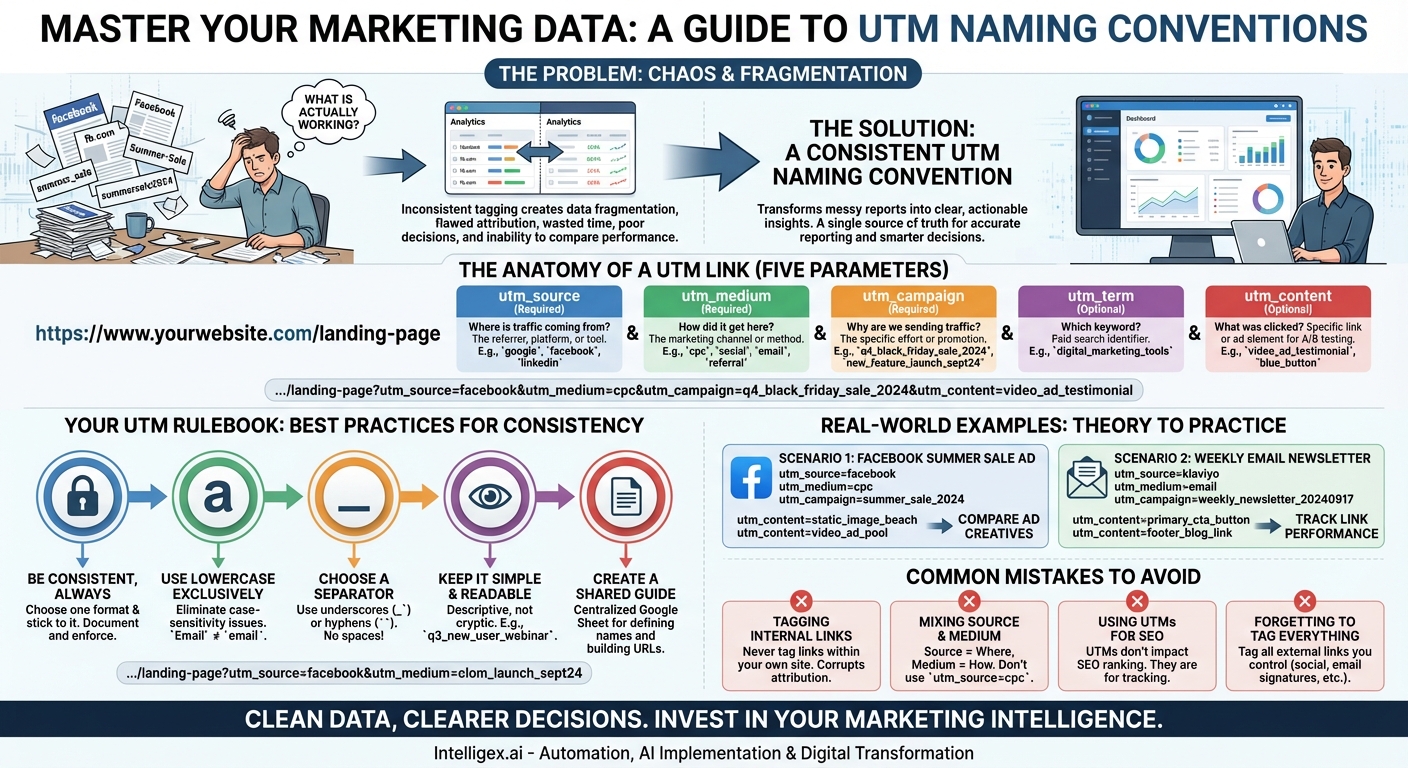
If you’ve ever stared at your Google Analytics reports, you’ve likely felt a familiar pang of confusion. You see traffic coming from “facebook,” “Facebook,” “fb.com,” and “l.facebook.com.” You have campaign data that looks like “Summer-Sale,” “summer_sale,” and “summersale2024.” It’s a chaotic mess that makes it nearly impossible to answer the most fundamental marketing question: “What is actually working?” This data fragmentation isn’t just a minor annoyance; it’s a critical flaw that undermines your ability to make smart, data-driven decisions. The solution, however, is surprisingly simple and completely within your control: a robust and consistent UTM naming convention.
UTM parameters (Urchin Tracking Module) are simple snippets of text added to the end of a URL that tell your analytics platform, like Google Analytics, more about where your visitors came from. They are the bedrock of accurate campaign tracking. When used correctly, they transform your messy reports into a clear, organized, and insightful dashboard. When used inconsistently—or not at all—they create more noise than signal. This guide will walk you through the basics of building a UTM naming convention that will clean up your reporting, clarify your attribution, and ultimately empower you to prove the value of your marketing efforts.
Why a Consistent UTM Naming Convention is Non-Negotiable
Before diving into the “how,” it’s crucial to understand the “why.” Implementing a strict UTM system isn’t just about being organized for the sake of it. It has a direct and profound impact on your marketing intelligence and budget allocation. The cost of messy data is far higher than the time it takes to create and follow a simple set of rules.
Without a standardized approach, you’ll inevitably face several critical problems:
- Fragmented and Inaccurate Reporting: As mentioned, analytics platforms are ruthlessly literal.
utm_source=Facebookandutm_source=facebookare treated as two entirely different traffic sources. This splits your data, making it impossible to see the true performance of a single platform. You might have ten different variations for a single source, each with a small piece of the overall picture. - Flawed Attribution: If you can’t accurately group your traffic, you can’t accurately attribute conversions, leads, or revenue. You might mistakenly cut the budget for a high-performing channel simply because its data was fragmented across multiple mislabeled entries.
- Wasted Time and Resources: Your team will spend countless hours trying to manually clean up, consolidate, and decipher reports. This is time that could be spent on strategy, optimization, and creative work. It’s a manual, error-prone process that turns reporting into a dreaded chore.
- Poor Decision-Making: The ultimate consequence of bad data is bad decisions. When you can’t trust your reports, you’re forced to rely on gut feelings and anecdotal evidence to guide your strategy. This is a recipe for wasted ad spend and missed opportunities.
- Inability to Compare Performance Over Time: How did this year’s Black Friday campaign compare to last year’s? Without a consistent naming structure like
bfcm_2023andbfcm_2024, making a direct, apples-to-apples comparison becomes a forensic investigation rather than a quick glance at a report.
A UTM naming convention is your single source of truth. It’s the framework that ensures every click from every campaign is categorized correctly, creating a clean, reliable dataset you can confidently use to steer your marketing ship.
The Anatomy of a UTM Link: Understanding the Five Parameters
A URL with UTM parameters looks longer than a standard link, but it’s composed of a few simple, logical parts. There are five standard parameters you can use. Three are required for effective tracking (Source, Medium, Campaign), and two are optional but highly recommended for more granular insights (Term, Content).
utm_source (Required)
The Question It Answers: Where is the traffic coming from?
This is the referrer, the specific platform, website, or marketing tool that is sending you the traffic. It’s the highest-level “where.” Think of the specific brand name or platform.
- Examples:
google,facebook,linkedin,bing,klaviyo,active_campaign,forbes,influencer_name
utm_medium (Required)
The Question It Answers: How did the traffic get here?
This identifies the general marketing channel or method you used. It’s a broad category. Using standard, recognized mediums is crucial because Google Analytics uses this parameter to group your traffic into its default channel groupings (e.g., Paid Social, Email, Organic Search).
- Examples:
cpc(for cost-per-click ads),social(for organic social posts),email,affiliate,referral,display,video
utm_campaign (Required)
The Question It Answers: Why are we sending this traffic?
This is where you name your specific marketing effort, promotion, or strategic initiative. It could be a product launch, a seasonal sale, a content promotion, or a specific newsletter edition. This is what allows you to group all related activities together.
- Examples:
q4_black_friday_sale_2024,new_feature_launch_sept24,guide_to_seo_ebook,weekly_newsletter_20240915
utm_term (Optional)
The Question It Answers: Which keyword did we pay for?
This parameter was originally designed for paid search campaigns to identify the specific keyword that triggered an ad. While auto-tagging in platforms like Google Ads often handles this automatically, it’s still useful for tracking keywords in other search engines or for internal classification.
- Examples:
utm_naming_conventions,digital_marketing_tools,blue_running_shoes
utm_content (Optional)
The Question It Answers: Which specific link or ad was clicked?
This is incredibly useful for A/B testing. If you have multiple links in the same email or multiple ad creatives in the same ad set, utm_content helps you differentiate their performance. It tells you exactly *what* element was clicked to bring the user to your site.
- Examples:
blue_button,header_link,image_ad_with_dog,video_ad_testimonial,sidebar_banner
Putting it all together, a fully tagged URL would look like this:
https://www.yourwebsite.com/landing-page?utm_source=facebook&utm_medium=cpc&utm_campaign=q4_black_friday_sale_2024&utm_content=video_ad_testimonial
Creating Your Rulebook: Best Practices for UTM Naming
Knowing what the parameters mean is only half the battle. The real power comes from applying a consistent set of rules across your entire team and all your campaigns. Here are the essential rules for building your UTM framework.
Rule 1: Be Consistent, Always
This is the golden rule that supersedes all others. Choose a format and stick with it religiously. Decide if you’re going to use facebook or meta, linkedin or li. Whatever you choose, document it and enforce it. The goal is to eliminate variations entirely.
Rule 2: Use Lowercase Exclusively
As mentioned, UTM parameters are case-sensitive. Email, email, and EMAIL will all show up as separate mediums in your reports. By enforcing a “lowercase only” rule, you immediately eliminate this common source of data fragmentation. It’s a simple fix with a massive impact.
Rule 3: Choose a Separator and Stick to It
Never use spaces in your UTM parameters. Browsers will encode spaces as %20, which is ugly, hard to read, and can sometimes cause links to break. Instead, use a consistent separator for multi-word phrases. The two most common options are underscores (_) and hyphens (-).
Example: summer_sale_2024 or summer-sale-2024.
Neither is inherently better than the other, but underscores are a very common convention. The key is to pick one and use it everywhere.
Rule 4: Keep It Simple and Readable
Your campaign names should be descriptive enough for a new team member to understand at a glance, but not so long that they become unwieldy. Avoid using cryptic codes or internal jargon that no one will remember in six months.
- Good:
q3_new_user_webinar - Bad:
promo_wbnr_nu_0924_v3_final
Rule 5: Create a Shared UTM Builder & Naming Guide
Human memory is fallible. The best way to ensure consistency is to remove the guesswork. Create a shared spreadsheet (like a Google Sheet) that serves two purposes:
- A Naming Guide: A tab that defines the exact names to be used for each source and medium (e.g., Source: `linkedin`, Medium: `social` or `cpc`).
- A URL Builder/Log: A template that allows team members to input their base URL and select from dropdowns for source, medium, and campaign type. This concatenates the final URL for them, reducing typos. It also creates a historical log of all tracked links that have been created.
This document becomes your team’s “Rosetta Stone” for campaign tracking.
From Theory to Practice: Real-World UTM Examples
Let’s apply these rules to a few common marketing scenarios to see how they work in practice.
Scenario 1: A Facebook Ad Campaign for a Summer Sale
You are running a campaign to promote a 20% discount on all summer apparel. You have two different ad creatives: a static image and a video.
- Base URL:
https://www.yourshop.com/summer-sale utm_source:facebook(The platform)utm_medium:cpc(It’s a paid ad)utm_campaign:summer_sale_2024(The specific promotion)utm_content(for the image ad):static_image_beach_sceneutm_content(for the video ad):video_ad_pool_party
Now, in your analytics, you can easily compare the performance of the two ad creatives within the same campaign, on the same platform.
Scenario 2: A Link in Your Weekly Email Newsletter
You send a weekly newsletter every Tuesday. In this week’s newsletter, you have a primary call-to-action button and a secondary link in the footer to your blog.
- Base URL:
https://www.yourwebsite.com/new-blog-post utm_source:klaviyo(The email service provider sending the traffic)utm_medium:email(The channel)utm_campaign:weekly_newsletter_20240917(The specific send, dated for easy reference)utm_content(for the CTA button):primary_cta_buttonutm_content(for the footer link):footer_blog_link
This allows you to see not only how your email marketing is performing overall, but which specific newsletter and which link placement within it is driving the most engagement.
Common UTM Mistakes and How to Avoid Them
Even with a system in place, some common pitfalls can still trip you up. Be mindful of these mistakes:
- Tagging Internal Links: Never, ever use UTM parameters on links that point from one page of your website to another (e.g., a link from your homepage to your contact page). Doing so will overwrite the original source data for that user. If a user arrives from an organic Google search and then clicks a UTM-tagged internal link, their session will be attributed to your internal campaign, not to Google. This completely corrupts your attribution data.
- Mixing Up Source and Medium: A common mistake is putting the channel in the source field (e.g.,
utm_source=cpc). Remember: Source is the brand/platform (the “where”), and Medium is the channel (the “how”).utm_source=googleandutm_medium=cpcis correct. - Using UTMs for SEO: UTM parameters do not impact SEO. Search engines know to ignore them for ranking purposes. You don’t need to worry about them creating duplicate content issues as long as your canonical tags are set up correctly.
- Forgetting to Tag Everything: Every link you have control over that points to your site from an external source should be tagged. This includes social media profiles, email signatures, guest post bios, and QR codes. If you don’t tag a link from a source that doesn’t pass referrer data (like an email client), that traffic will likely be misattributed as “Direct,” robbing you of valuable insights.
Clean Data, Clearer Decisions
Implementing a rigorous UTM naming convention is one of the highest-leverage activities a marketing team can undertake. It’s a foundational practice that pays dividends indefinitely. It’s the difference between guessing and knowing, between confusion and clarity, between wasting budget and investing it with confidence.
Taking the time to define your rules, create a shared resource, and train your team is not just an administrative task; it’s an investment in your marketing intelligence. By turning chaotic, fragmented data into a clean, organized, and actionable asset, you empower yourself to truly understand your audience, optimize your campaigns, and prove the undeniable impact of your work.
Related Posts
Category:
Get a FREE
Proof of Concept
& Consultation
No Cost, No Commitment!
