

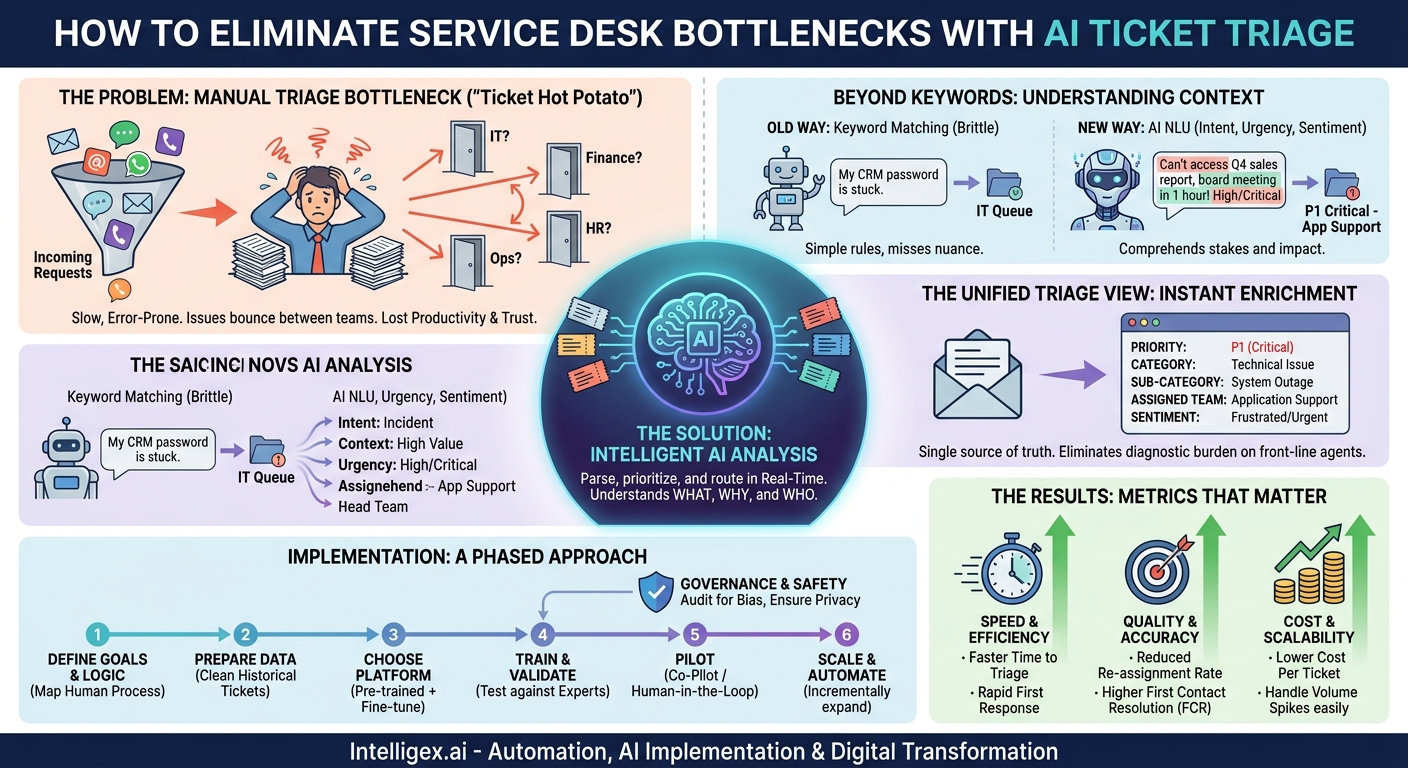
Every minute a critical ticket sits in the wrong queue is a minute of lost productivity, a dip in customer satisfaction, or a potential escalation of a business risk. The traditional first-in, first-out model for handling requests is no longer sufficient. Manual triage, where a person reads every incoming ticket to determine its importance and destination, creates a persistent bottleneck that slows down every department, from IT and Finance to HR and Operations.
This process is not just slow; it’s prone to human error. An agent scanning hundreds of tickets might miss the subtle urgency in a message, misinterpret a technical term, or simply route a request to the wrong team out of habit. The result is a frustrating game of “ticket hot potato,” where issues bounce between departments before finally landing with the person who can solve them. This wastes valuable employee time and erodes trust in your internal support systems.
The solution lies in shifting from manual inspection to intelligent analysis. By using AI to parse, prioritize, and route every incoming request in real time, you can create a single, unified system that understands the what, why, and who behind every ticket before a human ever sees it. This isn’t about replacing people; it’s about empowering them to focus on solving problems instead of sorting them.
Beyond Keywords: How AI Understands Ticket Context
For years, businesses have relied on rule-based automation to manage ticket flow. These systems typically use simple keyword matching. If a ticket contains the word “password,” it goes to the IT help desk. If it includes “invoice,” it’s routed to Finance. While better than nothing, this approach is brittle and lacks the nuance to understand true context.
Modern AI, specifically models using Natural Language Understanding (NLU), operates on a completely different level. Instead of just matching words, it comprehends intent, urgency, and sentiment. The AI reads a ticket the way a seasoned expert would, picking up on the subtle cues that reveal its true importance.
Consider these examples:
- Standard Request: “My login for the CRM is not working.” A keyword system would correctly route this to IT.
- Urgent Request: “I can’t access the Q4 sales report in the CRM, and my board meeting starts in one hour.” An AI model understands the time-sensitive language (“in one hour”) and the high-stakes context (“board meeting”). It can automatically flag this ticket as P1 (critical priority) and escalate it past the general queue.
Similarly, the AI can differentiate between impact levels:
- Low Impact: “There seems to be a calculation error on my expense report for last week.” This affects a single user.
- High Impact: “Our entire team in the London office cannot access the expense reporting system.” The AI identifies the scope (“entire team,” “London office”) and recognizes this as a major system outage, routing it to the application support team with high priority.
This ability to understand context is what separates basic automation from true intelligent triage. The AI isn’t just a mail sorter; it’s an expert analyst working at machine speed.
The Unified Triage View: Combining Priority and Routing
In many organizations, the “before” state of ticket management is a collection of disconnected queues and manual hand-offs. A finance request lands in a general support inbox, gets forwarded to the main finance team, and is then re-assigned to the accounts payable specialist. Each step adds delay and a chance for the ticket to get lost.
An AI-driven triage system creates a unified “after” state. As soon as a ticket arrives, the AI model instantly analyzes its content and enriches it with a layer of structured data. This data is then used to make an immediate, accurate decision about both priority and routing. Instead of a vague subject line, your support teams see a ticket that has already been classified.
What the AI Determines Instantly
- Priority: From P1 (Critical) to P4 (Low), based on detected urgency, business impact, and user sentiment.
- Sub-category: A more granular label, like Password Reset, Invoice Dispute, Benefits Inquiry, or Feature Request.
- Assigned Team or Agent: The specific group or even individual best equipped to handle the issue, based on predefined skills and responsibilities.
- Sentiment: An analysis of the sender’s tone (e.g., Frustrated, Confused, Neutral), which can help agents tailor their response.
– Category: A high-level classification, such as Billing Inquiry, Technical Issue, HR Request, or Sales Question.
This enriched data provides a single source of truth. The IT team doesn’t have to guess if a “billing portal issue” is a financial query or a technical bug; the AI has already analyzed the technical logs or error messages cited in the ticket and routed it to the right engineering team. This eliminates the diagnostic burden on front-line agents and gets expertise focused where it’s needed most.
Implementing AI Triage: A Phased Approach
Deploying an AI triage system is not about flipping a switch. It requires a thoughtful, phased approach that builds on your existing processes and data. Rushing the implementation can lead to poor results and erode team trust in the technology. Following a structured plan ensures the model is accurate, reliable, and adopted successfully.
- Define Your Triage Logic and Goals
Before introducing any technology, you must first document and refine your current processes. Get stakeholders from different departments in a room and map out your ideal state. Ask critical questions: What defines a P1 incident for the Sales team versus the Supply Chain team? Which team is ultimately responsible for website performance issues? This human-driven logic will become the foundation for training the AI. Your goal is to codify your best expert’s decision-making process. - Gather and Prepare Your Data
AI models learn from examples. The single most important asset for this project is your historical ticket data. You will need a clean, well-labeled dataset of thousands of past tickets, including how they were categorized, prioritized, and ultimately resolved. “Garbage in, garbage out” is the rule here. Time spent cleaning data, removing duplicates, and ensuring consistent labeling is a critical investment that pays dividends in model accuracy. - Choose the Right Model and Platform
You don’t need to build an AI model from scratch. Many platforms offer pre-trained models for common tasks like sentiment analysis and language classification. The key is choosing a solution that can be fine-tuned on your specific data and integrates seamlessly with your existing ticketing systems, such as Zendesk, Jira, or Salesforce Service Cloud. The platform should allow you to manage the model, monitor its performance, and adjust it over time. - Train and Validate the Model
Once you have your data and platform, you can begin training. The model will process your historical tickets and learn the patterns that connect certain words, phrases, and contexts to specific outcomes (e.g., “server is down” correlates with P1 priority and the Infrastructure team). After initial training, you must validate its performance. Run the model against a set of tickets it has never seen before and compare its predictions to the decisions your human experts made. This helps you measure its accuracy and identify areas for improvement. - Pilot with a Single Team as a Co-Pilot
Do not start with full automation. Begin with a pilot program for a single, high-volume team, like the IT help desk. Configure the AI to run in “suggestion mode.” When a new ticket arrives, the AI suggests a priority, category, and team, but a human agent must review and approve it. This “human-in-the-loop” approach has two benefits: it builds trust with your team and it creates a valuable feedback loop. Every time an agent corrects a suggestion, they are providing new training data to make the model smarter. - Scale and Automate Incrementally
Once the model consistently achieves high accuracy (e.g., 90% or higher) in its suggestions, you can begin to automate. Start with low-risk, high-volume categories. For instance, automatically route all confirmed password reset requests or close out-of-office replies. As confidence grows, you can expand automation to more complex tickets and onboard other departments. Continue to monitor performance metrics to ensure the system remains accurate and effective.
Real-World Scenarios Across Your Business
The value of AI triage extends far beyond IT. Any department that receives and processes requests can benefit from faster, more accurate routing. Here are a few practical examples.
For Finance and Billing
A vague email from a key account with the subject “Invoice question” arrives. Instead of landing in a generic finance queue, the AI parses the body, recognizes the customer’s name, and cross-references it in your CRM. It detects a frustrated sentiment and keywords related to “incorrect charge” and “contract terms.” The system automatically creates a high-priority ticket, assigns it to the senior billing specialist responsible for that account, and posts an alert in a shared channel for the account manager to see.
For HR and People Ops
An employee submits a request for “leave.” A basic system might route this to a generalist. The AI, however, distinguishes between different types of leave. A request for “information on parental leave policy” is identified as a standard inquiry. The AI can trigger an automated response with a link to the policy document and a list of required forms, potentially resolving the ticket without any human touch. In contrast, a request containing sensitive language about “medical leave accommodation” is flagged as confidential and routed directly to a specialized HR business partner.
For Supply Chain Management
An automated alert from a supplier’s system says “Shipment #ABC-123 Delayed.” The AI doesn’t just file this as a low-priority notification. It extracts the shipment number, looks it up in your ERP system, and discovers the shipment contains a critical component for your flagship product. The system immediately escalates the ticket, assigns it to the procurement manager for that supplier, and attaches the relevant purchase order and production schedule data to the ticket for immediate context.
Measuring Success: The Metrics That Matter
To justify the investment in an AI triage system, you must track its impact on business operations. Focus on concrete metrics that demonstrate improvements in speed, quality, and cost-effectiveness. Avoid vanity metrics and concentrate on the KPIs that reflect true business value.
Speed and Efficiency Metrics
- Time to Triage: The time from ticket creation to its correct assignment and prioritization. With AI, this should approach real time.
- Time to First Response: How quickly an agent provides a meaningful response. By eliminating the triage queue, this metric should improve dramatically.
- Average Resolution Time: The total time from ticket creation to closure. Getting tickets to the right expert faster directly reduces this time.
Quality and Accuracy Metrics
- Re-assignment Rate: The percentage of tickets that are “bounced” between teams. This is a direct measure of triage accuracy and should fall significantly.
- First Contact Resolution (FCR): The percentage of issues resolved by the first person who handles the ticket. Accurate routing is a primary driver of a high FCR rate.
- Customer/Employee Satisfaction (CSAT/ESAT): Surveys can measure whether users feel their issues are being handled faster and more effectively.
Cost and Scalability Metrics
- Cost Per Ticket: Calculated by dividing total support costs by ticket volume. Automation reduces the manual labor required per ticket, lowering this cost.
- Agent Capacity: As AI handles the repetitive task of triage, agents can focus on solving more complex problems, effectively increasing the ticket-handling capacity of your existing team.
- Scalability: The system can handle sudden spikes in ticket volume (e.g., during a system outage or a product launch) without a corresponding need to add staff.
Governance and Safe Implementation
Implementing AI, especially with access to customer or employee data, requires a strong governance framework. Addressing concerns around privacy, bias, and control from the outset is essential for building a system that is not only effective but also trustworthy.
Your approach should be centered on transparency and human oversight. The AI is a powerful tool, but it should operate within clear, safe boundaries.
A Checklist for Safe AI Triage
- Privacy and Access Control: Ensure the AI model only has the minimum necessary permissions. It should be able to read ticket content and add tags or assignments, but not modify or delete original content. All data handling must comply with regulations like GDPR and CCPA.
- Human in the Loop: Especially for high-stakes decisions, maintain a human review process. The AI can flag a ticket as a critical security incident, but a human expert should always confirm it before launching a full-scale response. Start with AI suggestions and move to full automation only after rigorous validation.
- Auditing for Bias: AI models learn from the data they are given. If your historical data contains biases, the model will learn them. Regularly audit your model’s decisions to ensure it is not unfairly prioritizing or de-prioritizing tickets based on user demographics, language, or other protected characteristics.
- Explainability: Choose a platform that can provide some insight into why it made a particular decision. For example, it might highlight the specific words or phrases (e.g., “system is down,” “cannot process payments”) that led it to assign a P1 priority. This helps build trust and aids in troubleshooting.
Your Next Steps to Smarter Triage
Moving from a manual queue to an intelligent, automated workflow is a transformational step. It replaces a system of reactive sorting with a proactive process of understanding and directing work the moment it arrives. The result is a faster, more accurate, and more scalable operation that serves both your customers and your internal teams more effectively.
Getting started doesn’t require a massive, company-wide overhaul. You can begin with a focused, practical plan.
- Assess Your Current State: Choose one of your most challenging ticket workflows. Map the entire process, from ticket creation to resolution. Identify the primary bottlenecks, common points of re-assignment, and the average delays.
- Identify a Pilot Team: Select a team with a clear need and a high volume of structured requests. Good candidates often include IT help desks (password resets, software requests), HR (policy questions), or Finance (invoice inquiries).
- Evaluate Your Data: Take an honest look at your historical ticket data. Is it accessible? Is it reasonably clean and well-labeled? This will be your most valuable asset in building a successful proof of concept.
- Explore a Proof of Concept: Before committing to a large-scale platform, consider a small-scale pilot. Working with an implementation partner, you can use your own data to train a test model and demonstrate the potential ROI in just a few weeks. This provides the concrete evidence needed to win broader stakeholder support.
By taking these deliberate steps, you can begin building a smarter triage system that clears bottlenecks, empowers your teams, and delivers a better service experience for everyone.
Your Next Read:
Get a FREE
Proof of Concept
& Consultation
No Cost, No Commitment!
