

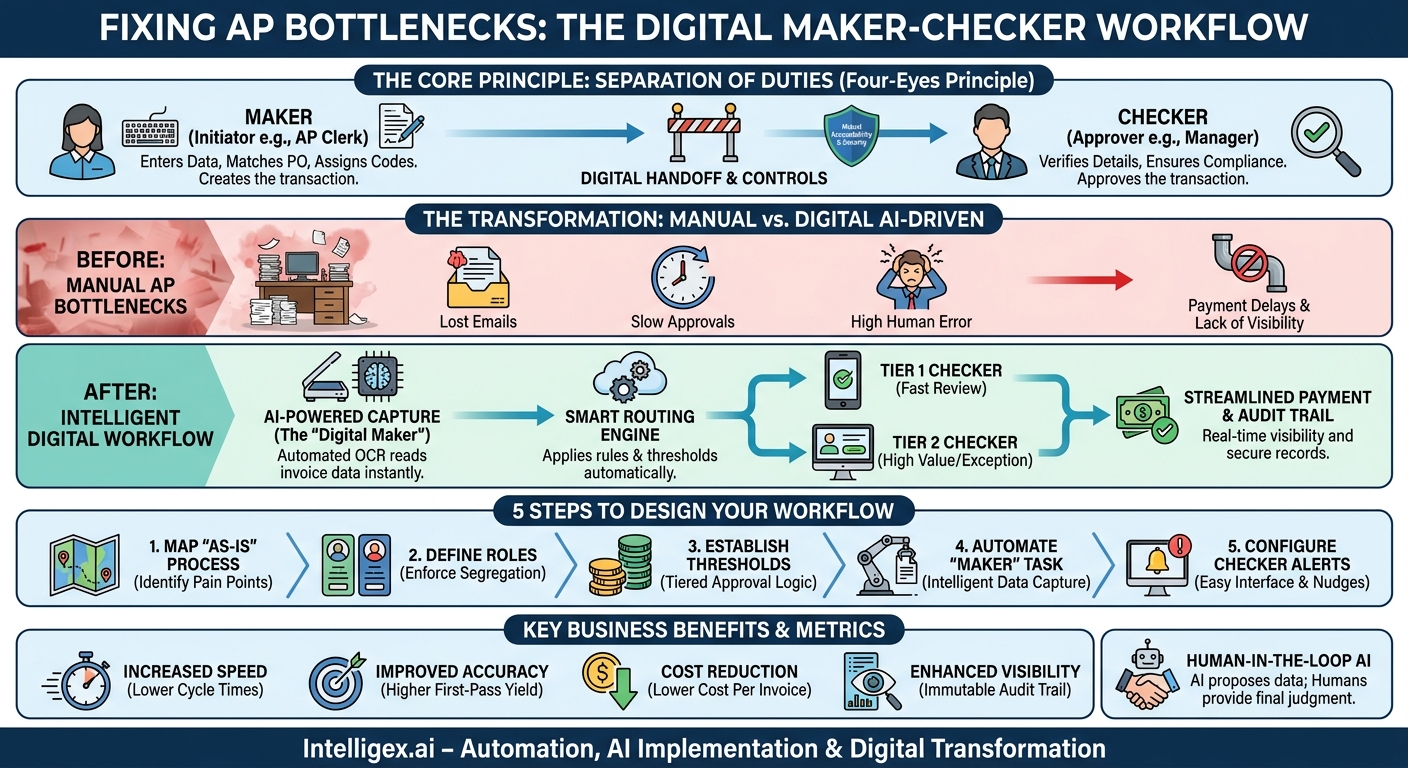
In any growing business, the accounts payable (AP) process can quickly become a bottleneck. Manual invoice approvals are slow, prone to costly human error, and create a frustrating lack of visibility for finance and operations teams. When an urgent payment is held up because an invoice is sitting in the wrong email inbox or buried under a stack of paper, the entire business feels the impact. The solution is not just about working harder; it is about working smarter with a time-tested control principle: the maker-checker pattern.
Also known as the “four-eyes principle” or segregation of duties, this pattern is the bedrock of financial control and operational integrity. At its core, it is a simple idea. One person (the Maker) initiates a task, and a second, independent person (the Checker) reviews and approves it before it is finalized. By digitizing and automating this workflow, you can transform your AP process from a source of friction into a streamlined, scalable, and secure business asset.
What is the Maker-Checker Pattern? A Practical Definition
The maker-checker pattern is a fundamental internal control designed to prevent errors and misuse of authority by requiring at least two individuals to complete a single task. It separates the creator of a transaction from its authorizer, creating a system of mutual accountability. While it is a cornerstone of financial services, its logic applies to nearly any business process where accuracy and oversight are critical.
Think of it outside the context of finance. A junior marketing associate (the Maker) drafts a major press release. Before it goes public, the Director of Communications (the Checker) must review it for accuracy, tone, and brand alignment. The associate cannot publish it alone. This two-step process catches potential mistakes and ensures the final output meets a high standard of quality.
In an accounts payable context, the application is direct:
- The Maker: An AP clerk receives an invoice from a vendor. They enter the invoice data into the accounting system, match it against a purchase order (PO), and assign the correct general ledger (GL) codes. In this step, the transaction is created but not yet approved for payment.
- The Checker: An AP manager, department head, or another authorized approver receives a notification that an invoice is ready for review. They verify the details, including the vendor name, amount, and PO match. If everything is correct, they approve the transaction, which then moves to the payment processing stage.
The key is independence. The checker cannot be the same person as the maker for a given transaction. This simple separation is a powerful deterrent against both accidental errors, like a typo in a payment amount, and deliberate fraud, such as creating a fictitious invoice for a shell company.
The Business Case: Why Maker-Checker Matters Beyond Compliance
Implementing a maker-checker workflow is often seen as a compliance requirement, but its true value extends far beyond ticking a box for auditors. When properly designed and automated, this pattern delivers measurable improvements in speed, cost, quality, and visibility across the organization.
Cost Reduction
Manual errors in AP are expensive. A single misplaced decimal point can lead to a massive overpayment, while paying a duplicate invoice is like setting cash on fire. A maker-checker process significantly reduces these risks. The second set of eyes is your first line of defense against costly mistakes. Furthermore, a streamlined digital workflow reduces the labor cost associated with tracking down lost invoices, correcting data entry errors, and answering endless “Where is my payment?” inquiries from vendors.
Increased Speed and Efficiency
A common misconception is that adding a second step slows things down. The opposite is true in a well-designed digital system. Manual, single-person approvals often get stuck in email chains or physical in-trays. An automated maker-checker workflow routes approval requests instantly to the right person’s digital queue. With clear rules, notifications, and escalation paths, invoices move smoothly without manual chasing. This frees up your AP team to focus on high-value activities like vendor analysis and cash flow optimization instead of administrative follow-up.
Improved Quality and Accuracy
Two heads are better than one. The checker’s review ensures that data entered by the maker is accurate, that invoices are coded to the correct cost centers, and that payments align with contractual terms. This leads to cleaner financial data, more reliable reporting, and fewer downstream issues during month-end close. A key metric to watch here is the First-Pass Yield, which measures the percentage of invoices processed correctly the first time, without needing rework.
Enhanced Visibility and Auditability
Who approved this payment? When did they approve it? Why was it delayed? In a manual system, answering these questions can require a painful forensic investigation. A digital maker-checker workflow provides a complete, immutable audit trail for every single invoice. Every action, from creation to final approval, is timestamped and attributed to a specific user. This transparency is invaluable during financial audits and provides management with real-time visibility into the status of all payables.
Scalability
A manual AP process breaks under pressure. As your business grows and invoice volume increases, you are forced to either hire more people or accept that payments will be delayed. An automated maker-checker workflow, however, is built to scale. The system can handle a tenfold increase in invoice volume without a corresponding increase in headcount because the rules, routing, and notifications are all managed by the software, not by people.
Designing Your Digital AP Maker-Checker Workflow: A 5-Step Process
Transitioning from a manual or semi-manual process to a fully digital maker-checker workflow requires careful planning. Following a structured approach ensures you build a system that is efficient, secure, and tailored to your organization’s specific needs.
- Map Your Current “As-Is” Process
Before you can design the future, you must understand the present. Document every single step of your current invoice approval process, from the moment an invoice arrives (via email, mail, or portal) to the moment payment is sent. Identify the people involved, the tools used (email, spreadsheets, paper), and the typical time it takes for each step. Be honest about where the bottlenecks and pain points are. This map will be your baseline for measuring improvement. - Define Roles and Responsibilities
Clearly establish who is authorized to be a “Maker” and who can be a “Checker.” These roles should be tied to job functions, not just individuals. For example, any member of the “AP Clerk” group can be a maker, while only those in the “Department Manager” group can be checkers for their department’s expenses. It is critical to enforce segregation of duties in the system so a user cannot act as both maker and checker on the same invoice. - Establish Approval Thresholds and Logic
Not all invoices require the same level of scrutiny. A $50 utility bill should not follow the same approval path as a $500,000 capital expenditure. Implement rule-based routing based on financial thresholds. For instance:- Invoices under $1,000: Require one checker (e.g., AP Manager).
- Invoices between $1,001 and $10,000: Require two checkers (e.g., Department Head and AP Manager).
- Invoices over $10,000: Require three checkers (e.g., Department Head, VP of Finance, and CFO).
This tiered approach ensures efficiency for low-value transactions while providing appropriate oversight for high-value payments.
- Automate the “Maker” Task with Intelligent Data Capture
This is where you can achieve a massive leap in efficiency. Use modern AI-powered tools for Optical Character Recognition (OCR) and data extraction. When an invoice PDF arrives, the system can automatically “read” it and populate the key fields: vendor name, invoice number, date, line items, and total amount. In this scenario, the human “Maker” (your AP clerk) shifts from a manual data entry role to a more valuable role as a verifier, confirming the AI’s output before submitting it for approval. This dramatically reduces manual effort and input errors. - Configure the “Checker” Interface and Notifications
Make it as easy as possible for checkers to do their job quickly and accurately. When an invoice is ready for their review, they should receive an instant notification via email or a centralized dashboard. The approval screen should present all necessary information at a glance: a clear image of the original invoice, the extracted data, the proposed GL code, and a link to the corresponding purchase order. The checker should be able to approve or reject with a single click and add comments if necessary.
Common Pitfalls and How to Avoid Them
Even a well-designed system can fail if people and processes are not aligned. Here are three common traps to watch out for when implementing a maker-checker workflow.
Pitfall 1: The “Rubber Stamp” Checker
This happens when the checker becomes complacent and approves transactions without proper review, trusting that the maker has done their job correctly. This defeats the entire purpose of the control.
How to Avoid It: Make the approval interface incredibly easy to use, highlighting key information so the checker does not have to hunt for it. Implement accountability measures like randomized spot-audits where a senior manager reviews a sample of approved transactions. Most importantly, foster a culture where diligence is valued and checkers understand their critical role in protecting the company’s assets.
Pitfall 2: Role and Permission Creep
Over time, employees change roles, and their system permissions may not be updated accordingly. This can lead to a situation where an individual has the ability to both create and approve the same transaction, creating a significant security vulnerability.
How to Avoid It: Your workflow automation system must be integrated with a robust Identity and Access Management (IAM) solution. Conduct regular (e.g., quarterly) audits of user permissions to ensure they are still appropriate for each user’s current role. Immediately revoke permissions when an employee leaves the company or changes departments.
Pitfall 3: Workflow Bottlenecks
The system works perfectly until a key approver goes on vacation. Suddenly, a hundred invoices are stuck waiting for a checker who is not there, delaying critical payments and frustrating vendors.
How to Avoid It: Build resilience into your workflow. Configure out-of-office delegations so that an approver can designate a backup to handle their queue while they are away. Additionally, set up automated reminders for pending approvals and escalation rules. For example, if an invoice is not approved within 48 hours, it can be automatically escalated to the checker’s manager.
Integrating AI Safely into Your Approval Process
Artificial intelligence, particularly in the form of document extraction and pattern recognition, can be a powerful accelerator for your AP process. However, its integration must be thoughtful and secure, with a clear understanding that AI enhances human judgment, it does not replace it.
Human in the Loop is Non-Negotiable
AI is exceptionally good at the repetitive “maker” task of extracting data from an invoice. It can identify the vendor, dates, and amounts with high accuracy. It can even suggest a GL code based on historical data. However, the final decision to approve a payment must always rest with a human. The “checker” role remains a critical point of human oversight and accountability. The workflow should be designed as “AI proposes, human disposes.”
Data Privacy and Security
Invoices contain sensitive information, including vendor bank details, pricing, and contact information. When you use an AI service, you must know where that data is being processed and stored. Ensure any third-party AI tool you use complies with relevant data protection regulations, such as the General Data Protection Regulation (GDPR) if you operate in Europe. Data should be encrypted both in transit and at rest.
Access Control and Audit Logs
Treat the AI component as a system user with its own set of permissions. It should only have access to the data it needs to perform its function. Every action taken by the AI, from ingesting a document to extracting data fields, must be logged. This creates a transparent and complete audit trail that shows both system- and human-driven actions, which is essential for security and compliance.
Measuring Success: Key Metrics for Your New AP Workflow
To demonstrate the value of your new digital maker-checker process, it is essential to track the right metrics. These key performance indicators (KPIs) will help you quantify improvements and identify areas for further optimization.
- Invoice Processing Time: The average end-to-end time from when an invoice is received to when it is fully approved for payment. Your goal is to see this number decrease significantly.
- Cost Per Invoice: A measure of efficiency. Calculate this by dividing the total monthly cost of your AP department (salaries, software, etc.) by the number of invoices processed. Automation should drive this cost down over time.
- Straight-Through Processing (STP) Rate: For simple, PO-matched invoices, the goal is zero human touch. This metric tracks the percentage of invoices that are received, matched, and approved by the system’s rules engine without any manual intervention.
- Approval Cycle Time: How long, on average, does an invoice wait in a checker’s queue? A low number indicates your approvers are engaged and the system is running smoothly.
- Error Rate: The percentage of invoices that require correction after the initial “maker” step. As your process and AI tools mature, this rate should fall, indicating higher data quality from the start.
Your Next Steps: Building a Better Approval Process
Implementing a robust, digital maker-checker workflow is a foundational step in modernizing your finance operations. It is not an overnight project, but a structured approach can deliver rapid value. Here is how to get started.
First, start small. Do not attempt to overhaul your entire AP process at once. Choose a single, high-volume, low-complexity invoice category, like recurring utility bills or software subscriptions, to pilot your new workflow. This allows you to learn and refine the process in a controlled environment.
Second, engage your team from the very beginning. Your AP clerks and managers are the experts on the current process. Involve them in the design of the new workflow. Their buy-in and feedback are critical for a successful implementation and adoption.
Finally, choose the right tools and partners. Look for workflow automation platforms that offer flexibility, strong access controls, integration with your existing ERP or accounting system, and intelligent document processing capabilities. A thoughtful investment in technology and process will pay dividends in efficiency, accuracy, and control for years to come.
Your Next Read:
Category:
Get a FREE
Proof of Concept
& Consultation
No Cost, No Commitment!
