

Every business runs on processes. From onboarding a new employee to processing a customer invoice, these series of steps are the gears that keep the organization moving. But when those gears are turned by hand, they grind. Manual processes are often slow, prone to error, and frustrating for the talented people forced to execute them. They create invisible friction that slows down growth, inflates costs, and prevents your team from focusing on what truly matters: innovation, strategy, and customer relationships.
The alternative isn’t a futuristic, far-off vision. It’s a practical, achievable shift from manual effort to automated workflows. This transformation is about more than just speed. It’s about introducing precision, scalability, and intelligence into the core of your operations. By replacing repetitive, rule-based tasks with automated systems, you unlock capacity, improve quality, and gain a clear, real-time view of your business performance. Let’s break down what this journey from manual to automated looks like in practice.
The True Cost of “Doing It By Hand”
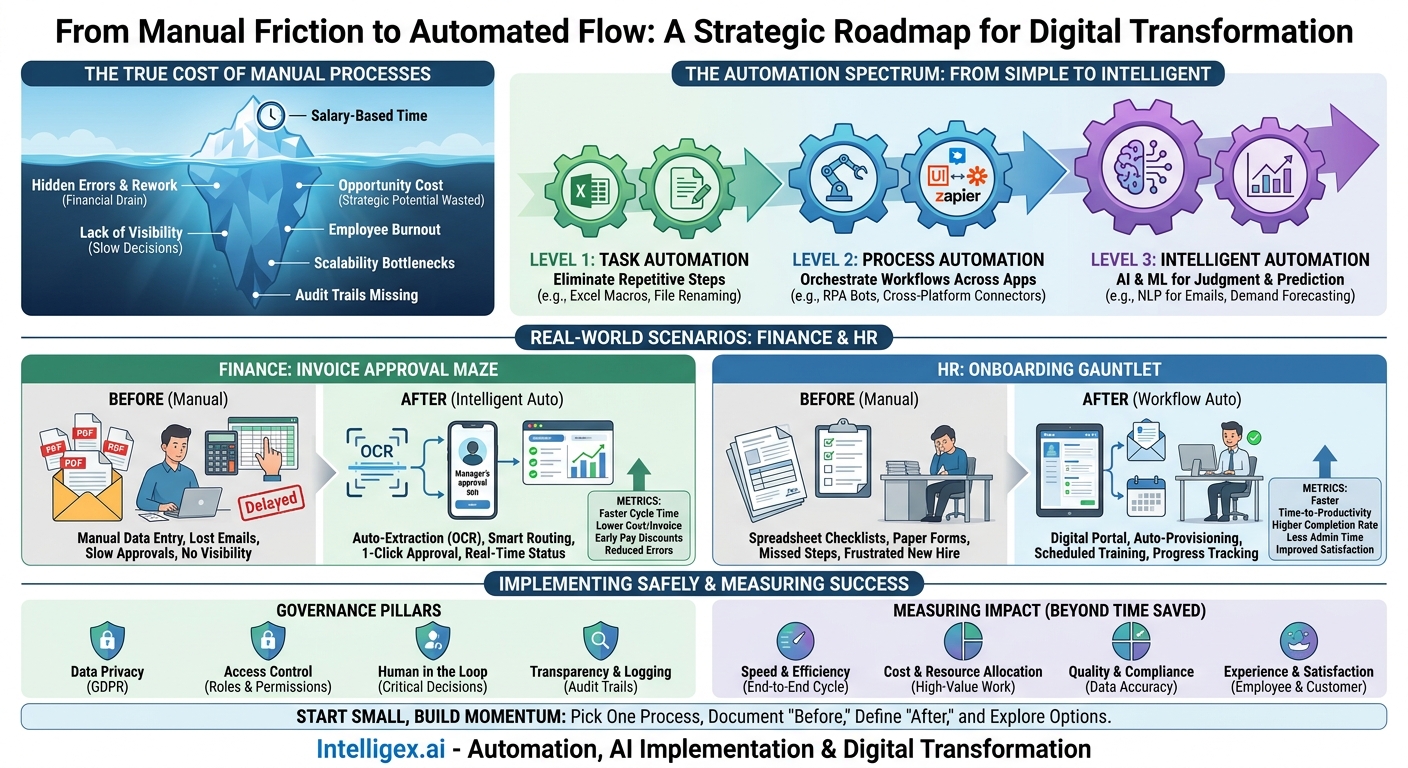
The most obvious cost of a manual process is the time an employee spends on it. But that salary-based calculation is just the tip of the iceberg. The real, hidden costs are often far greater and can impact every corner of the business, from finance to customer satisfaction.
First, consider the cost of errors. A single mistyped number in an invoice can lead to payment delays, damaged vendor relationships, and hours of administrative rework to track down and fix the mistake. A misconfigured user account during IT provisioning can lock a new hire out of critical systems, delaying their productivity for days. These aren’t just minor inconveniences. They are tangible financial drains and productivity killers.
Second is the opportunity cost. Every hour a skilled financial analyst spends copying data between spreadsheets is an hour they are not spending on strategic forecasting. Every moment a sales operations manager dedicates to manually generating reports is a moment they are not optimizing sales territories or improving CRM data quality. Your best people are bogged down in low-value work, and their strategic potential is wasted.
Finally, manual processes obscure visibility. When critical business information lives in scattered email inboxes, personal spreadsheets, and disconnected documents, you have no single source of truth. It becomes nearly impossible to know the real-time status of a customer order, a hiring process, or a marketing campaign. This lack of visibility leads to slow, reactive decision-making based on outdated or incomplete information.
Is a Manual Process Costing You More Than You Think?
Use this short checklist to evaluate a process within your own department:
- Error Rate: How often do mistakes happen in this process? What is the business impact (e.g., financial loss, customer complaint) of a single error?
- Rework Time: How much time does the team spend fixing these errors each week or month?
- Approval Delays: Does this process frequently get stuck waiting for an approval or input from someone else? How long are the delays?
- Team Morale: Do employees express frustration or boredom with this task? Is it a common source of burnout?
- Scalability: If your business volume for this process doubled tomorrow, would you need to double the headcount to handle it?
- Auditability: If you needed to provide a step-by-step history of a specific transaction from six months ago, could you do it easily?
Identifying Your First Automation Target
The idea of “automating the business” can feel overwhelming. The key is to start small with a single, well-defined process where you can achieve a clear win. A successful first project builds momentum, demonstrates value to stakeholders, and provides a valuable learning experience for the team. The ideal candidate for a first automation project isn’t necessarily the biggest or most complex process. It’s the one with the right balance of simplicity and impact.
Look for tasks that are highly repetitive, rule-based, and involve moving data between different systems. These are often the “swivel chair” processes where an employee reads information from one screen and types it into another. Think of tasks like generating weekly reports, processing expense claims, or updating contact information in a CRM. These processes are prone to human error, are not engaging for employees, and provide a perfect entry point for automation.
Follow this structured approach to select and prepare your first project:
- Map the Current Process: Don’t rely on assumptions. Sit down with the people who actually do the work and document every single step, click, and decision point. Use a simple flowchart or a list. Note the systems used (e.g., email, Excel, SAP, Salesforce) and the data involved at each stage.
- Identify the Pain Points: During the mapping process, ask the team what frustrates them. Where are the bottlenecks? Where do errors most often occur? Where do things slow down? These pain points are your primary targets for improvement.
- Quantify the “Before” State: To prove value later, you need a baseline. Measure the process as it exists today. How long does it take to complete one transaction? How many transactions are processed per week? What is the current error rate? This data is your starting line.
- Define the Desired “After” State: What does success look like? It’s not just “make it faster.” Be specific. A good goal might be: “Reduce the time to process a single invoice from 15 minutes to 2 minutes,” or “Eliminate all manual data entry errors,” or “Provide real-time status visibility to the sales team.”
- Assess Your Data and Systems: Confirm that the data needed for the automation is available and reliable. Is it structured (like in a database) or unstructured (like in an email body)? Do your systems have APIs (Application Programming Interfaces) that allow for easy integration, or will you need a different approach? Understanding the technical landscape is crucial before you start building.
The Automation Spectrum: From Simple Scripts to AI
Automation is not a single technology. It’s a spectrum of tools and techniques that can be applied to different types of problems. Understanding this spectrum helps you choose the right tool for the job, avoiding the common mistake of using a sledgehammer to crack a nut.
Level 1: Task Automation
This is the simplest form of automation, often focused on eliminating repetitive steps within a single application. Think of macros in Microsoft Excel that can format a report with a single click, or simple scripts that can rename and organize a folder full of files. These tools are often already available to your team and can provide quick wins by saving a few hours each week on highly repetitive, personal-scale tasks.
Level 2: Process Automation
This level connects multiple applications to orchestrate a complete business process. Robotic Process Automation (RPA) tools, like those from UiPath, are a prime example. An RPA “bot” can mimic human actions, like logging into a web application, copying and pasting data, and filling out forms. This is ideal for legacy systems that don’t have modern APIs. Workflow automation platforms, such as Zapier or Make, also fall into this category. They use pre-built connectors to create “if this, then that” workflows between modern cloud applications. For example: “When a new lead is added to a Google Sheet, automatically create a new contact in Salesforce and send a notification to a Slack channel.”
Level 3: Intelligent Automation
This is where Artificial Intelligence (AI) and Machine Learning (ML) enter the picture. Intelligent automation can handle tasks that require a degree of judgment or involve unstructured data. For instance, Natural Language Processing (NLP) can be used to read and understand incoming customer emails, automatically categorize them by topic (e.g., billing query, technical issue), and route them to the correct support agent. Machine learning models can analyze historical sales data to predict future demand, helping supply chain managers optimize inventory levels. This level of automation doesn’t just follow a script; it learns from data to make predictions and decisions.
A Tale of Two Departments: Real-World Scenarios
Theory is helpful, but seeing the “before” and “after” in a real-world context makes the value of automation tangible. Let’s look at two common business functions and how they are transformed.
Finance: The Invoice Approval Maze
Before: The accounts payable process is a manual marathon. An invoice arrives as a PDF attachment in a shared email inbox. A clerk opens the email, manually types the vendor name, invoice number, date, and line-item amounts into the accounting system. They then have to figure out who needs to approve the payment, save the PDF to a network drive, and forward the email to that manager. The manager might be busy and miss the email. The clerk has to send follow-up reminders. If the invoice is for a large amount, a second level of approval is needed, starting the email chase all over again. There is no visibility into where an invoice is in the process, leading to late payments and missed opportunities for early payment discounts.
After: An intelligent automation solution now monitors the AP inbox. When a new invoice arrives, it uses Optical Character Recognition (OCR) to automatically extract all the relevant data, validating it against existing purchase orders in the ERP system. Based on pre-set rules (e.g., department, amount), the system routes the invoice to the correct approver via a notification in their preferred tool (like Slack or Microsoft Teams). The manager can review and approve with a single click. The approved invoice is automatically posted to the accounting system for payment. The entire process is logged, and a real-time dashboard shows the status of every invoice, highlighting any bottlenecks.
What to Measure:
- Average invoice processing time (from receipt to approval).
- Cost per invoice processed.
- Rate of early payment discounts captured.
- Data entry error rate.
HR: The Onboarding Gauntlet
Before: Onboarding a new employee involves a massive checklist living in a spreadsheet. The HR coordinator manually sends out a welcome email with a stack of PDF forms for the new hire to print, sign, scan, and email back. The coordinator then has to create separate tickets with IT to request a laptop and software licenses, and with Facilities to arrange a desk. They have to manually enroll the employee in benefits and payroll, and then track down managers to ensure mandatory first-week training is scheduled. Steps are often missed, leading to a frustrating first-day experience where the new hire doesn’t have the equipment or access they need to be productive.
After: The process is now triggered automatically when a candidate’s status is changed to “Hired” in the applicant tracking system. This kicks off a master onboarding workflow. The new hire immediately receives a personalized welcome email with a link to a digital portal to complete all their paperwork online. Simultaneously, the workflow automatically generates tickets in the IT service management system (like Jira or ServiceNow) with all the necessary details for equipment provisioning. It assigns required training modules in the Learning Management System and adds a schedule of orientation meetings to the new hire’s and their manager’s calendars. The HR team has a dashboard to monitor the progress of all new hires, ensuring no one falls through the cracks.
What to Measure:
- New hire time-to-productivity.
- Onboarding task completion rate (on-time).
- HR administrative time spent per new hire.
- New hire satisfaction scores (from 30-day check-in surveys).
Implementing Safely: Governance and Human Oversight
As you introduce automation, especially intelligent automation that handles sensitive data, establishing clear governance rules is not just a best practice; it’s essential for security, compliance, and building trust in the system. Rushing into automation without a framework for control can create new risks.
Your approach should be built on four simple pillars:
- Data Privacy: Design your automations on a “need-to-know” basis. A process that sends marketing emails doesn’t need access to employee salary information. Ensure that any handling of personal data, whether for customers or employees, complies with regulations like the General Data Protection Regulation (GDPR). Always classify your data and apply the appropriate security controls.
- Access Control: Not everyone in the company should be able to build or deploy an automation that can access financial systems or customer data. Establish clear roles and permissions. Define who can create automations, who can approve them for production, and who can run them. This prevents unauthorized or poorly built processes from causing problems.
- Human in the Loop: Automation is a powerful tool, but it should not replace human judgment for critical or high-risk decisions. For processes like approving a payment over a certain threshold or resolving a complex customer complaint, the automation should handle the data gathering and preparation, but then present the information to a human for the final decision. This “human-in-the-loop” model combines the efficiency of machines with the wisdom of people.
- Transparency and Logging: Every automated process should produce a clear, understandable audit trail. You need to be able to see exactly what the automation did, what data it accessed, and what decisions it made. This logging is crucial for troubleshooting when things go wrong, for satisfying audit requests, and for ensuring the automation is performing as expected.
Measuring Success: Beyond “Time Saved”
The most common metric for automation is “hours saved,” but that single data point doesn’t capture the full business value. To truly understand the impact of your efforts, you need to measure a balanced set of metrics across different dimensions of the business. The KPIs you choose should tie back directly to the strategic goals you defined at the beginning of the project.
Think in terms of these categories:
- Speed and Efficiency: This is about more than just the time to complete a single task. Measure the end-to-end cycle time of the entire process. For sales, this could be the “lead-to-quote” time. For finance, it could be the “days to close” the monthly books. These metrics show how automation is improving overall business agility.
- Cost and Resource Allocation: Go beyond direct labor savings. Are you capturing more early payment discounts? Have you reduced costs associated with shipping errors or rework? Importantly, how have you reallocated your team’s time? Track the new, higher-value projects your team is now able to take on.
- Quality and Compliance: This is where automation’s precision shines. Measure the reduction in data entry errors, the improvement in data consistency across systems, and the increase in on-time compliance reporting. Higher quality data leads to better business intelligence and more confident decision-making.
- Experience and Satisfaction: Don’t overlook the human impact. Automation should make work better for both employees and customers. Use simple pulse surveys to measure employee satisfaction with their new workflows. For customer-facing processes, track metrics like customer satisfaction (CSAT) scores or Net Promoter Score (NPS) to see if faster, more accurate service is making a difference.
Your Next Steps to Automation
Moving from manual to automated is a journey of continuous improvement, not a one-time project. The key is to get started. You don’t need a massive, multi-year digital transformation strategy to begin. You just need to take the first step.
Here is a simple action plan you can use to build momentum this quarter:
- Form a Small, Focused Team: You don’t need a large committee. Bring together one person from the business department who feels the pain of the manual process and one person from IT or operations who understands the technical possibilities.
- Pick One Process: Using the criteria discussed earlier, choose one high-impact, low-complexity process. Don’t try to boil the ocean. Pick a process where a win is achievable and will be visible.
- Document and Measure “Before”: Before you change anything, thoroughly document the current state. Map the steps and quantify the key metrics like time, cost, and error rate. This baseline is your most important tool for proving value later.
- Define “After”: Clearly articulate the goals for the automated process. What specific, measurable outcomes are you trying to achieve? This will guide your design and tool selection.
- Explore Your Options: Start by looking at the tools you already own. Your existing enterprise software may have automation capabilities you aren’t using. From there, you can explore the wider spectrum of automation technologies to find the right fit for your specific problem.
By taking a structured, incremental approach, you can systematically remove friction from your business operations, freeing your team to focus on the strategic work that drives real growth.
Your Next Read:
Category:
Get a FREE
Proof of Concept
& Consultation
No Cost, No Commitment!
