

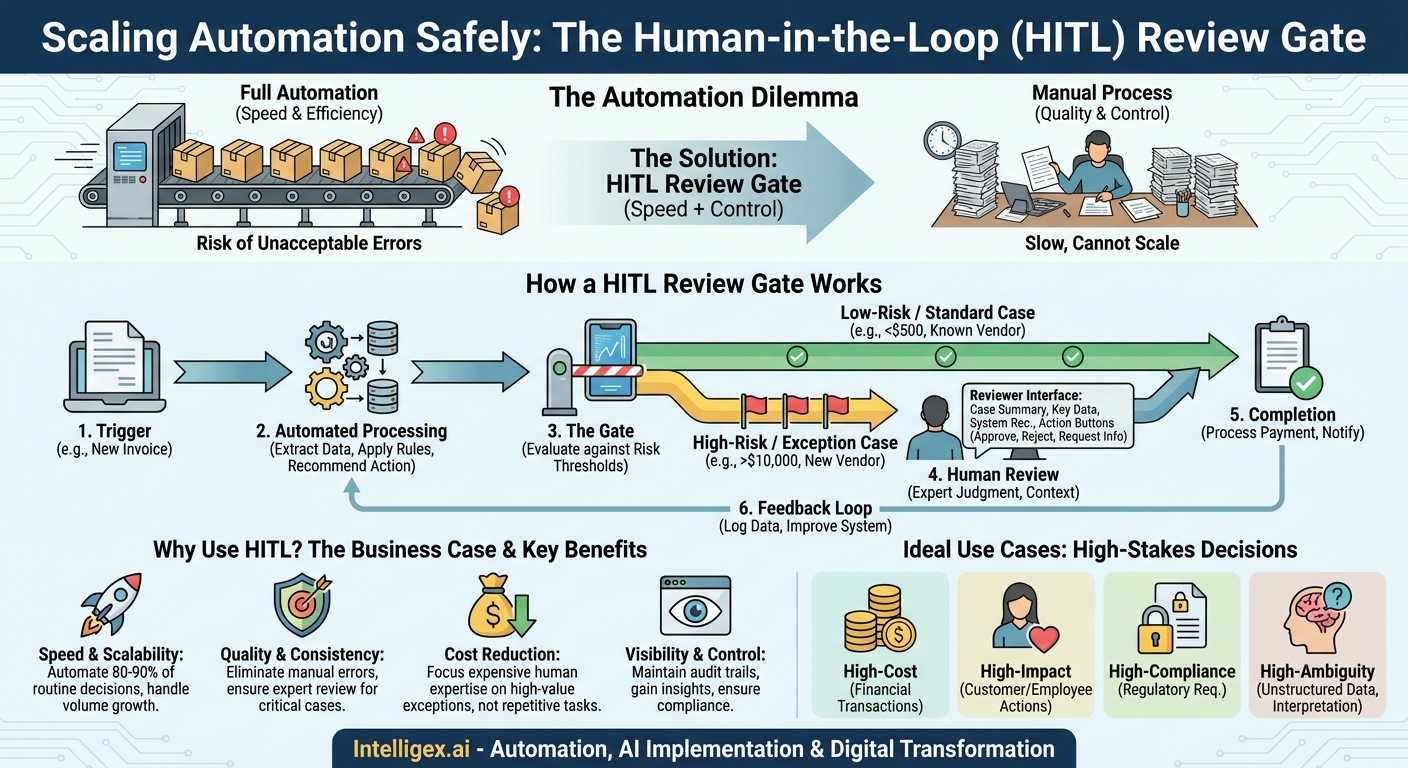
Automation promises speed and efficiency, but not all business decisions are created equal. While it’s tempting to automate everything, some choices are too sensitive, costly, or nuanced to entrust entirely to a machine. A single error in a large payment approval, a customer data request, or a critical HR decision can create significant financial or reputational damage. This leaves teams stuck in a frustrating middle ground: either they stick with slow, fully manual processes that can’t scale, or they risk unacceptable errors with full automation.
There is a better way. By implementing a simple pattern known as a Human-in-the-Loop (HITL) Review Gate, you can strike a powerful balance. This approach lets you automate the vast majority of routine decisions while intelligently flagging only the high-risk exceptions for human expertise. It’s a practical method for increasing speed and scalability without sacrificing quality and control.
What is a HITL Review Gate? A Practical Definition
A Human-in-the-Loop Review Gate is a specific checkpoint within an otherwise automated workflow where a human expert is required to make a final judgment. Think of it as an automated assembly line that produces standard components at high speed. Most components pass inspection automatically, but if a sensor detects a slight anomaly, that specific component is diverted to a quality control station for an expert technician to examine. The line doesn’t stop; only the exceptions get a second look.
In a business process, the workflow might look like this:
- Trigger: The process begins automatically (e.g., a new invoice is received).
- Automated Processing: The system extracts data, checks it against business rules, and prepares a recommended action (e.g., “Approve for Payment”).
- The Gate: The system evaluates the decision against pre-defined risk thresholds. If it’s a low-risk, standard case (e.g., invoice under $500 from a known vendor), it passes through automatically. If it’s a high-risk case (e.g., invoice over $10,000 or from a new vendor), the process pauses.
- Human Review: The high-risk case is routed to a human reviewer’s dashboard. The reviewer sees all the relevant data, the system’s recommendation, and simple options to approve, reject, or request more information.
- Completion: Once the human makes a decision, the automated workflow resumes and completes the final steps (e.g., processing the payment or notifying the vendor of a rejection).
This pattern combines the best of both worlds: the tireless efficiency of automation for the predictable majority and the critical thinking, context, and intuition of a human expert for the complex minority.
The Business Case: Why Not Just Automate Everything?
The goal of a HITL gate isn’t to slow down automation; it’s to enable it. Many critical processes remain manual precisely because the risk of an unmonitored automated error is too high. By introducing a smart review step, you de-risk the process and unlock significant efficiency gains. This approach is most valuable for decisions that are:
- High-Cost: Financial transactions like large expense report approvals, purchase order authorizations, or trade settlements where a mistake has immediate and significant monetary consequences.
- High-Impact: Actions that directly affect customers or employees, such as suspending a user account, flagging a transaction as fraudulent, or rejecting a candidate’s job application. An error here can damage relationships and trust.
- High-Compliance: Decisions governed by strict regulations, like processing a data deletion request under GDPR or finalizing financial statements for SOX compliance. An audit trail with a human sign-off is often essential.
- High-Ambiguity: Situations where the data is unstructured or requires nuanced interpretation, such as evaluating a complex insurance claim, approving brand-sensitive marketing copy, or interpreting a non-standard legal clause in a contract.
Implementing review gates creates clear business value across four key areas:
Speed and Scalability: By automating 80-90% of decisions, you dramatically increase throughput. Your team can handle a growing volume of transactions without a linear increase in headcount, because their time is reserved for the cases that truly need their attention.
Quality and Consistency: Automation ensures that all low-risk decisions are handled according to the same precise rules, eliminating common human errors like typos or oversights. For high-risk decisions, the human reviewer acts as a guardian of quality, applying expertise and preventing costly mistakes that a purely automated system might make.
Cost Reduction: Your most experienced (and expensive) employees are a valuable resource. HITL gates ensure their time isn’t wasted on repetitive, low-value tasks. Instead of manually reviewing every single invoice, they can focus their skills on resolving discrepancies for the largest and most complex accounts.
Visibility and Control: A well-designed HITL system creates a clear, auditable record of every decision, including who reviewed it and when. This provides managers with greater insight into process bottlenecks and risk patterns, offering a level of control that is impossible in a fully manual or fully automated “black box” system.
How to Design Your First HITL Review Gate
Building a review gate doesn’t have to be a massive, complex project. You can start with a simple, rules-based system and evolve it over time. Follow these steps to design and implement your first gate.
- Select and Define the Process: Choose a high-volume, semi-structured process that currently requires manual review. Good candidates include invoice processing, expense approvals, or customer support ticket routing. Clearly document the current steps, decision criteria, and common failure points.
- Automate Data Ingestion and Preparation: Set up a system to automatically collect the information needed to make the decision. This could be an OCR tool that reads invoices, an integration that pulls data from a CRM like Salesforce, or a simple form that standardizes user requests. The goal is to present all necessary data in one clean, structured format.
- Establish Clear Review Thresholds: This is the core logic of the gate. Define the rules that separate a “pass-through” case from a “review-required” case. Start with simple, objective criteria. For example, in expense reporting:
- Automatically approve if: The amount is less than $200, the expense category is standard (e.g., travel, software), and a valid receipt is attached.
- Flag for human review if: The amount is over $200, the category is “Miscellaneous” or “Entertainment,” or the receipt is missing.
- Design the Reviewer Interface (UI): The human reviewer’s screen is critical. It must be clean, fast, and provide all necessary context at a glance. A good review UI should include:
- A summary of the case (e.g., “Invoice #12345 from Acme Corp for $5,200”).
- The key data points used in the automated assessment.
- The system’s recommendation and the reason it was flagged (e.g., “Recommended: Approve. Flagged because amount > $5,000”).
- Clear, simple action buttons: Approve, Reject, and perhaps Re-assign or Request Info.
- Define and Automate Post-Review Actions: What happens after the human clicks a button? These next steps must also be automated. If “Approve” is clicked, the system should trigger the payment process and notify the vendor. If “Reject” is clicked, it should prompt the reviewer for a reason, then automatically notify the submitter and update the system status.
- Log Everything for Feedback and Improvement: Every automated decision and every human review must be logged. This audit trail is crucial for compliance. More importantly, it provides the data needed to improve the system. By analyzing which flagged items are consistently approved, you can refine your thresholds to further increase the automation rate over time.
Real-World Examples Across Business Functions
HITL review gates are not a theoretical concept. They are a practical pattern being applied across departments to streamline sensitive operations.
Finance: Accounts Payable Invoice Processing
A global logistics company receives thousands of invoices per week. A fully manual process was slow and error-prone. They implemented a HITL gate where an AI-powered system reads each invoice, matches it to a purchase order, and checks for internal policy violations. Over 75% of invoices that are under $5,000 and match a PO are now processed and paid automatically. Invoices that are high-value, lack a PO, or come from a new, unverified vendor are routed to an AP specialist’s queue for a 60-second review, freeing the team to focus on resolving complex vendor disputes.
Human Resources: Candidate Screening
A fast-growing tech firm struggled to manage the high volume of applications for engineering roles. They now use an automated system to parse resumes and score them against key job requirements (e.g., programming languages, years of experience). Candidates who score above a 90% match are automatically passed to the hiring manager. Candidates who score between 70-90% are flagged for a recruiter’s review. The recruiter can quickly assess the candidate for valuable but hard-to-quantify traits, like experience at a competitor or a strong project portfolio, ensuring promising but non-standard applicants aren’t missed.
Marketing: Brand Content Moderation
An e-commerce brand encourages users to post reviews and photos of their products. To prevent inappropriate content from appearing on their site, they use an AI model to scan all submissions. Content with a 99% confidence score of being “safe” is posted automatically. Any content flagged for potential policy violations (e.g., profanity, spam links, competitor mentions) is sent to a moderation queue where a community manager can make a final decision, protecting the brand’s reputation without manually reviewing every single post.
IT Operations: High-Privilege Access Requests
To enhance security, an enterprise uses a HITL gate for granting temporary “super-user” access to critical production systems. An engineer submits a request via a ticketing system, specifying the system and the reason. The request is automatically checked against a set of rules: Is the user on the correct team? Is there a valid, high-priority incident ticket linked? If all rules pass, the request is sent to the team’s on-call manager for a single-click approval via a mobile app. This process, which once took hours of manual checks and emails, is now completed in minutes while maintaining a strict, auditable approval chain.
Measuring Success: Key Metrics for Your Review Gates
To justify the investment and continuously improve your HITL system, it’s vital to track the right metrics. Focus on measuring efficiency, quality, and overall business impact.
- Automation Rate (or Straight-Through Processing Rate): The percentage of cases that are handled entirely without human intervention. This is your primary measure of efficiency. Your goal should be to safely increase this rate over time as you refine your rules and AI models.
- Review Queue Time: The average time a flagged case waits before a human begins reviewing it. A long queue time can become a new bottleneck, defeating the purpose of the system. Monitor this to ensure you have adequate reviewer capacity.
- Error Rate: Track the number of mistakes made by both the automated system and human reviewers. This helps you understand the quality of your gate logic and where additional training or system improvements are needed.
- Reviewer Agreement Rate: How often does the human reviewer agree with the system’s initial recommendation? A high agreement rate (e.g., 95% of the time, the reviewer approves what the system recommended for approval) indicates that your AI or rule engine is well-calibrated.
– Average Handle Time (AHT): The average time a human actively spends on a single review. As your review interface and AI suggestions improve, this number should decrease.
Safe Implementation and Governance
When you implement a system that makes decisions about sensitive data or high-value transactions, governance cannot be an afterthought. Building safety and control into the design from day one is essential for earning trust and ensuring compliance.
Focus on these core principles:
Role-Based Access Control (RBAC): Not everyone should be a reviewer. Access to the review queue and the ability to approve decisions must be strictly controlled. Grant permissions based on a user’s role and level of authority. For instance, a junior analyst might be able to review expense reports under $1,000, but only a finance director can approve those over $50,000.
Data Minimization and Privacy: The review interface should only display the minimum information necessary to make the decision. If a reviewer is verifying a customer’s address change, they don’t need to see the customer’s entire order history. For processes involving sensitive data regulated by laws like GDPR, this principle is not just good practice, it’s a legal requirement.
Immutable Audit Trails: Every single action taken by the system or a human must be logged in a way that cannot be altered. The audit log should capture the what, who, and when for every decision. This is non-negotiable for regulatory compliance, security investigations, and debugging process failures.
Before launching a new review gate, run through this simple checklist:
- Is there a single, accountable owner for the entire end-to-end process?
- Are all human reviewers properly trained on the decision criteria and the use of the tool?
- Is access to the review system restricted to only authorized personnel?
- Are we logging every single automated and human action for auditing purposes?
- Does the review interface prevent exposure of sensitive customer or employee data?
Your Next Steps: Putting HITL into Practice
Getting started with Human-in-the-Loop Review Gates is more accessible than you might think. You don’t need a massive, multi-year AI initiative. You can deliver real value by starting small and focusing on a single, well-defined problem.
1. Identify a High-Value Candidate Process. Look for a bottleneck in your organization that is rules-based but also has exceptions. Think about high-volume, repetitive tasks that your skilled employees dislike doing. Invoice processing, lead qualification, and IT support ticket classification are classic starting points.
2. Map the Current State. Before you build anything, document the existing manual process. Who is involved? What information do they rely on? What are the exact rules they follow? How long does an average case take? This baseline is critical for measuring your future success.
3. Define the “Gate” Logic. Start with the simplest possible rules to separate the “easy” cases from the “hard” ones. Don’t try to solve for every edge case at the beginning. A simple threshold based on dollar value, customer type, or request category is often enough to automate over 50% of the workload in the first version.
4. Build a Minimum Viable Product (MVP). Your first version doesn’t need to be powered by a complex neural network. You can prototype a review gate using existing workflow automation platforms, like those available from UiPath, or even by building a simple integration that routes flagged items from your core systems (often running on infrastructure like Amazon Web Services) to a designated email inbox or a shared channel. The key is to prove the value quickly, then iterate and enhance the system with user feedback and performance data.
By taking this pragmatic and incremental approach, you can begin to harness the power of automation for your most sensitive processes, building a more efficient, scalable, and controlled operation one gate at a time.
Your Next Read:
Category:
Get a FREE
Proof of Concept
& Consultation
No Cost, No Commitment!
