

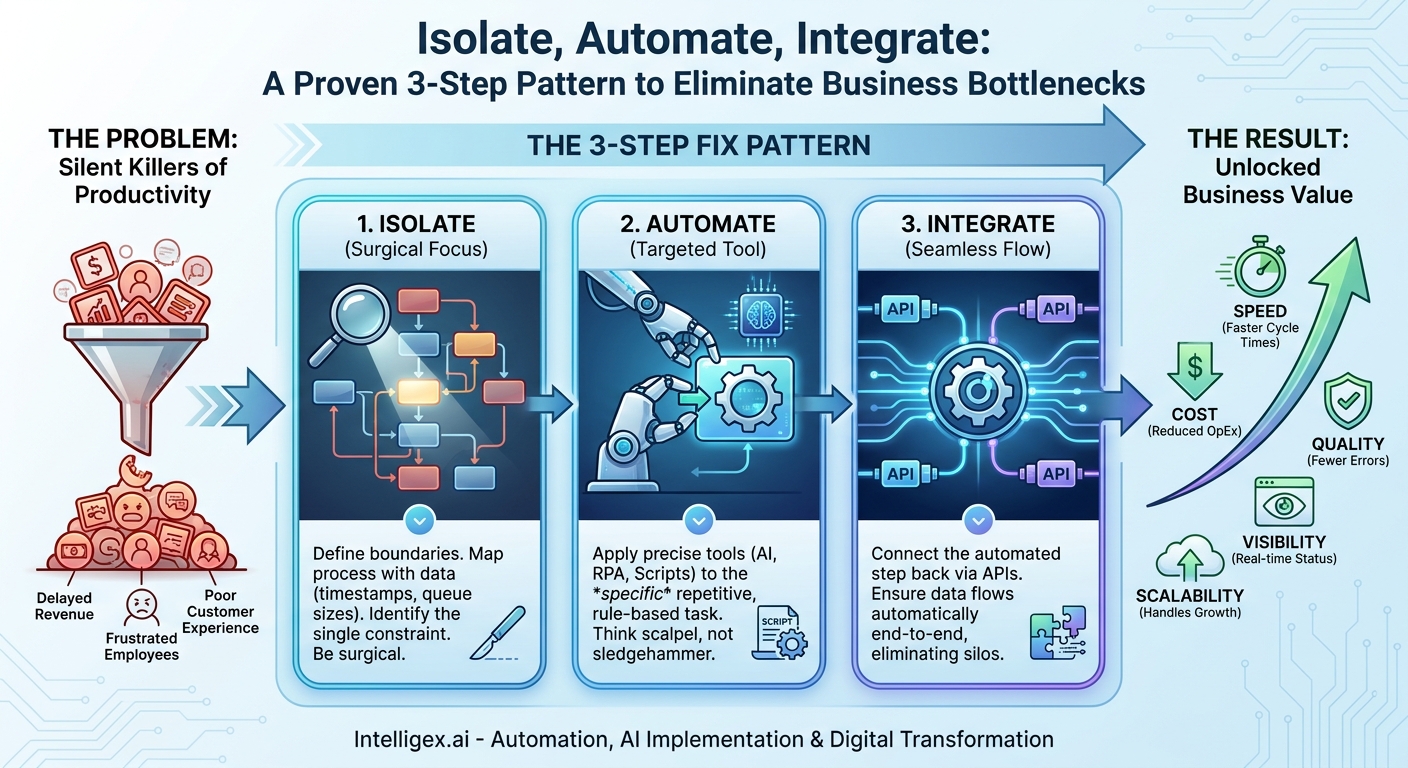
Every business has one. That one process where work goes to die. It might be the week-long wait for a contract approval, the manual data entry that grinds finance to a halt at the end of every month, or the endless back-and-forth required to onboard a new employee. We call these bottlenecks, but that term doesn’t quite capture the full extent of the damage. They aren’t just slow spots; they are silent killers of productivity, morale, and growth.
These friction points create ripple effects across the organization. They increase operational costs, delay revenue, frustrate high-performing employees, and ultimately lead to a poor customer experience. The common response is to throw more people at the problem or invest in a massive, all-encompassing software platform. But often, the most effective solution is far simpler and more targeted. It’s a repeatable, three-step pattern that transforms these frustrating blockages into smooth, automated workflows: Isolate, Automate, and Integrate.
What is a Bottleneck? More Than Just a Slow Step
A bottleneck is any point in a process where the volume of incoming work exceeds the capacity to process it. Think of it like a highway that shrinks from five lanes down to one. The result is a traffic jam. In business, this “traffic” is made up of invoices, support tickets, sales orders, or creative briefs. The pile-up doesn’t just slow things down; it introduces unpredictability and risk.
Identifying bottlenecks requires looking beyond the person or team who seems “slow” and instead focusing on the system itself. The problem is rarely a person’s performance but rather a flaw in the process design. Here are common examples from different business functions:
- Finance: The manual approval of invoices. A manager must physically review and sign every invoice over a certain amount, but they are often traveling or in meetings, causing payments to be delayed and supplier relationships to be strained.
- Human Resources: Screening candidate applications. A recruiter has to manually read through hundreds of resumes for a popular role, trying to match keywords and experience against a job description. Good candidates may accept other offers while waiting.
- Sales Operations: Assigning new leads. A new lead from the website sits in a general queue until a sales ops specialist manually checks the territory and assigns it to the correct account executive. This delay can be the difference between a won and a lost deal.
- Marketing: Legal and brand review for campaign assets. The legal team is a crucial checkpoint, but they are often inundated with requests from across the company, turning a quick review into a multi-day waiting game.
To find your bottlenecks, you need to measure the flow of work. Don’t rely on gut feelings. Instead, look at the data. Key metrics to track include cycle time (the time it takes to complete one step) and lead time (the total time from request to delivery). When the cycle time for one specific step is disproportionately long and variable, you’ve likely found your bottleneck.
The 3-Step Fix Pattern: Isolate, Automate, Integrate
Once you’ve identified a bottleneck, the temptation is to design a complex, end-to-end solution. This is a trap. Large-scale projects are slow, expensive, and carry a high risk of failure. The key to making rapid, tangible progress is to be surgical. This is where the Isolate, Automate, Integrate pattern comes in.
It’s a straightforward approach focused on delivering value quickly and building momentum.
- Isolate: The first step is to precisely define the boundaries of the problem. Don’t try to fix the entire “invoice processing” workflow. Instead, isolate the single, most time-consuming task within it, like “manually typing data from a PDF invoice into the accounting software.” This act of narrowing your focus is critical. It makes the problem solvable.
- Automate: With the task isolated, you can apply a targeted automation tool. This doesn’t necessarily mean a massive AI platform. It could be a simple script, an RPA (Robotic Process Automation) bot, or a dedicated AI service that does one thing well, like document data extraction. The goal is to automate the repetitive, low-judgment work within the isolated step.
- Integrate: An automated task is useless if it remains a silo. The final step is to connect this newly efficient step back into the larger process. This usually involves using APIs (Application Programming Interfaces) to ensure data can flow automatically from the previous step into your new tool, and from your tool into the next step in the workflow.
This pattern transforms a complex, overwhelming problem into a series of small, manageable fixes. By repeating this cycle, you can progressively eliminate friction and create a truly efficient, end-to-end process.
Step 1: How to Isolate the Real Bottleneck
You cannot fix a problem you do not fully understand. Isolation is the most important step in the process, and it requires discipline and a commitment to looking at the data, not just listening to anecdotes. Teams often misdiagnose the bottleneck because they focus on the most visible symptom, not the root cause.
Map the Process As It Is, Not As It Should Be
Start by getting the right people in a room (or on a video call) and mapping out every single step of the current process. Use a whiteboard or a digital collaboration tool like Miro or Lucidchart. The key here is brutal honesty. Document what actually happens, including the workarounds, the manual emails, and the spreadsheet tracking that people have created to survive. Don’t document the idealized process from a training manual.
As you map the process, ask questions about each step: Who is involved? What systems are used? What information is needed to start the step? What is the output? How long does it typically take? How long does it sometimes wait in a queue before starting?
Follow the Data, Not the Drama
Human memory is fallible, and personal frustrations can color perceptions. To find the real bottleneck, you need objective data. Look for digital footprints:
- Timestamps: Most modern software (like a CRM, ticketing system, or project management tool) logs when a task is created, assigned, and completed. The difference between these timestamps reveals both active work time and, more importantly, idle wait time.
- Queue Sizes: Look at the system dashboards. Where are the work-in-progress (WIP) numbers consistently high? A perpetually long queue is the clearest sign of a bottleneck.
- Error Logs: High error rates in a specific step can indicate a process that is too complex or manual, forcing people to make mistakes and creating rework that slows everything down.
A Checklist for Spotting a Bottleneck
As you review your process map and data, use this checklist to pinpoint the constraint:
- Where does work consistently pile up? (e.g., a shared email inbox, a manager’s approval queue)
- Which step has the longest wait time before it begins?
- Where do other teams frequently ask for status updates?
- What single step relies on a person who is frequently described as “swamped” or “the only one who knows how to do X”?
- What part of the process involves exporting data from one system, manipulating it in a spreadsheet, and uploading it to another?
By the end of this step, you should be able to make a clear and specific problem statement, such as: “Our lead-to-opportunity conversion time is slow because new leads wait an average of four hours in the general queue before being manually assigned by the sales ops team.” This is an isolated, solvable problem.
Step 2: Applying Precise Automation
With a clearly isolated bottleneck, you can now select the right tool to automate that specific task. The goal is a quick win, not a “big bang” implementation. Think scalpel, not sledgehammer. Your choice of technology should be driven entirely by the nature of the isolated task.
Start with the Most Repetitive, Rule-Based Tasks
The best candidates for initial automation are tasks that are highly repetitive, follow clear rules, and require little to no subjective judgment. This is where you can get the most value with the lowest risk.
Let’s look at some practical examples:
- For the Finance Bottleneck (Invoice Data Entry): The isolated task is extracting data from PDF invoices. Instead of replacing the entire accounting system, you could use an AI-powered document processing tool. These services can be trained to recognize and extract specific fields like vendor name, invoice number, date, and line-item amounts, and return that data in a structured format like JSON.
- For the Sales Ops Bottleneck (Lead Routing): The task is assigning leads. This is often a perfect fit for the native automation capabilities within your CRM. For example, in a system like Salesforce, you can build a simple flow that automatically assigns a new lead based on rules (e.g., if “Country” is USA and “Employee Count” is over 500, assign to Enterprise Team A). This can be configured in hours, not months.
- For the HR Bottleneck (Resume Screening): The task is the initial filtering of candidates. Most modern Applicant Tracking Systems (ATS) have built-in rules that can automatically screen for non-negotiable requirements, such as a specific certification, years of experience, or the legal right to work in a country. This allows the recruiter to focus their time on qualified candidates, not on disqualifying the unqualified.
Notice that in each case, we are not automating the entire function. We are not replacing the accountant, the sales ops specialist, or the recruiter. We are automating a single, painful task within their workflow to free them up for higher-value activities like financial analysis, sales strategy, and engaging with top talent.
Step 3: Integrating for Seamless Flow
Automation in a vacuum is a wasted investment. An automated step that requires someone to manually copy its output and paste it into the next system has not solved the root problem; it has just moved the manual work. The final, critical step is to integrate the automated task back into the overall business process, ensuring data flows seamlessly from end to end.
APIs are the Digital Glue
This is where Application Programming Interfaces (APIs) become essential. Think of an API as a standardized way for two different software applications to talk to each other. Instead of a human acting as the go-between, the systems can exchange data and trigger actions automatically. A well-documented API is the key to building an integrated and scalable technology stack.
Continuing our finance example:
- The process starts when an invoice arrives in a dedicated email inbox (e.g., [email protected]).
- An automation platform detects the new email and sends the PDF attachment to the AI document extraction tool via its API.
- The AI tool extracts the data and sends it back in a structured format.
- The automation platform then takes this structured data and uses the accounting software’s API to create a draft bill, pre-populating all the required fields.
- Finally, it sends a notification via the API of a tool like Slack or Microsoft Teams to the designated approver, with a direct link to the draft bill.
The result is a workflow where the human role has shifted from tedious data entry to strategic review and approval. The flow is faster, less error-prone, and completely transparent.
Measuring the Impact of a New Flow
To prove the value of your work and build the case for tackling the next bottleneck, you must measure the results. Key metrics to track include:
- Processing Time Per Item: How long does it now take to process a single invoice, from receipt to approval?
- Throughput: How many invoices can the team process in a day or week? This should increase dramatically without an increase in stress.
- Error Rate: What is the reduction in data entry errors and subsequent payment issues?
- Stakeholder Satisfaction: Survey the business team. Are they less frustrated? Do they feel they can focus on more valuable work?
A Note on Governance and Safe Implementation
As you begin to automate processes, especially those involving sensitive information or artificial intelligence, it’s crucial to build on a foundation of trust and security. Rushing implementation without proper governance can create new risks. Keep these principles in mind:
- Principle of Least Privilege: When connecting systems, ensure the automation tool or AI model has access to only the data it absolutely needs to perform its task. An invoice processing tool, for example, should not have access to your employee HR records.
- Data Privacy and Compliance: Be mindful of regulations like GDPR and CCPA. If a process involves customer or employee data, ensure your automation approach is compliant and that data is handled securely, both in transit and at rest.
- Human in the Loop: For critical decisions, use automation to augment, not replace, human judgment. An AI model can suggest a contract clause is non-standard, but a lawyer should make the final call. A system can flag a payment as unusual, but an accountant should conduct the investigation. This “human in the loop” approach ensures quality, accountability, and builds trust in the system.
The Business Value Unlocked
Following the Isolate, Automate, and Integrate pattern does more than just fix a single slow process. It fundamentally improves the way your business operates, delivering compounding value across several key areas:
- Speed: The most immediate benefit is a dramatic reduction in cycle times. Contracts get signed faster, customers get answers sooner, and products get to market quicker. This velocity is a significant competitive advantage.
- Cost: Automating manual work directly reduces operational costs. It also frees your most valuable resource, your people, from low-value, repetitive tasks. This allows them to focus on strategic work that drives growth, rather than just keeping the lights on.
- Quality: Humans are creative and strategic, but they are not well-suited for high-volume, repetitive data entry. Automation eliminates copy-paste errors, reduces mistakes, and leads to higher-quality data across all your systems.
- Visibility: When work is managed through an integrated digital process instead of email and spreadsheets, you gain unprecedented visibility. Leaders can see the status of any item in real time, without having to call a meeting or ask for a status update.
- Scalability: A manual process breaks under pressure. An automated and integrated process is built to scale. It can handle a 10x increase in business volume without requiring a 10x increase in headcount, enabling profitable growth.
Your Next Steps: Putting the Pattern into Practice
The theory is simple, but the value comes from action. The best way to start is to start small, prove the value, and build from there. Don’t set out to “digitally transform the company.” Instead, aim to “fix the sales lead assignment process.”
Here is a simple action plan to get started:
- Pick One Process: Choose a single process that is well-understood, universally frustrating, and measurable. The monthly financial close, new hire onboarding, or marketing content approval are all great candidates.
- Assemble a Small Team: Bring together a business expert who lives the process every day and a technical expert who understands automation and APIs. This two-person team can move much faster than a large committee.
- Map and Isolate: Dedicate a few hours to mapping the process on a whiteboard. Use data to identify and agree on the single biggest bottleneck to target first. Write a clear problem statement.
- Design a Small Pilot: Brainstorm the simplest possible way to automate that one step. Can it be done with a feature already in your existing software? Is there a lightweight tool you can use? Resist the urge to over-engineer it.
- Measure and Share: Before you start, benchmark the current performance. After you launch your pilot, measure the improvement. Share these results with leadership and the wider team to build momentum for tackling the next bottleneck.
By repeating this simple pattern, you can systematically turn bottlenecks into areas of strength, creating a more efficient, resilient, and scalable organization one process at a time.
Your Next Read:
Category:
Get a FREE
Proof of Concept
& Consultation
No Cost, No Commitment!
