

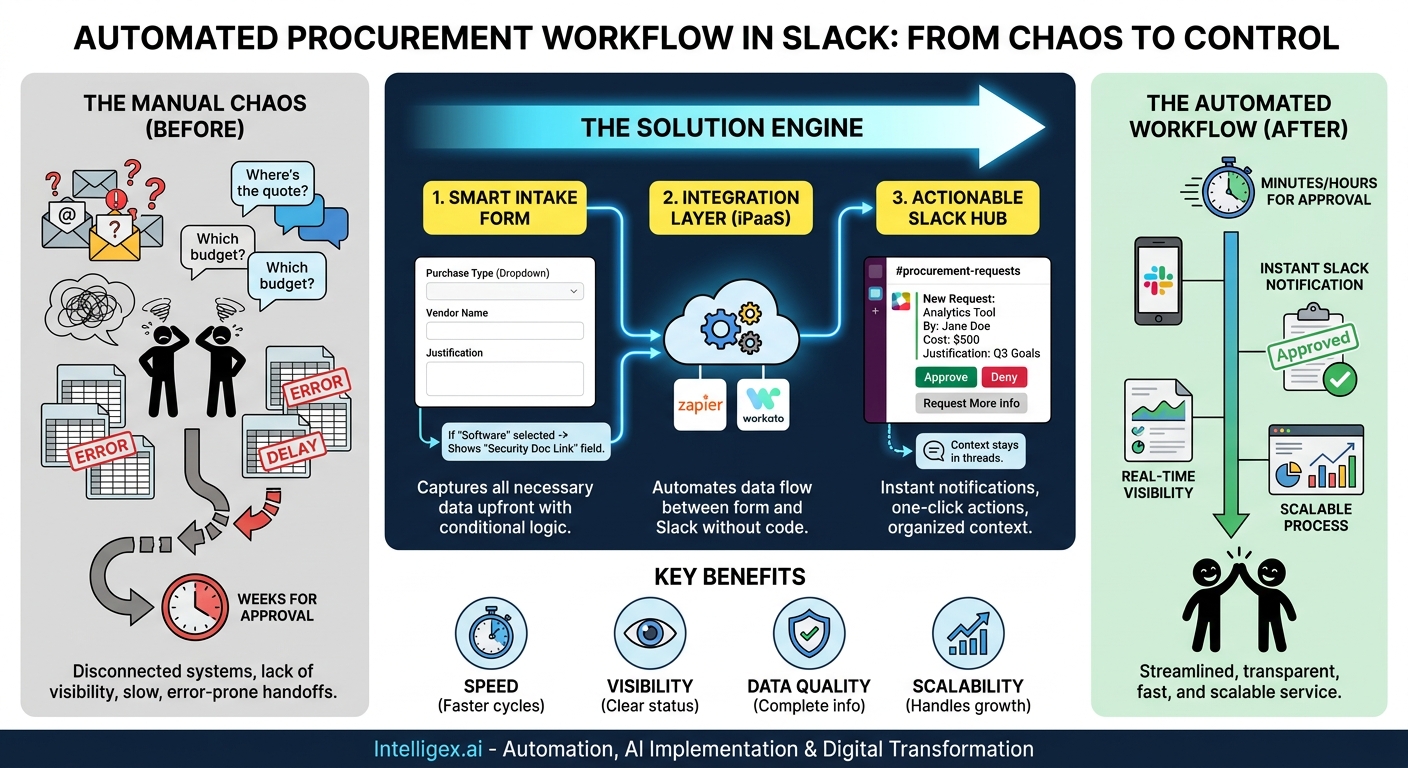
Chasing down approvals, deciphering cryptic email requests, and manually re-entering data from one system to another. If this sounds like your procurement process, you are not alone. For many growing companies, the process of requesting and approving purchases is a tangled web of emails, chat messages, and spreadsheets. This manual chaos doesn’t just frustrate employees; it directly impacts the bottom line by slowing down projects, creating compliance risks, and burning valuable hours on low-value administrative work.
The problem often starts at the very beginning: the intake process. A request for a new software license might arrive as a one-line email, while a plea for new hardware is buried in a direct message. This lack of a standardized starting point forces procurement, finance, and IT teams into a reactive cycle of clarification. Every “Can you send me the quote for that?” or “Which department’s budget is this for?” is a delay. These small delays accumulate, turning a simple request into a week-long ordeal and preventing teams from focusing on strategic tasks like vendor negotiation and cost optimization.
The Core Problem: Disconnected Systems and Manual Handoffs
The fundamental issue is a gap between where information is submitted and where it needs to be actioned. An employee fills out a form or sends an email, but the approver lives in a communication tool like Slack. This disconnect creates a series of manual, error-prone handoffs that undermine efficiency and visibility.
Let’s break down the common failure points across different departments:
- For Marketing and Sales: A team needs a new analytics tool to hit a quarterly goal. The request is sent via email but gets lost in an approver’s crowded inbox. The delay means they miss a critical window for campaign analysis, impacting revenue.
- For HR and Operations: Onboarding a new employee requires a laptop, software licenses, and a desk setup. These requests go to three different people, who then have to coordinate with each other manually. The result is a disjointed first day for the new hire and wasted time for the Ops team.
- For IT: A critical server needs an urgent upgrade. The request form is submitted, but the notification isn’t seen by the right person until the next day. This delay introduces unnecessary operational risk.
In every scenario, the core challenges are the same. First, there’s a lack of visibility; requesters have no idea where their request stands, leading to constant follow-up pings. Second, there’s a loss of speed; manual checks and clarifications add days to the cycle time. Finally, there’s a risk to quality and compliance; incomplete information can lead to incorrect purchases or missed security reviews.
The Solution: Connecting a Smart Intake Form to Slack
The most effective way to solve this is to bridge the gap between information collection and communication. By integrating a structured procurement intake form directly with Slack, you create a seamless, automated workflow. This isn’t about simply getting a notification. It’s about building a central hub for requests that is both structured and conversational.
Here’s how this simple integration drives business value:
- Speed: Approvers are notified instantly in the tool they already use. With interactive buttons, they can approve, deny, or ask for more information with a single click, dramatically reducing the time it takes to get a decision.
- Visibility: When a new request is posted to a dedicated Slack channel (e.g.,
#procurement-requests), everyone involved, from finance to department heads, can see it. Requesters can see the status of their submission without having to ask. - Data Quality: A well-designed form ensures you get all the necessary information upfront. No more chasing down cost centers, vendor quotes, or business justifications. This clean data is the foundation of an efficient process.
- Scalability: As your company grows, the volume of requests will increase. An automated workflow handles this increase without requiring you to hire more people to manage the process. It scales effortlessly.
This approach transforms procurement from a frustrating administrative hurdle into a streamlined, transparent service for the entire organization. It empowers teams to get what they need quickly while giving leadership the oversight required for responsible spending.
Step 1: Design an Intake Form That Eliminates Back-and-Forth
The success of your entire workflow depends on the quality of your intake form. A poorly designed form will just move the confusion from an email thread into a Slack channel. The goal is to create a “smart” form that guides the user to provide all necessary information on the first try. Use a modern form builder like Jotform, Typeform, or Google Forms that supports features like conditional logic.
Conditional logic is key. It allows you to show or hide fields based on previous answers. For example, if a user selects “Software” as the purchase type, you can then show specific fields related to software procurement, like “Cloud-based or On-premise?” and “Please provide a link to the vendor’s security policy.” This keeps the form clean and relevant for every user.
Essential Fields for Any Procurement Form:
Your form should be tailored to your business, but a strong foundation includes these core fields. Consider making most of them required to ensure you get complete submissions.
- Requester Name and Email: Automatically captured if your form tool allows.
- Department/Team: A dropdown list to ensure consistent naming.
- Purchase Type: A dropdown (e.g., Software, Hardware, Professional Services, Office Supplies) that can trigger conditional fields.
- Vendor/Supplier Name: The company you intend to purchase from.
- Item/Service Description: A clear, concise description of what is being requested.
- Business Justification: Why is this purchase necessary? How does it support business goals?
- Total Estimated Cost: Including currency. If it’s a subscription, ask for the cost per month/year.
- Budget/Cost Center: The budget this purchase should be allocated to.
- Supporting Documents: An upload field for quotes, contracts, or statements of work.
Example: Customizing Fields for Different Needs
Let’s see how conditional logic makes the form dynamic. Imagine a user selects a “Purchase Type.”
- If they choose “Software,” new fields appear:
- Is this a new subscription or a renewal?
- How many users need a license?
- Link to the vendor’s security and privacy documentation (critical for IT and legal review).
- If they choose “Hardware,” different fields appear:
- Item quantity.
- Preferred model or specifications.
- Delivery address and contact person.
- If they choose “Professional Services” (e.g., a contractor or consultant):
- Start and end dates for the engagement.
- Key deliverables.
- Primary internal contact for the vendor.
By investing time in designing a thoughtful form, you front-load the information gathering. This single step can eliminate over 50% of the typical back-and-forth that plagues procurement processes.
Step 2: Connecting Your Form to a Dedicated Slack Channel
Once your form is ready, the next step is to create the automated connection to Slack. This is done using an integration platform-as-a-service (iPaaS) tool. These platforms act as a bridge between your various applications, allowing you to build workflows without writing code. Popular and user-friendly options include Zapier and Workato.
Here is the general, step-by-step process for setting up this automation. The specific clicks will vary slightly depending on your chosen tools, but the logic remains the same.
- Prepare Your Tools: Before you start, make sure you have everything in place. You will need administrative access to your form-building tool, your integration platform, and your Slack workspace. It’s also a best practice to create a new, dedicated Slack channel for this, such as
#procurement-approvals, and invite all the relevant stakeholders (e.g., finance team, department heads, IT security). - Set Up the Trigger: In your integration tool, create a new workflow. The first step is always the “trigger.” This is the event that will start the automation. Select your form application (e.g., Jotform) and choose the trigger event, which will be “New Form Submission.” Authenticate your account and select the specific procurement form you just built.
- Format the Slack Message: The next step is the “action.” This is what happens after the trigger fires. Choose Slack as the application and select the action “Send Channel Message.” This is where you design the notification that will appear in your channel. Instead of sending a block of unformatted text, use the data from the form submission to create a clear, easy-to-read message. Map the fields from your form to the message text. For example:
New Purchase Request: [Insert ‘Item Description’ field from form]
Submitted By: [Insert ‘Requester Name’ field]
Department: [Insert ‘Department’ field]
Total Cost: [Insert ‘Total Cost’ field]
Justification: [Insert ‘Business Justification’ field] - Add Interactive Buttons for Approvals: This is the most critical part for driving efficiency. Most integration platforms allow you to add interactive components, like buttons, to your Slack messages. Add buttons for “Approve,” “Deny,” and “Request More Info.” You will configure what happens when these buttons are clicked in later steps of your workflow (e.g., updating a spreadsheet, sending a confirmation email).
- Test and Activate: Run a test by submitting a sample entry in your form. Check your Slack channel to ensure the message appears as expected and that the data is mapped correctly. Once you are satisfied, turn your workflow on. Now, every new procurement request will automatically and instantly appear in Slack, ready for action.
Beyond Notifications: Making Slack an Actionable Hub
Simply getting a notification in Slack is a good start, but the real transformation happens when you enable stakeholders to take action directly within the conversation. This minimizes context switching, the mental tax of jumping between different applications, which is a major productivity killer.
Using Threads to Keep Conversations Organized
To prevent your main procurement channel from becoming a noisy mess, configure your automation to post a reply in a thread for all updates related to a request. When someone clicks “Request More Info,” the subsequent questions and answers should happen within the thread of the original request message. This keeps all context for a single purchase in one organized place.
Automating the Next Steps
Think about what happens after a button is clicked:
- On “Approve”: The workflow can automatically update a master tracking spreadsheet (e.g., Google Sheets or Airtable) with the status “Approved” and the approver’s name. It can also send an automated email or Slack DM to the original requester letting them know their purchase is moving forward.
- On “Deny”: The workflow can prompt the approver for a reason, which is then logged in the tracking sheet and sent back to the requester. This provides valuable feedback and transparency.
- On “Request More Info”: The workflow can send a DM to the requester with a pre-filled message from the approver, asking them to provide clarification directly in the thread.
By building out these secondary automations, you are not just notifying people; you are orchestrating the entire approval process. You are creating a system that guides people to the next logical step, ensuring nothing falls through the cracks.
What to Measure: Gauging the Impact of Your New Process
To justify the effort and demonstrate value, it’s important to measure the impact of your new automated workflow. You don’t need a complex business intelligence platform to do this. A simple spreadsheet that logs the timestamp of each submission and its approval can provide powerful insights. Focus on these key performance indicators (KPIs):
- Request Cycle Time: This is the most important metric. Measure the average time from when a form is submitted to when it receives a final “Approved” or “Denied” status. Your goal is to drive this number down significantly.
- Time to First Response: How long does a request sit in the queue before someone on the approvals team interacts with it (e.g., clicks a button or comments in the thread)? Instant Slack notifications should make this time very short.
- Percentage of Requests with Complete Information: Track how often approvers have to click “Request More Info.” A high percentage might indicate that your intake form needs to be clearer or that certain fields should be made mandatory. The goal is to get this number as low as possible.
- Requester Satisfaction: While harder to quantify, you can gauge this through informal feedback or a simple survey. Are team members finding the new process faster and more transparent? This qualitative feedback is crucial for driving adoption and continuous improvement.
A Note on Security and Data Governance
When you integrate systems and move information, it’s essential to do so responsibly, especially when procurement requests may contain sensitive vendor or financial data.
First, use a private Slack channel for your procurement workflow and strictly control who has access. Not everyone in the company needs to see every purchase request. Second, be mindful of what information you display in the initial Slack notification. You may want to include a link to the full submission for sensitive details rather than posting them directly in the channel. For instance, you can post the request details but omit any attached contracts, directing approvers to view those in the secure form database. Finally, remember that Slack is a system of communication, not a permanent system of record. Your form submission database or a dedicated procurement platform should always be the source of truth for audit and compliance purposes.
Your Next Steps to a Streamlined Process
Eliminating procurement friction is an achievable goal that delivers immediate and measurable benefits in speed, cost, and employee satisfaction. By connecting a smart intake form to an actionable Slack channel, you create a powerful engine for operational efficiency.
Ready to get started? Here’s your action plan:
- Map Your Current Process: Identify the biggest bottlenecks. Where do delays happen most often? Who is involved at each stage?
- Design Your Ideal Intake Form: Use the checklist in this post as a starting point. Talk to different departments to understand their unique needs and build conditional logic to support them.
- Choose Your Tools: Select a form builder and integration platform that fit your company’s needs and budget.
- Build and Test in a Small Group: Roll out the new process with a single, friendly department first. Use their feedback to refine the form and the workflow before launching it company-wide.
This single integration is more than just a technical fix. It’s a strategic improvement that gives your teams the agility they need to succeed while providing the business with the control and visibility it requires.
Your Next Read:
Get a FREE
Proof of Concept
& Consultation
No Cost, No Commitment!
