

The seemingly simple act of requesting time off can quickly devolve into a chaotic mess of paper forms, lost emails, and confusing spreadsheet entries. For employees, it’s a black box: they submit a request and wait, unsure of its status or who is even reviewing it. For managers and HR professionals, it’s a time-consuming administrative burden, fraught with the risk of scheduling conflicts, inconsistent policy enforcement, and compliance missteps. This manual approach is not just inefficient; it’s a drain on morale and a significant operational risk. The solution lies in moving away from these ad-hoc methods and embracing a structured, automated leave request workflow with intelligent approval paths.
A leave request workflow is a formalized, digital process that governs how an employee’s request for time off is submitted, reviewed, approved or denied, and recorded. It transforms a disjointed series of manual actions into a predictable, transparent, and efficient system. By defining a clear path for every request, businesses can ensure consistency, reduce administrative overhead, and provide a much better experience for everyone involved.
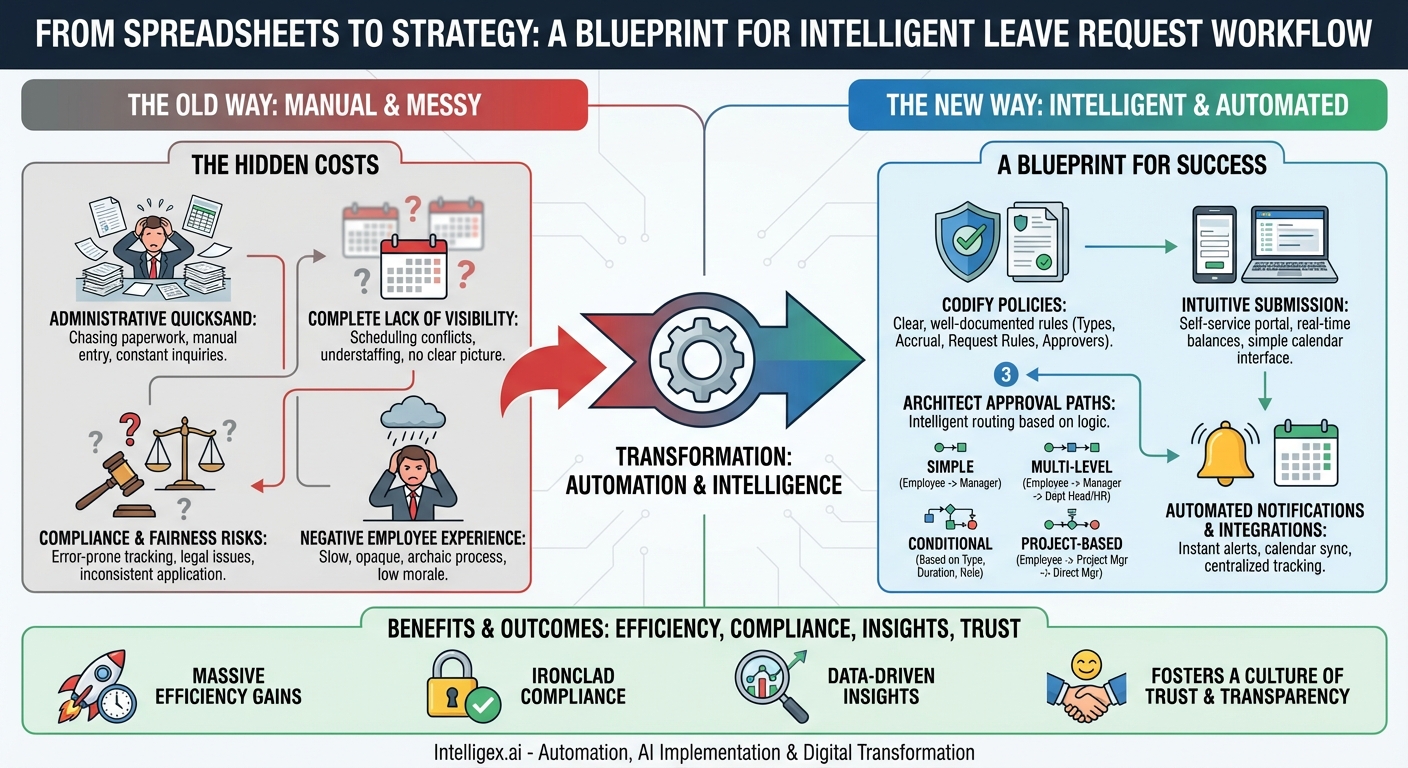
The Hidden Costs of Manual Leave Management
Before diving into how to build a better system, it’s crucial to understand the profound drawbacks of sticking with the old ways. Manual leave management, whether through paper, email, or spreadsheets, introduces a host of problems that can silently erode a company’s efficiency and culture.
- Administrative Quicksand: Managers and HR staff spend an inordinate amount of time chasing paperwork, manually entering data into spreadsheets, cross-referencing calendars, and answering an endless stream of “What’s the status of my request?” inquiries. This is low-value work that pulls them away from strategic initiatives like talent development and employee engagement.
- Complete Lack of Visibility: When requests live in email inboxes and on stray papers, no one has a clear picture of team availability. A manager might approve a request without realizing another key team member is already scheduled to be out, leading to understaffed shifts, project delays, and last-minute scrambles for coverage. Employees, in turn, have no easy way to check their remaining leave balances or see their request history.
- Compliance and Fairness Risks: Manually tracking leave accruals, balances, and different leave types (e.g., FMLA, sick leave, PTO) is highly error-prone. This can lead to serious compliance issues and legal trouble. Furthermore, without a standardized process, there’s a risk of inconsistent policy application, where one employee’s request is handled differently from another’s, creating perceptions of favoritism and unfairness.
- Negative Employee Experience: A slow, opaque, and cumbersome leave request process is a constant source of frustration for employees. It feels archaic and signals that the company doesn’t value their time. This friction point, though seemingly small, contributes to a broader sense of disengagement and can negatively impact employee morale and retention.
Building Your Leave Request Workflow: A Blueprint for Success
Designing an effective workflow isn’t just about buying a piece of software; it’s about thoughtfully architecting a process that fits your organization’s unique structure and policies. Here is a step-by-step guide to creating a robust and efficient system.
Step 1: Codify Your Leave Policies
Automation can only enforce the rules you give it. Before you can build a workflow, you must have crystal-clear, well-documented leave policies. If your policies are ambiguous, your automated workflow will be, too. Answer these questions and ensure the answers are easily accessible to all employees:
- What types of leave are offered? Clearly define each category: vacation, sick leave, personal days, bereavement, parental leave, FMLA, etc.
- How is leave accrued? Specify the rate of accrual (e.g., per pay period, monthly), any caps on carryover, and when accruals begin for new hires.
- What are the rules for requesting leave? Define the minimum notice period required, any blackout periods (e.g., during year-end closing), and the maximum duration of leave that can be taken at one time.
- Who needs to approve the request? This is the foundation for your approval paths.
This foundational step ensures that the logic you build into your workflow is based on a solid, equitable, and transparent policy framework.
Step 2: Design an Intuitive Submission Process
The workflow begins when an employee submits a request. This initial touchpoint should be as simple and frictionless as possible. A self-service portal is the ideal solution, allowing employees to access the system anytime, anywhere. A well-designed submission form should:
- Automatically display the employee’s current leave balances for all relevant categories.
- Use a simple calendar interface for selecting start and end dates, automatically calculating the total duration.
- Include a dropdown menu to select the correct leave type.
- Provide an optional field for comments or a brief reason for the request.
- Require the designation of a backup person, if company policy dictates.
The goal is to capture all necessary information upfront to eliminate the back-and-forth emails that plague manual processes.
Step 3: Architect Your Approval Paths
This is the heart of the workflow. The approval path determines the route a request takes from submission to final decision. Your system should be flexible enough to accommodate different scenarios, moving beyond a one-size-fits-all approach. Here are some common and effective approval path models:
Simple, Single-Level Approval
Path: Employee → Direct Manager
This is the most straightforward model, suitable for small businesses or organizations with a flat hierarchy. The employee’s direct manager is solely responsible for approving or denying the request. They have the best context on team workload and scheduling, making them the logical decision-maker for most routine requests. Its beauty lies in its speed and simplicity.
Multi-Level Approval
Path: Employee → Direct Manager → Department Head / HR
This path adds a second layer of oversight and is typically used for specific situations. For instance, a request for an extended leave of absence (e.g., more than two weeks) might first go to the direct manager for an initial check on team impact, and then escalate to the department head for a broader assessment of resource allocation. This ensures that significant absences receive the necessary level of strategic review.
Conditional Approval Paths
This is where a workflow becomes truly intelligent. Instead of a static path, the system automatically routes the request based on predefined conditions. This dynamic routing saves time and ensures the right people are involved without manual intervention.
- Based on Leave Type: A standard vacation request goes only to the direct manager. However, a request for FMLA or other protected leave could be automatically routed to both the manager and the HR department simultaneously. This ensures immediate HR visibility for compliance and documentation purposes.
- Based on Duration: A short request of 1-3 days might only require the manager’s approval. A longer request of 4-10 days could require approval from the manager and then the department head. A request for over 10 days might add the COO or another senior leader to the chain.
- Based on Role: A request from a frontline customer service agent might go to their team lead. A request from that same team lead would go to the customer service manager. A request from a key account executive on the sales team might notify both their sales manager and the head of sales operations to adjust forecasts.
Project-Based Approval
Path: Employee → Project Manager → Direct Manager
For consulting firms, software development teams, creative agencies, and other project-driven businesses, this model is essential. An employee’s absence directly impacts project timelines. In this workflow, the request first goes to the relevant project manager(s) to confirm that the absence won’t jeopardize deliverables. Once they approve, it proceeds to the employee’s direct (or “line”) manager for final approval based on departmental considerations.
Step 4: Implement Automated Notifications and Integrations
An automated workflow is only as good as its communication. No one should ever have to ask about the status of a request. Notifications are the engine that keeps the process moving and everyone informed.
- For the Requester: An immediate confirmation email upon submission, and subsequent notifications for every status change (approved, rejected, or pending action from an approver).
- For the Approver: An instant notification (via email, Slack, or a mobile app push) containing all the request details and simple “Approve” and “Reject” buttons. Good systems will also include a link to a team calendar to show any potential overlaps.
- Calendar Integration: This is a game-changer. Once a request is fully approved, the system should automatically add the leave dates to the employee’s personal calendar, the manager’s team calendar, and any relevant shared company calendars. This creates a single source of truth for who is out of the office.
Step 5: Centralize Tracking and Reporting
The final piece of the puzzle is a centralized dashboard where all leave data is stored and can be easily accessed. This provides invaluable insights for different stakeholders:
- Employees can log in to see their request history and accurate, up-to-the-minute leave balances.
- Managers get a real-time view of their team’s calendar, helping them plan workloads and avoid staffing shortages.
- HR and Leadership can run reports to analyze leave trends, track absenteeism, calculate leave liability for accounting purposes, and ensure a complete audit trail for compliance.
The Transformative Power of a Modern Workflow
Migrating from a manual process to an automated leave request workflow with intelligent approval paths is more than just an administrative upgrade. It’s a strategic investment that pays dividends across the organization. The benefits are clear and compelling: massive gains in efficiency, ironclad compliance, and data-driven insights for better resource planning. Most importantly, it fosters a culture of transparency and trust. It replaces frustration and uncertainty with a smooth, predictable, and fair process, demonstrating respect for your employees’ time and improving the daily experience for everyone. In today’s competitive talent market, creating a seamless operational environment is no longer a luxury—it’s essential.
Your Next Read:
Get a FREE
Proof of Concept
& Consultation
No Cost, No Commitment!
