

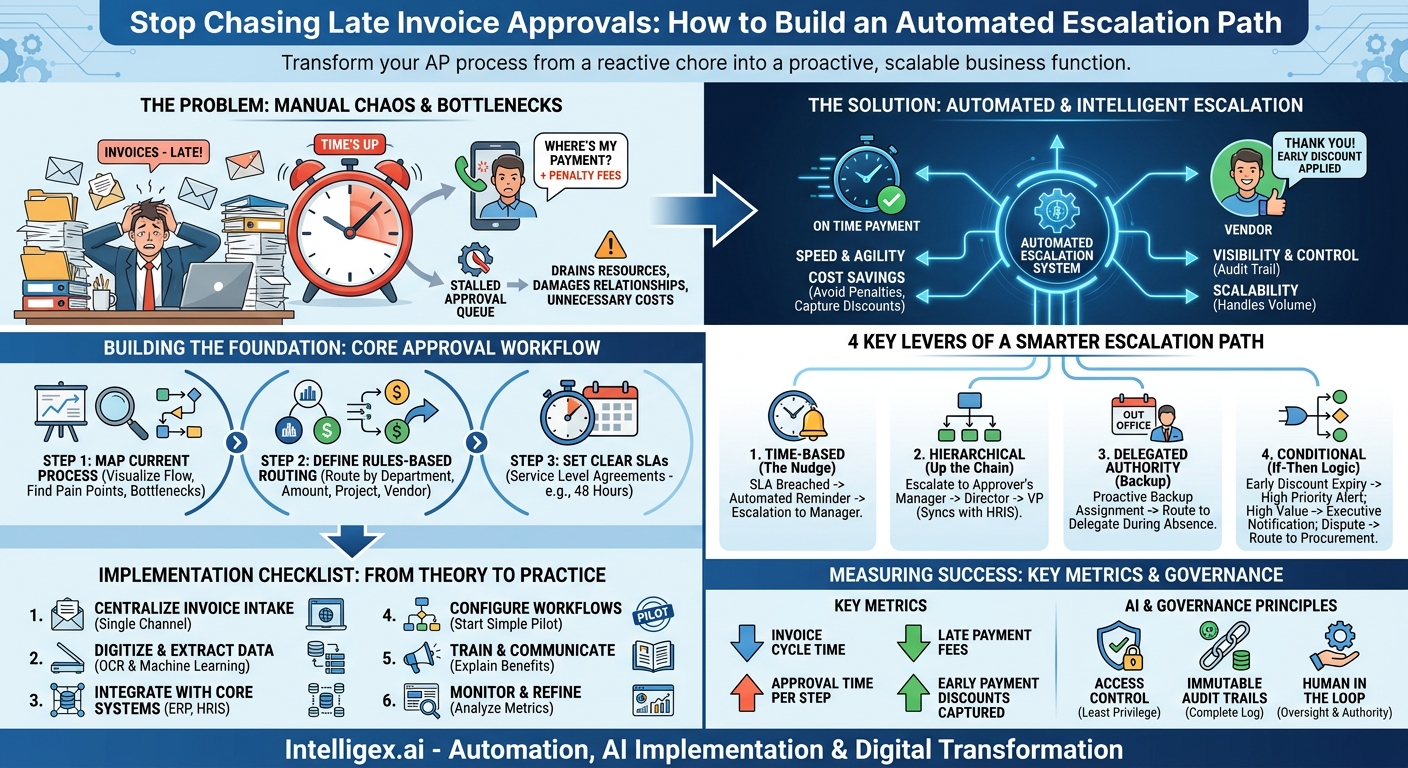
An invoice arrives in your accounts payable team’s inbox. It’s correctly formatted, the PO number matches, and the total is accurate. Everything seems perfect. Yet, three weeks later, you get a frustrated call from the vendor. The payment is late, and a penalty fee now applies. The reason? The invoice is sitting in a manager’s approval queue, buried under a mountain of other emails and tasks. This isn’t a rare inconvenience; it’s a systemic bottleneck that quietly drains resources, damages supplier relationships, and adds unnecessary costs to your bottom line.
Manual follow-ups, reminder emails, and tracking spreadsheets are temporary fixes for a deeper structural problem. To truly solve the issue of stalled approvals, you need a pre-defined, automated, and intelligent escalation path. This isn’t just a flowchart. It’s a dynamic system that ensures invoices keep moving, even when people are busy, on vacation, or simply forget. By building a robust escalation strategy, you transform your AP process from a reactive, manual chore into a proactive, efficient, and scalable business function.
What is an AP Approval Escalation Path? (And Why You Need One)
An AP approval escalation path is a set of pre-defined rules that automatically re-route an invoice for approval when a designated approver fails to act within a specified timeframe. Think of it as a smart safety net for your payment process. Instead of an invoice languishing in someone’s queue indefinitely, the system automatically takes the next logical step to get it approved.
This stands in stark contrast to the traditional, manual approach. The old way involves an AP clerk noticing an invoice is overdue, searching for the approver’s contact information, sending an email, and hoping for a response. If there’s no reply, the process repeats, sometimes moving up the chain of command through more manual emails or messages. This method is slow, untraceable, and completely unscalable.
A formal escalation strategy, especially one powered by automation, delivers clear business value across several key areas:
- Speed and Agility: The most direct benefit is faster approvals. By eliminating idle time, you shorten the entire invoice processing lifecycle. This means vendors get paid on time, every time, strengthening those critical relationships.
- Visibility and Control: With an automated path, every invoice has a clear status and a complete audit trail. You can see exactly where an invoice is, who it’s waiting on, and how long it has been there. This level of visibility is crucial for financial audits, compliance, and internal process improvement.
- Scalability: As your company grows, so does your invoice volume. A manual process breaks under this pressure, forcing you to hire more people just to keep up. An automated escalation system handles increased volume with ease, allowing your business to scale without a proportional increase in administrative overhead.
– Cost Savings: Faster processing directly impacts your bottom line. You can consistently avoid late payment penalties and, more importantly, strategically capture early payment discounts, which can add up to significant savings over a year. It also frees up your valuable AP team members from chasing approvals so they can focus on higher-value activities like financial analysis and vendor management.
Designing Your Core Approval Workflow: The Foundation
Before you can build an effective escalation path, you must first have a clear and logical primary approval workflow. Escalation is what happens when the primary path fails, so that path needs to be solid. If you try to automate a chaotic or poorly defined process, you will only create chaos faster. Building this foundation involves three key phases.
Step 1: Map Your Current Process (The Good, The Bad, and The Bottlenecks)
Start by visualizing how an invoice travels through your organization today. Get your AP team and stakeholders from a few key departments (like IT or Marketing) in a room with a whiteboard. Ask them to trace the journey of a typical invoice from receipt to payment. Be brutally honest about what you find.
Identify every touchpoint and decision point: Who first receives the invoice? Who codes it to a general ledger (GL) account? Who matches it to a purchase order? Who has final sign-off? As you map this out, ask critical questions:
- Where do invoices get stuck most often?
- Is a specific person or department a recurring bottleneck?
- Does the process change for invoices over a certain dollar amount?
- Are the rules different for operational expenses versus capital expenditures?
This exercise will reveal the hidden inefficiencies and pain points in your current system. It gives you a clear picture of what you need to fix before you can automate.
Step 2: Define Rules-Based Routing
Once you understand your process, you can define the rules that will govern the primary approval route. Rules-based routing uses the data on the invoice itself to automatically send it to the right person for the first round of approval. This eliminates the manual step of an AP clerk figuring out where each invoice should go.
Here are a few concrete examples of routing rules:
- By Department: If the invoice is for a marketing campaign management tool, route it to the Director of Marketing. If it’s for new servers, route it to the VP of IT.
- By Amount: Invoices under $5,000 only require the department manager’s approval. Invoices between $5,000 and $25,000 require the manager and their director. Anything over $25,000 also requires VP-level sign-off.
- By Project or GL Code: If an invoice is coded to a specific project, it can be routed directly to that project manager for initial approval.
- By Vendor: All invoices from your primary logistics provider could be routed to the Head of Supply Chain, regardless of the amount.
Step 3: Set Clear Service Level Agreements (SLAs)
A Service Level Agreement (SLA) in this context is a simple, agreed-upon timeframe for an approver to take action on an invoice. For example, you might set a company-wide SLA of 48 business hours for all standard invoices.
This is arguably the most important part of the foundation. Without an SLA, the term “late” is subjective and unenforceable. An SLA provides the objective trigger for your escalation path. When the 48-hour clock runs out, the system knows it’s time to take the next step. It removes ambiguity and sets clear expectations for every manager and budget holder in the company.
Building a Smarter Escalation Path: The 4 Key Levers
With a solid primary workflow in place, you can now design an intelligent escalation path. A mature strategy uses a combination of different levers to ensure no invoice is left behind. These levers can be layered to create a flexible and resilient system.
1. Time-Based Escalation (The Nudge)
This is the most common and fundamental type of escalation. It is based entirely on the SLA you defined earlier. The logic is simple: if an approver does not act within the set time, the system automatically initiates a series of actions.
A typical time-based flow might look like this:
- At 24 hours (50% of SLA): The system sends an automated reminder notification to the primary approver.
- At 48 hours (SLA breached): The system automatically escalates the approval task to the approver’s direct manager. At the same time, it sends a final notification to the original approver informing them that the task has been escalated.
- At 72 hours: If the manager also fails to act, the system can send a high-priority alert to a designated finance partner or AP lead to investigate the bottleneck.
2. Hierarchical Escalation (Going Up the Chain)
This lever relies on your company’s organizational chart. When an invoice is escalated, it automatically moves up to the original approver’s direct manager. This is highly effective because managers are typically responsible for their team’s budget and performance, making them the natural next point of contact.
For this to work seamlessly, your AP automation system needs to be integrated with your HR system of record, such as Workday, or an identity provider like Okta. This integration ensures that the org chart is always up-to-date. When an employee changes roles or managers, the escalation path updates automatically without any manual intervention from the AP team.
3. Delegated Authority (The Designated Backup)
People go on vacation, attend conferences, or take sick leave. A smart escalation strategy accounts for this proactively. Delegated authority allows approvers to assign a backup to handle their approvals while they are out of the office. For instance, a Director of Sales heading to an annual kickoff can designate their Sales Operations Manager as their delegate for the week. During that period, the system automatically routes all of their invoices to the delegate first, bypassing the primary approver entirely. This prevents a bottleneck from ever forming in the first place.
4. Conditional Escalation (The “If-Then” Logic)
This is where your escalation path becomes truly intelligent. Conditional escalation uses specific data points on the invoice to trigger unique, non-standard workflows. It moves beyond a one-size-fits-all approach and applies business logic to high-priority situations.
Consider these scenarios:
- Early Payment Discount Opportunity: An invoice from a key supplier offers a 2% discount if paid within 10 days. If the invoice sits unapproved for just 5 days, the system can trigger an immediate, high-priority escalation to the department head and the controller, highlighting the potential savings at risk.
- High-Value Invoices: Any invoice over $100,000 that is not approved within 24 hours could automatically generate a notification for the CFO’s executive assistant, ensuring top-level visibility on significant cash outlays.
- Dispute Resolution: If an approver “rejects” an invoice due to a pricing discrepancy, the system doesn’t just send it back to the AP clerk. A conditional rule can automatically route it to the procurement team member responsible for that vendor relationship to resolve the issue directly.
Implementation Checklist: From Theory to Practice
Transitioning to an automated approval and escalation system requires a thoughtful, phased approach. Jumping in without a plan can lead to confusion and low adoption. Follow these steps to ensure a smooth and successful rollout.
- Centralize Invoice Intake: You cannot automate what you cannot see. The first step is to establish a single channel for all incoming invoices. Whether it’s a dedicated email address or a vendor portal, all suppliers must submit invoices to one place. This ends the problem of invoices getting lost in various employee inboxes.
- Digitize and Extract Data: Once centralized, invoices need to be digitized. Modern AP platforms use Optical Character Recognition (OCR) and machine learning to automatically extract key data like vendor name, invoice number, date, amount, and line-item details. The quality of this data is critical, as it powers all your routing and escalation rules.
- Integrate with Core Systems: To enable advanced logic, your AP system must connect to your other business platforms. The two most critical integrations are with your Enterprise Resource Planning (ERP) system (e.g., NetSuite, SAP) and your Human Resources Information System (HRIS). The ERP integration allows for PO matching and seamless data transfer, while the HRIS integration provides the organizational hierarchy needed for escalations.
- Configure Workflows (Start Simple): Don’t try to boil the ocean. Begin by configuring the primary approval and a simple time-based escalation workflow for a single, cooperative department. Choose a team with a straightforward approval process, like Marketing or an internal operations group. Use this pilot program to work out any kinks and demonstrate value.
- Train and Communicate: Roll out the new system with clear communication. Focus on the “why” behind the change. Explain to approvers how this makes their job easier with features like mobile approvals, consolidated notifications, and full visibility into invoice details. Provide simple training guides and office hours to answer questions.
- Monitor and Refine: Once live, use the analytics in your AP platform to monitor performance. Look at the metrics to identify new bottlenecks. Is one director constantly having invoices escalated to them? This might indicate that their direct reports are overloaded or need more training. Use this data to continuously fine-tune your SLAs, routing rules, and escalation paths.
Measuring Success: Key Metrics for AP Approval Performance
To understand the impact of your new escalation strategy, you need to track the right metrics. These key performance indicators (KPIs) will help you quantify the improvements in efficiency, cost, and control.
- Invoice Cycle Time: This is the total time elapsed from invoice receipt to its final approval for payment. Your primary goal should be to consistently reduce this number.
- Approval Time per Step: A more granular metric that measures how long an invoice sits with each individual approver. This helps you pinpoint specific people or roles that may be slowing down the process.
- Percentage of Invoices Escalated: This metric serves as a health check for your process. A very high escalation rate might suggest your initial SLAs are too aggressive or that approvers need better training. A low and stable rate indicates a smooth and efficient primary workflow.
- Early Payment Discounts Captured: This is the flip side of late fees. Tracking the value of captured discounts provides a powerful way to demonstrate the proactive financial value the AP team is delivering.
– Late Payment Fee Incurrence: The ultimate bottom-line measure of success. This should trend down to zero over time.
The Role of AI and Governance in Modern Escalation Paths
Modern AP automation platforms are increasingly using Artificial Intelligence (AI) to make approval and escalation processes even smarter. This goes beyond the simple “if-then” rules of traditional workflows. For example, AI can provide predictive risk scoring, flagging an invoice that is at high risk of a delay based on historical patterns associated with the vendor, department, or even the time of year. This allows the AP team to intervene proactively before an SLA is ever breached. AI can also accelerate the pre-approval process by providing highly accurate GL code suggestions based on an analysis of past invoices, reducing manual errors and the back-and-forth they cause.
As you introduce more automation and intelligence, strong governance becomes paramount. A well-governed system operates on three core principles:
- Access Control: Users should only be able to view and act on invoices relevant to their role and budget authority. A manager in the sales department should never see a sensitive invoice from the legal team. This principle of least privilege is fundamental to security and privacy.
- Immutable Audit Trails: Every single action taken on an invoice, from its initial receipt to the final approval, must be logged. The log should capture the action (viewed, approved, rejected, commented, escalated), the user who performed it, and a precise timestamp. This unchangeable record is non-negotiable for financial audits and internal controls.
- Human in the Loop: The goal of automation and AI is to empower your team, not replace their judgment. The system can handle the routing, reminders, and escalations, but the final decision to approve a payment should always rest with a designated and accountable person. Automation provides the data and context; humans provide the oversight and final authority.
Your Next Steps: Building a Resilient AP Process
A static, manual approval process is a hidden liability in your organization. It introduces risk, erodes efficiency, and scales poorly. In contrast, a dynamic, automated, and intelligent escalation path is a strategic asset that builds operational resilience and financial control. The good news is that you don’t need a massive, months-long project to get started.
You can begin building a more resilient AP process this week. Take these simple first steps:
- Schedule a 30-minute meeting with your AP lead and one friendly department head who feels the pain of the current process.
- Use a whiteboard to map the current approval process for that single department. Identify the single biggest, most common bottleneck.
- On that same whiteboard, design a simple solution. What would a basic time-based escalation rule look like to solve that one problem?
This small exercise will illuminate the path forward. It is the first step on a journey toward transforming your accounts payable function from a cost center into a hub of strategic value for the entire organization.
Your Next Read:
Category:
Get a FREE
Proof of Concept
& Consultation
No Cost, No Commitment!
