

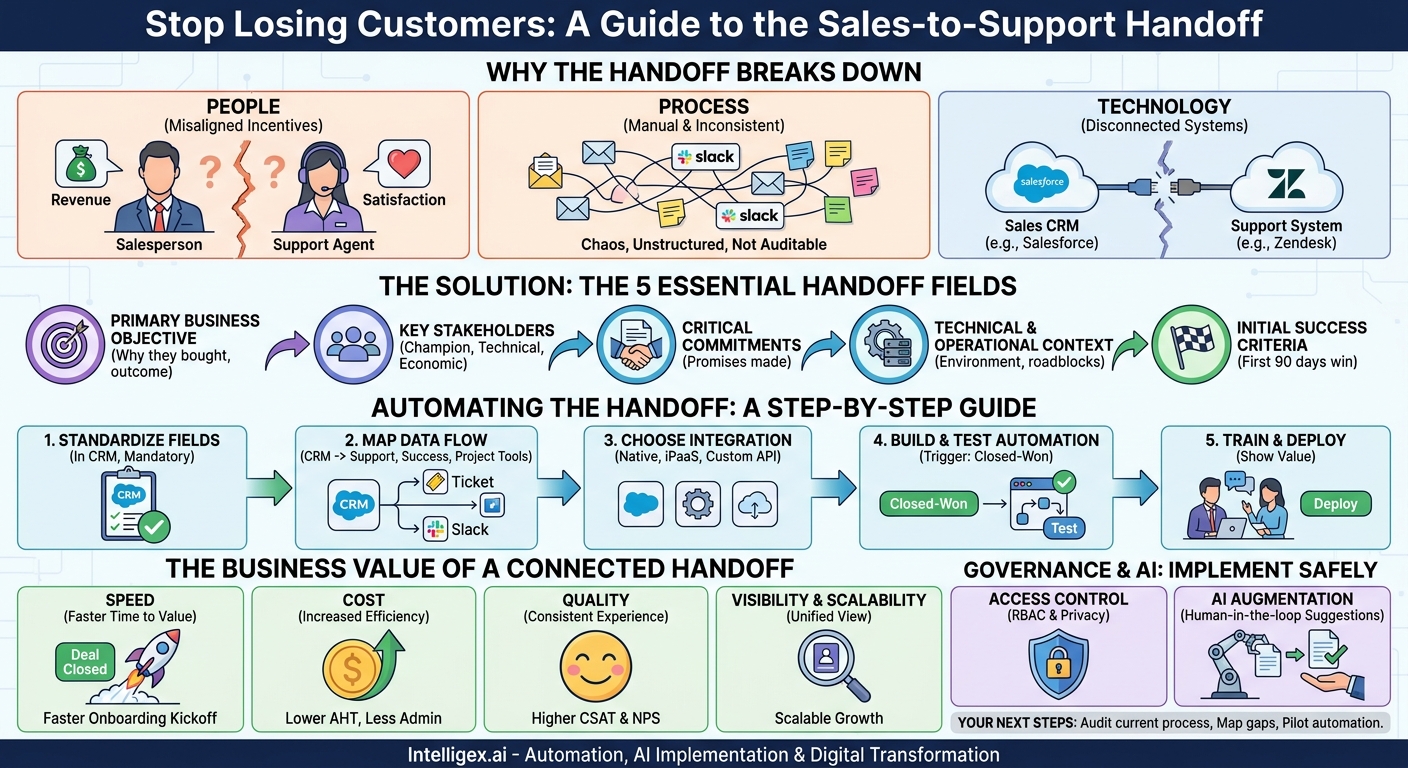
The deal is closed. Champagne corks fly in the sales department, and a new logo is added to the company website. But for the customer, the journey is just beginning. And too often, that journey starts with a jarring thud. They call support with a simple question and are met with a blank stare. The support agent asks them to repeat information they already gave the sales team. The promises made during the sales cycle seem to have vanished into thin air. This is the sales-to-support handoff gap, a critical failure point where customer trust erodes and churn risk skyrockets.
Fixing this isn’t about creating massive, multi-page briefing documents that no one has time to write or read. The solution is simpler and far more scalable. It’s about systematically and automatically transferring a small, curated set of essential data points from your sales team to your delivery and support teams. By focusing on just five key fields, you can eliminate the chaos, create a seamless customer experience, and build a foundation for operational excellence.
Why the Sales-to-Support Handoff Breaks Down
Before designing a solution, it’s crucial to understand the root causes of failure. The handoff gap isn’t usually the fault of one person or team. It’s a systemic issue born from misaligned incentives, disconnected processes, and siloed technology. When left unaddressed, it creates friction that customers feel immediately.
The People Problem: Misaligned Incentives
Your sales team is compensated for one thing: closing deals. Their entire workflow, mindset, and toolset are optimized for revenue generation. Post-sale administrative tasks, like filling out detailed forms for another department, are often seen as a distraction from their primary goal. On the other side, your support, onboarding, and customer success teams are incentivized by customer satisfaction, retention, and product adoption. They are desperate for the context locked away in the sales team’s notes and emails, but they lack a reliable way to get it.
The Process Problem: Manual and Inconsistent
In many organizations, the “handoff” is an informal process. It might be an email from the sales rep to a support distribution list, a quick Slack message, or a verbal mention in a team meeting. This approach is inherently flawed:
- It’s inconsistent. Some reps provide great detail, others provide none at all. The quality of the handoff depends entirely on the individual.
- It’s unstructured. Information buried in an email thread is difficult to parse and cannot be easily imported into a support or project management system.
- It’s not auditable. There is no central record of what was communicated, leading to “he said, she said” scenarios when a customer’s expectations are not met.
The Technology Problem: Disconnected Systems
The technical foundation of most companies mirrors their departmental structure. Sales lives in a CRM like Salesforce or HubSpot. Support works out of a ticketing system like Zendesk or Intercom. Customer Success might use a dedicated platform like Gainsight. When these systems don’t talk to each other, data gets trapped. This forces teams to resort to manual data entry, which is slow, expensive, and prone to human error. Every disconnected system is a potential point of failure in the customer journey.
The Foundation: The 5 Essential Handoff Fields
To build a reliable bridge between sales and support, you don’t need to transfer every single note and email. You need to focus on the essential context that the post-sale teams require to create a successful customer experience from day one. By standardizing these five fields in your CRM, you create a universal language for customer context that can be automated and scaled.
1. The Primary Business Objective
This is the most critical piece of information. It’s not about what the customer bought (e.g., “Enterprise Plan with 100 seats”). It’s about why they bought it. What specific pain point are they trying to solve or what outcome are they hoping to achieve? This field reframes the relationship from a transaction to a partnership focused on achieving a goal.
- Bad Example: Bought Enterprise Plan.
- Good Example: “Reduce manual invoice processing time by 50% in their finance department within six months.”
This information allows the onboarding team to tailor their approach and helps the support team troubleshoot issues with a clear understanding of the customer’s definition of success.
2. Key Stakeholders and Roles
A deal involves multiple people, and the post-sale teams need to know who is who. At a minimum, you should identify three key contacts. Storing this in structured fields (not a free-text notes field) is essential for automated communication and reporting.
- The Champion: The person who advocated for your solution internally. They are your key ally for adoption and future expansion.
– The Primary Technical Contact: The person responsible for implementation and integration. This is who your technical support team needs to connect with.
– The Economic Buyer: The person who holds the budget and signed the contract. They are a critical contact for renewals and commercial discussions.
3. Critical Commitments and Promises
This field is your best defense against the dreaded phrase, “But the salesperson promised…” During the sales cycle, special accommodations are sometimes made to win a deal. These might include a non-standard discount, a commitment to deliver a specific feature by a certain date, or a customized onboarding package. If this information isn’t formally documented and transferred, the delivery team is set up for failure. Documenting these commitments ensures accountability and manages customer expectations from the start.
4. Technical and Operational Context
No business operates in a vacuum. Understanding the customer’s environment is crucial for a smooth implementation. This field should capture key details about their existing technology stack, internal processes, and any potential roadblocks discussed during the sales process.
For a software company, this might include: “Customer uses SAP for their ERP and will require a custom integration. Their IT team has a two-week change control freeze every quarter.” For a professional services firm, it might be: “The marketing team is a key stakeholder but was resistant to the project. The project lead needs our help building a business case to get their buy-in.”
5. Initial Success Criteria (First 90 Days)
While the Primary Business Objective is the long-term goal, this field defines the short-term win. What does a successful start look like from the customer’s perspective? This sets a clear, achievable first milestone for the customer success and onboarding teams to target. It provides an immediate focus for the relationship and a tangible outcome to celebrate early on.
- Example 1: “Successfully onboard the 25-person marketing team and integrate with their Marketo instance.”
- Example 2: “Complete the data migration for their legacy system and run the first successful payroll through our platform.”
Automating the Handoff: A Practical Step-by-Step Guide
Once you’ve defined your essential fields, the next step is to automate the flow of information. Manually filling out a form is better than nothing, but true scalability comes from creating a seamless, trigger-based workflow between your systems. This ensures the handoff happens instantly and consistently, every single time.
- Standardize the Fields in Your CRM. The first and most important step is to build these five fields directly into your CRM. Create them as custom fields on the Opportunity or Account object. Work with your sales operations team to make these fields mandatory for moving a deal to the “Closed-Won” stage. This enforces data capture at the most logical point in the process.
- Map the Data Flow. Clearly identify your source and destination systems. The source is your CRM (e.g., Salesforce). The destinations could be multiple systems. For example, a new customer record might be created in your support platform (e.g., Zendesk), a new project might be created in your project management tool (e.g., Asana), and a notification with the key details sent to a dedicated Slack channel.
- Choose Your Integration Method. You have several options for connecting your systems, ranging in complexity and capability.
- Native Connectors: Many SaaS applications offer pre-built integrations with other popular tools. These are often the easiest to set up but may have limited customization options.
- Integration Platforms (iPaaS): Tools like MuleSoft or Workato provide a middleware layer to build sophisticated, multi-step workflows between hundreds of different applications without writing extensive code.
- Custom API Development: For highly specific or complex requirements, you can use the APIs (Application Programming Interfaces) of your systems to build a custom integration. This offers the most flexibility but requires development resources.
- Build and Test the Automation. Configure the workflow. The trigger should be the opportunity stage in your CRM changing to “Closed-Won.” Then, map each of the five standardized fields from the CRM object to the corresponding fields you’ve created in your support, success, or project management tools. Always build and test this in a sandbox or development environment first to avoid disrupting live operations.
- Train the Teams and Deploy. Technology is only half the battle. You must train your teams on the new process. Show the sales team how this new, streamlined process ultimately helps them by creating happier customers who are more likely to renew and refer others. Show the post-sale teams exactly where they can now find this reliable, structured information, eliminating their need to chase down sales reps for context.
The Business Value of a Connected Handoff
Implementing an automated handoff process is more than just an operational improvement. It delivers tangible business value across several key areas, directly impacting revenue, cost, and customer loyalty.
Speed: Faster Time to Value
An automated handoff means the onboarding process can begin moments after a deal is signed. This immediate momentum is critical for the customer, as it validates their purchasing decision and accelerates their time to first value (TTFV). The faster your customers achieve their first meaningful outcome with your product or service, the stickier they become.
What to measure: Track the time from “Deal Closed” to “Onboarding Kickoff.” You should see a significant reduction in this metric.
Cost: Increased Operational Efficiency
Manual processes are expensive. Every minute a support agent spends hunting for information or a sales rep spends on post-sale admin is a minute they are not spending on higher-value activities. Automation eliminates redundant data entry, reduces the likelihood of errors that require costly rework, and frees up your teams to focus on what they do best.
What to measure: Monitor metrics like Average Handle Time (AHT) in support and the number of post-sale administrative hours logged by the sales team.
Quality: A Consistent Customer Experience
Inconsistency is the enemy of a good customer experience. An automated handoff ensures that every customer, regardless of their size or which salesperson closed the deal, receives the same high-quality, context-aware welcome. This consistency builds trust and sets the foundation for a long-term, positive relationship.
What to measure: Look at Customer Satisfaction (CSAT) scores and Net Promoter Score (NPS) specifically for customers in their first 90 days. A smoother handoff should lead to improved scores.
Visibility and Scalability
When customer data flows seamlessly between systems, you gain a single, unified view of the entire customer lifecycle. Leadership can now track a customer’s journey from initial lead to loyal advocate without having to piece together reports from different departments. This connected data infrastructure is also inherently scalable. A process that relies on automation, not manual effort, can handle 10 new customers or 1,000 new customers with the same efficiency and quality.
Governance and AI: Implementing Safely
Automating the flow of customer data requires a thoughtful approach to governance and security. As you connect systems, you must also ensure you are protecting sensitive information and using technology responsibly.
Access Control and Data Privacy
Not everyone on the support team needs to see the detailed financial terms of a deal. Use role-based access controls (RBAC) in your destination systems to ensure that team members can only see the information relevant to their roles. Additionally, ensure that the data you are transferring complies with privacy regulations like GDPR and CCPA. The handoff process should be designed around the principle of data minimization, transferring only what is necessary for the post-sale teams to do their jobs effectively.
The Practical Role of AI
Artificial intelligence can enhance this process, but it should be applied pragmatically. Instead of replacing human judgment, AI can be used to augment it. For example, Natural Language Processing (NLP) models can analyze sales call transcripts and email conversations to automatically *suggest* content for the “Primary Business Objective” or “Critical Commitments” fields. However, the sales representative should always be required to review, edit, and approve these suggestions before the deal is closed. This “human-in-the-loop” approach combines the efficiency of AI with the accountability of a person, reducing manual data entry without sacrificing accuracy.
Common Pitfalls to Avoid
As you embark on this project, be aware of common challenges that can derail your efforts. Avoiding these pitfalls is as important as following the right steps.
- Over-engineering the solution. The goal is not to sync every single field between your systems. Start with the five essential fields. You can always add more later if there is a clear business need. Resisting the urge to boil the ocean is key to getting a quick win.
- Forgetting the “why” for sales. If the sales team perceives this as just another administrative hurdle, adoption will be low. You must continuously communicate how this process benefits them through happier customers, better reviews, more referrals, and faster commission payouts.
- Ignoring feedback from the “customer” of the process. Your support and customer success teams are the internal customers of the handoff. Regularly solicit their feedback. Is the information they are receiving useful? Is it clear? Is anything missing? Use this feedback to iterate and improve.
- Setting it and forgetting it. Your business is not static. Your products, customers, and processes will evolve. Schedule a review of your handoff fields and automation logic every six months to ensure they are still relevant and effective.
Your Next Steps: Building a Seamless Handoff
Transforming your sales-to-support handoff from a source of chaos into a strategic asset is an achievable goal. It creates a powerful first impression for new customers and builds a scalable foundation for growth. The key is to start now with a focused, iterative approach.
Begin by auditing your current process. Get the key stakeholders from Sales, Support, Customer Success, and Operations together to map out how information flows today and identify the most painful gaps. Use the five fields discussed here as a starting point to define the essential data for your business. Finally, start small. Pilot your new automated process with a single product line or customer segment to prove the value and work out any kinks before rolling it out across the entire organization. By taking these deliberate steps, you can build a more connected, efficient, and customer-centric business.
Your Next Read:
Get a FREE
Proof of Concept
& Consultation
No Cost, No Commitment!
