

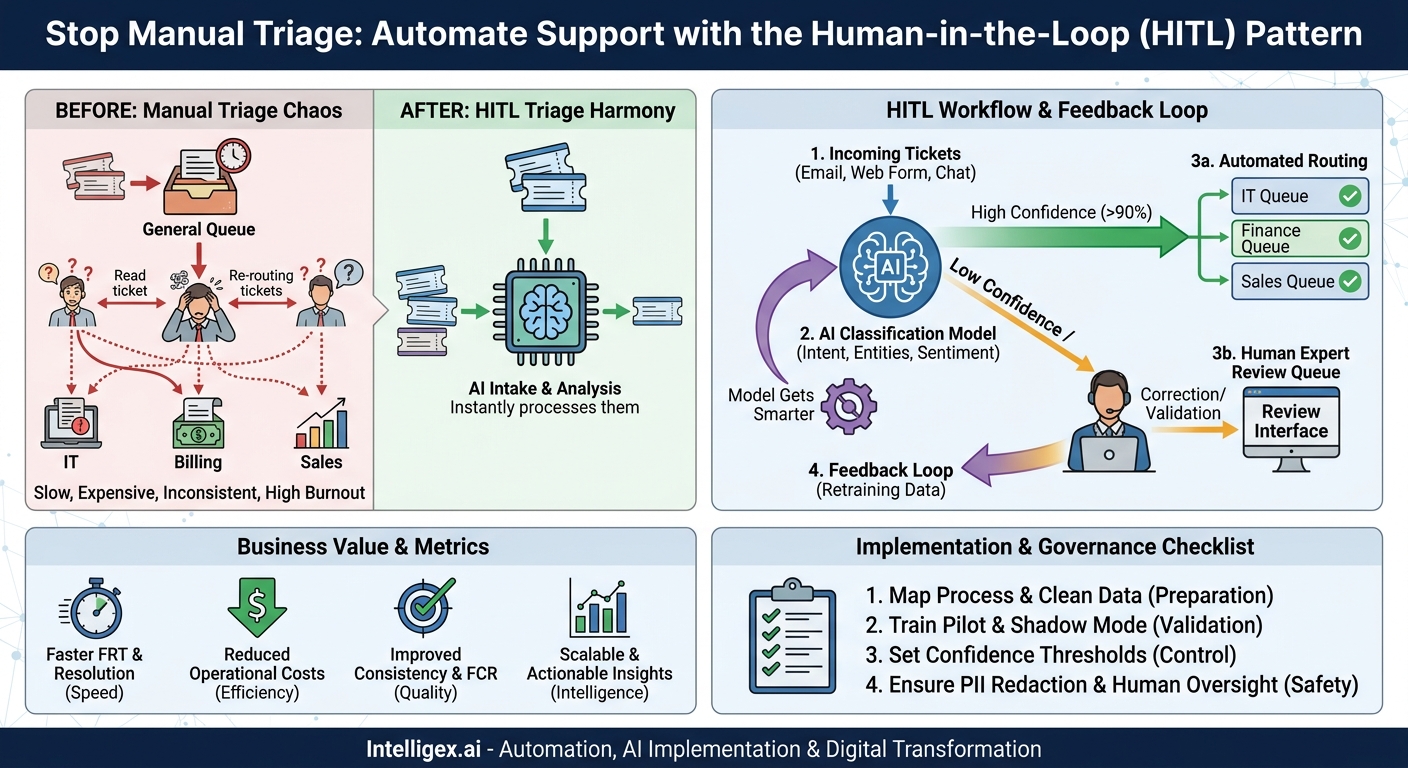
Your customer support queue is a constant battle. Every new ticket is a mystery box that a human agent has to open, read, understand, and then decide where it needs to go. This manual triage process is not just slow, it is expensive and inconsistent. Valuable agents spend a significant portion of their day acting as switchboard operators instead of problem solvers. The result? Customers wait longer, costs creep up, and your best people get burned out on repetitive work.
There is a more effective way to manage this inflow. By implementing a Human-in-the-Loop (HITL) triage pattern, you can use AI to handle the predictable, high-volume work while empowering your human experts to focus on the complex issues where they add the most value. This isn’t about replacing people with bots. It is about creating a powerful partnership between technology and your team to deliver faster, smarter, and more scalable support.
What is the HITL Triage Pattern?
To understand the power of the HITL triage pattern, let’s first look at the traditional, fully manual process. A ticket arrives from a customer. It sits in a general queue until an agent is available. That agent reads the ticket, perhaps for the first time, and tries to figure out its core purpose. Is it a billing question? A technical bug? A sales inquiry? They then manually categorize the ticket and re-assign it to the appropriate team or specialist. This single ticket may be read by two or three different people before anyone even begins to work on a solution.
The HITL triage pattern fundamentally redesigns this workflow. It introduces a smart automation layer at the very beginning of the process.
Here is how it works in practice:
- Intake and Analysis: An AI model instantly reads every incoming support ticket, email, or web form submission the moment it arrives.
- Extraction and Classification: The model is trained to understand human language. It identifies the customer’s intent (e.g., “password reset,” “invoice request”), extracts key information (like an order number or product name), and even gauges sentiment (is the customer happy, frustrated, or angry?).
- Automated Routing: Based on this analysis, the model applies a set of predefined business rules. If it determines with high confidence that a ticket is a password reset request, it can route it directly to the IT automation queue. If it’s a refund request for a specific product line, it can go straight to the finance team that handles it.
- Human Review for Ambiguity: This is the critical “human-in-the-loop” component. The AI is not expected to be perfect. If the model’s confidence in its own prediction is below a certain threshold (say, 90%), or if the ticket contains unusual language, it does not guess. Instead, it flags the ticket and routes it to a small, specialized queue for a human triage expert. This expert quickly reviews the AI’s suggestion and makes the correct assignment with a single click.
- The Feedback Loop: Every correction made by the human reviewer is captured as valuable training data. This data is used to periodically retrain and improve the AI model. Over time, the model learns from its mistakes, its accuracy increases, and the percentage of tickets it can handle automatically grows. The system gets smarter with every human interaction.
This approach combines the best of both worlds: the speed and scale of machine learning with the nuance and judgment of a human expert. The bulk of simple, repetitive triage is automated, while human attention is reserved for the exceptions and complexities that require it.
The Business Case: Why This Pattern Delivers Value
Adopting an HITL triage pattern is not just a technical upgrade. It’s a strategic move that delivers tangible business results across multiple fronts. By automating the front end of your support process, you create cascading benefits that impact your customers, your team, and your bottom line.
Speed and Customer Experience
In customer support, speed matters. The time it takes to get a ticket to the right person is a major component of your First Response Time (FRT). Manual triage creates inherent delays. An AI-powered system, however, routes a ticket in seconds. This means the clock on problem-solving starts almost immediately. For customers, this translates to a dramatically better experience. Their issue is acknowledged and sent to the right expert right away, building confidence and reducing frustration.
Significant Cost Reduction
Your support agents are a valuable resource. Every minute they spend on administrative tasks like reading and routing is a minute they are not spending on solving complex customer problems. Manual triage is a low-value, high-cost activity. By automating 70%, 80%, or even more of this work, you can optimize your resource allocation. This does not always mean reducing headcount. It often means empowering your existing team to handle a higher volume of substantive work, improving their job satisfaction and increasing the overall efficiency of your operation. Your cost-per-ticket resolution drops because the initial handling cost is near zero.
Improved Quality and Consistency
Humans make mistakes, especially when performing repetitive tasks. A tired or new agent might misclassify a ticket, sending it on a detour through multiple departments before it finds the right home. This increases resolution time and frustrates customers. An AI model, on the other hand, applies your business rules with perfect consistency every single time. It never has a bad day. This ensures that a “billing inquiry” always goes to the billing team, leading to a higher First Contact Resolution (FCR) rate because the first person to engage with the customer is the correct one.
Actionable Insights from Unstructured Data
Support tickets are a goldmine of business intelligence, but it is often locked away in unstructured text. An AI triage model naturally structures this data as part of its process. Every ticket is automatically tagged with an intent, entities, and sentiment. Suddenly, you have a real-time dashboard showing exactly what your customers are asking for. Are you seeing a spike in “shipping damage” tickets? That is an early warning for your logistics team. Is a new feature generating a lot of “how-to” questions? Your documentation or product team needs to know. This visibility allows you to be proactive instead of reactive.
Built-in Scalability
What happens to a manual triage team during a product launch or a service outage? They get overwhelmed. Hiring and training new agents takes time, so you cannot easily scale up and down. An automated system, however, can handle a surge in volume with ease. Whether you receive one hundred tickets or ten thousand, the AI processes them at the same speed. Your human review team may see a temporary increase in their queue, but the system as a whole absorbs the pressure, ensuring that your service levels do not collapse when you need them most.
Implementing the HITL Triage Pattern: A Step-by-Step Guide
Putting this pattern into practice requires a thoughtful approach that combines process definition, data preparation, and smart technology choices. It is an iterative journey, not a one-time project. Here is a practical roadmap to get you started.
- Define Your Support Categories and Routing Rules
Before you write a single line of code, you must map your business process. Sit down with your support leads and document the “happy path” for your most common ticket types.- What are the top 10-15 reasons customers contact you? (e.g., Billing Inquiry, Technical Issue, Feature Request, Address Change).
- Which team or individual is responsible for each category?
- What specific information is needed to resolve each type of ticket? (e.g., a “return request” needs an order number).
This exercise creates the foundational logic that your AI model will learn to execute.
- Gather and Label Your Historical Data
An AI model learns from examples. You will need a dataset of past support tickets to train it. The goal is quality over quantity. A clean, well-labeled dataset of 1,000-2,000 tickets is often more effective than 50,000 messy ones. “Labeling” simply means going through each historical ticket and assigning it the correct category from the list you created in Step 1. This initial data preparation is the most critical factor for success. - Select and Train an Initial Model
You don’t need a team of PhDs to build a classification model. You can leverage powerful, pre-existing services from cloud providers like Amazon Web Services or Google Cloud. These platforms provide Natural Language Processing (NLP) APIs that can be trained on your custom-labeled data. The objective here is not perfection. You are building a “Minimum Viable Model” that is good enough to start the process. It might only be 75% accurate at first, but that is the baseline you will improve upon. - Design the Human Review Interface
The experience of your human triage specialists is paramount. Their review tool must be incredibly fast and simple. A good interface should present the key information clearly:- The original ticket text.
– The AI model’s predicted category and its confidence score (e.g., “Billing Inquiry – 85% confidence”).
- A simple set of buttons or a dropdown menu to either confirm the prediction or correct it.
- Deploy in “Shadow Mode”
Do not switch on automation on day one. First, run the model in the background. As new tickets arrive, your model will make its predictions and store them, but your human team will continue to triage everything manually as they do today. After a week or two, you can compare the AI’s decisions to your team’s decisions. This provides a safe, risk-free way to measure the model’s real-world accuracy and identify any major gaps in its understanding. - Go Live with a Confidence Threshold
Once you are comfortable with the model’s performance in shadow mode, you can go live. You do this by setting a confidence threshold. For example, you might establish a rule: “If the AI’s confidence is above 95%, automate the routing. If it is between 70% and 95%, send it to the human review queue. If it is below 70%, send it to the general queue as a fallback.” This threshold allows you to control the level of automation and ensure that only the most certain predictions are acted upon without human oversight. - Close the Loop and Iterate
The process is not over once you go live. The real power of HITL comes from continuous improvement. Every correction made by your human review team is a learning opportunity for the model. On a regular basis (e.g., monthly or quarterly), use this new, human-verified data to retrain your model. Each retraining cycle will make the model more accurate, allowing you to gradually increase the automation rate.
The goal is to enable a reviewer to validate a ticket in seconds.
Practical Scenarios Across Your Business
While customer support is the classic use case, the HITL triage pattern is a versatile framework that can add value to any business unit that deals with a high volume of inbound, unstructured requests. The core principle remains the same: use AI for the initial sort and humans for expert validation.
IT Help Desk
An internal IT help desk is often overwhelmed with repetitive requests. The HITL pattern can automatically identify and route common issues like password resets, requests for software access, VPN troubleshooting, and new hardware requisitions. This frees up skilled IT personnel to focus on more complex system-level problems and infrastructure projects.
Finance and Billing
The accounts receivable team receives a constant stream of emails from customers. An AI model can read these emails and classify them as invoice queries, payment notifications, refund requests, or disputes over charges. High-confidence requests, such as a simple request for a copy of an invoice, could even be fully automated, while complex disputes are routed directly to a senior billing specialist.
Sales and Marketing Operations
Every lead that comes through a “Contact Us” form on your website is valuable. The triage pattern can analyze the content of the form submission to qualify and route the lead. It can extract the company name, estimate company size, identify the product of interest, and gauge the urgency. Based on these factors, it can assign the lead to the correct sales representative based on territory, industry focus, or account size, ensuring a faster and more relevant follow-up.
Human Resources
An HR department serves the entire company and fields a wide variety of employee questions. An HITL system can be used to triage requests sent to a general HR inbox. It can differentiate between questions about payroll, benefits enrollment, company policy, and requests for leave. This ensures that sensitive and specialized inquiries are handled promptly by the correct HR business partner.
Measuring Success: The Metrics That Matter
To justify the investment and demonstrate the value of your HITL implementation, it is crucial to track the right key performance indicators (KPIs). Your metrics should cover efficiency, quality, and the performance of the automation itself.
Efficiency Metrics
- First Response Time (FRT): This should show a dramatic improvement as the initial routing delay is virtually eliminated.
- Average Triage Time: The time a ticket spends in an unassigned queue before being picked up. This should trend towards zero for automated tickets.
- Time to Resolution (TTR): While not solely dependent on triage, faster routing to the correct expert should lead to a reduction in overall resolution times.
Quality Metrics
- Re-assignment Rate: Track the number of times a ticket is “bounced” between teams. A successful implementation will cause this number to plummet.
- First Contact Resolution (FCR): The percentage of tickets resolved in a single interaction. When the right expert gets the ticket first, FCR rates tend to increase.
- Customer Satisfaction (CSAT): Ultimately, the goal is happier customers. Monitor your CSAT scores to ensure that increased efficiency is translating into a better customer experience.
Automation Metrics
- Automated Triage Rate: What percentage of all incoming tickets are being categorized and routed without any human touch? This is your primary measure of automation success.
- Human Correction Rate: Of the tickets sent for human review, what percentage require a correction? This is a direct measure of your model’s accuracy on ambiguous cases. As the model improves, this rate should decrease.
A Note on Safe and Responsible Implementation
Implementing any AI system, especially one that handles customer communication, requires a focus on safety and governance. The goal is to build a system that is not only effective but also trustworthy.
Data Privacy: Customer tickets can contain sensitive information. When preparing your training data, ensure that all Personally Identifiable Information (PII), such as names, addresses, phone numbers, and credit card details, is properly redacted or anonymized. Use tools and techniques that prevent sensitive data from being stored in logs or used inappropriately in model training.
Access Control: The human review interface should operate on the principle of least privilege. Your triage specialists need to see the content of the ticket to categorize it, but they may not need access to the customer’s entire account history. Configure permissions carefully to ensure reviewers only see the information essential for their task.
Human Oversight is Non-Negotiable: The system must be designed with the human in mind. There should always be a clear and simple process for an agent to override an automated decision or escalate a ticket. The purpose of HITL is to augment human capability, not to create a rigid, “black box” system. The system should be designed to fail gracefully by defaulting to a human queue when it encounters something it does not understand.
Getting Started: Your Next Steps
Implementing a human-in-the-loop triage pattern is an achievable project that delivers compounding returns in efficiency and quality. You can start small, prove the value, and expand over time. The key is to move from theory to action.
Use this checklist to plan your initial steps:
- Analyze Your Current State: Map your existing triage process. Identify your main ticket categories and measure how long tickets currently wait before being assigned. Find the biggest bottleneck.
- Define a Pilot Scope: You don’t need to automate everything at once. Choose one high-volume, well-understood ticket category or a single team (like the IT help desk) to serve as your pilot project.
- Build Your Business Case: Use your current metrics (like average triage time and re-assignment rate) to project the potential cost savings and efficiency gains from automating a portion of the workload.
- Begin the Conversation: Start a discussion with your technical teams or an experienced implementation partner. The goal is to explore a small-scale proof-of-concept to demonstrate the pattern’s value with your own data.
By taking a pragmatic, step-by-step approach, you can transform your support triage from a costly bottleneck into a strategic asset for your business.
Your Next Read:
Category:
Get a FREE
Proof of Concept
& Consultation
No Cost, No Commitment!
