

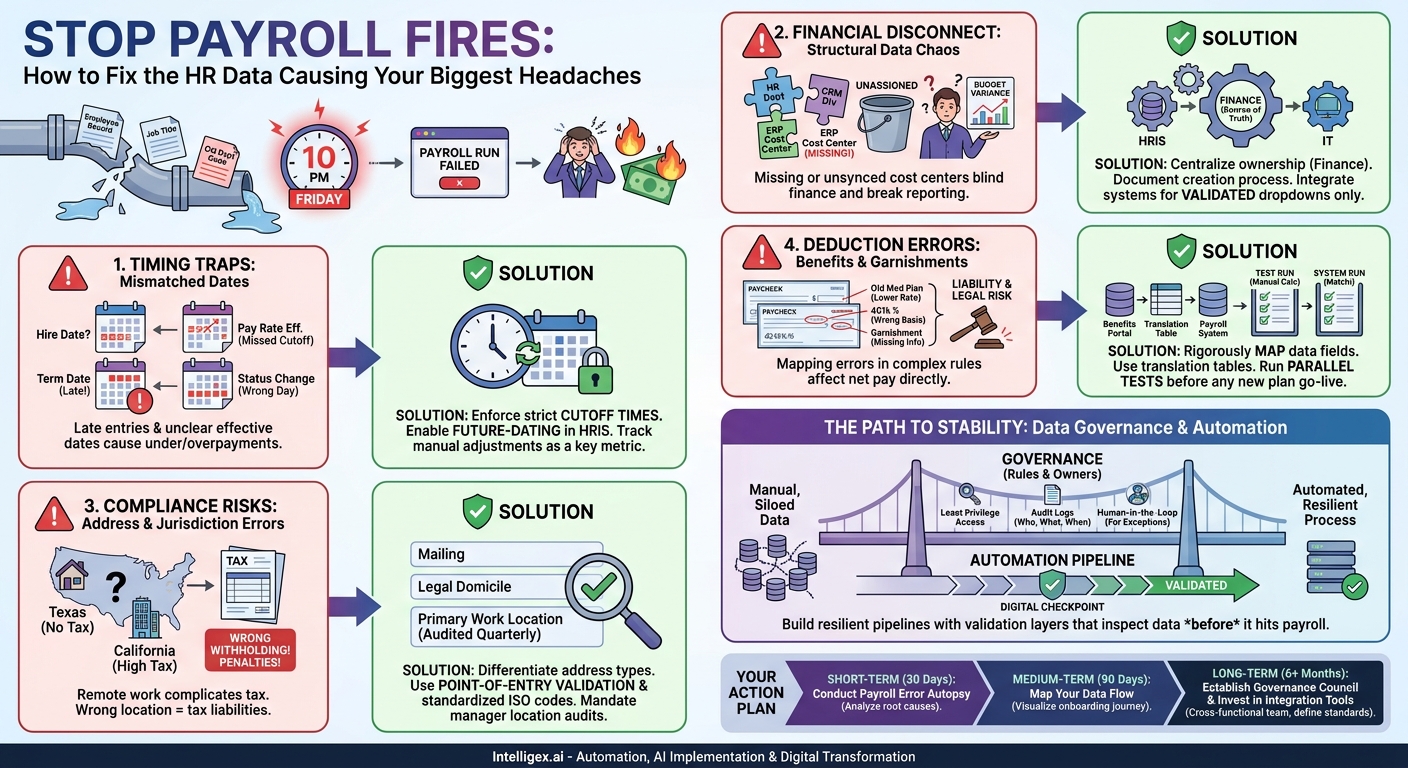
It’s 10 PM on the second Friday of the month. The payroll run fails. Again. After hours of frantic digging, the culprit is found: a single employee record, updated in the HR system with a new job title but an old, deactivated department code. The entire process grinds to a halt over a few bytes of mismatched data. This scenario isn’t just an IT headache; it’s a direct blow to operational efficiency, employee morale, and financial accuracy. Every manual correction costs time and money, erodes trust in your systems, and pulls your skilled teams away from strategic work.
The connection between Human Resources data and payroll processing is one of the most critical, yet fragile, data pipelines in any organization. When it works, it’s invisible. When it breaks, the consequences are immediate and severe. Achieving payroll stability isn’t about buying more software. It’s about enforcing discipline and intelligence in how you manage the specific data fields that connect these two worlds. Getting this right delivers tangible business value through improved speed, reduced costs, higher quality data, greater financial visibility, and the scalability to grow without breaking your core processes.
The Foundational Failure: Mismatched Employee Status and Effective Dates
More payroll errors originate from incorrect timing than from almost any other source. Payroll is a time-sensitive, transactional process. An employee’s pay is calculated based on their status, pay rate, and deductions as of a specific date. HR systems, however, are often managed as continuous records, where changes can be entered at any time. This fundamental disconnect creates a timing trap.
Imagine a manager promotes a team member on the 28th of the month, with the new salary effective on the 1st of the next month. The HR business partner, busy with other tasks, enters this change into the HRIS on the 2nd. If the data sync for the payroll period already ran on the 1st, that employee’s raise is missed entirely. This results in an underpayment, a frustrated employee, and a time-consuming off-cycle payment or manual correction that must be processed by both HR and Finance.
Key Fields and Common Pitfalls
The most dangerous fields are those that carry a date component. These require rigorous control.
- Hire Date: Seems simple, but can be problematic. Is it the day they signed the offer, their first day of orientation, or the day they officially begin their duties? This date drives eligibility for benefits and payroll, so consistency is paramount.
- Termination Date: This determines final pay, vacation payout, and benefits cutoff. A date entered one day late can result in costly overpayments and complex clawback procedures.
- Pay Rate Effective Date: For promotions, merit increases, or cost-of-living adjustments, this date is everything. The change must be entered into the system before the effective date passes the payroll cutoff.
- Status Change Date: A change from part-time to full-time (or vice-versa) impacts pay, tax calculations, and benefits eligibility. The effective date of this change dictates when those new calculations should begin.
To mitigate these risks, you must treat data entry as a time-sensitive operation. Establish and enforce strict data entry cutoff dates for each payroll cycle. For example, all HR changes impacting the upcoming payroll must be entered and approved in the HRIS by 5 PM on the Tuesday before the pay date. More importantly, your HR system should support future-dating. An administrator should be able to enter a promotion that takes effect three weeks from now, and the system should hold that change until the correct date before syncing it to payroll. The key metric to track here is the number of manual payroll adjustments per pay period. A downward trend is a clear indicator of improving process health.
The Financial Black Hole: Job Codes, Departments, and Cost Centers
While an incorrect effective date impacts a single employee, a problem with structural data like a cost center can poison an entire company’s financial reporting. These data fields link an employee’s labor cost to the correct bucket in the company’s general ledger. When this link is broken, the finance team flies blind, budgets become inaccurate, and leaders cannot make informed decisions about resource allocation.
Consider a rapidly growing sales team that creates a new “Enterprise West” division. The sales operations team creates the new division in their CRM, and HR creates a corresponding department in the HRIS. But if no one creates a matching cost center in the ERP or finance system, any new hires assigned to this department will either be rejected by the payroll system or, worse, get dumped into a default or “unassigned” cost center. Months later, the CFO will see a massive, unexplained variance in the G&A budget, triggering a painful and manual forensic accounting exercise to re-allocate those labor costs. This directly impacts visibility and scalability; you cannot grow effectively if your financial data is unreliable.
Creating a Single Source of Truth
The root cause is almost always the lack of a single, authoritative source for this organizational data. HR, Finance, and Operations maintain their own lists, which quickly drift apart. The solution is to centralize ownership and create a clear, governed process.
Use this checklist to assess your current state:
- Central Ownership: Is there a single team (usually Finance or FP&A) designated as the owner and gatekeeper of all cost centers, department IDs, and business unit codes?
- Documented Process: Is there a formal, documented process for requesting, approving, and activating a new code? Does this process include notifying downstream system owners in HR and IT?
- System Integration: Are your HR and finance systems integrated so that the list of available codes in the HRIS is pulled directly from the finance system of record? This prevents HR users from selecting invalid or outdated codes.
- Restricted Permissions: Are the permissions to create or edit these codes in your systems tightly controlled? Free-text fields are a primary source of error and should be eliminated in favor of dropdown menus populated from the central source.
Fixing this provides immense value. Financial reporting becomes faster and more accurate. Department heads can trust their budget vs. actuals reports. And the company gains the ability to scale its organizational structure without creating chaos in its financial data.
The Compliance Nightmare: Addresses and Tax Jurisdictions
Employee addresses seem like simple contact information, but in the world of payroll, they are a critical input for tax compliance. State and local tax withholding is determined by where the employee lives and where they work. In an era of increasing remote and hybrid work, the complexity and risk associated with address data have exploded.
A classic failure occurs when an employee moves from a state with no income tax (like Texas) to one with a high income tax (like California). If they update their mailing address in the HR self-service portal, but the “Work Location” field isn’t updated, the payroll system may continue to withhold taxes based on the old location. This can lead to significant under-withholding, resulting in a large tax bill for the employee and potential penalties for the employer for failing to remit the correct taxes. The problem is magnified across hundreds or thousands of employees.
A Step-by-Step Process for Validating Location Data
You must shift from passively collecting addresses to actively validating and managing them as critical compliance data. This requires a systematic approach.
- Differentiate Address Types: Formally define and create separate fields in your HRIS for Mailing Address, Legal Domicile Address (for residency-based taxes), and Primary Work Location. An employee might live in New Jersey but work in a New York City office, a distinction with major tax implications.
- Implement Point-of-Entry Validation: Integrate an address validation service (many are available as simple APIs) into your HRIS. When an employee or HR administrator enters an address, the service should automatically standardize it to postal service formats and verify that it’s a valid, deliverable address. This prevents typos and formatting errors at the source.
- Establish a Work Location Audit: For your remote and hybrid workforce, you cannot assume their home address is their work location. Institute a quarterly process where managers are required to certify the primary work state for each of their direct reports. This creates a documented record for compliance purposes.
- Standardize Your Data: Where possible, use standardized codes instead of free-text fields. For states and countries, adopt a recognized standard like the ones found in ISO 3166 to ensure consistency across all your systems.
Investing in address data quality is not just about IT; it’s about risk management. It reduces the likelihood of tax compliance penalties, improves the employee experience by ensuring accurate withholding, and provides the visibility needed to manage a distributed workforce effectively.
The Hidden Details: Deductions, Garnishments, and Benefits
While base pay is straightforward, the net pay on an employee’s check is determined by a complex series of deductions. Health insurance premiums, 401(k) contributions, flexible spending accounts, and court-ordered garnishments all have unique rules, amounts, and start/end dates. Errors in these fields are particularly damaging because they directly affect an employee’s take-home pay and can have significant legal consequences.
A common scenario involves benefits enrollment. An employee elects a new, more expensive medical plan during open enrollment. The benefits administration system sends the update to the HRIS, but the new deduction amount or plan code isn’t mapped correctly to the corresponding field in the payroll system. For several pay periods, the old, lower premium is deducted. This creates a liability for both the employee and the company, requiring a messy reconciliation to collect the arrears and correct the contribution records with the insurance carrier.
Garnishments are even higher stakes. Failing to correctly process a child support order or tax levy can expose the company to legal penalties. The data must be perfect: the case number, the amount or percentage, any protected minimum wage, and the remittance details for the agency must all be entered without error.
Building a Resilient Deduction Process
The key to managing deduction data is rigorous testing and clear ownership. Every time a new benefit plan is introduced or a vendor is changed, you must treat the data integration as a high-risk project.
Start by mapping every single data field from the source (like a benefits portal) to the destination (the payroll system). Pay close attention to data formats. Is the deduction a flat amount or a percentage? Is it a pre-tax or post-tax deduction? Use a “translation table” if the codes used by your benefits provider (e.g., “PPO-Gold”) don’t match the codes in your payroll system (e.g., “MED-PPO-01”).
Before go-live, run a parallel test. Take a representative sample of employees and calculate their paychecks manually in a spreadsheet using the new deduction rules. Compare the results line-by-line with what the integrated system produces in a test payroll run. This manual validation is your best defense against systemic errors that could impact your entire workforce.
Data Governance and Automation: Your Path to Stability
Fixing individual data fields is a short-term solution. Building a resilient, scalable payroll process requires a long-term commitment to data governance and intelligent automation. Data governance is simply the formal practice of managing your data as a strategic asset. It answers critical questions in a clear and documented way.
For example, who is the official “owner” of the Cost Center data field? It should be a specific role in the Finance department. What are the valid formats for an Employee ID? It should be a 7-digit number with no letters. By defining and enforcing these rules, you prevent bad data from ever entering your ecosystem.
Safe Implementation and the Role of Automation
This is where automation and modern integration platforms become powerful enablers. Instead of relying on humans to remember hundreds of data rules, you can build those rules directly into the data pipeline between your systems, like your HRIS (e.g., Workday) and your payroll engine.
However, handling sensitive HR and payroll data requires a thoughtful and safe approach.
- Principle of Least Privilege: Access to edit critical payroll-impacting fields should be tightly restricted. An HR generalist may need to update an employee’s address, but they should not be able to edit their pay rate or social security number. Implement role-based access controls to enforce this.
- Maintain Audit Logs: Every change to a critical data field should be logged. The log must capture what was changed, who changed it, and when. This is non-negotiable for troubleshooting and compliance.
- Human-in-the-Loop for Automation: Automation should be used to flag exceptions, not to make final decisions on sensitive data. For instance, an automated script can identify an employee whose work state and home state are different and flag it for review. A trained payroll specialist should then make the final determination on the correct tax setup. This combines the speed of machines with the judgment of humans.
By using an integration platform to create these validation layers, you can build a “digital checkpoint” that inspects data as it moves from the HR system. It can automatically check if a cost center exists in the finance system, if a pay rate is within the approved salary band for a job code, or if a new hire record is missing a required tax form. This prevents errors from reaching the payroll engine, dramatically improving data quality, processing speed, and overall system trust.
Next Steps: Your Action Plan for Payroll Stability
Moving from a reactive, error-prone payroll process to a stable and scalable one is a journey. It requires a strategic focus on data quality and process discipline. Here is a practical action plan to get started.
Short-Term (Next 30 Days): Conduct a Payroll Error Autopsy. Pull the records for every manual payroll correction and off-cycle payment made in the last six months. Categorize the root cause of each error. Was it a late entry? An incorrect job code? A benefits mismatch? This data will provide a clear, evidence-based picture of your biggest vulnerabilities and tell you where to focus your initial efforts.
Medium-Term (Next 90 Days): Map Your Data Flow. Choose one critical process, like employee onboarding, and visually map the journey of data from its point of origin (the applicant tracking system) to its final destination (the payroll register). Identify every system, every manual data entry point, and every handoff between teams. This map will reveal the hidden inefficiencies and risks in your current state and provide a blueprint for improvement.
Long-Term (6+ Months): Establish a Data Governance Council and Invest in Automation. Form a small, cross-functional team with representatives from HR, Finance, and IT. Make them the official owners of the shared data fields that impact payroll. Task them with defining the rules, standards, and processes for managing this data. Simultaneously, explore modern integration and automation tools that can enforce these rules programmatically, eliminating your reliance on manual checks and creating a truly resilient, scalable, and high-quality payroll process.
Your Next Read:
Category:
Get a FREE
Proof of Concept
& Consultation
No Cost, No Commitment!
