

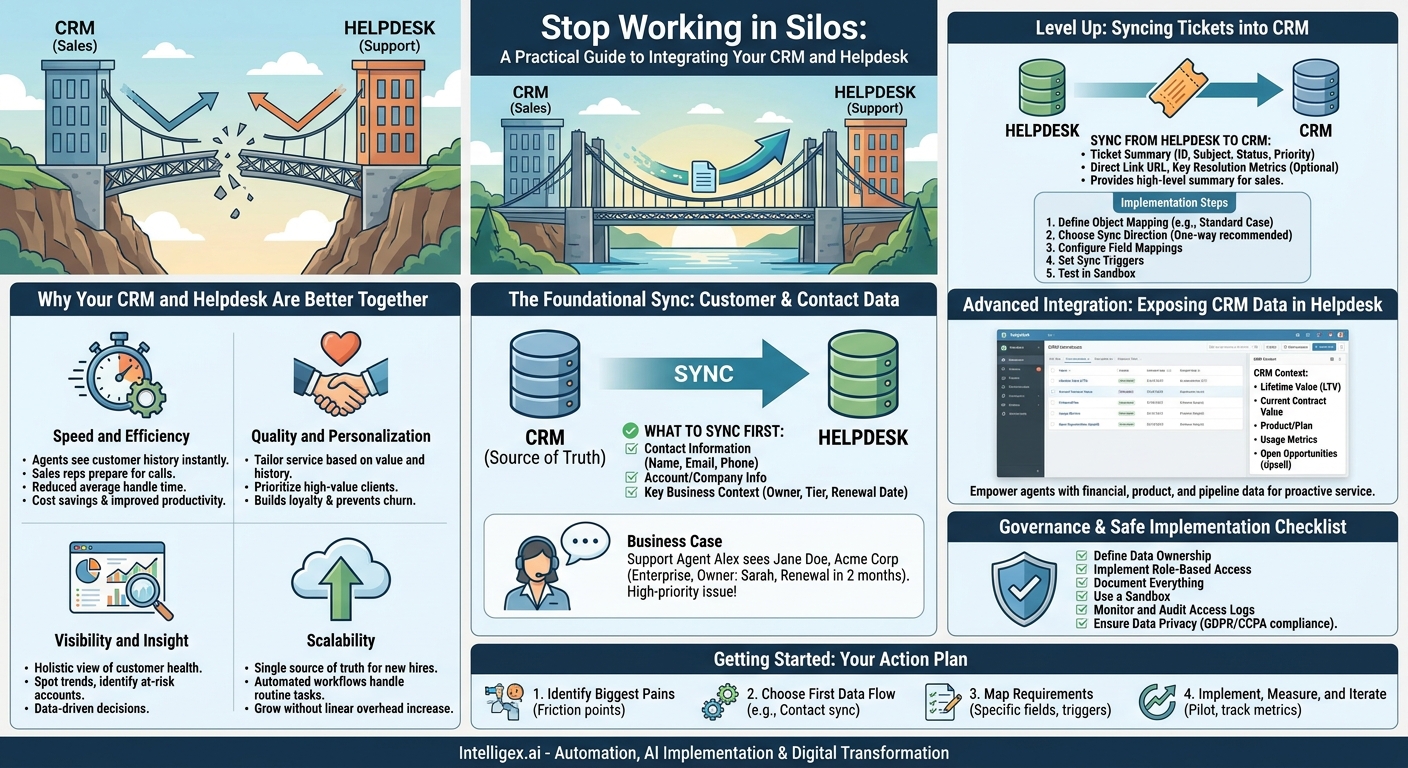
Your sales team works in the CRM. Your support team lives in the helpdesk. When these two systems don’t talk to each other, your customer experience suffers. Sales reps call customers without knowing they just had a frustrating support issue. Support agents answer questions without knowing the customer’s history, contract value, or strategic importance. This disconnect creates friction, wastes time, and ultimately, costs you money.
Integrating your Customer Relationship Management (CRM) and helpdesk platforms is more than just a technical convenience. It’s a foundational step in building a truly customer-centric operation. By creating a unified view of the customer journey, you empower every team to deliver faster, smarter, and more personalized service. This isn’t about chasing technology for its own sake; it’s about driving real business value: increased efficiency, higher customer retention, and more informed strategic decisions.
Why Your CRM and Helpdesk Are Better Together
Before diving into the specifics of what to sync, it’s crucial to understand the business value you’re unlocking. A successful integration isn’t measured by the number of fields you map, but by the improvements you see in core business metrics. The benefits typically fall into four key categories.
Speed and Efficiency
When support agents have customer history from the CRM at their fingertips, they spend less time asking repetitive questions (“Can you confirm your account number?”) and more time solving problems. This directly reduces average handle time. Similarly, when your sales team can see a customer’s support ticket history inside the CRM, they can prepare for conversations more effectively, avoiding awkward surprises and resolving potential issues proactively. This operational speed translates directly to cost savings and improved team productivity.
Quality and Personalization
A generic customer experience is no longer enough. Integrating your systems allows for a level of personalization that builds loyalty. Imagine a support agent who can see that a customer is a high-value, long-term partner. They can tailor their language, prioritize the ticket, and provide a level of service that reflects that relationship. This context prevents treating your biggest client like a brand new trial user, a mistake that can have significant financial consequences.
Visibility and Insight
Which customers are submitting the most support tickets? Are clients with a certain product line more likely to churn? Without integrated data, answering these questions requires manually exporting reports and stitching them together in spreadsheets. When helpdesk data flows into the CRM, you can build dashboards that provide a holistic view of customer health. This visibility allows leadership to spot trends, identify at-risk accounts, and make data-driven decisions about product development and customer success strategies.
Scalability
As your business grows, manual processes and data silos become unsustainable. An integrated system provides a scalable foundation for your customer operations. New sales reps and support agents can get up to speed faster because they have access to a single source of truth. Automated workflows between the systems can handle routine tasks, freeing up your teams to focus on high-value activities. This allows you to grow your customer base without a linear increase in operational overhead.
The Foundational Sync: Customer and Contact Data
The most logical and critical place to start any CRM and helpdesk integration is with your core customer data. This creates a single, authoritative source for who your customers are, ensuring consistency across all departments. Getting this right prevents confusion, duplicate records, and the embarrassing mistake of asking a customer for information you should already have.
What to Sync First
Don’t try to sync every single field from day one. This common mistake leads to cluttered interfaces and unnecessary complexity. Start with the essentials that provide the most immediate value.
- Contact Information: Name, email address, phone number, and title. This is the absolute minimum required to identify the person you’re interacting with.
- Account or Company Information: The company name the contact belongs to, and its associated website or address. This links individual contacts to a single business entity.
- Key Business Context Fields: This is where the real value begins. Sync critical fields from the CRM to the helpdesk like:
- Account Owner or Customer Success Manager
- Customer Tier (e.g., Enterprise, SMB, Trial)
- Contract Renewal Date
- Customer Since Date
The Business Case in Action
Let’s say a support ticket arrives. With a basic contact sync, your agent, Alex, sees the ticket is from Jane Doe at Acme Corp. With a more robust sync, Alex immediately sees more. The helpdesk interface shows that Acme Corp is an “Enterprise” tier client, their account owner is Sarah (from the sales team), and their contract is up for renewal in two months.
Instantly, Alex knows this isn’t just any ticket. It’s a high-priority issue from a key account at a critical time. Alex can solve the problem with the appropriate level of urgency and even send a quick note to Sarah, the account owner, giving her a heads-up. This coordinated, context-aware response is impossible when data lives in separate silos.
Level Up: Syncing Tickets and Cases into the CRM
Once you’ve established a single source of truth for customer identity, the next step is to give your customer-facing teams visibility into support interactions. This typically involves syncing ticket or case data from your helpdesk back into your CRM. The goal isn’t to replicate the entire helpdesk in the CRM, but to provide a clear, concise summary of support activity.
What to Sync from Helpdesk to CRM
Again, selectivity is key. The sales team doesn’t need to read every single email exchange. They need a high-level summary to inform their conversations.
- Ticket Summary Data: Sync the ticket ID, subject line, status (Open, Pending, Closed), priority, and creation date.
- A Direct Link: Always include a URL that links directly back to the original ticket in the helpdesk. If a sales rep needs more detail, they can click through to the source instead of cluttering the CRM interface.
- Key Resolution Metrics (Optional): For advanced reporting, consider syncing metrics like Time to First Response or Time to Resolution. This can help you analyze if certain customer segments are receiving slower service.
A Step-by-Step Process for Implementation
Mapping this data flow requires a structured approach. Whether you’re using a native integration (like the one between Salesforce and Service Cloud) or a third-party middleware tool, the logical steps are similar.
- Define Your Object Mapping: First, decide where this data will live in the CRM. Does a ticket from your helpdesk (e.g., Zendesk) map to the standard “Case” object in your CRM, or will you create a custom “Support Ticket” object? Using the standard Case object is often the simplest path.
- Choose Your Sync Direction: For ticket data, a one-way sync from the helpdesk to the CRM is usually the best starting point. This makes the helpdesk the system of record for support interactions, while the CRM is the system of record for the customer relationship. A two-way sync can add complexity (e.g., what happens if someone changes the status in both systems at once?).
- Configure Field Mappings: This is the core of the technical setup. You’ll map fields one-to-one. For example: Helpdesk `Ticket Subject` maps to CRM `Case Subject`; Helpdesk `Ticket Status` maps to CRM `Case Status`. Ensure your status fields have matching values (e.g., “Open” in both systems).
- Set Your Sync Triggers: Decide when data should be updated. A common configuration is to sync when a ticket is created and every time its status is updated. This ensures the CRM has near real-time information without overwhelming your systems with constant updates for every minor change.
- Test in a Sandbox: Before deploying to your entire team, test the integration thoroughly in a sandbox or development environment. Create test accounts and tickets to ensure data flows as expected and doesn’t cause any unintended consequences.
Advanced Integration: Exposing CRM Data in the Helpdesk
This is the reverse of the previous step and is arguably where support teams feel the most immediate benefit. By displaying key CRM data directly within the helpdesk interface, you empower your support agents with the business context they need to provide truly exceptional service. Most modern helpdesk platforms support this through sidebar apps or integrations that query the CRM in real time.
What to Display from CRM in Helpdesk
Think about the information that would change how an agent approaches a conversation. What data helps them prioritize, personalize, and solve problems more effectively?
- Financial Data: Display fields like Lifetime Value (LTV), current contract value, or recent purchase amounts. This helps agents immediately identify high-value customers.
- Product and Usage Data: Show which products or subscription plans the customer has. If you have product analytics, displaying a metric like “Last Seen” or “Key Feature Usage” provides powerful context.
- Sales Pipeline Information: Is there an open opportunity for a large upsell? Knowing this can change the entire tone of a support interaction. The agent can be extra careful to provide a positive experience and can flag any relevant information for the sales rep.
Scenario: From Problem Solver to Strategic Partner
A customer submits a ticket about being unable to generate a specific type of report. Without integration, the support agent simply walks them through the steps to create the report and closes the ticket.
With integration, the agent sees the same ticket, but their helpdesk sidebar shows information from the CRM: this customer is on the “Pro” plan, their usage of the reporting feature is high, and there is an open opportunity for the “Advanced Analytics” add-on being managed by a sales rep named David.
The agent solves the immediate problem, but then adds, “I see you use our reporting feature a lot. I wanted to let you know that the Advanced Analytics add-on could automate this for you and even schedule the report to be emailed to your team each week.” The agent then adds a private note to the ticket, which syncs back to the opportunity in the CRM, telling David about the conversation. The support agent has now gone from a simple problem solver to an active participant in the customer’s success and the company’s growth.
A Note on Governance and Safe Implementation
Integrating systems that hold sensitive customer and commercial data requires a thoughtful approach to governance and security. Moving data between platforms increases its exposure, so it’s critical to implement safeguards from the beginning. This isn’t just about compliance; it’s about building trust with your customers and ensuring the long-term integrity of your data.
Control Access with Care
The principle of least privilege is paramount. A frontline support agent might need to see a customer’s subscription tier, but they probably don’t need to see the detailed notes from every sales call or the exact value of a pending deal. Use role-based access controls in both your CRM and helpdesk to ensure that users can only see the information that is strictly necessary for their role. This minimizes the risk of accidental data exposure or misuse.
Plan for Data Privacy
Regulations like GDPR and CCPA give customers the right to access and delete their data. An integration adds complexity to these requests. You must have a clear, documented process for handling a data deletion request across all connected systems. If a contact is deleted in your CRM, what happens to their tickets in the helpdesk? Define these rules before you go live to ensure you can remain compliant.
When you start using AI features that leverage this integrated data, such as AI-powered ticket summaries or sentiment analysis, be transparent. Ensure that any automated decision-making process has a “human in the loop” for review, especially when it impacts the customer experience. An AI can flag a customer as “at-risk,” but an account manager should be the one to verify and act on that insight.
A Checklist for Safe Integration
- Define Data Ownership: For every piece of shared data (like “Customer Status”), assign a single system as the “source of truth” to prevent conflicts.
- Implement Role-Based Access: Configure permissions in both platforms before syncing any sensitive data.
- Document Everything: Keep a clear record of your data mappings, sync logic, and business rules. This is invaluable for future troubleshooting and enhancements.
- Use a Sandbox: Never build or test an integration in your live production environment. A sandbox allows you to experiment safely without affecting real customers.
- Monitor and Audit: After launch, regularly monitor your integration for errors and audit access logs to ensure it’s being used as intended.
Getting Started: Your Integration Next Steps
Integrating your CRM and helpdesk is a journey, not a one-time project. The key is to start with a clear plan that focuses on solving your most pressing business problems first. By delivering value incrementally, you can build momentum and stakeholder support for more advanced integrations down the road.
Here is a simple action plan to get you started:
- Identify Your Biggest Pains: Get leaders from Sales, Support, and Operations in a room. Ask them: What is the biggest source of friction in our customer handoffs? Where are we wasting the most time on manual data entry? Prioritize the top 1-3 problems that an integration could solve.
- Choose Your First Data Flow: Based on your pain points, pick one high-impact, low-complexity data flow to implement first. For most companies, this is syncing foundational Account and Contact data from the CRM to the helpdesk. It’s a quick win that delivers immediate value.
- Map the Requirements: Don’t just talk about “syncing contacts.” Get specific. Which fields are required? Who needs to see them? What is the trigger for the sync? Document these details before you start any technical work.
- Implement, Measure, and Iterate: Build your first integration and roll it out to a small pilot group. Track the impact on key metrics. Is average handle time going down? Are sales reps reporting better-informed conversations? Use this feedback to refine the process and plan your next phase.
By connecting these critical systems, you’re not just moving data around. You’re building a more intelligent, responsive, and efficient organization. You’re empowering your teams with the context they need to stop working in silos and start working together to create an exceptional customer experience.
Your Next Read:
Get a FREE
Proof of Concept
& Consultation
No Cost, No Commitment!
