

The relentless hum of the modern enterprise is data. Yet, in many organizations, the accounts payable (AP) department remains an outlier, a place where manual processes and paper documents still dictate the pace of business. The journey of an invoice, from its arrival to final payment, is often a winding, inefficient path fraught with potential for error, delay, and unnecessary cost. Invoice Processing Automation (IPA) offers a powerful solution, but to truly appreciate its transformative potential, we must look beyond the surface-level benefits and delve into its core architecture. Understanding the intricate system of technologies and workflows that power IPA reveals not just a tool, but a fundamental redesign of a critical business function.
This is not merely about scanning a document and having a computer read it. A robust IPA architecture is a multi-layered, intelligent ecosystem designed to ingest, understand, validate, and act upon invoice data with minimal human intervention. It’s an assembly of specialized engines, logical workflows, and seamless integrations that collectively create a straight-through processing pipeline for the vast majority of invoices, freeing human experts to manage only the exceptions.
The Architectural Blueprint: A Layer-by-Layer Breakdown
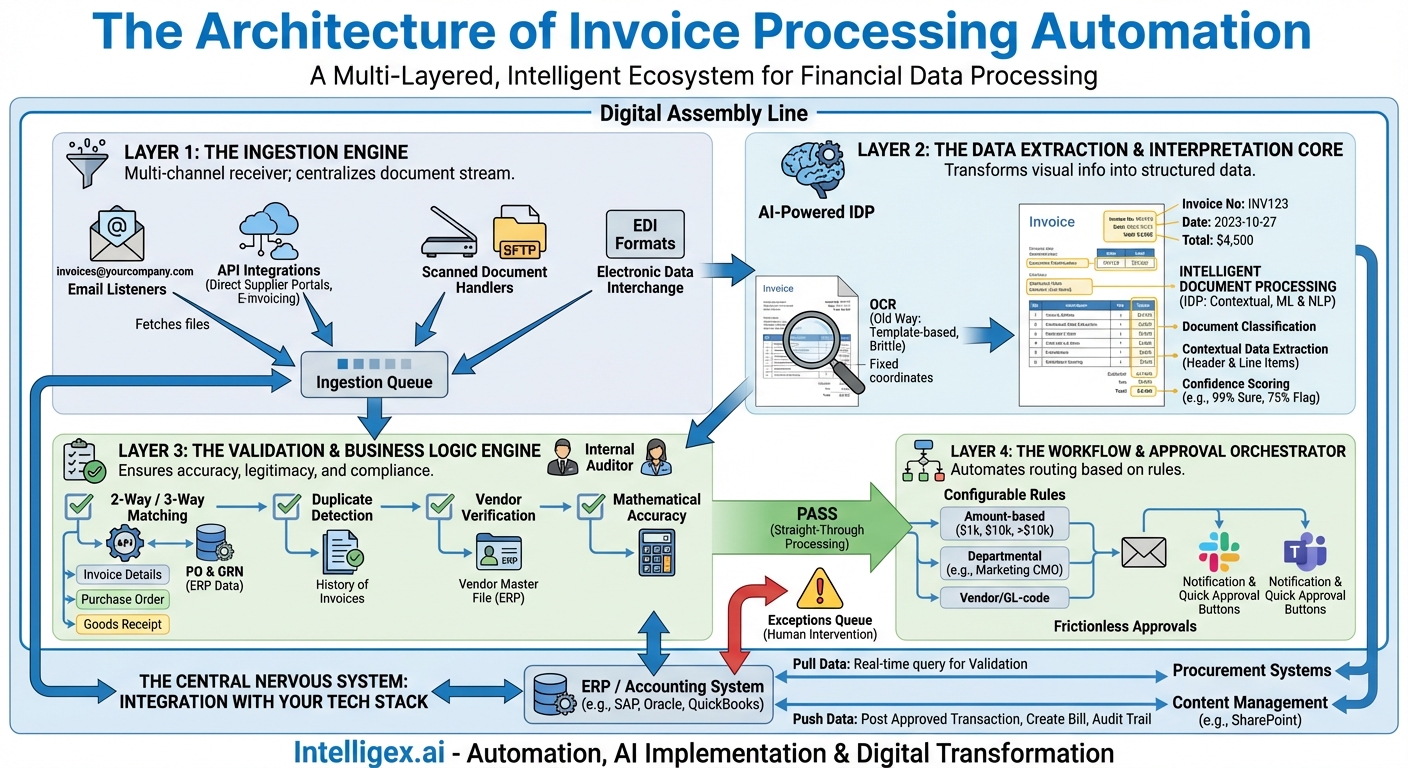
At its heart, an invoice processing automation system can be deconstructed into four primary architectural layers. Each layer performs a distinct function, handing off its processed output to the next in a seamless, orchestrated sequence. Think of it as a digital assembly line for financial data.
Layer 1: The Ingestion Engine
The first challenge in automation is dealing with variety. Invoices arrive through a multitude of channels, and the architecture must be agnostic and adaptable enough to handle them all. The Ingestion Engine is the system’s front door, a multi-channel receiver designed to capture invoices regardless of their source or format.
- Email Listeners: The most common channel. The system continuously monitors dedicated email inboxes (e.g.,
[email protected]) using protocols like IMAP or POP3. It automatically fetches incoming emails, detaches the invoice files (PDF, JPG, TIFF, etc.), and passes them to the next layer. - API Integrations: For more sophisticated suppliers, the system can connect directly to their portals or e-invoicing networks (like Peppol) via Application Programming Interfaces (APIs). This is the most reliable method, as it involves structured data exchange rather than document interpretation.
- Scanned Document Handlers: For the lingering world of paper, invoices are scanned and placed into a designated network folder. The Ingestion Engine “watches” this folder, automatically picking up any new files for processing. This is often handled via SFTP (Secure File Transfer Protocol) for security.
- Electronic Data Interchange (EDI): A long-standing method used by large enterprises for a standardized, computer-to-computer exchange of business documents. The architecture must be able to receive and parse these structured EDI formats.
The goal of the Ingestion Engine is to centralize the chaos. It takes a chaotic stream of documents from disparate sources and funnels it into a single, standardized queue for the next, more intelligent, processing layer.
Layer 2: The Data Extraction & Interpretation Core
This is where the “magic” truly begins. An invoice is a semi-structured document; while it contains standard fields like vendor name, invoice number, and line items, their position, layout, and language can vary wildly. The Interpretation Core’s job is to transform this visual information into structured, machine-readable data.
This layer has evolved significantly over time:
- Optical Character Recognition (OCR): The foundational technology. OCR engines scan an image of an invoice and convert the characters into digital text. Early OCR was template-based, meaning it had to be pre-programmed with the exact coordinates of where to find the invoice number or total amount for each specific vendor’s invoice layout. This was brittle and required immense setup and maintenance.
- Intelligent Document Processing (IDP): Modern IPA architectures have moved far beyond simple OCR. IDP is the AI-powered evolution, leveraging Machine Learning (ML) and Natural Language Processing (NLP) to read documents like a human would—by understanding context.
An IDP-based engine doesn’t just look for text at a specific coordinate. It performs several sophisticated tasks:
- Document Classification: First, it identifies the document type. Is this an invoice, a credit memo, a purchase order, or a shipping receipt?
- Contextual Data Extraction: Using NLP, the model understands the relationship between words. It knows that the text “Invoice No.” is a label and that the string of characters next to it is the corresponding value. It can accurately identify header-level data (vendor name, invoice date, due date, totals) and complex table-level data (individual line items with quantity, description, unit price, and line total). This capability allows it to process invoices from vendors it has never seen before with remarkable accuracy.
- Confidence Scoring: Crucially, the AI assigns a confidence score to each piece of extracted data. If it is 99% sure about the invoice total but only 75% sure about a specific line-item quantity, it can flag that specific field for human review, rather than stopping the entire process.
Layer 3: The Validation & Business Logic Engine
Extracting data is only half the battle. The data must then be validated against your company’s own records and business rules to ensure it is accurate, legitimate, and compliant. This engine acts as the system’s internal auditor, running a series of automated checks in seconds that would take a human clerk several minutes, or even hours, to perform.
- Two-Way and Three-Way Matching: This is the cornerstone of AP validation. The engine makes API calls to your ERP or procurement system to perform these checks automatically.
- Two-Way Match: It compares the invoice details (quantities, prices) against the corresponding Purchase Order (PO).
- Three-Way Match: For businesses that track deliveries, it adds a third check, comparing the invoice against both the PO and the Goods Receipt Note (GRN) to ensure the company is only paying for goods or services that were both ordered and received.
- Duplicate Detection: The system checks the extracted vendor name and invoice number against the history of all processed invoices to prevent accidental duplicate payments, a common and costly manual error.
- Vendor Verification: It cross-references vendor details on the invoice (name, address, tax ID) with the vendor master file in the ERP to ensure the vendor is legitimate and approved. This is a critical fraud prevention step.
- Mathematical Accuracy: The engine performs basic calculations, verifying that the sum of line items matches the subtotal, that tax calculations are correct, and that the final total adds up properly.
Invoices that pass all these checks are flagged for “straight-through processing.” Those that fail, for example due to a price mismatch, are automatically routed to an exceptions queue for human intervention.
Layer 4: The Workflow & Approval Orchestrator
Once an invoice is validated (or flagged as an exception), it must be directed to the right person or department for coding and final approval. The Workflow Orchestrator automates this entire routing process, eliminating email chains and lost paperwork.
This engine is typically a highly configurable, rules-based system. Administrators can build complex approval hierarchies based on any number of variables extracted from the invoice or ERP data:
- Amount-based routing: Invoices under $1,000 are auto-approved; invoices from $1,001 to $10,000 require a department manager’s approval; invoices over $10,000 require both a manager and a VP.
- Departmental routing: Invoices with a PO coded to the Marketing department are sent to the CMO for approval.
- Vendor-specific or GL-code routing: Invoices from a specific legal firm or for a particular project are sent directly to the relevant stakeholder.
The orchestrator integrates with standard business communication tools. When an invoice requires a manager’s approval, they don’t have to log into a separate system. Instead, they receive a notification via email, Slack, or Microsoft Teams with a summary of the invoice and simple “Approve” or “Reject” buttons, making the process frictionless and fast.
The Central Nervous System: Integration with Your Tech Stack
A modern IPA architecture does not operate in a silo. Its true power is unleashed through its deep and seamless integration with the organization’s existing financial and operational systems. These integrations form the connective tissue, the central nervous system that allows data to flow freely and actions to be synchronized across the entire procure-to-pay lifecycle.
The most critical integration point is with the Enterprise Resource Planning (ERP) or accounting system (e.g., SAP, Oracle NetSuite, Microsoft Dynamics, QuickBooks). The IPA platform must have a bi-directional relationship with the ERP. It needs to:
- Pull Data: It continuously queries the ERP for real-time data needed for validation, such as open purchase orders, vendor master files, and goods receipt records.
- Push Data: Once an invoice is fully approved, the IPA system’s final architectural act is to post the transaction data to the ERP. It creates a bill or voucher payable record, complete with all necessary coding, the invoice image, and a full audit trail. This single action eliminates the final, most error-prone manual data entry step in the entire process.
Other key integrations include procurement systems for enhanced PO matching and content management platforms like SharePoint for long-term, compliant archival of all invoice-related documents.
An Invoice’s Journey: The Automated Workflow in Action
Let’s trace a single invoice through this architecture. A PDF from a supplier arrives via email. The Ingestion Engine fetches it. The IDP Core reads it, extracting all key data with 99% confidence and identifying the related PO number. The Validation Engine then makes an API call to the ERP, finds the matching PO and a corresponding GRN, confirms the prices and quantities are identical, and verifies the math. The three-way match is successful. The Business Logic Engine sees the invoice total is $4,500 and is coded to the IT department. The Approval Orchestrator automatically routes it to the IT Director’s queue, sending them a Teams message. The director reviews the details on their phone and clicks “Approve.” In the final step, the system pushes all the data into the ERP, creating a bill ready for payment. The entire process, from receipt to ready-for-payment, takes less than five minutes, with zero manual keystrokes.
Building a Future-Proof Accounts Payable Function
The architecture of invoice processing automation is a testament to how intelligent systems can deconstruct and re-engineer a complex business process. By layering technologies for ingestion, interpretation, validation, and workflow orchestration, and underpinning it all with deep ERP integration, organizations can achieve a level of efficiency and accuracy that is simply impossible in a manual environment. This architectural shift does more than just speed up payments; it transforms the AP department from a cost-centric data entry hub into a strategic financial function, empowering staff to focus on vendor management, cash flow optimization, and data analysis that drives real business value.
Your Next Read:
Get a FREE
Proof of Concept
& Consultation
No Cost, No Commitment!
