

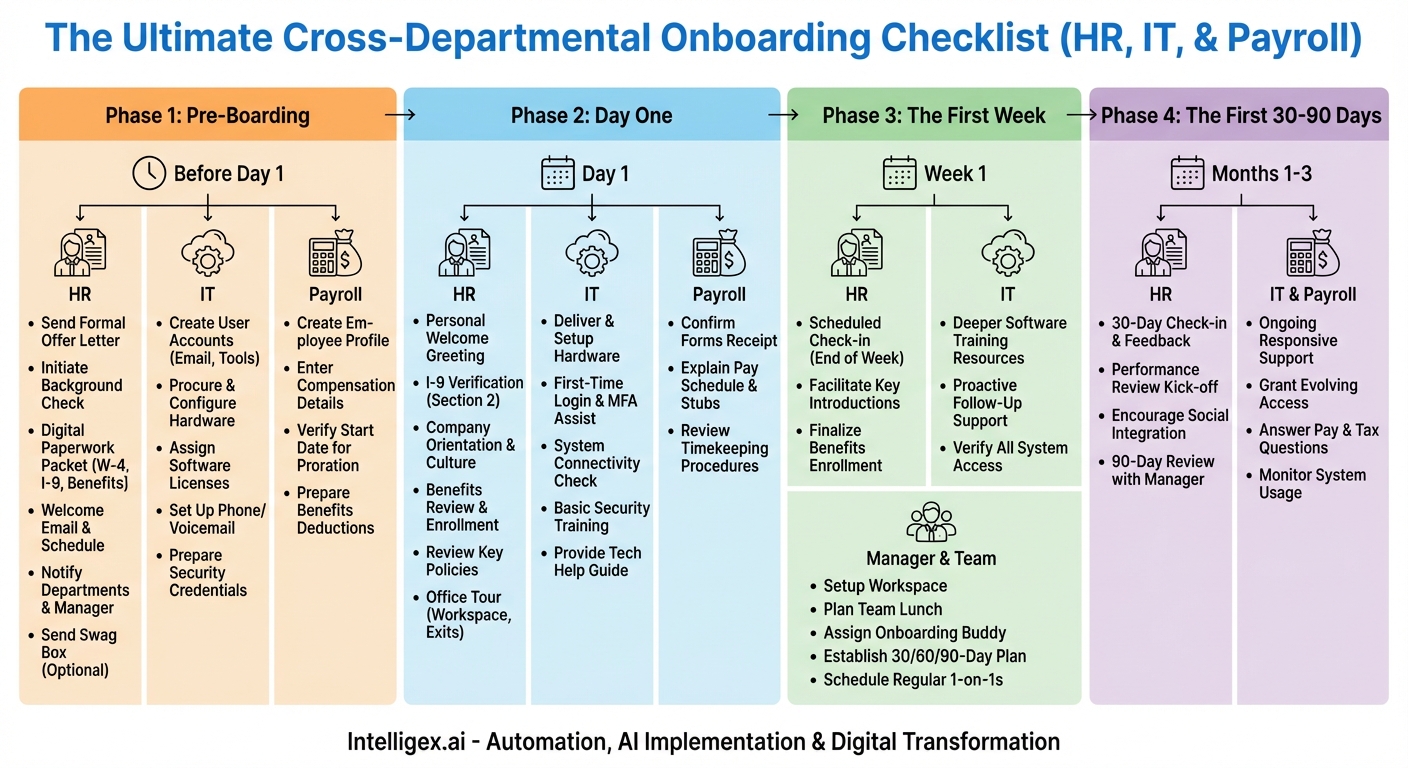
The journey of a new employee doesn’t begin on their first day; it starts the moment they accept your offer. Similarly, their success isn’t determined by a single training session, but by a carefully orchestrated onboarding process that makes them feel welcomed, prepared, and valued. A disjointed or chaotic onboarding experience can lead to confusion, disengagement, and, ultimately, higher turnover. According to research by Gallup, only 12% of employees strongly agree their organization does a great job of onboarding new employees. This staggering statistic reveals a massive opportunity for companies willing to invest in a structured, thoughtful process.
The secret to exceptional onboarding lies in seamless cross-departmental collaboration. It’s a carefully choreographed dance between Human Resources (HR), Information Technology (IT), and Payroll. When these three pillars work in unison, they create a stable and supportive foundation for the new hire. When they operate in silos, the new employee is the one who feels the cracks, spending their crucial first days chasing down logins, clarifying pay details, or wondering what’s expected of them. This comprehensive checklist breaks down the onboarding journey by timeline and department, ensuring no detail is overlooked and every new hire is set up for long-term success.
Phase 1: Pre-Boarding (From Offer Acceptance to Day One)
This is arguably the most critical phase. The period between offer acceptance and the first day is fraught with potential for buyer’s remorse. A strong pre-boarding process reinforces the new hire’s decision, builds excitement, and handles administrative hurdles before they even set foot in the office. This ensures their first day is about connection, not paperwork.
HR’s Pre-Boarding Checklist:
- Send a Formal Offer Letter: Once the verbal offer is accepted, immediately send the official written offer letter detailing salary, benefits, start date, and other key terms.
- Initiate Background Check: If required, start the background check process promptly and communicate the steps clearly to the candidate.
- Digital Paperwork Packet: Send a welcome email with a link to a digital portal for all necessary paperwork. This includes the W-4, I-9 (Section 1), direct deposit form, benefits enrollment information, and employee handbook acknowledgment. Completing this ahead of time is a massive time-saver.
- The “Welcome Aboard” Email: A few days before their start date, send a warm, welcoming email. Include practical details like the first-day schedule, dress code, where to park or enter the building, and who they should ask for upon arrival. CC their new manager.
- Coordinate with Other Departments: Officially notify IT, Payroll, and the hiring manager of the new employee’s name, title, and start date. This is the trigger for their respective processes.
- (Optional but Recommended) Send a Swag Box: A small welcome package with company merchandise like a mug, t-shirt, or notebook sent to their home can generate significant excitement and make them feel part of the team before they even start.
IT’s Pre-Boarding Checklist:
- Create User Accounts: Based on the HR notification, create all necessary system accounts. This includes email, internal messaging platforms (Slack, Microsoft Teams), project management tools (Jira, Asana), HRIS, and any role-specific software.
- Procure and Prepare Hardware: Order and configure the new employee’s laptop, monitor(s), keyboard, mouse, and any other required hardware. Ensure it’s imaged with the standard company software suite.
- Assign Licenses: Allocate necessary software licenses (e.g., Adobe Creative Suite, Microsoft 365, specific development tools) to the new user account.
- Set Up Phone/Voicemail: If the role requires a desk phone or company mobile, set up the line and voicemail.
- Prepare Security Credentials: Generate initial login credentials and prepare any necessary security fobs or access badges. Ensure these are stored securely and ready for Day One.
Payroll’s Pre-Boarding Checklist:
- Create Employee Profile in Payroll System: Using the information from HR, create a new employee profile in the payroll software (e.g., ADP, Gusto, Workday).
- Enter Compensation Details: Accurately input their salary or hourly rate, pay frequency, and any guaranteed bonuses or commissions. Double-check this against the offer letter.
- Verify Start Date for Proration: Note the start date to ensure their first paycheck is correctly prorated if they start mid-pay-period.
- Prepare for Benefits Deductions: Set up placeholders for benefits deductions, which will be finalized once the employee completes their enrollment.
Phase 2: Day One (The Welcome Experience)
The goal of the first day is to make the new employee feel welcome, oriented, and productive—without overwhelming them. It should be a positive, memorable experience that validates their decision to join your company.
HR’s Day One Checklist:
- Be Ready to Greet Them: Have someone from HR (or their manager) ready to welcome the new hire at the agreed-upon time. A warm, personal greeting makes a huge difference.
- I-9 Verification: Complete Section 2 of the Form I-9. This is a legal requirement in the U.S. and must be done in person by examining their identification documents.
- Company Orientation: Provide a high-level overview of the company’s mission, vision, values, and culture. Introduce them to the organizational structure and key leaders.
- Benefits Review: Walk through the benefits package in detail and answer any questions they have. Clearly explain enrollment deadlines.
- Review Key Policies: Briefly cover critical policies such as the code of conduct, IT security, and time-off requests. Avoid a dry, monotonous reading of the handbook.
- Office Tour: Show them the essential spots: their workspace, restrooms, kitchen/break areas, and emergency exits.
IT’s Day One Checklist:
- Deliver and Set Up Hardware: Personally deliver the prepared hardware to the employee’s desk. Help them with the initial power-up and login process.
- First-Time Login Assistance: Guide them through changing their temporary password and setting up multi-factor authentication (MFA).
- System Connectivity Check: Ensure they can successfully connect to the internet (Wi-Fi/Ethernet) and access core systems like their email and internal messaging.
- Basic Security Training: Provide a brief but mandatory overview of cybersecurity best practices, including phishing awareness, password policies, and responsible data handling.
- Provide a “Tech Help” Guide: Give them a one-sheet (digital or physical) with instructions on how to submit an IT support ticket, who to contact for help, and FAQs.
Payroll’s Day One Checklist:
- Confirm Receipt of Forms: Verify that the direct deposit and tax withholding forms have been received and processed correctly.
- Explain Pay Schedule and Pay Stubs: Briefly explain the company’s pay cycle (e.g., bi-weekly, semi-monthly), when they can expect their first paycheck, and how to access their pay stubs online.
- Review Timekeeping Procedures: For non-exempt employees, provide clear instructions on how to clock in and out and submit their timesheets. Explain overtime policies.
Phase 3: The First Week (Building Momentum)
During the first week, the focus shifts from orientation to integration. The new hire should begin to understand their role, meet their team, and start working on small, meaningful tasks.
HR’s First Week Checklist:
- Scheduled Check-in: Schedule a brief, informal check-in towards the end of the week. Ask, “How is everything going? What questions have come up? Is there anything you need?”
- Facilitate Introductions: Help the hiring manager ensure the new employee has been introduced to key people they’ll be working with outside of their immediate team.
- Finalize Benefits Enrollment: Send a reminder about the deadline for benefits enrollment and offer assistance if needed.
IT’s First Week Checklist:
- Deeper Software Training: Schedule or provide resources for training on more complex, role-specific software.
- Follow-Up Support: Proactively check in to see if they have encountered any technical issues or have questions about using the company’s systems.
- Verify All System Access: Double-check that all their required permissions and access rights are functioning as intended. It’s common for a niche system to be missed in the initial setup.
Manager & Team’s Role (Supported by All Departments):
- Set Up the Workspace: Before Day One, ensure their desk is clean, equipped with basic supplies, and ready to go.
- Plan a Team Lunch: A welcome lunch on the first or second day is a fantastic way to break the ice in a casual setting.
- Assign an Onboarding Buddy: Pair the new hire with a peer who can answer informal questions about company culture, processes, and “how things are done around here.”
- Establish a 30/60/90-Day Plan: Work with the new hire to set clear, achievable goals for their first three months. This provides a roadmap for success.
- Schedule Regular 1-on-1s: Put weekly check-in meetings on the calendar from the very beginning to establish a cadence of open communication.
Phase 4: The First 30-90 Days (Driving Integration)
The onboarding process doesn’t end after the first week. The first three months are crucial for solidifying training, building relationships, and ensuring the employee is on a path to becoming a fully contributing member of the team.
HR’s 30-90 Day Checklist:
- 30-Day Check-in: Conduct a more formal check-in to discuss how they are settling into their role and the company culture. Gather feedback on the onboarding process itself—this is invaluable for future improvements.
- Performance Review Kick-off: Ensure the manager has discussed the performance review process and that goals are clearly documented in the HRIS.
- Encourage Social Integration: Inform them about company social events, employee resource groups (ERGs), or other cultural activities.
- 90-Day Review: Facilitate a formal 90-day review between the employee and their manager to assess progress against the initial plan and set goals for the future.
IT & Payroll’s Ongoing Role:
Beyond the first week, IT and Payroll transition into a supportive role. Their primary function is to be responsive and helpful. For IT, this means providing timely support for any technical issues and granting access to new systems as the employee’s role evolves. For Payroll, it means being available to answer any questions about pay, taxes, or deductions, especially after the first full paycheck is received.
Ultimately, a successful onboarding program is an investment that pays for itself many times over. It transforms an administrative process into a strategic advantage, boosting employee engagement, accelerating time-to-productivity, and dramatically improving retention. By using a coordinated, cross-departmental checklist, you ensure that every new hire receives a consistent, comprehensive, and welcoming experience that sets the stage for a long and successful career with your organization.
Your Next Read:
Category:
Get a FREE
Proof of Concept
& Consultation
No Cost, No Commitment!
