

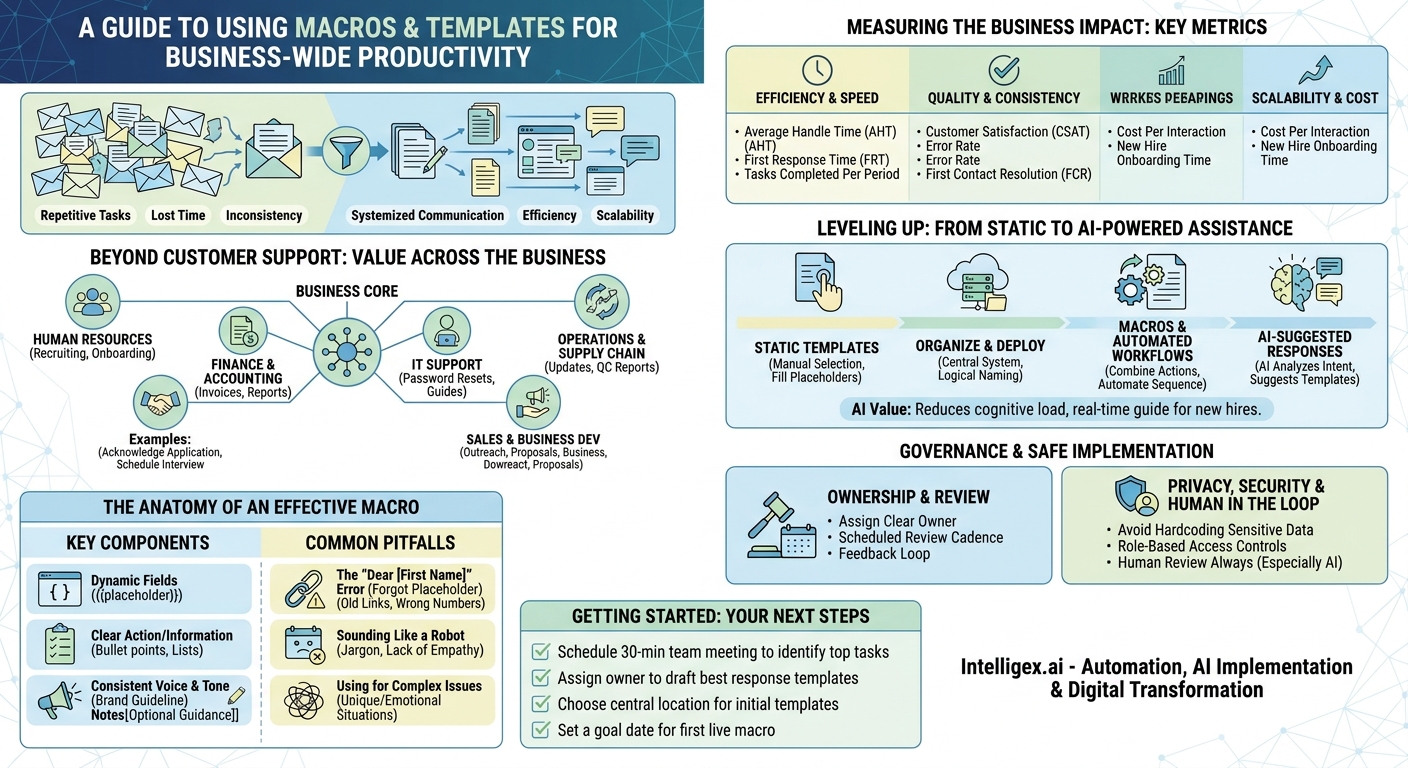
In any growing business, a silent tax on productivity builds up one email, one ticket, and one status update at a time. It’s the time your team spends answering the same questions, providing the same instructions, and typing the same messages over and over. This repetition doesn’t just drain time and increase operational costs; it introduces inconsistency, slows down responses, and burns out your best people. The solution isn’t just about working harder. It’s about working smarter by systemizing your communications with support macros and templates.
While often associated with customer support helpdesks, the power of standardized responses extends across every department. They are a foundational tool for digital transformation, enabling teams to deliver high-quality, consistent information at scale. By embedding your best practices directly into your daily workflows, you create a more efficient, reliable, and scalable operation, freeing up your team to focus on the complex, high-value work that truly drives the business forward.
Beyond Customer Support: Value Across the Business
The first mistake many organizations make is confining templates to the customer service department. Any role that involves repetitive communication can benefit. Think about the common interactions that happen every day in different parts of your company. Standardizing these exchanges delivers consistent value and frees up significant time.
Here are just a few examples of where macros and templates can have an immediate impact:
- Human Resources: An HR team handles a high volume of predictable inquiries. Instead of writing each response from scratch, they can use templates for tasks like acknowledging a job application, scheduling interviews, sending onboarding instructions to new hires, or answering common questions about benefits. This ensures every candidate and employee receives timely, accurate, and consistently branded information.
- Finance and Accounting: The finance department is a hub of recurring communication. Templates can streamline sending invoice payment reminders, requesting missing information for expense reports, or notifying department heads about budget submission deadlines. This reduces manual effort and minimizes errors in critical financial processes.
- IT Support: Internal IT teams face a constant stream of similar requests. Macros are perfect for providing step-by-step instructions for a password reset, guiding an employee through a software installation, or sending out a notification about a planned system maintenance window. This results in faster ticket resolution and less downtime for employees.
- Sales and Business Development: A sales team’s effectiveness hinges on timely and professional communication. Templates can be used for initial outreach to a new lead, following up after a meeting, or sending a standard proposal cover letter. This allows salespeople to focus their energy on building relationships and closing deals, not on composing routine emails. For a powerful CRM platform that supports this, you can explore tools like Salesforce.
- Operations and Supply Chain: Clear communication is essential for a smooth supply chain. Templates help manage routine interactions like requesting a status update from a vendor, confirming a shipment with a logistics partner, or sending a quality control report to a supplier. This creates a clear, auditable trail of communication and reduces misunderstandings.
The common thread is simple: if a question has been asked before, it will be asked again. By creating a standardized answer, you codify your best response and make it instantly available to everyone on the team.
The Anatomy of an Effective Macro
A poorly constructed template can do more harm than good, coming across as robotic, impersonal, or unhelpful. The goal is not to eliminate human interaction but to handle the repetitive parts of it efficiently. A great macro or template is a well-designed tool that empowers your team to be both fast and personal.
Key Components of a Powerful Template
Effective templates are built with a few core elements that make them flexible and user-friendly.
- Dynamic Fields (Placeholders): This is the most critical element for personalization. Placeholders are variables that automatically pull specific information into the template, such as the customer’s name, a ticket number, an invoice due date, or a product name. Using `{{customer.first_name}}` instead of a generic greeting immediately makes the communication feel more personal.
- Clear Action or Information: The body of the template should be direct and easy to understand. If you are asking the recipient to do something, make the call to action obvious. If you are providing information, structure it logically with bullet points or numbered lists for readability.
- Consistent Voice and Tone: Every template should sound like it came from your company. Before writing, define your communication style. Are you formal and professional, or friendly and casual? Ensuring all templates adhere to this guideline creates a cohesive brand experience.
- Internal Notes and Optional Sections: Sometimes a template needs slight variations. Include clear internal notes, often in brackets like `[If customer is asking about Project X, include this paragraph]`, to guide your team member on how to customize the message for specific situations.
Common Pitfalls to Avoid
Building a template library is easy to start but requires care to maintain. Watch out for these common issues:
- The “Dear [First Name]” Error: The most infamous mistake is forgetting to replace a placeholder. This instantly signals a canned response and can damage trust. Good training and well-designed software can help prevent this.
- Outdated Information: A template is a living document. If it contains a link to an old policy, an incorrect phone number, or a reference to a discontinued service, it creates confusion and frustration. Templates must be reviewed and updated regularly.
- Sounding Like a Robot: Efficiency should not come at the expense of empathy. Avoid overly formal or jargon-heavy language. Write your templates as if you were speaking to a person, then refine the language to be clear and concise.
- Using a Template for a Complex Issue: Templates are for common, simple situations. When a customer or colleague has a unique, complex, or emotionally charged issue, a template is the wrong tool. Your team needs to be trained to recognize when to abandon the script and provide a thoughtful, personalized response.
A Step-by-Step Guide to Creating Your First Template Library
Building a comprehensive library of macros can feel daunting, but starting small with a focused approach is the key to success. By following a structured process, you can create a valuable resource that delivers immediate results.
- Identify High-Frequency, Low-Complexity Tasks: The first step is to find the best candidates for templating. Don’t guess. Use data. Look through your team’s sent emails, support ticket history, or project management comments from the last month. Tag or categorize every interaction to find the top 5-10 most common questions or requests. These are your starting points.
- Gather and Analyze Your Best Responses: You don’t need to reinvent the wheel. Your team is already answering these questions. Ask your top performers to share their best-written responses to the common queries you identified. Analyze what makes them effective. Is the language clear? Is the structure logical? Do they anticipate the next question?
- Draft the Master Template: Synthesize the best elements from the examples you gathered into a single “master” version. Write the core message, and then identify every piece of information that will change with each use (e.g., name, date, order number) and replace it with a clear placeholder like `{{ticket_id}}`. Add internal notes to guide the user on how and when to use the template.
- Conduct a Peer Review: Share the draft with the team that will be using it. Ask for feedback with specific questions. Does this template accurately answer the question? Will it save you time? Is anything confusing? Is the tone right? This collaborative step ensures the final product is practical and gets buy-in from your team.
- Organize and Deploy in a Central System: Templates are useless if people can’t find them. Implement them directly into the software your team uses every day, such as your CRM, helpdesk platform like Zendesk, or email client. Use a logical naming convention (e.g., “Password Reset – Instructions” or “Invoice – First Reminder”) so users can quickly find what they need.
- Train Your Team and Monitor Usage: Don’t just launch the library and hope for the best. Hold a short training session to show your team where the templates are, how to use them, and when a personalized response is more appropriate. After launch, monitor usage and ask for ongoing feedback to identify which templates are most valuable and which need refinement.
Measuring the Business Impact: Key Metrics to Track
Implementing macros is not just an operational tweak; it is a business improvement initiative. To demonstrate its value and justify further investment, you need to track the right metrics. The impact can be seen across efficiency, quality, and scalability.
Efficiency and Speed Metrics
These metrics show how templates help your team get more done in less time.
- Average Handle Time (AHT): For roles that handle tickets or cases, this is the total time spent from when an interaction starts until it is closed. Macros reduce the time spent typing and searching for information, which can significantly lower AHT.
- First Response Time (FRT): This measures how quickly a team member acknowledges a new request. With templates, your team can send a helpful, informative initial reply in seconds, improving the perception of responsiveness.
- Tasks Completed Per Period: Whether it’s tickets resolved, invoices sent, or candidates screened, tracking the total output per employee per day or week can show a clear lift in productivity after implementing a template library.
Quality and Consistency Metrics
Efficiency is meaningless if quality suffers. These metrics ensure your standards remain high.
- Customer Satisfaction (CSAT): By providing faster, more accurate, and more consistent answers, templates can lead to higher satisfaction scores. Monitor your CSAT or other feedback scores before and after implementation.
- Error Rate: Track the percentage of responses that contain factual errors, typos, or broken links. Because templates are reviewed and approved, they should dramatically reduce the rate of human error in your communications.
- First Contact Resolution (FCR): This measures the percentage of issues resolved in a single interaction. A well-written template that anticipates follow-up questions can increase your FCR rate, which is a strong driver of customer satisfaction.
Scalability and Cost Metrics
This is where the long-term strategic value becomes clear.
- Cost Per Interaction: By reducing the time it takes to handle each task, you directly lower the labor cost associated with it. This is a powerful metric for making the business case.
- New Hire Onboarding Time: With a comprehensive library of best-practice responses, new team members can become competent and productive much faster. They don’t have to learn how to answer every question from scratch; they can learn from the collective knowledge embedded in your templates.
Leveling Up: From Static Templates to AI-Powered Assistance
Static templates are a powerful first step, but technology now allows for more dynamic and intelligent forms of assistance. Understanding the progression from basic to advanced tools helps you build a roadmap for continuous improvement.
The evolution typically follows three stages:
- Static Templates: This is the foundation. A user manually browses a list, selects the appropriate pre-written text, fills in the placeholders, and sends the message. The user does all the work of choosing the right response.
- Macros and Automated Workflows: This is a step beyond simple text replacement. A macro can combine a template with one or more actions. For example, a single click on a “Resolve Ticket” macro could simultaneously apply a pre-written response, change the ticket status to “Closed,” and add a specific tag for reporting. This automates a sequence of tasks, not just the text.
- AI-Suggested Responses: This is where modern AI enters the picture. Instead of the user searching for a template, the system analyzes the incoming message (an email, a support ticket, a chat) and uses natural language processing to understand its intent. It then automatically suggests one or more relevant templates, often with the placeholders already filled from the context of the conversation. The user simply has to review the suggestion, make any needed edits, and click send.
The primary business value of AI-powered suggestions is the reduction in cognitive load. The system does the work of finding the right information and presenting it to the user at the exact moment they need it. This not only makes experienced employees faster but also acts as a real-time training guide for new hires, helping them respond with the confidence and accuracy of a seasoned expert.
Governance and Safe Implementation
A library of macros and templates is a valuable knowledge asset. Like any asset, it requires proper management and governance to remain effective and secure, especially as you begin to incorporate AI.
Establishing Clear Ownership and Review
A common failure point is a “set it and forget it” mentality. To prevent your templates from becoming outdated, you need a clear governance model.
- Ownership: Assign a clear owner for the template library. This could be a team lead, a department head, or a small “center of excellence” committee. Their responsibility is to approve new templates, retire old ones, and ensure consistency.
- Review Cadence: Schedule a recurring review of all templates, for example, once per quarter. During the review, check for outdated links, incorrect product information, or language that needs refreshing.
- Feedback Loop: Create a simple process for team members to suggest new templates or report issues with existing ones. This keeps the library relevant to their day-to-day needs.
Privacy, Security, and the Human in the Loop
When you automate communication, you must be vigilant about protecting sensitive data and maintaining quality control.
- Avoid Hardcoding Sensitive Data: Never store sensitive personal or company information directly in a template. Always use placeholders that pull data from secure, underlying systems like your CRM.
- Use Role-Based Access Controls: Your platform should allow you to control who can create, edit, and approve templates. Not everyone on the team needs the ability to change master templates. Limit editing rights to designated owners or managers.
- Keep a Human in the Loop: This is the most important rule, especially with AI suggestions. An AI model does not understand nuance, empathy, or a customer’s frustration. All template-based and AI-suggested responses must be reviewed by a human before being sent. The goal is to assist your team, not replace their judgment. This final review step is critical for catching errors, ensuring the tone is appropriate, and deciding when a fully custom response is needed.
Getting Started: Your Next Steps
The theory is simple, but the value comes from action. Don’t try to boil the ocean by building a perfect, all-encompassing template library on day one. Instead, focus on making incremental progress that delivers immediate value. Start small, prove the concept, and build momentum.
Here is a simple action plan to get started this week:
- Schedule a 30-minute meeting with your team. The only agenda item is to identify the top three to five most repetitive questions you answer or messages you send.
- Assign a single owner for each of the identified items. Their task is to find the best existing response and draft it as a formal template, complete with placeholders and notes.
- Choose a central, accessible location to store these first few templates. It can be as simple as a shared document or a dedicated channel in your team chat tool to start.
- Set a goal to have your first macro live and in use by a specific date, perhaps within the next two weeks.
By taking these small, concrete steps, you will begin to reclaim the time lost to repetition and build a more scalable, efficient foundation for your team’s communication.
Your Next Read:
Category:
Get a FREE
Proof of Concept
& Consultation
No Cost, No Commitment!
