

As organizations integrate artificial intelligence into core operations, the initial excitement of automation can quickly be replaced by a pressing question: how do we trust this? When an AI model processes thousands of invoices, flags potential compliance risks, or triages customer support tickets, you need more than a “black box” solution. You need control, visibility, and a clear line of accountability. This is where Human-in-the-Loop (HITL) governance moves from a technical concept to a business necessity.
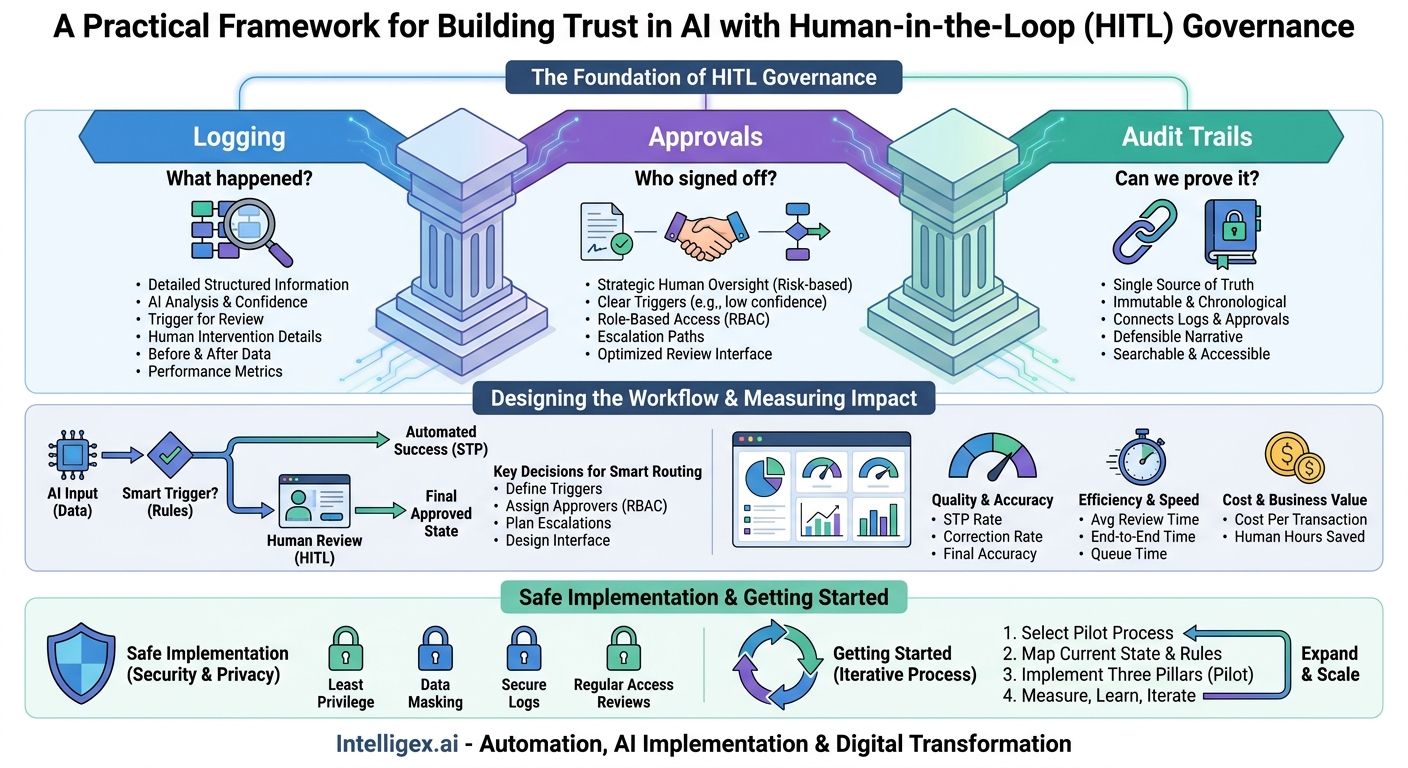
A well-designed HITL process isn’t just about having a person check the AI’s work. It’s about building a scalable, defensible system that balances speed with accuracy. The foundation of this system rests on three pillars: robust logging, intelligent approvals, and immutable audit trails. Getting these right enables you to not only trust your automated processes but also to continuously improve them, manage risk, and prove compliance with confidence.
What is HITL Governance, Really?
At its core, HITL governance is the framework of rules, roles, and records that manage human oversight within an automated workflow. It’s not about micromanaging the AI. Instead, it’s about strategically inserting human judgment where it adds the most value and creating a verifiable record of every decision, both human and machine. Think of it as the management system for your augmented workforce.
This framework is built on three simple but powerful ideas:
- Logging: Answering the question, “What happened?” This involves capturing detailed, structured information about every step in a process, from the AI’s initial analysis to the human’s final action.
- Approvals: Answering the question, “Who signed off?” This is the system of rules and workflows that determines when a human needs to intervene and who is authorized to make the final decision.
- Audit Trails: Answering the question, “Can we prove it?” This is the unchangeable, chronological record that connects all the logs and approvals, creating a single source of truth for every transaction.
Without this structure, scaling AI-powered automation is risky. A mistake made by an AI in an ungoverned process can be replicated thousands of time before anyone notices. A lack of clear approval paths creates bottlenecks or, worse, allows unauthorized changes to slip through. And without a reliable audit trail, a simple customer dispute or a formal compliance audit can become a time-consuming and costly forensic investigation. Effective governance turns automation from a potential liability into a transparent, scalable asset.
The Foundation: Granular Logging for AI and Automation
Effective governance begins with great data. In an HITL context, this means logging far more than just “Process X completed successfully.” To manage, troubleshoot, and improve your automated systems, you need a detailed record of each transaction’s journey. This granular logging is the raw material for everything that follows, from routing an item for approval to analyzing long-term performance.
Vague logs are nearly useless. For example, a log entry that says “Invoice 123 processed” tells you nothing about a potential error. A better log provides the full story.
What to Log in an HITL Workflow
A robust log for a single transaction should capture a clear sequence of events. Consider an accounts payable team using an AI to extract data from vendor invoices. A comprehensive log for one invoice would include:
- System & Data Identifiers: The unique ID for the transaction (e.g., Invoice #ABC-123), the name and version of the AI model used, and the event timestamp.
- AI Analysis & Confidence: The raw data the AI extracted (vendor name, due date, line items, total amount) and, crucially, a confidence score for each field. A 99% confidence on the total amount is very different from 65%.
- Trigger for Human Review: The specific reason the item was flagged for a human. For example, “Confidence score for ‘Vendor Name’ below 90%” or “Total amount exceeds $50,000 threshold.”
- Human Intervention Details: The user ID of the reviewer (e.g., ‘jane.doe’), the timestamp of their action, and the specific action they took (e.g., Approve, Reject, Edit).
- The “Before and After” Data: If the reviewer made a correction, the log must capture both the AI’s original output and the human-corrected final version. For instance, AI extracted “Invoce Tech,” and the human corrected it to “Invoice Tech Inc.”
- Performance Metrics: The time taken for the human to complete the review. This is vital for measuring process efficiency.
This level of detail provides immediate business value. It allows an operations manager to pinpoint why certain invoices are consistently being flagged, revealing a problem with a specific vendor’s format or a weakness in the AI model. It also provides the data needed to create a feedback loop, using human corrections to retrain and improve the AI over time, reducing the need for future interventions.
Designing Approval Workflows That Don’t Kill Productivity
The goal of automation is to increase speed and efficiency. A poorly designed approval workflow can destroy those gains, creating new bottlenecks that leave employees frustrated and processes stalled. The key is to be strategic, applying human oversight based on risk, value, and uncertainty, rather than requiring a human to review every single item.
Building an effective workflow involves making several key decisions upfront. It’s about defining the “rules of the road” so the system can handle the majority of transactions automatically while intelligently routing the exceptions.
Key Decisions for Smart Approval Routing
Before implementing any technology, your team should be able to answer these questions:
- What triggers an approval? Not everything needs a second look. Define clear, automated triggers based on business rules. A low-confidence score from the AI is a classic trigger. Others might be based on financial thresholds (e.g., all payments over $10,000), specific keywords (e.g., “legal notice”), or new, unrecognized vendors.
- Who is the right approver? Use Role-Based Access Control (RBAC) to define approval groups. For instance, an “AP Clerk” role can approve standard invoices up to $5,000, while a “Finance Manager” role is required for anything above that. This ensures the right level of seniority is applied to the right level of risk.
- What happens in an escalation? People go on vacation or get busy. Your workflow cannot grind to a halt. Define clear escalation paths. For example, if an item sits in an AP Clerk’s queue for more than 24 hours, it might be automatically reassigned to another clerk or escalated to a manager.
- How is information presented to the reviewer? The user interface for the reviewer is critical. It should clearly highlight what the AI found and why it needs review. Showing the original document next to the extracted data, with low-confidence fields highlighted in yellow, allows a human to make a decision in seconds, not minutes.
A checklist can help ensure you cover the essentials before launching.
Approval Workflow Design Checklist
- [ ] We have defined clear, data-driven triggers for requiring human review.
- [ ] We have mapped business roles (e.g., Sales Ops, HR Partner) to specific approval permissions.
- [ ] We have established Service Level Agreements (SLAs) for review times (e.g., 4 business hours).
- [ ] We have a documented process for handling escalations and reassignments.
- [ ] The review interface is simple, highlights key information, and minimizes clicks.
- [ ] We have a plan to handle exceptions that fall outside the defined workflow.
Getting this right means your experts spend their time on the complex, high-risk cases where their judgment truly matters. The system hums along, processing the routine work automatically and ensuring that speed and control coexist.
Building a Bulletproof Audit Trail
While logs record what happened and approvals document who signed off, the audit trail ties it all together into a coherent, defensible narrative. It is the single source of truth that allows you to reconstruct the entire lifecycle of a transaction, from the moment data entered your system to the final, approved outcome. This is non-negotiable for regulated industries and a best practice for everyone else.
An audit trail is more than just a collection of logs. It must be structured, searchable, and, most importantly, immutable. An auditor or manager should be able to look at an audit trail and have complete confidence that it represents a complete and untampered history of the transaction.
A Step-by-Step Process for a Defensible Audit Trail
Constructing a reliable audit trail involves a sequence of technical and process-oriented steps.
- Capture the Initial State and AI Result. The trail must begin with the original input data and the AI’s untouched output. This includes the data extracted, the classifications made, and the associated confidence scores. This establishes the baseline for everything that follows.
- Record Every Human Interaction as a Linked Event. When a user reviews the item, a new, separate event must be created in the audit trail. This event must be explicitly linked to the initial state and should contain the user’s ID, a precise timestamp, and the specific change made. Storing the “before” and “after” values of any edited field is critical.
- Document the Final, Approved State. After human review, the final state of the data is confirmed. The audit trail should record this final version and the timestamp of its approval before it is sent to a downstream system of record, like an ERP or a CRM such as Salesforce.
- Ensure Immutability Through Technology. Audit trails must be protected from modification. This is often achieved by using append-only logging systems or database technologies that use cryptographic hashing to chain records together (similar to a blockchain). Once a record is written, it cannot be altered or deleted without breaking the chain, making tampering evident.
- Make the Trail Searchable and Accessible. An audit trail is only useful if you can find what you are looking for. The records must be indexed with relevant business identifiers like a customer ID, invoice number, or case number. This allows authorized users to quickly retrieve the full history of a specific transaction during an inquiry.
For a supply chain team resolving a dispute with a supplier over a shipment, a clear audit trail is invaluable. It can instantly show the original bill of lading, the AI’s data extraction, the logistics coordinator who confirmed the quantity, and the exact time it was entered into the inventory system. This turns a week of searching through emails into a five-minute query, saving time, money, and business relationships.
Measuring the Impact: Metrics for HITL Governance
Implementing a robust governance framework is an investment. To justify that investment and drive continuous improvement, you must measure its impact. The right metrics provide clear visibility into the performance of your people, processes, and technology, moving the conversation from anecdotal feelings to data-driven facts.
Your metrics should cover three main areas: the quality and accuracy of the output, the speed and efficiency of the process, and the overall cost and business impact.
Key Metrics to Track
Quality and Accuracy Metrics:
- Straight-Through Processing (STP) Rate: The percentage of transactions processed by the AI with no human intervention. This is a primary measure of automation efficiency.
- Human Correction Rate: The percentage of transactions reviewed by a human that required a change. A high correction rate may indicate a problem with the AI model or poor-quality input data.
- Final Process Accuracy: The accuracy of the data after the entire HITL process is complete. This is the ultimate measure of quality delivered to the business.
Efficiency and Speed Metrics:
- Average Review Time Per Item: How long, on average, a human spends on a single transaction. Tracking this can help optimize the review interface and identify reviewers who may need additional training.
- End-to-End Processing Time: The total time from when a document is received to when it is fully approved. This measures the velocity of your entire operation.
- Queue Time: How long items wait for a human to begin a review. High queue times are a clear indicator of a bottleneck.
Cost and Business Value Metrics:
- Cost Per Transaction: A blended cost that accounts for the AI processing and the human review time. The goal is to drive this down over time while maintaining quality.
- Human Hours Saved: A comparison of the time spent in the new HITL process versus the previous, fully manual process. This is a direct measure of ROI.
These metrics should be captured automatically from your logging and audit systems and displayed on dashboards for operations managers and stakeholders. They not only prove the value of your automation but also act as an early warning system, highlighting emerging problems before they impact the business.
Safe Implementation: Privacy, Security, and Access Control
Many automated processes, from HR to finance, handle sensitive or personally identifiable information (PII). A core function of governance is to ensure this data is protected throughout the HITL workflow. Building trust in the system requires demonstrating a commitment to security and privacy from day one.
This doesn’t require complex, esoteric security measures. It’s about applying well-established security principles to your HITL process in a common-sense way.
- Adhere to the Principle of Least Privilege. Reviewers should only have access to the data they need to perform their function. An accounts payable clerk in the North American division does not need to see invoices from the European division. Use the roles you defined for your approval workflow to enforce these data boundaries.
- Use Data Masking Where Appropriate. In the review interface, sensitive information that is not essential for the verification task should be masked or redacted. For example, when verifying an address, there is no need to display a customer’s date of birth.
- Secure Your Logs and Audit Trails. The detailed logs that make your governance system work are themselves sensitive data. Access to them should be tightly controlled and monitored. Store them in a secure environment, such as a dedicated logging service on a platform like AWS, and ensure only authorized personnel (like auditors or system administrators) can access them directly.
- Conduct Regular Access Reviews. People change roles and leave the company. Periodically review who has approval and review permissions in your HITL system to ensure access rights remain current. This simple housekeeping task is a critical security control.
By building these safeguards into your process, you protect your company and your customers. You also make it much easier to demonstrate compliance with regulations like GDPR and CCPA, which treat data governance as a primary requirement.
Getting Started: Your Next Steps
Implementing HITL governance is not an all-or-nothing project. It’s an iterative process of building a framework for trust and control around your AI and automation initiatives. The goal is not to create bureaucracy, but to build the guardrails that allow you to scale your operations quickly and safely.
A practical path forward involves starting small, proving value, and then expanding.
- Select a Pilot Process. Choose one business process that is high-value but not yet mission-critical. Invoice processing, sales order entry, or employee expense report review are often excellent candidates. The ideal pilot has clear rules and a high volume of transactions.
- Map the Current State and Define the Rules. Work with the business team to map the existing manual workflow. Identify the key decision points, the data used to make those decisions, and the risks associated with an error. This will form the basis for your approval triggers and logging requirements.
- Implement the Three Pillars for the Pilot. For your chosen process, define what needs to be logged, design a simple approval workflow with one or two roles, and ensure the system creates a searchable audit trail. Don’t over-engineer it at this stage.
- Measure, Learn, and Iterate. Run the pilot and carefully track the metrics for quality, speed, and cost. Use the insights from your logs and audit trails to refine the AI model and the workflow rules. Once you have demonstrated clear business value, you will have the blueprint and the business case to expand the governance framework to other processes across the organization.
By taking a structured, deliberate approach, you can transform HITL governance from a complex challenge into a powerful competitive advantage, enabling your organization to harness the full potential of AI with confidence.
Your Next Read:
Category:
Get a FREE
Proof of Concept
& Consultation
No Cost, No Commitment!
