

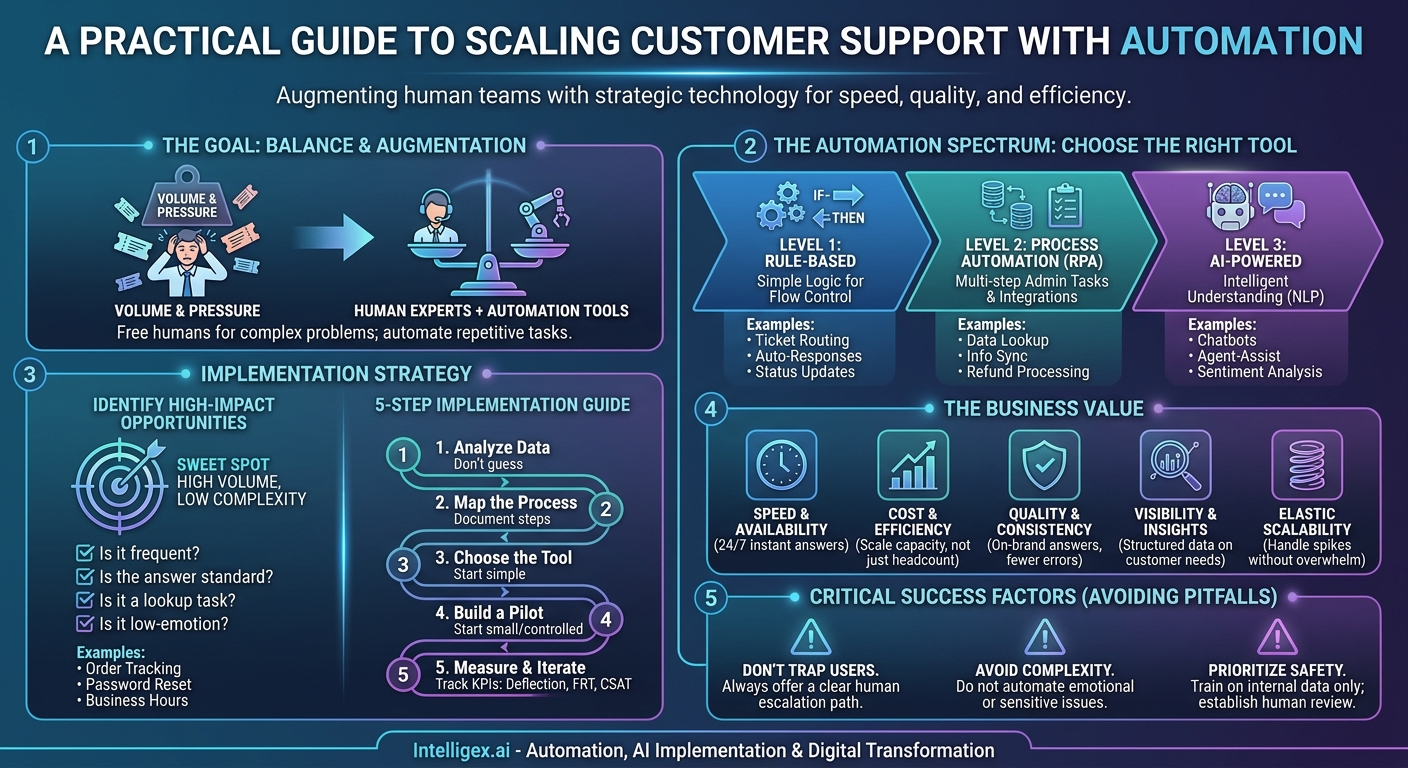
Customer support is a balancing act. Your team is under constant pressure to resolve issues faster, deliver better experiences, and keep costs under control. As your business grows, scaling that support function becomes a critical challenge. Simply hiring more agents often isn’t a sustainable solution. This is where automation stops being a buzzword and becomes a strategic tool for managing volume, improving efficiency, and freeing your human experts to focus on what they do best: solving complex problems.
The goal is not to replace your talented support team. It’s to augment them. By strategically automating the right tasks, you can build a more resilient, responsive, and effective customer support operation. This isn’t about deploying a futuristic AI for its own sake. It’s about applying proven technology to solve real business problems, delivering measurable value in speed, quality, and scalability.
The Automation Spectrum: From Simple Rules to Intelligent Assistants
“Automation” can mean many different things, from a simple email auto-responder to a sophisticated AI that holds a conversation. Understanding this spectrum is the first step in choosing the right tool for the right job. Most support automation strategies involve a mix of these approaches, layered on top of each other.
Level 1: Rule-Based Automation
This is the most common and accessible form of automation, likely already available in your current help desk or CRM software. It operates on simple “if-this-then-that” logic. These rules are excellent for managing the flow of incoming requests and ensuring nothing falls through the cracks.
- Ticket Routing: Automatically assign tickets to the correct team based on keywords in the subject line or body (e.g., “invoice” or “billing” goes to Finance; “bug” or “error” goes to Tier 2 Support).
- Automated Responses: Instantly confirm receipt of a customer’s request, setting expectations for a response time. You can also send automated follow-ups for tickets awaiting a customer reply.
- Status Updates: Automatically change a ticket’s status when a certain action occurs, like when an agent sends a reply or a customer responds.
Level 2: Process Automation (RPA & Integrations)
The next level involves automating repetitive, multi-step tasks that agents perform manually. This often requires connecting different systems, such as your help desk, e-commerce platform, and shipping provider. This is where agents start to feel a real reduction in tedious administrative work.
- Data Lookup: An agent receives a “Where is my order?” request. Instead of manually logging into Shopify or FedEx, copying the tracking number, and pasting it into a reply, an automation can pull this data and present it directly within the support ticket.
- User Information Sync: Automatically pull customer details from your CRM (like their subscription level or account history) into the support ticket, giving the agent full context without switching tabs.
- Refund Processing: For straightforward refund requests that meet pre-defined criteria, an automation could process the refund in the payment system and update the customer ticket simultaneously.
Level 3: AI-Powered Automation
This is where modern AI, particularly natural language processing (NLP), comes into play. These systems can understand, interpret, and respond to customer language, enabling them to handle entire conversations or provide intelligent assistance to human agents. Platforms like Intercom or the AI features in systems like Zendesk and Salesforce fall into this category.
- Conversational Chatbots: AI-powered bots can handle common, full-conversation queries from start to finish. They can answer questions like “How do I reset my password?” by providing step-by-step instructions or linking to the correct knowledge base article.
- Agent-Assist Tools: AI can listen to a conversation in real-time and suggest relevant answers or internal documentation to the human agent. This speeds up resolutions and helps with training new agents.
- Sentiment Analysis: AI can analyze the text of an incoming ticket to gauge the customer’s emotional state (e.g., frustrated, angry, pleased) and automatically prioritize urgent or negative interactions for immediate human attention.
Identifying High-Impact Automation Opportunities
The key to a successful automation strategy is not to automate everything, but to automate the right things. The best place to start is with tasks that are high in volume but low in complexity. These are the repetitive queries that consume a significant portion of your team’s time but require little to no critical thinking or empathy.
The “High Volume, Low Complexity” Sweet Spot
Think about the questions your team answers over and over again. These are your prime candidates for automation because resolving them provides the biggest return on your investment of time and resources. Each one you automate frees up dozens or hundreds of hours per month.
Common examples include:
- What are your business hours?
- How do I track my order?
- What is your return policy?
- How can I reset my password?
- Can you send me a copy of my invoice?
A Checklist for Finding Your Best Candidates
Use your support ticket data to guide your decisions. Look for patterns and quantify the effort involved. Ask yourself and your team these questions:
- Is it frequent? Does this question appear in 10% or more of our daily tickets?
- Is the answer standard? Is the resolution the same almost every time, with no variation?
- Is it a lookup task? Does resolving the ticket require looking up a piece of data (like an order status or a policy) and relaying it?
- Is it low-emotion? Is this typically a simple transactional query, not a complaint or a complex bug report?
- Does it require no negotiation or judgment? The process should be black and white, with no need for a human to make a judgment call.
If you can answer “yes” to most of these questions, you have found an excellent candidate for automation.
A Step-by-Step Guide to Implementing Your First Automation
Getting started doesn’t have to be a massive, company-wide project. A focused, iterative approach is far more likely to succeed. Pick one process, build a pilot, measure its performance, and then expand based on what you learn.
- Analyze Your Support Data. Don’t rely on guesswork. Dive into your help desk analytics for the last 30-90 days. Use tags, categories, or text analysis to find the top 3-5 most frequent and repetitive support requests. This data is your roadmap.
- Define and Map the Process. Choose one request from your list (e.g., “order status inquiry”). Document every single step a human agent currently takes to resolve it. Which systems do they open? What information do they look for? What do they communicate back to the customer? This detailed map becomes the blueprint for your automation.
- Choose the Right Tool for the Job. Based on your process map, select the appropriate level of automation. Is a simple keyword-based auto-reply with a link to a tracking page sufficient? Or do you need a chatbot that can ask for the order number and look it up via an API integration? Start with the simplest tool that can get the job done.
- Build a Small, Controlled Pilot. Don’t launch your new automation to all customers at once. Start by deploying it on a specific channel (e.g., chat but not email) or making it available only to a small segment of users. Another safe approach is to use it as an internal tool first, where it helps your agents find information faster before it ever interacts directly with a customer.
- Measure, Learn, and Iterate. A “set it and forget it” approach will fail. You must track performance to understand what’s working and what isn’t. Use feedback to continuously refine the automation’s responses, logic, and escalation paths.
Key Metrics to Measure:
- Ticket Deflection Rate: The percentage of inquiries resolved by the automation without creating a human-handled ticket.
- First Response Time (FRT): Automation provides instant responses, which should dramatically lower your average FRT.
- Containment Rate (for chatbots): The percentage of conversations fully resolved by the bot without needing to escalate to a human.
- Customer Satisfaction (CSAT): After an automated interaction, ask customers to rate their experience. A low CSAT score is a clear signal that the automation needs improvement.
The Business Value Explained: More Than Just Cost Savings
While reducing cost-per-interaction is a significant benefit, the true business value of support automation extends far beyond the balance sheet. It creates a stronger foundation for growth and a better experience for both customers and employees.
Speed & Availability: Automation works 24/7/365. Customers can get instant answers to common questions at any time of day, without waiting in a queue. This immediate service for simple issues dramatically improves the customer experience and frees up agents to provide faster responses on more complex tickets during business hours.
Cost & Efficiency: By handling a high volume of simple requests, automation allows you to scale your support capacity without a linear increase in headcount. This isn’t about replacing agents. It’s about reallocating your most valuable resource, your team’s brainpower, away from repetitive tasks and toward high-value activities like customer retention, proactive support, and solving difficult problems.
Quality & Consistency: Humans can have bad days. They can make typos or forget a step in a standard process. An automated workflow delivers the same, correct, on-brand answer every single time. This consistency builds trust and reduces the errors that can lead to customer frustration.
Visibility & Data Insights: Every interaction with an automated system is perfectly logged and structured. This creates a powerful dataset that reveals exactly what your customers are asking for, in their own words. You can use these insights to identify confusing parts of your product, gaps in your documentation, or emerging customer issues before they become widespread problems.
Scalability: What happens when you have a product launch, a marketing campaign goes viral, or an unexpected service outage? A human team can be quickly overwhelmed by a sudden spike in support volume. An automated system handles the 10,000th request just as quickly as the first, providing an elastic buffer that protects your team and your customer experience during periods of high demand.
Automation Across the Organization: Not Just for Support
The principles of automating high-volume, low-complexity tasks apply across the entire business. A central automation strategy can deliver efficiency gains for nearly every department that interacts with customers or employees.
- Finance & Billing: An automated workflow can handle requests for invoices, confirm payment receipts, or answer basic questions about subscription plans by querying the accounting system directly.
- Sales & Marketing: A chatbot on your website can pre-qualify leads by asking a series of questions, book demos directly on a sales rep’s calendar, and answer top-of-funnel product questions, ensuring the sales team only spends time on warm, qualified prospects.
- HR & Internal Support: The same technology can power an internal help desk for employees. Automate answers to common questions about payroll, benefits, IT support (e.g., “how do I connect to the VPN?”), and company policies.
- Supply Chain & Logistics: For B2B companies, an automated portal or chatbot can provide partners and clients with real-time updates on order status, inventory levels, and shipping logistics, reducing the need for manual check-ins.
Avoiding Common Pitfalls: A Guide to Safe and Effective Implementation
Implementing automation carries enormous potential, but it also comes with risks. A poorly designed bot can be more frustrating than no bot at all. A thoughtful, customer-centric approach is essential for success.
Don’t Hide the Human Escalation Path. This is the cardinal rule. If a customer is frustrated or has a problem the automation can’t solve, they must have a clear, easy, and immediate way to connect with a human agent. Trapping a user in a “bot loop” is a guaranteed way to lose a customer.
Don’t Automate Complex or Emotional Issues. Automation is for transactional, informational queries. It is the wrong tool for handling a major service outage, a sensitive billing dispute, or a deeply frustrated customer. These situations require human empathy, nuance, and creative problem-solving.
Start with Internal Data, Not the Open Internet. Train your AI tools exclusively on your own trusted content: your knowledge base, product documentation, and historical support conversations. Allowing an AI to “browse the web” for answers is a recipe for disaster, as it can lead to it providing incorrect, outdated, or even competitor information.
Prioritize Privacy and Access Control. Treat your automation as a new employee with a specific job. It should operate under the principle of least privilege, meaning it only has access to the data and systems it absolutely needs to perform its function. It might need to look up an order status, but it should not have access to full customer financial histories or other sensitive personal information. All actions taken by the automation should be logged for security and auditing purposes.
Establish a Human Review Process. Automation is not a one-time setup. Designate a person or team to regularly review a sample of automated interactions. This continuous feedback loop is critical for identifying areas where the bot is failing, refining its responses, and ensuring it maintains a high standard of quality and accuracy.
Your Next Steps to Smarter Support
Starting with support automation doesn’t require a massive budget or a dedicated data science team. The most impactful changes often begin with small, practical steps that build momentum. The key is to move from guessing what to automate to using your own data to make informed decisions.
Here is a simple action plan to get started:
- Analyze: Spend one hour this week reviewing your support tickets from the last 30 days. Your help desk software likely has a reporting feature that can help you do this.
- Identify: Tag and count your tickets to find the top three most common, repetitive questions your team has to answer.
- Map: Choose one of those questions and write down the exact, step-by-step process a new agent would follow to answer it.
- Explore: Investigate the built-in automation or integration capabilities of your existing help desk, CRM, or e-commerce platform. You may find you already have the tools you need to automate that first simple workflow.
By taking this deliberate, data-driven approach, you can begin to transform your customer support from a cost center into a scalable, efficient, and strategic asset for your business.
Your Next Read:
Category:
Get a FREE
Proof of Concept
& Consultation
No Cost, No Commitment!
