

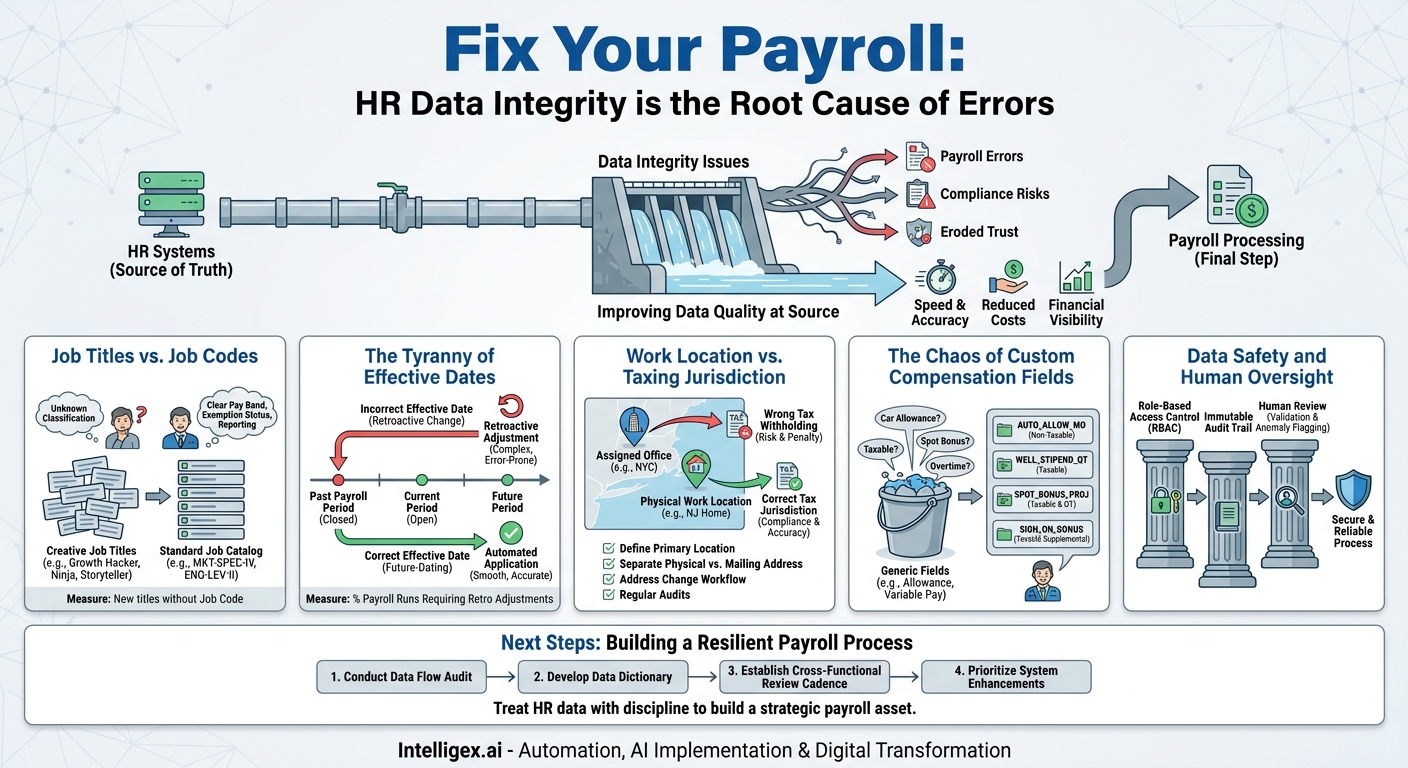
Payroll is often seen as a purely financial function, a methodical process of calculating wages and cutting checks. But in reality, it’s the final, critical step in a long data journey that begins in your Human Resources systems. When that data journey is flawed, the consequences are immediate and severe. A single incorrect data field can halt a payroll run, create costly compliance risks, and erode employee trust. The issue isn’t a failure of payroll; it’s a failure of data integrity originating upstream.
Fixing this isn’t about buying more software. It’s about establishing clear rules, processes, and ownership for the handful of HR data fields that matter most. By focusing on data quality at the source, businesses can dramatically improve the speed, accuracy, and efficiency of their entire payroll operation. This directly impacts the bottom line by reducing manual correction costs and provides the visibility needed for accurate financial planning and labor cost analysis.
Job Titles vs. Job Codes: The Classic Mismatch
The problem often starts with the best intentions. A hiring manager wants an exciting, modern job title to attract top talent. “Growth Hacker” sounds more appealing than “Marketing Analyst II,” and “Data Storyteller” is more compelling than “Business Intelligence Specialist.” While these creative titles work well for recruiting, they can wreak havoc on payroll and financial reporting when they aren’t tied to a standardized internal structure.
When the free-text job title is the only field driving compensation and classification, systems can’t operate. Payroll software doesn’t know how to classify a “Customer Success Ninja” for overtime eligibility or map them to the correct pay band. Finance can’t accurately report on departmental labor costs when titles are inconsistent across teams. This forces manual workarounds, where HR or payroll specialists must individually interpret each title and map it to the correct internal code, a process ripe for error.
From Ambiguity to Structure: The Role of a Job Catalog
The solution is to decouple the external-facing job title from the internal, system-critical job code. This creates a source of truth for all systems while still allowing flexibility in recruiting.
- Job Title: This is the descriptive, public-facing name used on job boards and business cards. It can be flexible.
- Job Code: This is a standardized, unique identifier that connects the role to critical business logic. It is rigid and controlled.
For example, the public-facing titles “Senior Content Strategist” and “Lead SEO Specialist” might both map to the internal job code MKT-SPEC-IV. This code, not the title, dictates the salary range, bonus eligibility, benefits tier, and exemption status (e.g., exempt from overtime). When Finance runs a report, they can query labor costs for all `MKT-SPEC-IV` positions, providing a clean, aggregated view of that role’s total cost, regardless of the creative titles used.
What to measure: Track the “Number of new job titles created without a corresponding job code.” Every instance represents a potential data error. The goal is to enforce a process where no new position is opened without first being mapped to a standard job code in your catalog.
The Tyranny of Effective Dates
Timing is everything in payroll. A promotion, a salary increase, or a change in status from part-time to full-time is only as good as its effective date. When these dates are entered incorrectly or misaligned with payroll processing cycles, the result is almost always a painful and time-consuming correction. The most common failure is entering a change with a date that falls within a payroll period that has already been closed.
Consider an employee who is promoted from an hourly, non-exempt role to a salaried, exempt role. The manager approves the promotion on the 5th of the month but asks HR to make it effective as of the 1st. If payroll for the previous period (which included the 1st) has already been processed, the system has already paid the employee at their old hourly rate. This now requires a complex retroactive adjustment to claw back the hourly pay and issue the correct prorated salary, a process that confuses the employee and creates extra work for the payroll team.
A Step-by-Step Guide to Taming Timelines
Controlling effective dates requires a clear, communicated process supported by system-level guardrails. It’s not about being bureaucratic; it’s about ensuring accuracy and predictability.
- Establish and Enforce Data Cutoff Dates. Communicate a firm deadline for each pay period. For example, all changes (new hires, terminations, pay adjustments) that need to be reflected in the upcoming paycheck must be entered and fully approved in the HR system no later than three business days before the processing date. Any changes submitted after this cutoff will be automatically effective in the next pay period.
- Leverage Future-Dating. For planned changes like promotions or annual salary increases, enter them into the HR system as soon as they are approved, but with the correct future effective date. A good HRIS will hold these changes in a pending state and apply them automatically on the specified date, ensuring they are picked up in the correct payroll cycle without last-minute scrambling.
- Configure System Validations. Work with your IT team or HRIS provider to implement rules that prevent or flag changes dated in a closed payroll period. The system should, at a minimum, warn the user that they are making a retroactive change that will require manual intervention.
- Document a Formal Retro-Pay Process. Mistakes will still happen occasionally. Have a clear, documented, and auditable process for calculating and processing retroactive payments. This should be treated as an exception, requiring a higher level of approval to execute. This ensures that such adjustments are handled consistently and transparently.
What to measure: The primary metric here is the “Percentage of payroll runs requiring retroactive adjustments.” A high percentage indicates a systemic issue with the timing of data entry. Reducing this metric directly translates to saved administrative hours and improved payroll accuracy.
Work Location vs. Taxing Jurisdiction
In the age of remote and hybrid work, the seemingly simple “Work Location” field has become one of the most critical and error-prone data points in an HR system. The tax implications are enormous. An employee’s physical work location determines which state, county, and city taxes must be withheld. Getting this wrong creates significant compliance risk for the employer and a major headache for the employee come tax season.
The confusion often arises from a mismatch between a person’s “assigned office” and where they actually perform their work. An employee might be officially assigned to the New York City office but work permanently from their home in New Jersey. If the HR system only lists “New York” as the location, payroll will incorrectly withhold New York taxes, failing to account for New Jersey state income tax. This can lead to penalties for the employer and a surprise tax bill for the employee.
A Checklist for Location Data Accuracy
Ensuring accurate location data requires a proactive approach, especially with a distributed workforce. It cannot be an afterthought.
- Define the “Primary Work Location.” Create a clear, written policy that defines what constitutes an employee’s official work location for tax purposes. For remote employees, this is typically their home address.
- Separate Physical vs. Mailing Address. Your HRIS must have distinct fields for Mailing Address and Physical Work Address. Payroll tax calculations must be driven only by the Physical Work Address.
- Implement a Change of Address Workflow. When an employee updates their address, it should trigger an automated notification to HR and Payroll. This is not just a simple data update; it’s a potential change in their tax jurisdiction that requires review.
- Conduct Regular Audits. At least twice a year, run a report to compare employee work locations against their state tax withholding setups. Flag any discrepancies for review, such as an employee with a California work address who is set up for Texas tax withholding (which has no state income tax).
This rigor provides immense business value by mitigating tax compliance risk, which can run into thousands or even millions of dollars in penalties. It also improves the employee experience, ensuring they are “taxed where they work” and avoiding unpleasant financial surprises.
The Chaos of Custom Compensation Fields
Many HR systems contain generic compensation fields like “Other Earnings,” “Allowance,” or “Variable Pay.” While intended for flexibility, these fields often become a data governance nightmare. Without strict definitions, managers use them for wildly different purposes, and the payroll system has no way to interpret the context.
For example, a sales manager might use the “Allowance” field to enter a monthly, non-taxable car allowance for their team. A marketing manager might use the same field to enter a one-time, taxable bonus for a successful project launch. When this data flows to payroll, the system sees two identical labels with two numbers. It doesn’t know which is taxable, which should be included in overtime calculations, or how to label it on the employee’s paystub. This forces the payroll team to manually investigate every entry, slowing down the process and introducing risk.
Creating Clarity with Specific Earnings Codes
The solution is to eliminate generic compensation fields in favor of a catalog of specific, pre-defined earnings codes. Each code should have a clear purpose and be pre-configured with the correct tax and overtime rules in the payroll system.
Instead of one “Allowance” field, you might have:
- AUTO_ALLOW_MO: Monthly Car Allowance (non-taxable, per IRS rules)
- WELL_STIPEND_QT: Quarterly Wellness Stipend (taxable)
- SPOT_BONUS_PROJ: Spot Bonus for Project (taxable, included in overtime calculation)
- SIGN_ON_BONUS: Sign-On Bonus (taxable, supplemental rate)
When a manager needs to award a bonus, they don’t enter a number in a generic field. They select the “Spot Bonus” earnings code and enter the amount. This structured data flows seamlessly to payroll, where the system already knows exactly how to tax it, report it, and display it. This improves processing speed, ensures tax compliance, and gives Finance granular visibility into different types of compensation spending.
Data Safety and Human Oversight
Automating the flow of data between HR and payroll systems is essential for efficiency and scalability. However, this integration also introduces the need for strong data governance and security. The goal is to make the process robust and reliable, not just fast. This involves a combination of system controls and human judgment.
First, access must be strictly controlled. Using role-based access control (RBAC) is fundamental. An HR business partner may need to initiate a promotion, but perhaps only a Compensation specialist can approve a change to a salary field. Limiting who can view and edit sensitive data fields like social security numbers, bank details, and salary information reduces the risk of both accidental errors and malicious activity.
Second, every change must be logged. Your HRIS should maintain an immutable audit trail that records what data was changed, who changed it, and when the change was made. This log is not just for compliance; it is an invaluable tool for troubleshooting. When a payroll error occurs, the audit trail allows you to quickly trace the issue back to its source.
Finally, automation should assist, not replace, human oversight. Automated validation rules are excellent for catching formatting errors, like an invalid bank routing number or an impossible date of birth. AI-powered tools can be used to flag anomalies, such as a junior employee suddenly being assigned an executive-level bonus. But these systems should trigger a review, not an automatic approval. A final human checkpoint before payroll is finalized is a critical safeguard to catch context-sensitive errors that a machine might miss.
Next Steps: Building a Resilient Payroll Process
Strengthening the data link between HR and payroll is an ongoing process, not a one-time project. It requires cross-functional collaboration and a commitment to data quality. Here is a practical action plan to get started.
- Conduct a Data Flow Audit. With stakeholders from HR, Payroll, and Finance, map every single data point that flows from your HR system to your payroll system. Identify the “source of truth” for each field and document its purpose. Pay special attention to the fields discussed here: job codes, effective dates, work locations, and compensation types.
- Develop a Data Dictionary. For each critical field, create a simple, clear definition. Document what the field means, what format the data should be in, who is responsible for entering it, and who is responsible for approving it. This dictionary becomes the central guide for training and governance.
- Establish a Cross-Functional Review Cadence. Schedule a brief, monthly or quarterly meeting between HR, Payroll, and IT. Use this time to review key metrics like the number of retro-pay adjustments and integration error rates. Proactively discuss upcoming organizational changes (like a new bonus plan or office location) that will impact data and systems.
- Prioritize System Enhancements. Use the findings from your audit to build a business case for targeted improvements. This could be as simple as adding new earnings codes or as complex as implementing a new API-based integration. Focus on changes that will prevent errors at the point of entry, which always delivers a higher return than cleaning up mistakes downstream.
By treating HR data with the same discipline as financial data, you can build a payroll process that is not only faster and cheaper to run but also a strategic asset that provides clear, reliable insights into your organization’s most valuable resource: its people.
Your Next Read:
Category:
Get a FREE
Proof of Concept
& Consultation
No Cost, No Commitment!
