

The monthly financial close. For many finance and operations teams, it’s a dreaded cycle of manual data exports, frantic spreadsheet manipulation, and late-night reconciliations. You rely on NetSuite as your system of record, and it excels at managing core business processes. But when it comes to reporting, especially reporting that requires blending data from other systems, the process often breaks down. Reports are inconsistent, time-consuming to generate, and lack the cross-functional context needed for strategic decision-making. The core problem isn’t NetSuite itself; it’s that your ERP has become a data silo.
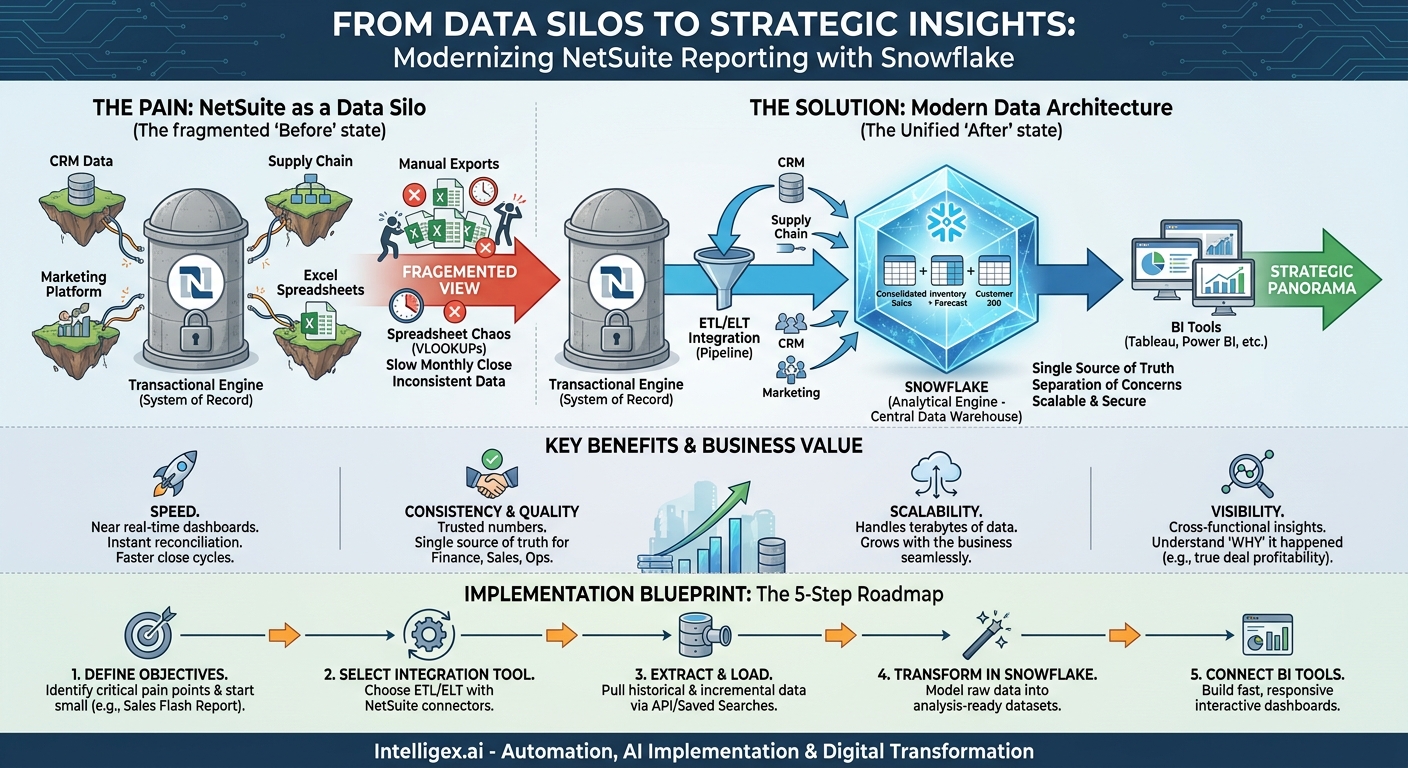
Imagine trying to build a comprehensive view of your business by taping together dozens of small, blurry photographs. That’s what financial reporting feels like when you’re pulling data from NetSuite, your CRM, your marketing automation platform, and your supply chain software into separate spreadsheets. This fragmented approach creates a cascade of problems that ripple across the organization. By integrating NetSuite with a modern cloud data platform like Snowflake, you can replace this patchwork process with a single, high-resolution panorama of your entire business, making your financial close faster, more accurate, and infinitely more insightful.
Why Your Financial Close Process Is So Painful
The challenges of a siloed NetSuite instance go far beyond simple inconvenience. They represent a fundamental barrier to operational efficiency and strategic clarity. When your primary financial data is locked within the ERP, every request for a consolidated report becomes a high-effort, manual project. This creates bottlenecks that impact every department.
Consider these common scenarios:
- The Finance Team: The CFO asks for a detailed breakdown of gross margin by customer segment, factoring in sales commissions from your CRM and specific shipping costs from your logistics platform. The finance team spends days exporting CSVs, manually joining data in Excel using VLOOKUPs, and correcting for inconsistencies. By the time the report is ready, the data is already a week old.
– The Sales Team: A sales leader wants to understand the true profitability of deals closed last quarter. The revenue figures are in NetSuite, but the detailed cost of goods sold (COGS), implementation hours, and customer support tickets are spread across different systems. Without a unified view, they can’t distinguish between high-revenue but low-profit customers and truly valuable accounts.
– The Operations Team: The supply chain manager needs to forecast inventory needs based on historical sales trends from NetSuite and upcoming marketing promotions stored in another system. Because the data isn’t integrated, they rely on educated guesses, leading to potential stockouts of popular items or costly overstocking of others.
In each case, the root cause is the same. NetSuite is built for transactions, not for complex, multi-source analytics. Its reporting capabilities are powerful for data within NetSuite, but they were never designed to be the analytical engine for your entire company. Relying on it for this purpose leads to a slow, brittle, and error-prone reporting environment. The solution is not to replace NetSuite, but to augment it with a platform built for analytics at scale.
The NetSuite and Snowflake Architecture: A Modern Solution
Integrating NetSuite with Snowflake creates a modern data architecture that separates your transactional system (NetSuite) from your analytical system (Snowflake). This “separation of concerns” is the key to unlocking speed, consistency, and deep visibility. NetSuite continues to be the engine that runs your day-to-day business operations, while Snowflake becomes the central, consolidated repository for all your business data, ready for analysis.
This architecture delivers tangible business value across several key dimensions:
- Speed: Snowflake’s architecture is designed for running complex queries across massive datasets in seconds, not hours. Instead of waiting for a cumbersome NetSuite report to run, your team can access pre-built, interactive dashboards that refresh in near real-time. The monthly close process accelerates because reconciliation and analysis happen instantly.
- Consistency and Quality: By consolidating NetSuite data with data from all your other platforms into one place, you establish a single source of truth. The finance, sales, and marketing teams all work from the same validated numbers. This eliminates the endless debates over whose spreadsheet is correct and builds trust in the data across the organization.
- Scalability: As your business grows, so does your data volume. A reporting process built on spreadsheets and NetSuite exports will eventually break under the load. Snowflake is built to scale elastically, meaning it can handle terabytes of data and thousands of concurrent users without a drop in performance. Your reporting capabilities can grow seamlessly with your company.
– Visibility: This is perhaps the most transformative benefit. You can finally ask complex, cross-functional questions and get immediate answers. How does a specific marketing campaign impact sales of a high-margin product line? What is the correlation between customer support ticket volume and customer churn? By joining data from across the business, you move from just reporting on what happened to understanding why it happened.
A Practical Blueprint: How to Implement the Integration
Setting up a robust data pipeline from NetSuite to Snowflake is a methodical process. While the technical details can be complex, the strategic steps are straightforward. Following a clear plan ensures you deliver business value quickly while building a scalable and maintainable solution.
- Define Your Core Reporting Objectives: Before you move a single byte of data, start with the end in mind. Meet with your finance and business leaders to identify their most critical reporting pain points. Focus on the questions they currently cannot answer. Good starting points often include consolidated financial statements, sales pipeline analysis, and inventory forecasting. Prioritize one or two high-impact use cases for your initial pilot project, such as a daily sales flash report or a detailed gross margin analysis.
- Select Your Data Integration Tool: You need a mechanism to move data from NetSuite’s API into Snowflake. This is typically handled by an ETL (Extract, Transform, Load) or ELT (Extract, Load, Transform) tool. There are many options available, from enterprise-grade platforms like Fivetran and Matillion to more customizable solutions using open-source frameworks. The right choice depends on your budget, your team’s technical skills, and the complexity of your data. For a NetSuite-to-Snowflake pipeline, tools with pre-built NetSuite connectors can significantly accelerate the process.
- Establish the Data Extraction and Loading Pipeline: This is the technical heart of the project. Your integration tool will connect to the NetSuite API to pull the data. You must decide what data to pull. Using NetSuite’s Saved Searches is often the most efficient way to extract clean, pre-filtered data for specific objects like transactions, customers, or inventory items. Your pipeline should first perform a historical load to bring all relevant past data into Snowflake, followed by an incremental update schedule (e.g., hourly or daily) to keep the data fresh.
- Transform and Model the Data in Snowflake: Once the raw NetSuite data is in Snowflake, the real value creation begins. This “T” in ELT is where you transform raw, transactional tables into clean, analysis-ready datasets. This involves joining tables, renaming columns for clarity, casting data types, and calculating new business metrics. For example, you might create a single, wide “sales_transactions” table that joins data from sales orders, customer records, and item details. This modeling step is crucial for performance and usability. It makes it easy for business users and BI tools to consume the data without needing to understand the complexities of NetSuite’s raw schema.
- Connect Your Business Intelligence (BI) Tools: With your data cleaned and modeled in Snowflake, you can connect your preferred BI platform, such as Tableau, Power BI, or Looker. This is where you build the final reports, dashboards, and visualizations for your business users. Because all the heavy lifting (data processing and aggregation) is done by Snowflake, the dashboards will be fast, responsive, and always pulling from the single source of truth.
Key Considerations and Pitfalls to Avoid
A successful integration project is about more than just technology. It requires careful planning, stakeholder alignment, and an iterative approach. As you embark on this journey, keep these practical do’s and don’ts in mind to navigate common challenges.
A Checklist for Success
- Do start small and iterate. Your first goal should be to solve one specific, high-visibility problem. A perfect example is automating a report that currently takes a senior financial analyst 10 hours to produce every week. Delivering a quick win builds momentum and demonstrates the value of the investment.
- Don’t try to replicate every NetSuite report on day one. This is a common mistake that leads to “analysis paralysis” and scope creep. The goal is not to rebuild NetSuite’s reporting module in Snowflake. The goal is to create new, consolidated views that were previously impossible. Focus on net-new value.
- Do involve business stakeholders from the beginning. This cannot be a project run solely by the IT department. Finance and operations leaders must be involved in defining requirements, validating the data, and championing the new reporting process. Their involvement ensures the final product actually solves their problems.
- Don’t underestimate data validation. Trust is the most important currency in data analytics. You must have a rigorous process for validating the numbers in Snowflake against the source data in NetSuite. Build parallel reports in the early stages to prove to your finance team that the new system is accurate and reliable.
- Do plan for NetSuite’s API governance. NetSuite, like most SaaS platforms, has API concurrency and rate limits to ensure platform stability. Work with your integration partner to design an extraction strategy that is efficient and respects these limits to avoid disrupting your core ERP operations.
Measuring Success: From Faster Close to Deeper Insights
The impact of a successful NetSuite and Snowflake integration should be measurable and felt across the business. To justify the investment and track your progress, focus on a mix of quantitative and qualitative metrics that tie directly to business value.
Here’s what you should measure:
- Reduction in Time-to-Close: This is the most direct financial metric. Track the number of business days it takes to close the books each month. A well-executed project should significantly shorten this cycle, freeing up the finance team for more strategic activities.
- Decrease in Manual Reporting Hours: Survey your finance and analytics teams to quantify the number of hours they spend each week on manual data extraction, cleaning, and reconciliation. The goal is to drive this number as close to zero as possible for recurring reports.
- Improved Report Generation Speed: Measure the “time to answer.” How long does it take from the moment a business leader asks a question to the moment they receive a data-backed answer? This should shift from days or weeks to minutes or hours.
- Increased Data Trust and Consistency: A qualitative but critical metric. Track the reduction in support tickets or email chains questioning report data. When executives stop asking “Where did you get this number?” and start asking “What should we do based on this number?” you know you have succeeded.
- Enablement of New Strategic Insights: The ultimate goal is to move beyond operational reporting. Keep a log of the new, cross-functional questions your business can now answer. For example, “What is our true, fully-loaded customer acquisition cost by marketing channel when we include sales commissions and implementation costs?” Answering just one of these questions can provide a massive return on investment.
Governance and Security in a Centralized Data World
Consolidating your most critical business data into a single platform offers immense power, but it also comes with immense responsibility. A strong governance and security framework is not an optional add-on; it is a foundational requirement for building a trusted data platform.
When implementing your Snowflake data warehouse, prioritize these three areas:
- Rigorous Access Control: Implement a Role-Based Access Control (RBAC) model from day one. This principle ensures that users can only see the data they are explicitly authorized to see. Your finance team can access sensitive P&L data, but the marketing team can only see aggregated revenue and campaign performance. Snowflake’s security features make it straightforward to define granular permissions at the database, schema, table, and even column level.
- Data Privacy and Masking: When combining financial data with customer or employee data, you must be diligent about protecting Personally Identifiable Information (PII). Use data masking techniques to anonymize or pseudonymize sensitive fields like names, email addresses, and phone numbers in non-production environments or for analytical use cases where the specific identity is not required.
- Maintaining the Human in the Loop: This architecture is designed to empower human experts, not replace them. The goal is to automate the 80% of work that is tedious data gathering and preparation, freeing up your talented analysts to spend 100% of their time on high-value analysis, interpretation, and strategic recommendation. The data provides the “what,” but your team provides the critical “so what.”
What’s Next? Your Action Plan
Moving from a siloed reporting environment to a modern, centralized data platform is a transformative step. It elevates your reporting from a backward-looking chore to a forward-looking strategic asset. By integrating NetSuite and Snowflake, you empower your teams with the speed, consistency, and holistic visibility needed to make smarter, faster decisions.
If the challenges of manual reconciliation and inconsistent reports resonate with you, it’s time to take action. Here is a simple, three-step plan to get started:
- Identify Your Biggest Bottleneck: Pinpoint the single most painful and time-consuming report in your current financial close or operational reporting process. This will be the focus of your initial pilot.
- Assemble a Cross-Functional Team: Bring together a small group of stakeholders from Finance, IT, and the relevant business unit (e.g., Sales or Operations). This team will define the requirements and validate the results.
- Launch a Focused Pilot Project: Scope a project to solve that one bottleneck. The goal is to prove the value of the NetSuite-to-Snowflake architecture quickly, building a solid business case for broader adoption.
The journey to a data-driven culture begins with a single, reliable source of truth. By laying this foundation, you position your organization to not only streamline today’s reporting but also to unlock the advanced analytics and AI-driven insights of tomorrow.
Your Next Read:
Category:
Get a FREE
Proof of Concept
& Consultation
No Cost, No Commitment!
