

Your team just launched a new automation. It processes thousands of customer orders every day, saving hundreds of hours a month. It works perfectly, most of the time. But what happens when it doesn’t? What happens when an order form has a typo, a required field is blank, or a connected system is temporarily offline? Too often, these transactions either fail silently or create a cryptic error log that developers have to spend hours deciphering. The automation that was meant to save time is now creating a hidden workload of detective work, delaying orders and frustrating both your team and your customers.
This is where the concept of an exception queue moves from a technical nice-to-have to a business necessity. An exception queue is more than just an error log; it’s a structured, managed system for capturing, triaging, and resolving the inevitable hiccups in any automated process. It turns chaos into a clear, actionable workflow, ensuring that no transaction is left behind and providing critical insights to make your automations more resilient over time. It’s the operational backbone that allows automation to scale reliably without collapsing under the weight of its own imperfections.
Beyond “Success” and “Failure”: The Hidden Cost of Unhandled Exceptions
In the world of business process automation, it’s easy to fall into a binary trap. We think a task either succeeded or it failed. The reality is far more nuanced. Many automated tasks land in a grey area, a state of limbo where the process could not be completed as designed, but the failure wasn’t catastrophic enough to bring the entire system down. This is an “exception.”
An exception is any event that disrupts the normal flow of an automated process. It is not necessarily a bug in the code. More often, it is a problem with the data or the environment. Here are a few concrete examples from different departments:
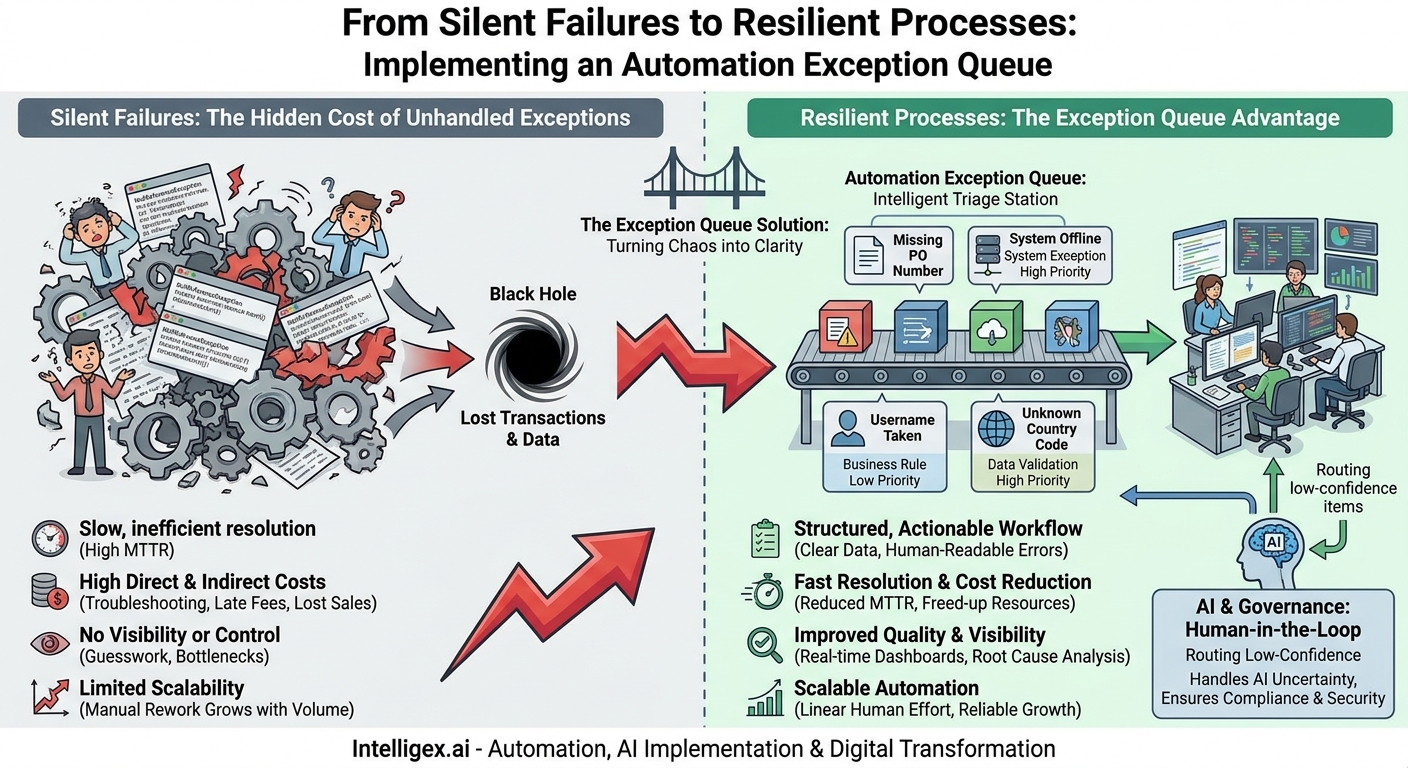
- Finance: An invoice processing bot receives a PDF from a new vendor. The format is slightly different, and the bot cannot find the purchase order number. This is a business exception.
- Supply Chain: An automated inventory check tries to connect to a warehouse management system’s API to get stock levels, but the system is down for maintenance. This is a system exception.
- Human Resources: A new hire onboarding workflow attempts to create a user account, but the employee’s chosen username is already taken. This is a business rule exception.
- Sales: A process that syncs new leads from a marketing platform to your CRM finds a lead with a country code it doesn’t recognize. The CRM rejects the record. This is a data validation exception.
Without a dedicated exception queue, these items become digital ghosts. They might be logged in a text file on a server that no one reads, or worse, they might simply vanish. The business impact can be severe and insidious. That unprocessed invoice becomes a late payment, damaging a key supplier relationship. The failed inventory check leads to an inaccurate stock count, resulting in a stockout and a lost sale. The new hire shows up on their first day without a laptop or network access, creating a terrible first impression. These aren’t just technical issues; they are direct hits to operational efficiency, financial health, and customer satisfaction.
What is an Exception Queue? A Practical Definition
Think of an exception queue as an intelligent triage station for your digital workforce. Instead of letting failed tasks pile up in a messy, unorganized log file, a queue provides a structured holding area where these items can be reviewed, prioritized, and handled by a human. It’s the critical handoff point between the automation and your team.
A well-designed exception item is not just an error message. It’s a complete package of information that gives a business user everything they need to solve the problem quickly. The key components include:
- The Transaction Data: A copy of the data the bot was working on, such as the invoice details, the customer order information, or the employee record.
- Metadata: Essential context like a unique transaction ID, the time the exception occurred, the name of the automation process, and the source of the data (e.g., email attachment name).
- Priority Level: A rating (e.g., Low, Medium, High, Critical) to help the team decide what to work on first. An exception for a $500,000 order should be handled before one for a $50 internal expense claim.
– A Clear Reason for Failure: Translated from technical jargon into plain English. Instead of “NullReferenceException,” it should say, “The invoice is missing a valid Purchase Order number.”
This structure turns a reactive, chaotic process of firefighting into a proactive, manageable workflow. Your team no longer has to hunt for problems. The problems are delivered to them in an organized queue, complete with the context needed for a swift resolution.
The Business Value of a Well-Managed Exception Queue
Implementing exception handling isn’t just about cleaning up errors. It delivers tangible value across several key business dimensions, forming the foundation for robust and scalable automation programs.
Speed and Efficiency
When an exception occurs without a queue, the resolution process is slow and inefficient. A business user notices a problem (e.g., a missing payment), reports it to their manager, who then files a ticket with IT. The IT team has to dig through logs to identify the failed transaction before passing it back to the business team to fix the underlying data and re-run the process. This can take days. With an exception queue, the failed item appears in a workbasket for the correct business team almost instantly. This drastically reduces the Mean Time to Resolution (MTTR) from days to hours, or even minutes.
Cost Reduction
Inefficient exception handling has direct and indirect costs. The direct costs include the hours spent by expensive technical resources troubleshooting what are often simple data issues. Indirect costs include things like late payment fees, penalties for missing Service Level Agreements (SLAs), and the opportunity cost of lost sales. By routing exceptions directly to the business users who can fix them, you free up your developers to focus on building new value, not just maintaining the old.
Quality and Accuracy
An exception queue is a powerful quality control tool. It guarantees that no transaction is ever silently dropped or lost. Every item is accounted for. Furthermore, it creates a powerful feedback loop. By analyzing the most common reasons for exceptions, you can identify the root causes of process failures. This could lead to improving a web form to prevent bad data entry, retraining a team on a specific procedure, or working with a vendor to standardize their invoice format. The goal is to not only handle exceptions efficiently but to reduce the number of exceptions over time.
Visibility and Control
A queue provides a real-time dashboard of your automation’s health. Operations managers can see exactly how many transactions are being processed, how many are failing, and why. This visibility is crucial for managing workload, identifying bottlenecks, and understanding the true performance of a process. It replaces ambiguity and guesswork with hard data, giving you the control to manage your operations effectively.
Scalability
This is perhaps the most critical benefit. You cannot scale an automation program if its failure rate creates a disproportional amount of manual rework. If a 1% exception rate requires 10% of your team’s time to manage, the automation will never deliver on its promised ROI as you increase transaction volumes. A well-oiled exception handling process ensures that the human effort required to manage failures grows linearly and predictably with the volume, making it possible to scale from processing hundreds of transactions a day to hundreds of thousands.
Designing Your First Exception Queue: A Step-by-Step Guide
Setting up an effective exception queue involves more than just installing a piece of software. It requires thoughtful process design focused on making the resolution workflow as seamless as possible. Here is a practical, step-by-step approach.
- Define and Categorize Your Exceptions: Before you build anything, map out the types of things that can go wrong. Group them into two main buckets. System Exceptions are technical issues (e.g., network timeout, application crash, invalid login credentials). These should typically route to your IT or automation support team. Business Exceptions are data or logic issues (e.g., missing information, duplicate record, required approval not provided). These should route to the business users who own the process.
- Choose the Right Technology: You don’t need a complex system from day one. The tool should match your scale and maturity.
- Basic: For a simple, low-volume automation, a structured shared mailbox with email templates or a carefully managed spreadsheet can work as a starting point. However, these are difficult to track and scale.
- Intermediate: Use a standard ticketing system your organization already uses, like the ones offered by Atlassian (Jira) or ServiceNow. You can create a specific project or ticket type for automation exceptions.
- Advanced: Leverage the built-in queueing capabilities of your Robotic Process Automation (RPA) platform, such as UiPath Orchestrator or Automation Anywhere Control Room. These tools are designed for this exact purpose and offer robust features for managing, reporting on, and re-submitting items. For more custom applications, a cloud-based message queue service like Amazon Simple Queue Service (SQS) can be a powerful option.
- Define the “Queue Item” Data Schema: This is the most critical step. Work with the business users who will be resolving the exceptions. Ask them: “What is the absolute minimum information you would need to solve this problem without having to look in multiple other systems?” Your schema should always include a Transaction ID, a link to any source files, a human-readable error message, and the key data points for that specific transaction (e.g., Invoice Number, Customer ID, Employee Name).
- Design the Human Workflow: Define the rules of engagement for your queue. Who is responsible for monitoring it? What is the SLA for acknowledging and resolving a “Critical” priority item versus a “Low” one? How does a user signal that they have started working on an item to prevent duplication of effort? How is an item re-submitted to the automation after the data has been corrected? Document this process clearly.
- Implement and Test Relentlessly: Once built, test the end-to-end process. Intentionally feed the automation bad data that you know will cause different types of exceptions. Does the item show up in the queue correctly? Is all the necessary data present? Are the notifications sent to the right people? Testing the failure path is just as important as testing the success path.
Common Pitfalls to Avoid
Even with the best intentions, exception handling strategies can fail. Here are a few common traps to watch out for and how to steer clear of them.
The “Black Hole” Queue
This is the most common failure mode: a team builds a queue, directs all the exceptions there, and then no one monitors it. The queue grows endlessly, and the problems are ignored until they cause a major downstream issue. Solution: Assign clear, named ownership for the queue. Make reviewing the queue a part of someone’s daily standard work. Build SLA-based alerts that notify a manager if items are aging without being addressed.
Cryptic and Useless Error Messages
An exception item that says “Error: Object reference not set to an instance of an object” is useless to a finance clerk. They have no idea what it means or how to fix it. Solution: The developers building the automation must be responsible for catching technical errors and translating them into meaningful business context. The error message should describe the business problem, not the code problem. For example: “Could not proceed: The supplier ‘Intelligex Inc.’ is not set up in the payment system.”
Treating All Exceptions as Equal
A queue with 500 items can be overwhelming if there’s no way to tell what’s important. An exception preventing a multi-million dollar transaction from being processed should not be buried under 499 minor data entry errors. Solution: Implement a priority system based on business impact. This can be based on financial value, customer tier, product type, or regulatory deadlines. This allows the team to focus their energy where it matters most.
Fixing Symptoms, Not the Root Cause
A team can become very efficient at resolving the same type of exception over and over again. While this is better than not resolving them at all, it’s a missed opportunity. Solution: Dedicate time (e.g., in a weekly or monthly meeting) to analyze the metrics from your queue. If 40% of all exceptions are due to the same missing data field from the same source, that points to a systemic problem that needs to be fixed at its source. The ultimate goal of exception handling is to continuously shrink the number of exceptions that occur in the first place.
A Note on AI, Governance, and Security
As you introduce more intelligent automation and AI into your processes, exception queues take on an even more important role in governance and safety. AI models are probabilistic, not deterministic. They don’t just “succeed” or “fail”; they operate with a certain level of confidence.
An exception queue is the perfect mechanism for managing this uncertainty. For example, an AI model for document understanding might extract invoice data with 99% confidence on one document but only 70% confidence on another. Instead of processing the low-confidence document and risking an error, the automation’s business logic should route it to a human validation queue. This “human-in-the-loop” approach allows you to harness the power of AI at scale while maintaining a critical layer of human oversight for ambiguous cases.
This also has significant security and privacy implications. The data within your exception queue is often sensitive. It could contain Personally Identifiable Information (PII), financial data, or protected health information. Access to these queues must be strictly controlled.
- Access Control: Use role-based access to ensure that only authorized individuals can view and manage specific queues. An HR benefits administrator should be the only one handling exceptions from an HR process containing employee salary data.
- Data Masking and Minimization: When designing your queue item schema, consider what data is truly necessary for resolution. Avoid logging highly sensitive information (like full credit card numbers or social security numbers) in plain text whenever possible.
Your Next Steps: Putting Exception Handling into Practice
Ignoring exceptions is not a strategy for success. It’s a recipe for invisible risk, mounting technical debt, and automations that fail to deliver on their potential. By embracing structured exception handling, you build a foundation for a more resilient, transparent, and scalable digital workforce. The path forward is an iterative one.
Here is a simple action plan to get started:
- Audit a Key Automation: Select one of your most critical existing automations. Ask the tough questions: How do we know when it fails on a single transaction? Where do those failures go? Who is responsible for fixing them? Quantify the time currently being spent on this reactive troubleshooting.
- Pilot a Simple Queue: Based on your audit, design and implement a basic exception queue for that one process. It could be as simple as a structured Trello board or a dedicated Jira project. Focus on getting the data schema right.
- Assign Clear Ownership: Give a specific person or team the responsibility for monitoring the queue and resolving items. Make it an official part of their role, not something they do “if they have time.”
- Review and Improve: Schedule a 30-minute meeting every two weeks to review the queue’s metrics. What were the top exception reasons? Is the resolution time getting better or worse? What one thing can you improve in the source process this month to reduce the exception rate?
By taking these deliberate steps, you will transform exceptions from a source of frustration and hidden costs into a valuable source of insight that drives continuous improvement across your business.
Your Next Read:
Category:
Get a FREE
Proof of Concept
& Consultation
No Cost, No Commitment!
