

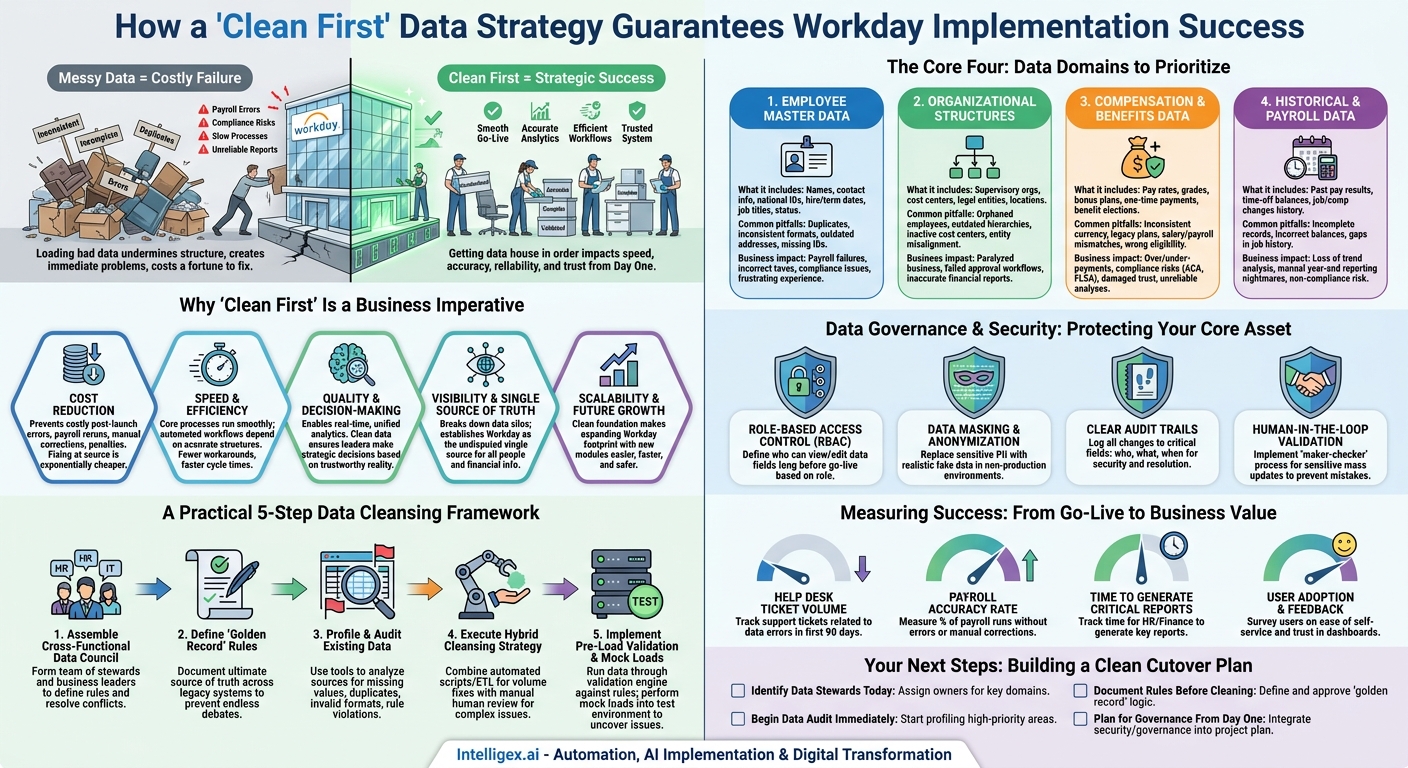
A Workday implementation is more than a technical upgrade; it’s a fundamental shift in how your organization manages its most critical assets: its people and its finances. The moment you “cut over” to the new system is the culmination of months of planning, configuration, and testing. But the success of that moment, and the long-term value of your investment, hinges on a single, often underestimated factor: the quality of the data you bring into the system. Loading messy, inconsistent, or incomplete data into a pristine Workday environment is like moving old, broken furniture into a brand-new house. It undermines the structure, creates immediate problems, and costs a fortune to fix later.
This is why a “clean first” approach is not just a best practice, but a business necessity. Getting your data house in order before the cutover directly impacts the speed of your deployment, the accuracy of your reporting, the reliability of your analytics, and the trust your employees will have in the new system. It is the foundation upon which every subsequent business process, from payroll to performance management, will be built.
Why “Clean First” Is a Business Imperative
Treating data cleansing as a last-minute IT task is a recipe for a painful and expensive go-live. The quality of your data has a direct and measurable impact on core business value drivers. When stakeholders ask why they should invest time and resources in pre-cutover data cleaning, the answer lies in these five areas:
- Cost Reduction: Clean data prevents a cascade of costly post-launch errors. A single mistake in an employee’s pay rate or bank details can lead to payroll reruns, manual corrections, and compliance penalties. Fixing data issues at the source, before they are loaded into Workday, is exponentially cheaper than untangling them after they have infected multiple downstream processes and reports.
- Speed and Efficiency: With clean data, your core business processes run smoothly from day one. Automated workflows, like manager approvals for time off or promotions, depend on accurate supervisory structures. Reliable data means fewer manual workarounds, faster cycle times for key HR and finance activities, and a quicker path to realizing the efficiency gains you expected from Workday.
- Quality and Decision-Making: Workday’s power lies in its ability to provide real-time, unified analytics. But if the underlying data is flawed, your dashboards and reports will be, too. “Garbage in, garbage out” is a cliché for a reason. Clean data ensures that leaders are making strategic decisions about hiring, compensation, and financial planning based on a reality they can trust.
- Visibility and a Single Source of Truth: A primary goal of implementing a system like Workday is to break down data silos. By cleansing and standardizing data from disparate legacy systems before migration, you establish Workday as the undisputed single source of truth for all people and financial information. This visibility is critical for everything from accurate headcount reporting to enterprise-wide financial consolidation.
- Scalability and Future Growth: Your Workday journey doesn’t end at go-live. As you add new modules like Recruiting, Learning, or Adaptive Planning, they will all draw from the same core data foundation. A clean foundation makes it easier, faster, and safer to expand your Workday footprint, allowing the platform to grow with your business instead of holding it back.
The Core Four: Data Domains to Prioritize
While all your data is important, not all of it carries the same level of risk during a cutover. Focus your initial cleansing efforts on the foundational data domains that impact the most critical business processes. Getting these four areas right will prevent the vast majority of go-live issues.
1. Employee Master Data
This is the bedrock of your HCM system. It contains the fundamental information about every person in your organization. If this data is wrong, nearly every other process will fail.
What it includes: Legal names, personal contact information (addresses, phone numbers), national IDs (like Social Security Numbers), hire dates, termination dates, job titles, and employment status (full-time, part-time, contractor).
Common pitfalls:
- Duplicate employee records created by rehires or system glitches.
- Inconsistent name formats (e.g., “John Smith,” “Smith, John,” “J. Smith”).
- Outdated home addresses, leading to mailed documents being returned.
- Missing national IDs, which can cause significant payroll and tax filing issues.
Business impact: Errors here lead directly to payroll failures, incorrect tax withholdings, compliance violations, and a frustrating employee experience when they can’t access benefits or receive important communications.
2. Organizational Structures
This data defines how your business is organized and how work, money, and responsibility flow through it. It’s the blueprint for your security, workflows, and reporting.
What it includes: Supervisory organizations (who reports to whom), cost centers, company/legal entities, and business locations.
Common pitfalls:
- “Orphaned” employees who don’t report to an active manager in the system.
- Outdated supervisory hierarchies that don’t reflect recent reorganizations.
- Inactive cost centers still assigned to active employees, causing financial misallocations.
- Misalignment between legal entities and the employees assigned to them.
Business impact: A broken organizational structure paralyzes the business. Approval workflows for promotions, compensation changes, and purchase orders will fail. Financial reports will be inaccurate, and managers won’t be able to see their complete teams.
3. Compensation and Benefits Data
This data is highly sensitive and has a direct financial impact on both the employee and the company. Precision is paramount.
What it includes: Salary and hourly pay rates, pay grades, bonus and commission plans, one-time payment history, and benefit plan elections.
Common pitfalls:
- Inconsistent currency codes for international employees.
- Legacy pay grades or benefit plans that are no longer in use but are still assigned to employees.
- Mismatches between an employee’s stated salary and the actual payroll calculations.
- Incorrect benefit eligibility data, leading to employees being offered the wrong plans.
Business impact: Errors in this domain result in overpayments or underpayments, significant compliance risks (especially with regulations like the ACA or FLSA in the U.S.), and damaged employee trust. It also makes critical analyses, like pay equity reviews, impossible to conduct reliably.
4. Historical and Payroll Data
To enable accurate reporting and trend analysis, you need clean historical data. This is especially true for payroll, where year-over-year comparisons and tax filings are essential.
What it includes: Past pay results (earnings, deductions, taxes), time-off balances (vacation, sick leave), and historical job and compensation changes.
Common pitfalls:
- Incomplete payroll records from a previous system, making year-end tax forms inaccurate.
- Incorrectly migrated time-off balances, leading to disputes over accrued leave.
- Gaps in job history, making it difficult to track an employee’s career progression or tenure.
Business impact: Without clean historical data, you lose the ability to perform vital trend analysis. Year-end reporting becomes a manual nightmare, and you risk non-compliance with tax and labor laws that require accurate record-keeping.
A Practical 5-Step Data Cleansing Framework
Data cleansing can feel overwhelming. The key is to follow a structured process that involves business stakeholders from the start. This isn’t just an IT data dump; it’s a business-led initiative to define what “good” looks like.
- Assemble a Cross-Functional Data Council: Your first step is to form a team of data stewards. This must include representatives from HR (for employee and org data), Finance (for cost centers and financial data), and IT (for technical expertise). Crucially, it should also include leaders from key business units who understand the operational reality of the data. This council is responsible for making final decisions on data rules and resolving conflicts.
- Define Your “Golden Record” Rules: Your legacy data likely lives in multiple systems (e.g., an HRIS, a payroll system, a separate benefits portal). When conflicts arise, which system is the ultimate source of truth? The council must formally document these rules. For example: “An employee’s legal name and hire date are owned by the HRIS. The employee’s bank details are owned by the payroll system.” These rules prevent endless debates during the cleansing process.
- Profile and Audit Existing Data: Before you can fix the problems, you have to find them. Use data profiling tools (or even advanced spreadsheet functions) to analyze your data sources for common errors. Look for things like missing values in required fields, duplicate records, invalid formats (e.g., impossible dates), and data that violates your business rules (e.g., an employee assigned to a deactivated cost center).
- Execute a Hybrid Cleansing Strategy: The actual cleaning process involves a combination of automation and manual intervention.
- Automated Cleansing: Use scripts and ETL (Extract, Transform, Load) tools for high-volume, rule-based fixes. This is perfect for standardizing addresses (e.g., changing all instances of “St.” to “Street”), formatting phone numbers consistently, or removing extra spaces from names.
- Manual Review: Some issues require human judgment. Merging duplicate employee records, for instance, requires a careful review by an HR partner to ensure the correct data is retained. Resolving conflicting job titles for the same role may require input from a line manager.
- Implement Pre-Load Validation and Mock Loads: After cleansing, and before the final cutover, run the data through a validation engine. This involves running reports that check the entire dataset against the business rules your council defined. Any record that fails validation must be flagged for review. Performing several “mock” data loads into your Workday test environment is the ultimate validation, as it will reveal how the system itself interprets your data and uncover issues you may have missed.
Data Governance and Security: Protecting Your Core Asset
As you cleanse and prepare your data for Workday, you are handling some of the most sensitive information in your company. Building strong data governance and security practices into the process is not optional; it’s essential for compliance and for building trust in the new system.
This isn’t about creating bureaucracy. It’s about establishing clear accountability and safeguards. Your data governance plan should be a simple, living document that addresses key principles.
- Role-Based Access Control (RBAC): Define exactly who can view, create, and edit specific data fields long before go-live. A hiring manager should see data for their direct reports, but not their team’s compensation details. An HR administrator may need to edit personal information, but a finance analyst should only have read-only access. These roles must be mapped and tested thoroughly.
- Data Masking and Anonymization: Your developers and testers do not need to see real employee social security numbers or salary details in non-production environments. Implement data masking to replace sensitive PII (Personally Identifiable Information) with realistic but fake data in your testing and development tenants. This dramatically reduces the risk of a data breach.
- Clear Audit Trails: Ensure that all changes to critical data fields (like compensation, bank details, or home addresses) are logged. The audit trail should record who made the change, what was changed, and when. This is non-negotiable for security and for resolving future discrepancies.
- Human-in-the-Loop Validation: For the most sensitive data cleansing activities, such as merging duplicate employee profiles or making mass compensation updates, implement a “maker-checker” process. One person proposes the change, and a second, authorized person must review and approve it before it is executed. This human checkpoint prevents simple mistakes from becoming major problems.
Embedding these practices protects your company from compliance risks related to regulations like GDPR and CCPA, but more importantly, it sends a clear message to employees that their data is being handled responsibly.
Measuring Success: From Go-Live to Business Value
The success of your data cleansing effort isn’t measured on cutover weekend. It’s measured in the weeks and months that follow. By tracking the right metrics, you can demonstrate the tangible business value of your “clean first” approach and justify the upfront investment.
Focus on metrics that connect directly to business operations and efficiency:
- Help Desk Ticket Volume: Track the number of support tickets related to incorrect employee data, pay discrepancies, or failed approvals in the first 90 days after launch. A low volume is a strong indicator of clean data.
- Payroll Accuracy Rate: Measure the percentage of payroll runs that are completed without errors or require manual corrections. The goal should be to significantly improve upon the benchmark from your legacy system.
- Time to Generate Critical Reports: How long does it take your HR and Finance teams to generate key reports like the monthly headcount, organizational charts, or financial close statements? With clean, structured data in Workday, this time should decrease dramatically.
- User Adoption and Feedback: Survey key users, like managers and HR business partners. Are they able to complete self-service tasks easily? Do they trust the data they see in their dashboards? Positive qualitative feedback is a powerful measure of success.
Your Next Steps: Building a Clean Cutover Plan
A successful Workday cutover begins long before the go-live date. It starts with a deliberate commitment to data quality. Waiting until the final weeks to think about data is a path to budget overruns, missed deadlines, and a system that fails to deliver on its promise. Instead, you can take action now to build a solid foundation.
Start with these four steps:
- Identify Your Data Stewards Today: Don’t wait. Formally assign owners for key data domains from HR, Finance, and other core business functions. These are the people who will make the critical decisions for your data council.
- Begin Your Data Audit Immediately: Start profiling your highest-priority data domains: Employee Master and Organizational Structures. Understanding the scope of the problem is the first step toward solving it.
- Document Your Rules Before You Clean: Convene your data stewards to define the “golden record” rules and the data quality standards you expect. Get this business logic documented and approved before a single record is changed.
- Plan for Governance From Day One: Integrate your data security and governance plan into the main project plan, not as a separate workstream. Define your access roles and data masking strategy as part of the initial design, not as an afterthought.
By prioritizing data cleanliness from the outset, you transform your Workday implementation from a risky technical project into a strategic business initiative that delivers lasting value from day one.
Your Next Read:
Category:
Get a FREE
Proof of Concept
& Consultation
No Cost, No Commitment!
