

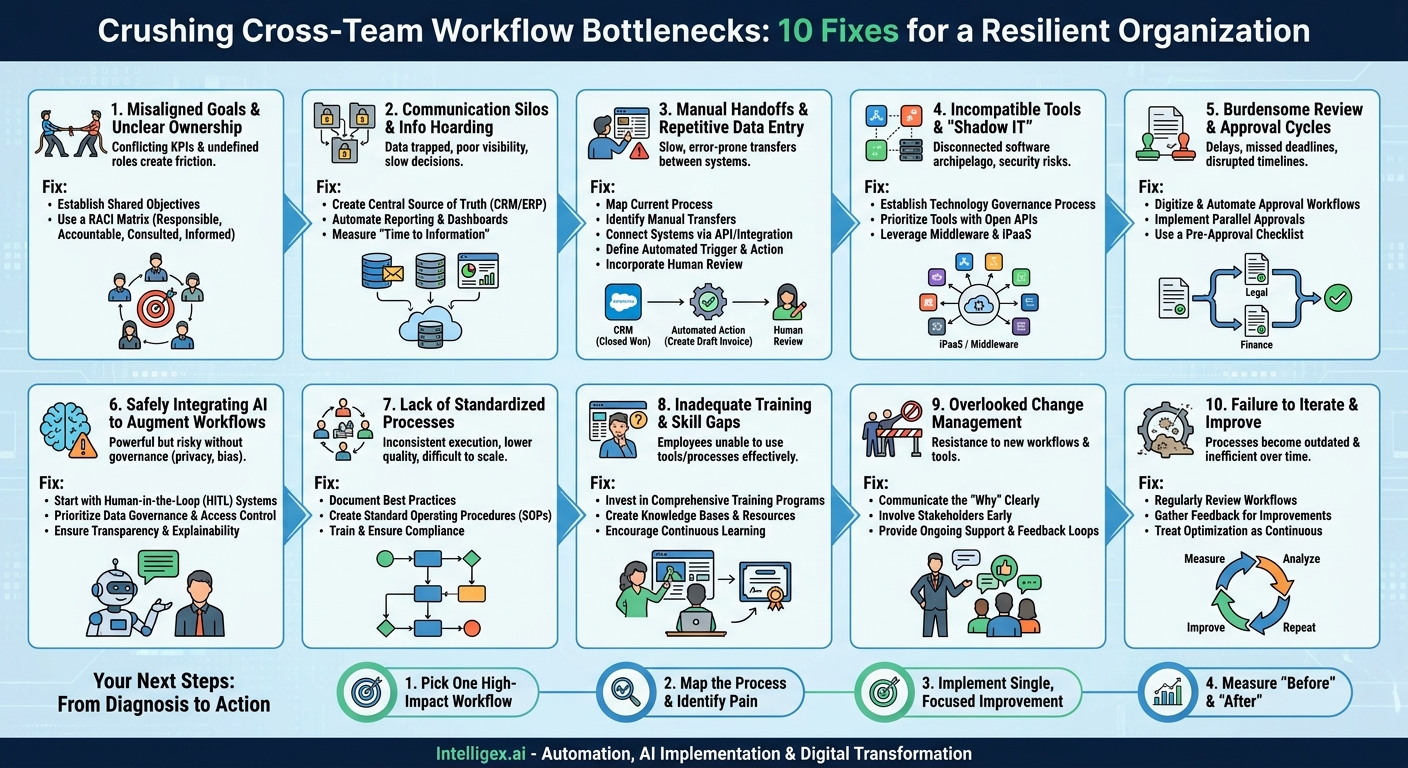
In a perfect world, work flows seamlessly from one team to another. Marketing qualifies a lead, Sales converts it, Operations fulfills the order, and Finance invoices the client. Each handoff is clean, fast, and error-free. But in reality, these handoffs are where work gets stuck. These friction points, or bottlenecks, are more than just minor annoyances. They directly impact your bottom line by increasing costs, delaying revenue, and frustrating both your employees and your customers.
Identifying and resolving these bottlenecks is the foundation of digital transformation. It’s not about adopting technology for its own sake; it’s about strategically applying process improvements and automation to create a more resilient, efficient, and scalable organization. Let’s break down the 10 most common cross-team workflow bottlenecks and explore practical ways to solve them.
1. Misaligned Goals and Unclear Ownership
This is the silent killer of cross-functional projects. When teams have conflicting objectives, they inevitably pull in different directions. Marketing might be measured on generating a high volume of leads, while Sales is measured on conversion rates for high-quality leads. This misalignment creates friction. Marketing sends over unqualified leads to hit its quota, and the sales team wastes time sifting through them, damaging trust and efficiency.
Equally damaging is unclear ownership. When a task falls between two departments, who is ultimately accountable for its completion? Without a clear owner, critical steps are often missed, leading to delays and finger-pointing when things go wrong.
How to Fix It:
Establish Shared Objectives: Instead of team-specific KPIs, introduce shared goals that require collaboration. For example, instead of “leads generated” and “deals closed,” a shared metric could be “pipeline velocity” or “customer acquisition cost.” This forces teams to work together towards a common business outcome.
Use a RACI Matrix: For any significant cross-team initiative, create a simple RACI (Responsible, Accountable, Consulted, Informed) chart. This clarifies roles and expectations instantly.
- Responsible: The person or team doing the work.
- Accountable: The single person who owns the final outcome.
- Consulted: Subject matter experts who provide input.
- Informed: People who need to be kept up-to-date on progress.
Documenting this at the start of a project eliminates ambiguity and ensures everyone understands their role in the bigger picture.
2. Communication Silos and Information Hoarding
Information is often trapped within specific departments, email threads, or private messaging channels. This creates a fragmented view of the business. An operations team might be completely unaware of a large marketing promotion, leaving them unprepared for a sudden spike in demand. A finance team might struggle to forecast revenue accurately because they lack real-time visibility into the sales pipeline locked away in the company CRM.
This lack of shared information forces employees to waste time hunting down data or, worse, making critical decisions based on incomplete or outdated information. The business cost is significant: missed opportunities, poor resource planning, and slow decision-making.
How to Fix It:
Create a Central Source of Truth: The goal is to make critical business data accessible to those who need it, when they need it. This doesn’t mean everyone sees everything. It means integrating your core systems so data can flow between them. A well-configured CRM like Salesforce should be the single source of truth for all customer information, accessible by Sales, Marketing, and Customer Service. Similarly, an ERP system should centralize financial and operational data.
Automate Reporting and Dashboards: Replace manual status update meetings and spreadsheet requests with automated dashboards. Tools like Tableau, Power BI, or even the built-in reporting in your core applications can pull data from multiple sources and present it in an easy-to-understand format. This provides real-time visibility and empowers teams to make data-driven decisions independently.
What to Measure: A key metric to track is “time to information.” How long does it take for an employee to get the data required to do their job? Reducing this time directly boosts productivity and agility.
3. Manual Handoffs and Repetitive Data Entry
The manual handoff is the most visible and painful type of bottleneck. An employee from one team completes a task and then has to manually package the information (often by filling out a spreadsheet or sending an email) and pass it to the next team. That team then has to manually re-enter the same information into their own system. Each step introduces the potential for delay and human error.
A classic example is the “lead-to-cash” process. A salesperson closes a deal in the CRM. They then email the signed contract and customer details to the finance department. Someone in finance manually creates a new customer in the accounting system and generates an invoice. This process is slow, inefficient, and doesn’t scale. A single typo in a customer’s billing address can delay payment by weeks.
How to Fix It:
Workflow automation is the definitive solution here. By connecting your systems, you can create seamless, automated handoffs that are triggered by business events.
- Map the Current Process: The first step is always to understand the current state. Get the stakeholders together and visually map every step, decision point, and data transfer in the workflow.
- Identify the Manual Transfers: Pinpoint exactly where data is being copied and pasted from one system or document to another. These are your primary targets for automation.
- Connect Your Systems: Use an integration platform or direct API connections to link the relevant applications. For the lead-to-cash example, this means connecting your CRM to your ERP or accounting software.
- Define the Trigger and Action: Establish a clear trigger for the automation. For instance, when a deal’s status in the CRM changes to “Closed Won,” that is the trigger. The action is to automatically create a new customer record and a draft invoice in the accounting system using the data from the CRM.
- Incorporate Human Review Where Needed: Automation doesn’t mean removing humans entirely. The process can automatically create a draft invoice, which is then flagged for a final review by a team member before being sent to the customer. This combines the speed of automation with the oversight of human judgment.
The business value is immediate: faster cycle times, drastically reduced error rates, and more time for your team to focus on high-value work instead of administrative tasks.
4. Incompatible Tools and Unmanaged “Shadow IT”
In an effort to be productive, individual teams often adopt the tools that work best for them. The engineering team uses Jira, the marketing team loves Asana, and the sales team can’t live without their specific sales enablement tool. While these tools may be best-in-class for their specific function, they often don’t communicate with each other, creating a disconnected “archipelago” of software.
This problem is amplified by “Shadow IT,” where teams purchase and use software without the IT department’s knowledge or approval. This not only creates integration challenges but also introduces serious security vulnerabilities and data governance risks.
How to Fix It:
Establish a Technology Governance Process: Create a simple but formal process for evaluating and approving new software. This shouldn’t be a bureaucratic hurdle, but a collaborative checkpoint to ensure a new tool meets security standards, complies with data privacy regulations, and, crucially, can be integrated with your existing technology stack.
Prioritize Tools with Open APIs: When selecting new software, make API accessibility a key criterion. An API (Application Programming Interface) is what allows different software systems to talk to each other. A vendor with a well-documented, robust API is demonstrating a commitment to being a part of a larger ecosystem, not a walled garden. This forward-thinking approach prevents future integration headaches.
Leverage Middleware and Integration Platforms: For existing tools that don’t talk to each other, a middleware or Integration Platform as a Service (iPaaS) solution can act as a universal translator. These platforms specialize in connecting disparate systems, allowing you to build automated workflows even between applications that weren’t designed to work together.
5. Burdensome Review and Approval Cycles
Work doesn’t just move between teams; it also moves up and down the organizational chart for reviews and approvals. A marketing campaign brief, a new hire offer, a project budget, or a legal contract can get stuck for days or even weeks waiting for the right person to sign off. The problem is often compounded by sequential approval chains, where the document can’t move to the next approver until the current one has signed off.
These delays are not just about time. They disrupt project timelines, cause teams to miss deadlines, and leave employees feeling powerless as they wait for a decision.
How to Fix It:
Digitize and Automate Approval Workflows: Move approvals out of email inboxes and into a dedicated system. This could be within your project management tool, a workflow automation platform, or a specialized application. This creates a clear, auditable trail of who needs to approve what and by when.
Implement Parallel Approvals: Challenge the need for sequential approvals. If a contract needs a review from both Legal and Finance, can they both review it at the same time rather than one after the other? This simple change can cut approval times in half.
Use a Pre-Approval Checklist: Ensure that any request for approval is complete before it’s submitted. A simple checklist can confirm that all necessary supporting documents and context are included, preventing the request from being rejected due to missing information.
A Simple Approval Checklist:
- Is the approver for this stage clearly defined?
- Has a reasonable deadline for the review been set?
- Does the approver have all the necessary context and linked documents?
- Is there a documented escalation path if the deadline is missed?
6. Safely Integrating AI to Augment Workflows
Artificial intelligence offers powerful new ways to break through bottlenecks, from automatically categorizing customer support tickets to analyzing sales data to predict which deals are most likely to close. However, deploying AI without proper governance can create new risks related to data privacy, bias, and accuracy. The key is to implement it thoughtfully and safely.
Avoid generic AI hype. Instead, focus on specific, measurable problems. Don’t ask, “How can we use AI?” Ask, “Can an AI model help us more accurately route service tickets to the right agent, reducing our resolution time?”
How to Implement AI Responsibly:
Start with Human-in-the-Loop (HITL) Systems: For critical processes, don’t let the AI operate with full autonomy at first. Instead, use a HITL approach where the AI makes a recommendation or automates a preliminary step, but a human makes the final decision. For example, an AI can screen and score candidate resumes based on job criteria, but a human recruiter makes the final decision on who to interview. This leverages the speed of AI while retaining human oversight and judgment.
Prioritize Data Governance and Access Control: AI models are only as good as the data they are trained on. Ensure that your AI systems are only trained on clean, relevant, and ethically sourced data. Crucially, implement strict, role-based access controls. An AI assistant designed to help the sales team analyze their pipeline should not have access to sensitive employee data from the HR system. For a deeper dive into cloud security and governance principles, resources like the official AWS documentation offer extensive best practices.
Ensure Transparency and Explainability: For decisions that impact customers or employees, you should be able to explain why the AI system made a particular recommendation. Choose AI tools and build models that provide this “explainability,” which is essential for building trust and for troubleshooting when things go wrong.
Your Next Steps: From Diagnosis to Action
Reading about bottlenecks is one thing; fixing them is another. The key is to avoid trying to solve everything at once. Real, sustainable change comes from a focused, iterative approach.
1. Pick One High-Impact Workflow: Start with a process that is widely acknowledged as being slow or painful. Good candidates often include customer onboarding, employee onboarding, order fulfillment, or content approval. Choose one that involves multiple teams and has a clear business impact.
2. Map the Process and Identify the Pain: Gather a small group of people who actually perform the work from each team involved. On a whiteboard or virtual canvas, map out every single step of the process as it exists today, not as it’s written in a manual. As you map, ask the group: “Where do we wait the longest?” and “Where do the most mistakes happen?” This will quickly reveal the biggest bottleneck.
3. Implement a Single, Focused Improvement: Target that one bottleneck. Don’t redesign the entire workflow. If the bottleneck is a manual data handoff, automate it. If it’s a slow approval, digitize it and set up reminders. The goal is to get a quick win that delivers tangible value.
4. Measure the “Before” and “After”: Before you make the change, measure the performance of the bottleneck. This could be cycle time, error rate, or employee time spent on the task. After implementing your improvement, measure it again. Quantifying the improvement (e.g., “We reduced invoice processing time from 4 days to 4 hours”) is the best way to build momentum and get buy-in for tackling the next bottleneck.
By systematically identifying and resolving these cross-team bottlenecks, you do more than just improve efficiency. You build a more connected, agile, and scalable organization that is ready for future growth.
Your Next Read:
Category:
Get a FREE
Proof of Concept
& Consultation
No Cost, No Commitment!
