

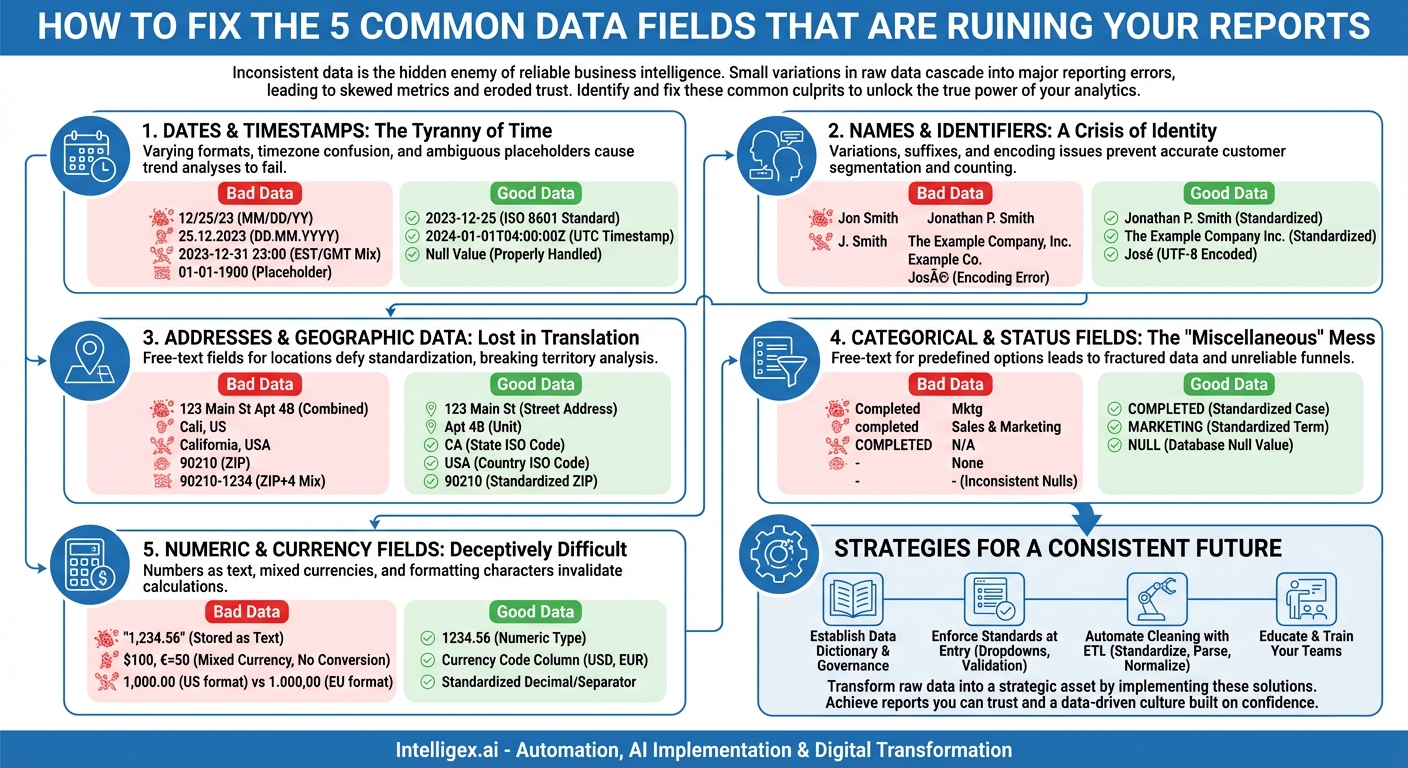
In the world of data analytics and business intelligence, consistency is king. Accurate, reliable reports are the bedrock of sound decision-making, strategic planning, and operational efficiency. Yet, many organizations find themselves battling reports that are fragmented, inaccurate, or simply untrustworthy. The culprit is often not a flaw in the reporting tool itself, but a more insidious problem lurking within the raw data: inconsistency. Seemingly minor variations in how data is captured and stored can cascade into major reporting headaches, leading to skewed metrics, wasted hours on manual cleanup, and a fundamental lack of trust in the numbers. This erosion of confidence can paralyze a data-driven culture before it even has a chance to flourish.
The challenge is that these inconsistencies often hide in plain sight, embedded in the very fields we use every day. They are the digital equivalent of typos and grammatical errors, and just like in a written document, they can completely change the meaning of the final product. Understanding which data fields are most susceptible to these issues is the first critical step toward building a robust and reliable reporting ecosystem. By identifying these common offenders, we can begin to implement the processes and standards necessary to tame the chaos and unlock the true power of our data.
The Common Culprits: Data Fields That Wreak Havoc on Reports
While any data field can potentially harbor inconsistencies, a few usual suspects are responsible for the vast majority of reporting problems. Let’s dissect these problem areas one by one, exploring the specific ways they introduce “dirty” data and corrupt our analytics.
1. Dates and Timestamps: The Tyranny of Time
Dates are arguably the number one cause of reporting inconsistencies. They seem simple, but their representation is fraught with ambiguity. When your reports can’t agree on when something happened, trend analysis, period-over-period comparisons, and financial closing reports all fall apart.
- Varying Formats: The most common issue. A single dataset might contain dates in multiple formats:
MM/DD/YYYY(e.g., 12/25/2023) – Common in the US.DD/MM/YYYY(e.g., 25/12/2023) – Common in Europe and elsewhere.YYYY-MM-DD(ISO 8601 standard) – The least ambiguous and most database-friendly.Month D, YYYY(e.g., December 25, 2023) – Often from manual entry.
Without a standardized format, a date like
03/04/2024could be interpreted as March 4th or April 3rd, leading to disastrous miscalculations. - Timezone Troubles: For global organizations, timestamps are a minefield. A sale recorded at
2023-12-31 23:00:00in New York (EST) is actually from2024-01-01 04:00:00in London (GMT). If timezones aren’t standardized—typically to Coordinated Universal Time (UTC)—or if timezone information isn’t stored alongside the timestamp, daily, weekly, and monthly reports can be wildly inaccurate. - Time Component Inconsistency: Does a “day” end at midnight? Does a date field like
2023-12-25implicitly mean2023-12-25 00:00:00? Some systems might store just the date, while others store a full timestamp. When you try to group by day, records from a single conceptual “day” can be split across two days if the timezone handling is incorrect. - Placeholder and Null Dates: What happens when a date is unknown? Some legacy systems use a placeholder like
1900-01-01or9999-12-31. These are valid dates that can severely skew calculations for average age, time-to-resolution, or other duration-based metrics if not properly excluded.
2. Names and Identifiers: A Crisis of Identity
Whether you’re dealing with customers, employees, or products, name fields are often a mess of variations that prevent proper grouping and unique counting. This directly impacts sales reports by representative, customer segmentation, and inventory management.
- Personal Name Variations: A single customer, Johnathan “Jon” P. Smith, could appear in your CRM in numerous ways:
- Jon Smith
- Jonathan Smith
- J. Smith
- Smith, John
- [email protected] (used as a name)
Each of these variations will be treated as a unique entity by a reporting tool, artificially inflating customer counts and splitting their history across multiple records.
- Company Name Suffixes and Punctuation: Similarly, a company can be recorded with endless permutations. Consider “The Example Company”:
- The Example Company, Inc.
- The Example Company Inc
- Example Company, LLC
- Example Co.
These differences make it impossible to get a clean, consolidated view of account activity or total spend by a single corporate entity.
- Character Encoding and Special Characters: Names with accents, umlauts, or other non-ASCII characters (e.g., “José” vs. “Jose”) can be corrupted during data import/export if character encoding (like UTF-8) isn’t handled consistently. This leads to garbled text and split records.
3. Addresses and Geographic Data: Lost in Translation
Geographic data is fundamental to sales territory analysis, logistics planning, and marketing campaign targeting. Unfortunately, address fields are often free-text nightmares that defy standardization.
A simple task like “show me all sales in California” becomes a complex data-cleaning project when the state is represented as “CA,” “Calif.,” “Cali,” and “California.”
- Component Ambiguity: A single address line like “123 Main St Apt 4B” contains multiple pieces of information. Inconsistent abbreviations (Street vs. St., Avenue vs. Ave., Apartment vs. Apt. vs. Unit) make parsing and standardization difficult. Breaking addresses into discrete components (Street Number, Street Name, Street Suffix, Unit Type, Unit Number) at the point of entry is the only reliable solution.
- State, Province, and Country Variations: As mentioned, abbreviations and full names are often used interchangeably. Country data is even more problematic, with “USA,” “U.S.,” “United States,” and “United States of America” all referring to the same place. This breaks maps and any report that groups by geography.
- Postal Code Formats: In the US, you might have the 5-digit ZIP code (e.g., 90210) and the 9-digit ZIP+4 code (e.g., 90210-1234). In other countries, postal codes can contain letters and have different structures (e.g., Canada’s “A1A 1A1” or the UK’s “SW1A 0AA”). Storing these in a single field without validation leads to a jumble of formats.
4. Categorical and Status Fields: The “Miscellaneous” Mess
Fields that should contain a limited set of predefined options (e.g., sales status, product category, priority level) are often implemented as free-text fields, opening the door to chaos. This directly impacts the accuracy of funnels, conversion rates, and inventory reports.
- Case Sensitivity: One of the most common and frustrating issues. A reporting tool will see “Completed,” “completed,” and “COMPLETED” as three distinct categories, fracturing your data and making simple counts unreliable.
- Synonyms and Abbreviations: The “Marketing” department might also be entered as “Mktg,” “Sales & Marketing,” or even misspelled as “Markting.” A product color could be “Gray” or “Grey.” Without a strictly enforced list of options, these fields become nearly useless for accurate aggregation.
- The Null/Empty Dilemma: How do you represent a missing value? Is it a
NULLvalue in the database, an empty string (""), the text “N/A,” “None,” or a single hyphen? Each of these will be treated differently by reporting tools, complicating filtering and calculations. For example, counting records wherestatus != 'Complete'might incorrectly exclude records where the status isNULL.
5. Numeric and Currency Fields: Deceptively Difficult
You would think numbers are easy, but they come with their own set of consistency traps that can invalidate financial reports and any quantitative analysis.
- Numbers Stored as Text: This is a silent killer of reports. If a number like “1,234.56” is stored as a text string, it can’t be used in mathematical operations like SUM or AVG. It also causes sorting errors, where “100” comes before “20” because text is sorted character by character. This often happens when data is exported to formats like CSV and then re-imported without proper data type enforcement.
- Inconsistent Currency and Units: A “revenue” column is meaningless without a corresponding “currency” column. Mixing USD ($), EUR (€), and JPY (¥) in a single column without specifying the currency for each transaction makes any total summation completely wrong. The same applies to units of measurement: a “weight” column is useless if it contains a mix of pounds (lbs) and kilograms (kg).
- Formatting Characters: The presence of currency symbols ($, €), commas as thousand separators, and regional differences in the decimal separator (a period in the US, a comma in Europe) can cause a numeric field to be misinterpreted as text, leading to the problems described above.
Why Does This Happen and How Do We Fix It?
These issues don’t arise out of nowhere. They are symptoms of deeper systemic problems, but the good news is that they are solvable. The primary causes are typically a combination of human error during manual data entry, multiple software systems with different standards trying to sync data, and a lack of overarching data governance.
Fixing reporting consistency is not a one-time project; it’s a commitment to data quality. The strategy involves a two-pronged approach: cleaning the data you already have and preventing bad data from entering your systems in the future.
Strategies for a Consistent Future
- Establish a Data Dictionary and Governance Policy: This is the foundation. A data dictionary is a central document that defines every data field in your system. It specifies the data type (e.g., text, integer, ISO 8601 date), format (e.g., YYYY-MM-DD), and a list of allowed values for categorical fields. This becomes the single source of truth for your entire organization.
- Enforce Standards at the Point of Entry: The best way to keep data clean is to prevent it from getting dirty. Replace free-text fields with dropdown menus, date pickers, and validated form fields wherever possible. For addresses, use services that can parse and standardize them against a postal database in real-time.
- Implement Data Validation Rules: Your database and applications should have built-in rules that reject non-compliant data. For example, a rule could prevent a user from entering a state as “Cali” by enforcing the two-letter abbreviation “CA.”
- Automate Data Cleaning with ETL Processes: For data that is already in your system or coming from external sources you don’t control, use an ETL (Extract, Transform, Load) process. These are automated workflows that can:
- Standardize cases: Convert all categorical text to a consistent case (e.g., uppercase).
- Trim whitespace: Remove leading or trailing spaces from text fields.
- Parse and reformat dates: Convert all date variations into a single, standard format like ISO 8601.
- Normalize values: Use mapping tables to convert variations like “USA” and “U.S.” into a standard “United States.”
- Educate and Train Your Teams: Data quality is everyone’s responsibility. Train employees who enter data on the importance of consistency and the standards defined in your data dictionary. When people understand the downstream impact of a “minor” typo, they become more diligent.
Ultimately, achieving reporting consistency is a journey of a thousand small steps. It begins with recognizing the common fields where chaos takes root and systematically imposing order. By standardizing dates, cleaning up names and addresses, controlling categorical data, and properly formatting numbers, you transform your raw data from a liability into a strategic asset. The payoff is immense: reports you can trust, insights you can act on, and a data-driven culture built on a foundation of confidence.
Your Next Read:
Category:
Get a FREE
Proof of Concept
& Consultation
No Cost, No Commitment!
