

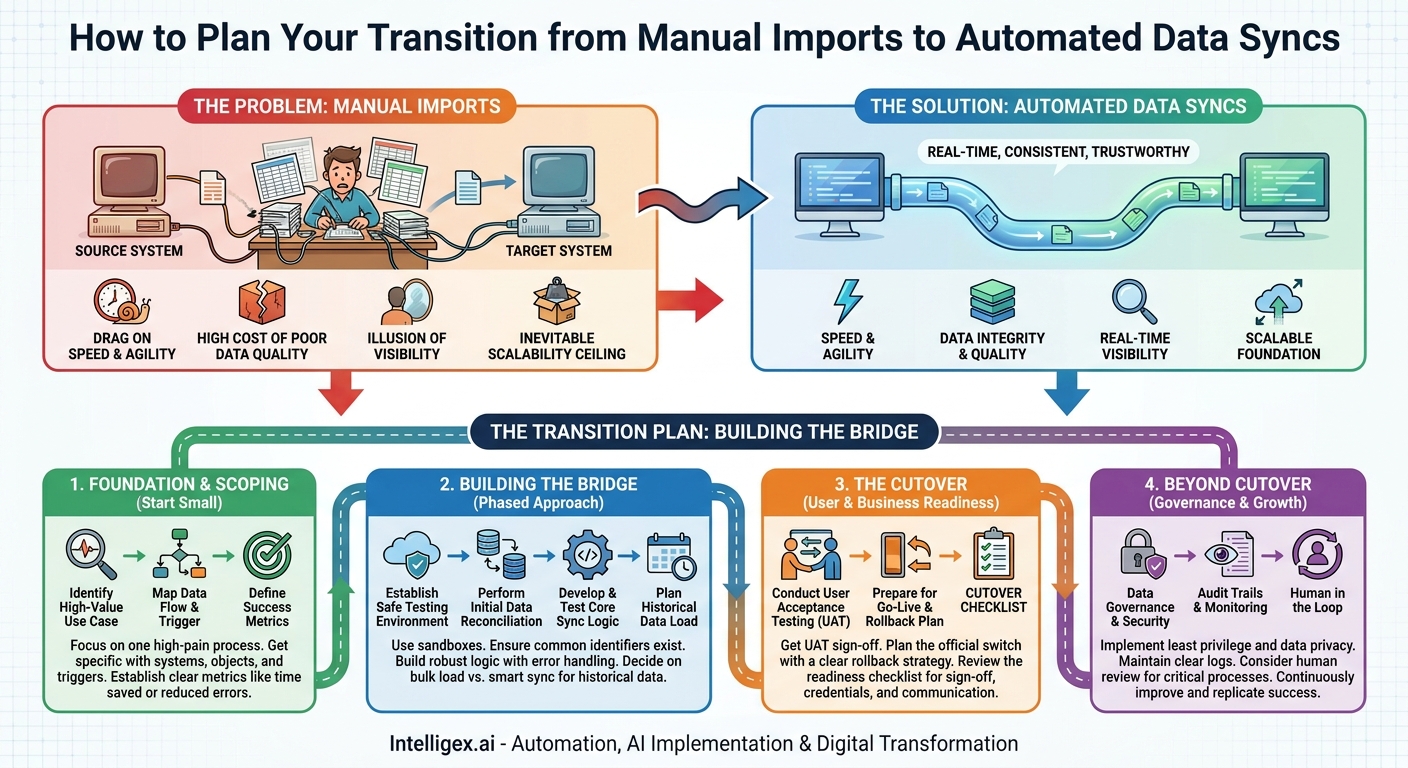
In countless organizations, the weekly or even daily ritual of the manual data import is a familiar routine. A team member downloads a CSV file from one system, painstakingly cleans it up in a spreadsheet, and carefully uploads it into another. It feels productive. It gets the job done. But this quiet, repetitive task is often a silent drain on the business, introducing hidden costs, risks, and limitations that stifle growth. The manual process is a bottleneck disguised as a workflow.
Moving from manual imports to automated synchronization is not just a technical upgrade. It’s a fundamental business transformation. It replaces slow, brittle, and error-prone processes with speed, resilience, and data quality. This shift unlocks real-time visibility, empowers teams with trustworthy information, and builds a scalable foundation for future growth. The question isn’t whether to automate, but how to execute the transition smoothly and effectively. A well-structured cutover plan is the bridge between the old way of working and a more efficient, data-driven future.
Why Manual Imports Silently Sabotage Your Business
Before diving into the “how” of a cutover, it’s critical to understand the “why.” The problems with manual data handling go far beyond the hours an employee spends wrangling spreadsheets. The true costs are systemic and impact every corner of the organization.
The Drag on Speed and Agility
Manual imports operate on a delay. A sales team closes a deal on Monday, but the finance team may not see it in the billing system until Friday’s upload. This lag creates a ripple effect of inefficiency. Invoices are delayed, revenue recognition is pushed back, and sales commission reports are always out of date. In a fast-moving market, decisions based on week-old data are gambles, not strategies. Automated syncs happen in near-real-time, ensuring that when a critical event occurs in one system, the relevant downstream systems know about it instantly.
The High Cost of Poor Data Quality
Humans make mistakes. It is inevitable. A typo in a product SKU, an extra space in a customer name, or an incorrectly formatted date can cause upload failures or, worse, introduce corrupt data into a critical system. Each error requires time to investigate, communicate, and correct. This reactive fire-drill consumes valuable resources that could be spent on proactive, high-value work. Automation enforces consistency. By defining data mapping and transformation rules once, you ensure that data flows correctly every single time, drastically improving the integrity of your entire data ecosystem.
The Illusion of Visibility
When data only moves once a week, you never have a true, up-to-the-minute picture of your business. A supply chain manager might be looking at inventory levels that are three days old, while a marketing leader is analyzing campaign performance based on last week’s lead conversions. This lack of real-time visibility forces leaders to manage by looking in the rearview mirror. An automated data sync provides a continuous, live feed, enabling dashboards and reports that reflect reality as it happens, not as it was recorded last Tuesday.
The Inevitable Scalability Ceiling
A manual process might work for 100 records a day. It starts to creak at 1,000 and completely breaks at 10,000. As your business grows, data volume and complexity increase exponentially. You cannot hire your way out of this problem. The manual process becomes an anchor, preventing you from scaling operations, entering new markets, or launching new products efficiently. Automation is inherently scalable. A well-designed sync can handle ten records or ten million records with the same logic and reliability, providing a platform that grows with your business.
The Foundation: Scoping Your First Automated Sync
The journey to full automation can seem daunting. The key is to start small with a single, high-impact process. Proving the value on a focused use case builds momentum and provides critical lessons for future projects. Rushing to automate everything at once is a common mistake that often leads to complex, failed initiatives.
Identify a High-Value, High-Pain Use Case
Look for a manual import process that is both a significant source of frustration and is critical to a core business function. The goal is to find a problem where the return on investment is clear and easily measured. Here are a few common examples across different departments:
- Sales to Finance: Automating the creation of customers and invoices in an ERP system (like NetSuite) when a deal is marked “Closed-Won” in a CRM like Salesforce. The pain is delayed billing and revenue recognition. The value is faster cash flow and reduced accounting errors.
- HR to IT: Automating user account creation in Active Directory and core SaaS apps when a new employee is added to the HRIS (like Workday). The pain is a frustrating day-one experience for new hires. The value is improved operational efficiency and a better employee onboarding process.
- E-commerce to Supply Chain: Syncing new orders from an e-commerce platform (like Shopify) to a warehouse management system (WMS). The pain is a delay in order fulfillment. The value is faster shipping times and higher customer satisfaction.
Map the Data Flow and Define the Trigger
Once you have a use case, get specific. Sit down with the business users who run the manual process and map out the details. You need to answer three questions:
- What are the systems? (e.g., Source: Salesforce, Target: NetSuite)
- What are the data objects and fields? (e.g., From the Salesforce Opportunity and Account objects, we need to map Account Name, Billing Address, and the Amount to the NetSuite Customer and Sales Order objects.)
- What is the trigger? (e.g., The sync should run the moment an Opportunity’s `Stage` field is updated to “Closed-Won”.)
This mapping exercise is not just a technical step. It often uncovers hidden complexities or inconsistencies in the manual process, forcing a valuable conversation about data standards.
Define Your Success Metrics
How will you know if the project was a success? Establish clear, measurable metrics before you begin. This helps justify the investment and provides a clear benchmark for evaluating the outcome. Good metrics are specific and tied to business value.
- Time Saved: Measure the number of hours per week the team currently spends on the manual import process.
- Error Rate Reduction: Track the number of data-related support tickets or manual corrections required before and after automation.
- Process Velocity: Measure the time it takes for data to move from the source to the target system. For example, “Time from Deal Close to Invoice Sent” could decrease from 3 days to 3 minutes.
Building the Bridge: A Step-by-Step Cutover Plan
With a clear scope, you can build a structured plan for the transition. This is not just about writing code or configuring a tool. It is a change management process that requires careful testing, validation, and communication. A phased approach is always preferable to a single, high-risk “go-live” event.
- Establish a Safe Testing Environment. Never build or test an integration in your live production systems. Use developer sandboxes for both your source and target systems. This allows you to experiment, break things, and refine the logic without any risk to your day-to-day business operations.
- Perform Initial Data Reconciliation. Automation cannot fix a messy house. Before you can sync data, you need a way to link records between the two systems. This usually means ensuring a common identifier exists in both places (e.g., `Salesforce_Account_ID` in NetSuite). You may need to perform a one-time data cleanup and backfill project to establish these links for existing records. Skipping this step is a leading cause of integration failure.
- Develop and Test the Core Sync Logic. This is where the integration is built, whether using a platform like MuleSoft, a tool like Zapier, or custom code. The focus should be on robust error handling. Test exhaustively for edge cases: What happens if a required field is missing? What if the target system is temporarily unavailable? What is the logic for record updates versus record creations?
- Plan the Historical Data Load. You need a strategy for handling all the data that already exists. You have two primary options: a) perform a one-time bulk migration to get the target system up to date before turning on the real-time sync, or b) design the sync logic to be smart enough to process historical records over time. For large datasets, a separate bulk migration is often safer and more efficient.
- Conduct User Acceptance Testing (UAT). This is the most critical step for gaining business buy-in. The end-users (the finance team, the IT admins) must test the automation in the sandbox environment. They should follow their normal processes and verify that the data appearing in the target system is accurate, complete, and in the correct format. Their sign-off confirms the solution meets the business requirements.
- Prepare for Go-Live and Rollback. The go-live event is the official cutover. This involves deploying the integration to the production environment, turning off the old manual process, and turning on the new automated sync. It must be accompanied by a clear rollback plan. What will you do if something goes wrong? The plan should detail the exact steps to disable the automation and revert to the manual process to ensure business continuity.
The Cutover Checklist: Are You Ready to Flip the Switch?
Before scheduling the go-live, run through a final readiness checklist. A “yes” to every item on this list significantly increases the likelihood of a smooth and successful transition.
- UAT Sign-Off: Have the primary business stakeholders formally signed off on the UAT results, confirming the solution works as expected?
- Production Configuration: Are all production credentials, API keys, and system permissions in place and tested?
- Communication Plan: Have all affected teams been notified of the cutover date, time, and any potential (even brief) system interruptions?
- Monitoring and Alerting: Is a system in place to monitor the health of the integration? Who will receive an alert if a sync fails?
- Rollback Readiness: Is the rollback plan documented, and has the technical team confirmed they are prepared to execute it immediately if needed?
- Support Handover: Has the support team been trained on the new process and how to handle common inquiries or initial troubleshooting steps?
– Decommissioning Plan: Has the old manual process been fully documented and a formal communication sent to the team on when and how it will be retired?
Navigating Data Governance and Security in an Automated World
Automation introduces powerful new capabilities, but it also requires a disciplined approach to governance and security. As you connect systems and enable data to flow freely, you must ensure it does so safely and responsibly. Integrating these principles into your plan from day one is far easier than trying to retrofit them later.
The Principle of Least Privilege
When you create a connection between two systems, you often use a dedicated integration user account. This account’s permissions should be strictly limited to only what is necessary to perform the sync. For example, if the integration only needs to create and update customer records, it should not have permission to delete them or access sensitive financial reports. Avoid the temptation to use a full system administrator account for convenience, as this creates an unnecessary security risk.
Data Privacy and Sensitive Information
Carefully review the data fields being synchronized. Does the integration move Personally Identifiable Information (PII) or other sensitive data? Ensure that both the source and target systems, as well as the integration platform itself, have appropriate encryption and access controls. In some cases, you may decide to deliberately exclude certain sensitive fields from the sync to minimize the data footprint and reduce compliance risks (such as with GDPR or CCPA).
Audit Trails and Change Management
Your integration platform should provide a clear and immutable log of every action it takes. You need to be able to answer: What data was moved? When was it moved? Was the sync successful? This audit trail is essential for troubleshooting issues and is often a strict requirement for compliance with regulations like Sarbanes-Oxley (SOX). Knowing who or what changed data is a cornerstone of good governance.
Keeping a Human in the Loop
Not every automated process should be 100% “lights out.” For highly critical processes, such as provisioning large customer orders or processing payroll data, consider building in a human review step. The automation can do the heavy lifting of collecting and validating the data, but it then presents it to a person for final approval before committing it to the target system. This “human in the loop” approach provides a powerful balance between the speed of automation and the control of human oversight.
Your Next Steps to Automation
Moving away from manual imports is a journey of continuous improvement. The goal is not to solve every data challenge at once, but to build momentum by delivering value quickly and reliably. By starting with a well-defined cutover plan for a single, high-impact process, you create a blueprint for success that can be replicated across the entire organization. The result is a more efficient, agile, and scalable business powered by data you can trust.
Ready to begin? Here is a simple action plan:
- Identify the Pain: Pinpoint one recurring manual import process that is notoriously slow, error-prone, or frustrating for your team.
- Quantify the Cost: Create a simple business case. Estimate the weekly hours spent on the task and document a recent example of a costly error it caused.
- Draft a Plan: Use the steps outlined here to sketch a high-level cutover plan. Identify the systems, the data, the trigger, and the key stakeholders.
- Engage for Expertise: Share your plan with an integration specialist. Validating your approach and exploring the right technology options is a crucial step to ensure your first automation project is a resounding success.
Your Next Read:
Get a FREE
Proof of Concept
& Consultation
No Cost, No Commitment!
