

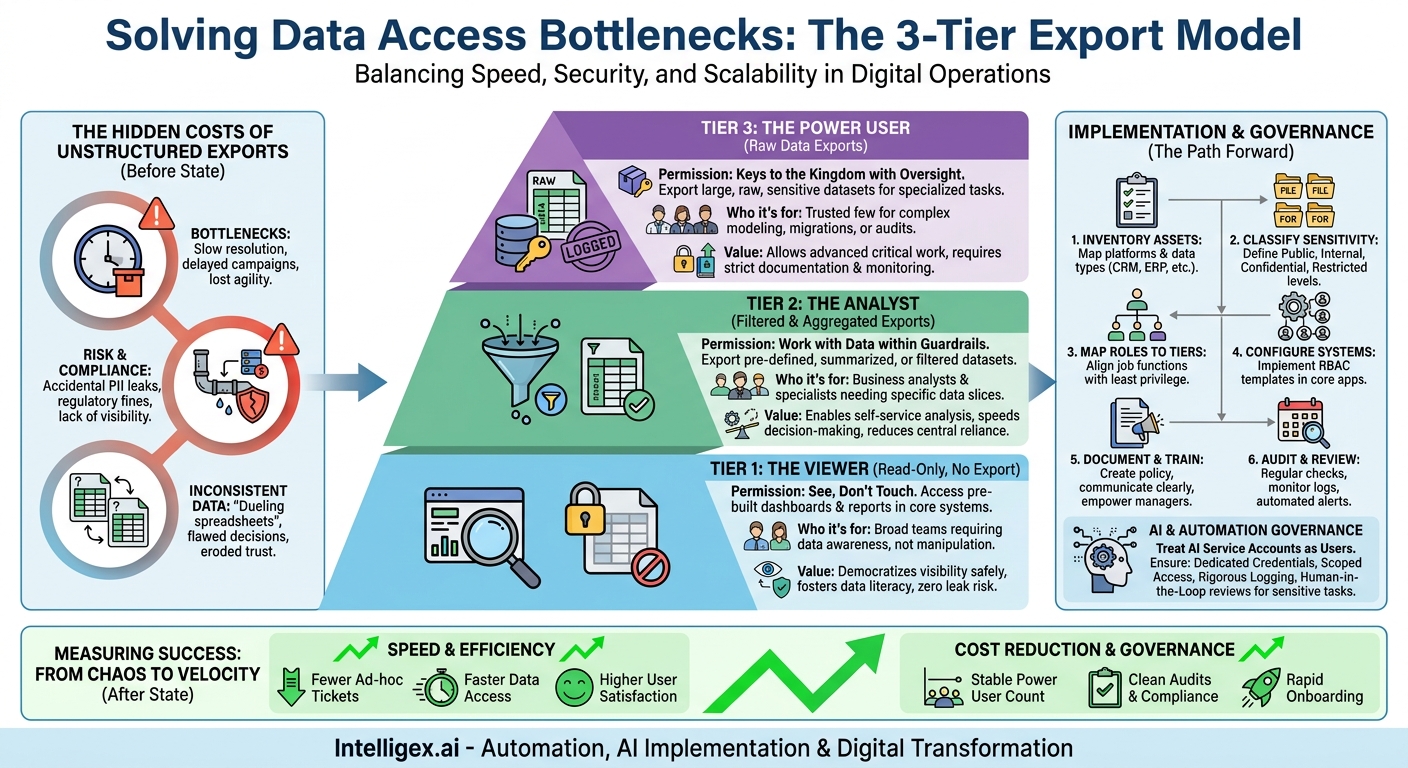
Your team needs data. A sales manager wants to pull a list of contacts for a new campaign. A finance analyst needs to export transaction details for a quarterly audit. An operations lead wants to analyze supply chain performance. Each request seems simple, but together they create a constant, low-level drain on your technical teams. The alternative, giving everyone broad access, feels like leaving the front door unlocked. Every uncontrolled spreadsheet that leaves your systems is a potential data leak, a compliance risk, and a source of inconsistent information.
This conflict between speed and safety is one of the most common challenges in digital operations. When data access is too restrictive, it creates bottlenecks that slow down the entire business. When it’s too open, it introduces security risks and leads to “data chaos,” where multiple versions of the truth circulate in offline files. The solution isn’t to build a complex web of hundreds of granular permissions; that’s too slow to manage and impossible to scale. The answer is to simplify.
By implementing a straightforward, role-based model with just a few tiers of export permissions, you can empower your teams with the data they need while maintaining strict governance. This approach replaces ad-hoc ticket systems and overly permissive defaults with a clear, predictable framework. It’s a foundational step in digital transformation that directly improves speed, reduces operational cost, enhances data quality, and provides the visibility needed to scale securely.
The Hidden Costs of Unstructured Data Exports
In many organizations, the process for exporting data is informal and inconsistent. An employee might ask a colleague in IT for a “quick data dump,” or they might have inherited broad export permissions they don’t truly need. While this may seem harmless, this lack of structure carries significant hidden costs that accumulate over time, impacting everything from team productivity to regulatory compliance.
First, there’s the cost of bottlenecks. When a marketing specialist has to file a ticket and wait two days for a simple customer segment list, the campaign launch is delayed. When a supply chain analyst is blocked from exporting logistics data, they can’t identify and resolve a shipping issue. These small delays, multiplied across every department, represent a massive loss of productivity and agility. Your teams are forced to work at the pace of the most overloaded data gatekeeper, not at the speed of business. A key metric to watch here is the average resolution time for data requests. If that number is measured in days instead of hours, it’s a clear sign of an inefficient process.
Second is the cost of risk. An employee with excessive permissions might accidentally export a file containing sensitive personally identifiable information (PII) and share it improperly. This isn’t usually malicious; it’s a mistake born from having access to more data than necessary. In the era of GDPR, CCPA, and other data privacy regulations, a single mistake can lead to significant fines and reputational damage. Without a structured export policy, you lack the visibility to even know what data has left your systems, let alone who accessed it and why.
Finally, there’s the cost of inconsistent data. When multiple people can export the same raw data, they inevitably filter, clean, and aggregate it in slightly different ways. This leads to “dueling spreadsheets” in meetings, where the sales team’s report on quarterly numbers doesn’t match the one from finance. Decisions are made based on flawed or contradictory information, eroding trust in the data and leading to poor business outcomes. A well-defined export system ensures that business logic and aggregations are applied consistently before the data is extracted, creating a single source of truth.
A Three-Tier Model for Practical Export Permissions
Instead of creating a labyrinth of custom permissions for every individual, a simpler model based on three distinct tiers provides clarity and control. This approach is easy for employees to understand, straightforward for managers to approve, and efficient for IT to implement and audit. Each tier is defined by the type of data interaction allowed, aligning with common business roles and responsibilities.
Tier 1: The Viewer (Read-Only, No Export)
This is the default permission level for the majority of employees. It operates on the principle of “see, don’t touch.”
- Who it’s for: Junior team members, new hires, employees in roles that require data awareness but not data manipulation (e.g., a sales development representative who needs to see account history but not export it).
- What they can do: Access and view dashboards, reports, and records directly within your core systems like your CRM, ERP, or business intelligence (BI) platform. They can consume pre-built insights and get the information they need to do their job without being able to extract the underlying raw data.
- Business Value: This tier democratizes access to information safely. It fosters a data-literate culture by allowing everyone to see performance metrics and operational dashboards, all while eliminating the risk of accidental data leaks or unauthorized sharing. It grants visibility without creating vulnerability.
Tier 2: The Analyst (Filtered and Aggregated Exports)
This tier is for users who need to work with data, but not the entire unfiltered dataset. It empowers them to perform their own analysis within well-defined guardrails.
- Who it’s for: Business analysts, marketing managers, operations leads, and finance specialists who need to dig deeper into specific data subsets.
- What they can do: Export pre-defined reports or data that has been summarized or filtered. For example, a marketing manager could export a list of contacts from a specific campaign, containing only name, company, and email, but not sensitive PII like home address or phone number. A finance analyst could export monthly general ledger summaries, but not the raw, line-item transaction details.
- Business Value: The Analyst tier strikes the perfect balance between empowerment and control. It provides teams with the self-service capabilities they need, dramatically reducing their reliance on central data teams. This accelerates analysis and decision-making while ensuring that users only have access to the data slices relevant to their function.
Tier 3: The Power User (Raw Data Exports)
This is the highest level of access and should be granted sparingly, with clear justification and oversight. These are the users who need the “keys to the kingdom” for legitimate, specialized purposes.
- Who it’s for: A very small, trusted group, such as data scientists building complex models, senior IT administrators performing system migrations, or a compliance officer conducting a full audit.
- What they can do: Export large, raw, and potentially sensitive datasets directly from the source system. This access is not for routine reporting; it is for tasks that cannot be accomplished with aggregated or filtered data.
- Business Value: This tier enables the most advanced data work and critical system functions to proceed without impediment. However, its value comes from its strict control. Every Power User’s access should be documented, regularly reviewed, and their export activities should be logged and monitored. This provides high-level capability with high-level accountability.
Implementing Your Tiered Access System: A Step-by-Step Guide
Transitioning to a tiered access model is a structured process that moves your organization from an ad-hoc approach to a governed, scalable one. By following a clear plan, you can implement this framework efficiently and with broad support from business and technical teams.
- Inventory Your Data Platforms and Assets: You cannot protect what you do not know. Start by identifying the primary systems where critical data resides. This typically includes your Customer Relationship Management (CRM) platform like Salesforce, your Enterprise Resource Planning (ERP) system, your Human Resources Information System (HRIS), and your data warehouse or BI tools. For each platform, list the major types of data it contains (e.g., customer contacts, financial transactions, employee records).
- Classify Your Data by Sensitivity: Not all data carries the same level of risk. Create a simple classification scheme. For example: Public (e.g., press releases), Internal (e.g., project plans), Confidential (e.g., customer lists, sales figures), and Restricted (e.g., employee PII, financial credentials). The tier of access required will depend heavily on this classification. An export policy for Internal data will be more lenient than one for Restricted data.
- Map Existing Roles to the Three Tiers: Sit down with department heads from Sales, Marketing, Finance, and Operations. Review their team structures and job functions. Using the principle of least privilege, map each role to one of the three tiers. Ask probing questions: “Does a sales manager need to export the entire company contact database, or just the contacts in their team’s territory?” Start everyone at the lowest possible tier and require justification for elevation.
- Configure the Tiers in Your Core Systems: This is the technical implementation step. Work with your IT administrators to translate the defined tiers into actual permission sets and user profiles within your key applications. Most modern SaaS platforms and databases have robust role-based access control (RBAC) features. The goal is to create three clear, reusable templates (Viewer, Analyst, Power User) that can be assigned to users.
- Document the Policy and Train Your Teams: A policy that no one knows about is useless. Create a simple, one-page document that explains the three tiers, provides examples for each, and outlines the process for requesting a change in access level. Hold brief training sessions with managers to ensure they understand their role in approving access for their team members. Clear communication prevents frustration and ensures smooth adoption.
- Establish a Cadence for Audits and Reviews: Access needs are not static. People change roles, and projects start and end. Implement a regular review process. For example, conduct a quarterly audit of all “Power User” accounts to re-verify their necessity. Use system logs to monitor for unusual export activity, such as an employee suddenly exporting massive amounts of data late at night. An automated alert system for large exports can be a powerful tool for proactive governance.
Common Pitfalls and How to Avoid Them
Implementing a new access control model is as much about managing change as it is about technology. Even a well-designed system can fail if you fall into common traps. Being aware of these pitfalls ahead of time can help you navigate the rollout smoothly and ensure its long-term success.
Pitfall: Over-Complicating the Tiers
The temptation can be to create a highly granular system with ten or more tiers, each with minute differences. This often stems from trying to accommodate every single edge case from the start. The result is a system that is too complex to manage, impossible for users to understand, and brittle to maintain.
How to avoid it: Stick to the simple three-tier model (Viewer, Analyst, Power User) as your foundation. Its strength is its clarity. You can always handle rare exceptions with a temporary, time-bound permission grant rather than creating an entire new permanent tier. Start simple and only add complexity if a clear and persistent business need emerges.
Pitfall: Creating a Rigid, Inflexible Process
If your process for requesting a temporary access upgrade is too bureaucratic or slow, users will find workarounds. They might share login credentials or ask a colleague with higher permissions to export data for them, which completely undermines your security model and audit trail.
How to avoid it: Design a clear and efficient “exception process.” There should be a simple form or ticket type for requesting temporary elevated access for a specific project or task. The request should require a manager’s approval and have a mandatory expiration date. This provides the necessary flexibility for business needs while keeping everything documented and controlled.
Pitfall: The “Set It and Forget It” Mindset
Role-based access is not a one-time project; it is an ongoing program. An employee who moves from the finance department to a marketing role may no longer need access to sensitive financial data. Without a process to review and adjust permissions, they retain that access indefinitely, creating a latent security risk known as “privilege creep.”
How to avoid it: Integrate access control reviews into your standard employee lifecycle processes. When an employee changes roles or leaves the company, their access permissions should be part of the offboarding or transfer checklist. Schedule semi-annual audits with department heads to review the access lists for their teams and decertify any permissions that are no longer needed.
Governance in the Age of AI: A Note on Safe Automation
As companies increasingly integrate AI and automation tools into their workflows, a new type of “user” is emerging: the non-human service account. AI models that summarize reports, automation bots that sync data between systems, and other machine identities also need access to your company’s data to function. Treating these service accounts as an afterthought is a critical governance mistake.
An AI agent with overly broad data access can become a powerful vector for a data breach. A misconfigured bot could inadvertently expose sensitive information, or a compromised AI service could be used to exfiltrate data silently and at a massive scale. The same principles of role-based access that apply to human users must be applied even more rigorously to these automated systems.
When connecting a new AI tool or automation platform, you must assign it a role within your tiered system. An AI-powered tool that helps write marketing emails needs Analyst-level access to product descriptions and past campaign data. It almost certainly does not need Power User access to your raw customer transaction database or employee HR records. Applying the principle of least privilege is paramount.
Before integrating any AI service that requires data access, run through this simple checklist:
- Dedicated Credentials: Is the AI tool using a dedicated service account with its own credentials, or is it piggybacking on a human employee’s account? It must always be the former to ensure a clear audit trail.
- Scoped Access: Are its permissions scoped only to the specific data fields and tables it absolutely needs to perform its function?
- Logging and Monitoring: Are the AI’s data access and export activities being logged and monitored with the same rigor as a human Power User? Set up alerts for anomalous activity.
- Human-in-the-Loop: For processes involving sensitive data, is there a human checkpoint to review and approve the AI’s output before it is finalized or sent externally?
By treating AI as just another user type within your governance framework, you can harness its power for productivity and innovation without creating a new, unchecked security blind spot.
Measuring Success: From Bottlenecks to Business Velocity
The success of a tiered access control system is not just measured by risk reduction, but by tangible improvements in business operations. By tracking the right metrics, you can clearly demonstrate the value of moving from a chaotic, ad-hoc process to a structured, scalable framework. These metrics fall into two main categories: efficiency gains and improved governance.
Speed and Efficiency
This is about removing friction and empowering teams to move faster. The goal is to shift your data team from being report-pulling gatekeepers to strategic partners.
- What to measure: A sharp reduction in the number of routine, ad-hoc data request tickets submitted to your IT or data analytics team.
- What to measure: A decrease in the average time it takes for a business user in the “Analyst” tier to acquire the data they need for their work, moving from days to minutes.
- What to measure: Positive feedback and higher user satisfaction scores from business departments, who now feel more empowered and less blocked.
Cost Reduction and Governance
This is about minimizing risk, ensuring compliance, and creating a more scalable and secure operational environment.
- What to measure: The total number of “Power User” accounts. This number should be small, stable, and well-documented. Any growth should trigger a review.
- What to measure: The successful and timely completion of internal or external access audits, with a significant reduction in the number of exceptions or findings related to excessive permissions. For organizations that rely on cloud infrastructure, this aligns with security best practices found in documentation from providers like Amazon Web Services.
- What to measure: The speed of onboarding new employees. With pre-defined roles, a new hire can be granted appropriate data access on day one, reducing ramp-up time.
Your Next Steps: Building a Smarter Data Export Policy
Implementing a comprehensive role-based access system can feel like a daunting project. The key is to start small, prove the value, and build momentum. You don’t need to overhaul every system in your company at once. Instead, focus on a single, high-pain, high-value area to demonstrate a quick win.
This week, take one concrete action. Identify one business team that constantly struggles with data access bottlenecks, such as Sales Operations, and one system that is critical to their work, like your CRM. Then, follow this simple action plan:
- Schedule a 30-minute meeting with the head of that team and the IT administrator responsible for the system.
- Ask them one focused question: “What is the single most common data export your team requests, and what business question are you trying to answer with it?”
- Map the solution to the three-tier model. Is this a report that could be a self-service, filtered export for the “Analyst” tier? Does the whole team need it, or just a few people? Does it contain sensitive data?
This small, focused exercise will make the abstract concept of tiered access concrete. It moves the discussion from a theoretical policy to solving a real, daily frustration. By delivering a tangible improvement for one team, you will create the business case and the internal champions you need to expand the framework across the entire organization.
Your Next Read:
Category:
Get a FREE
Proof of Concept
& Consultation
No Cost, No Commitment!
