

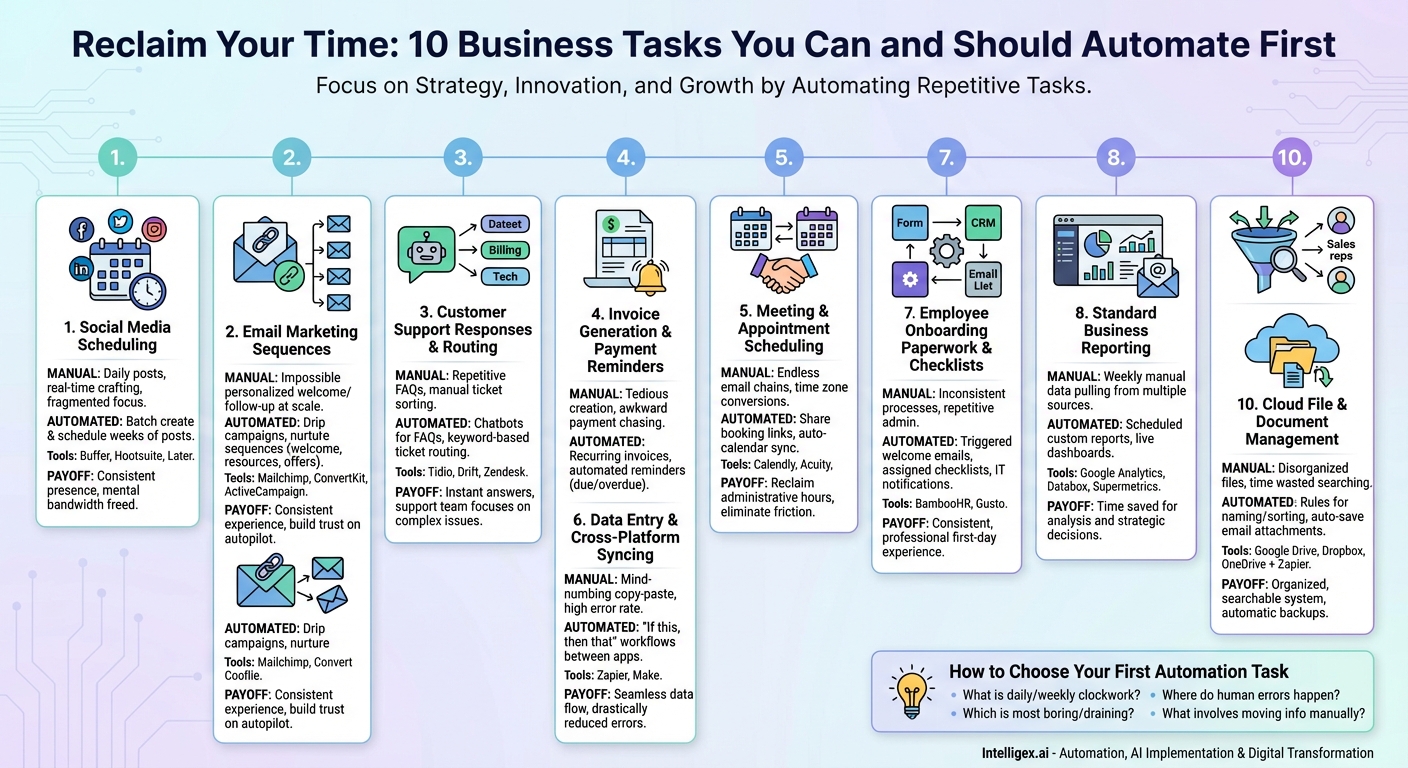
In the world of business, time is the one resource you can never get back. Yet, so much of it is consumed by repetitive, manual tasks that drain your energy and pull focus from what truly matters: strategy, innovation, and growth. You’re caught in the entrepreneur’s paradox—working tirelessly in your business, leaving little time to work on it. This is where automation comes in, not as a futuristic concept for giant corporations, but as a practical, accessible solution for businesses of all sizes. By identifying and automating the right tasks, you can reclaim countless hours, reduce costly human errors, and empower your team to focus on high-impact activities. The key is knowing where to start. Jumping into complex process automation can be daunting, but there are several “low-hanging fruit” tasks that offer a high return on investment with minimal setup. This guide will walk you through the top 10 business tasks you can—and should—automate first to build a more efficient, resilient, and scalable operation.
1. Social Media Scheduling and Posting
The Manual Grind: You know you need a consistent social media presence, but the daily reality involves logging into multiple platforms, crafting posts in real-time, and trying to remember the optimal posting times for each network. It’s a constant interruption that fragments your day and often leads to inconsistent or last-minute posting.
The Automated Solution: Tools like Buffer, Hootsuite, and Later allow you to batch your social media content creation. You can dedicate a few hours to write and schedule a week’s or even a month’s worth of posts across all your platforms. These tools automatically publish your content at pre-determined, optimized times. Many also offer features to re-queue evergreen content, ensuring your profiles are never silent.
The Payoff: Automating your social media posting frees up daily mental bandwidth, ensures a consistent brand voice, and allows you to engage with your audience more strategically when you are online. You shift from being a reactive content publisher to a proactive community manager.
2. Email Marketing Sequences
The Manual Grind: A new person subscribes to your newsletter or downloads a resource. Manually sending a personalized welcome email is impossible at scale. Without an automated follow-up, you miss a critical opportunity to build a relationship while their interest is at its peak.
The Automated Solution: Email marketing platforms like Mailchimp, ConvertKit, or ActiveCampaign are built for this. You can create automated “drip campaigns” or “nurture sequences.” For example, you can set up a workflow where every new subscriber immediately receives a welcome email, followed by an email sharing your most popular resources three days later, and a special offer a week after that. These sequences run 24/7 without you lifting a finger.
The Payoff: You create a consistent and welcoming experience for every new lead, build trust over time, and guide prospects through the customer journey on autopilot, ensuring no lead goes cold.
3. Initial Customer Support Responses & Ticket Routing
The Manual Grind: Your support inbox is flooded with common questions: “What are your business hours?” “How do I reset my password?” “What is your return policy?” Your team spends a significant portion of its day typing out the same answers, while more complex issues wait in the queue.
The Automated Solution: Implement a simple chatbot on your website using tools like Tidio or Drift to handle frequently asked questions. For more complex queries, help desk software like Zendesk or Freshdesk can use keyword-based rules to automatically tag and route support tickets to the correct department (e.g., “billing” goes to finance, “bug” goes to tech). You can also set up auto-replies to let customers know their request has been received and when they can expect a response.
The Payoff: Customers get instant answers to simple questions, improving satisfaction. Your support team is freed from repetitive queries to focus on solving high-stakes, complex problems, boosting morale and efficiency.
4. Invoice Generation and Payment Reminders
The Manual Grind: Manually creating invoices each month is tedious and prone to error. Even worse is the awkward and time-consuming task of tracking payments and chasing down late clients. This administrative burden directly impacts your cash flow.
The Automated Solution: Modern accounting software like QuickBooks, Xero, and FreshBooks have robust automation features. You can set up recurring invoices for retainer clients that are generated and sent automatically on a specific day each month. You can also create automated email reminders that are sent when an invoice is due soon, due today, or overdue by a certain number of days.
The Payoff: You get paid faster, improve your cash flow consistency, reduce administrative overhead, and avoid the uncomfortable task of being a debt collector. It professionalizes your entire billing process.
5. Meeting and Appointment Scheduling
The Manual Grind: The endless email chain of “What time works for you?” followed by a series of back-and-forth suggestions, time zone conversions, and calendar checks. Scheduling a single meeting can sometimes take more time than the meeting itself.
The Automated Solution: Tools like Calendly, Acuity Scheduling, and Doodle eliminate this dance entirely. You set your availability, and the tool creates a simple booking link you can share with clients, prospects, or colleagues. They see your open slots in their own time zone and pick a time that works. The event is then automatically added to both of your calendars, complete with meeting links for virtual calls.
The Payoff: You reclaim hours of administrative time each week, eliminate scheduling friction, and present a more professional and streamlined image to anyone you’re meeting with.
6. Data Entry and Cross-Platform Data Syncing
The Manual Grind: A new lead fills out a form on your website. You have to manually copy their information from your form software into your CRM, then add them to your email marketing list. This kind of copy-paste work is not only mind-numbing but also a major source of data entry errors.
The Automated Solution: Integration platforms like Zapier and Make (formerly Integromat) act as a bridge between your web applications. You can create simple “if this, then that” workflows. For example: “When a new entry is submitted in Typeform (this), automatically create a new contact in HubSpot and add them to a specific list in Mailchimp (that).” No coding is required.
The Payoff: You create a seamless flow of information between the tools you use every day, eliminate manual data entry, drastically reduce errors, and ensure your data is always up-to-date across all systems.
7. Employee Onboarding Paperwork and Checklists
The Manual Grind: When a new employee starts, HR or a manager spends hours sending out the same welcome email, tax forms, policy documents, and IT setup requests. It’s a repetitive process that can lead to inconsistencies and a disorganized first-day experience for the new hire.
The Automated Solution: Using HR software like BambooHR or Gusto, or even a workflow tool like Zapier, you can create an onboarding template. When a new employee is added to the system, it can automatically trigger a series of actions: sending a welcome email with a first-week schedule, assigning a checklist of forms to be completed, and notifying IT to set up their accounts and hardware.
The Payoff: Every new hire receives a consistent, professional, and welcoming experience from day one. It reduces the administrative burden on your team and ensures all necessary compliance and setup steps are completed on time.
8. Standard Business Reporting
The Manual Grind: Every Monday morning, you or a team member spends an hour logging into Google Analytics, your CRM, and your social media platforms to pull the same key performance indicators (KPIs) and compile them into a weekly report. It’s a necessary but highly repetitive chore.
The Automated Solution: Most analytics platforms have built-in reporting automation. In Google Analytics, you can create custom reports and have them automatically emailed to stakeholders on a daily, weekly, or monthly schedule. For more complex reporting across multiple data sources, tools like Databox or Supermetrics can connect to all your platforms and display your KPIs on a live, self-updating dashboard.
The Payoff: You save valuable time on data collection and can spend that time on data analysis and strategic decision-making. Key metrics are always accessible, enabling a more agile and data-informed culture.
9. Basic Lead Qualification and Assignment
The Manual Grind: Leads come in from various sources, and a sales manager has to manually review each one to determine if they are a good fit and then assign them to a sales representative. This manual triage creates a delay, and valuable, hot leads can lose interest while they wait to be contacted.
The Automated Solution: A Customer Relationship Management (CRM) system like HubSpot or Salesforce can automate this process. You can set up lead scoring rules based on specific criteria (e.g., company size, job title, pages visited on your website). Leads that reach a certain score are marked as “sales qualified.” You can then create routing rules to automatically assign these qualified leads to the next available sales rep in a round-robin fashion.
The Payoff: Your sales team can immediately focus their efforts on the most promising leads, dramatically increasing conversion rates and shortening the sales cycle. Every lead gets a prompt follow-up.
10. Cloud File and Document Management
The Manual Grind: Your team saves files to a shared drive, but with inconsistent naming conventions and folder structures, it quickly becomes a digital junk drawer. You waste time searching for documents, and critical files might not be backed up properly.
The Automated Solution: Cloud storage services like Google Drive, Dropbox, and OneDrive have built-in automation capabilities. You can create rules to automatically sort files into specific folders based on their name or type. For instance, any file containing the word “Invoice” in its name can be automatically moved to the “Finance” folder. You can also connect these services to a tool like Zapier to automatically save email attachments from specific senders to a designated folder.
The Payoff: You maintain an organized, searchable file system with minimal effort, improve collaboration, and ensure that important documents are automatically backed up and stored in the right place.
How to Choose Your First Automation Task
Feeling inspired but not sure where to begin? Start by performing a simple “task audit.” For one week, pay close attention to your daily activities and ask yourself these questions:
- What task do I perform every single day or week like clockwork?
- Which activity is the most boring or mentally draining?
- Where are mistakes most likely to happen due to human error?
- What task involves moving information from one system to another?
The answer to these questions will point you toward your perfect first candidate for automation. The goal isn’t to automate everything at once, but to start small, achieve a quick win, and build momentum. Pick one task from this list that causes you the most friction and take the first step. You’ll be amazed at how much time and energy you can reclaim, paving the way for a more productive and strategic future.
Your Next Read:
Get a FREE
Proof of Concept
& Consultation
No Cost, No Commitment!
