

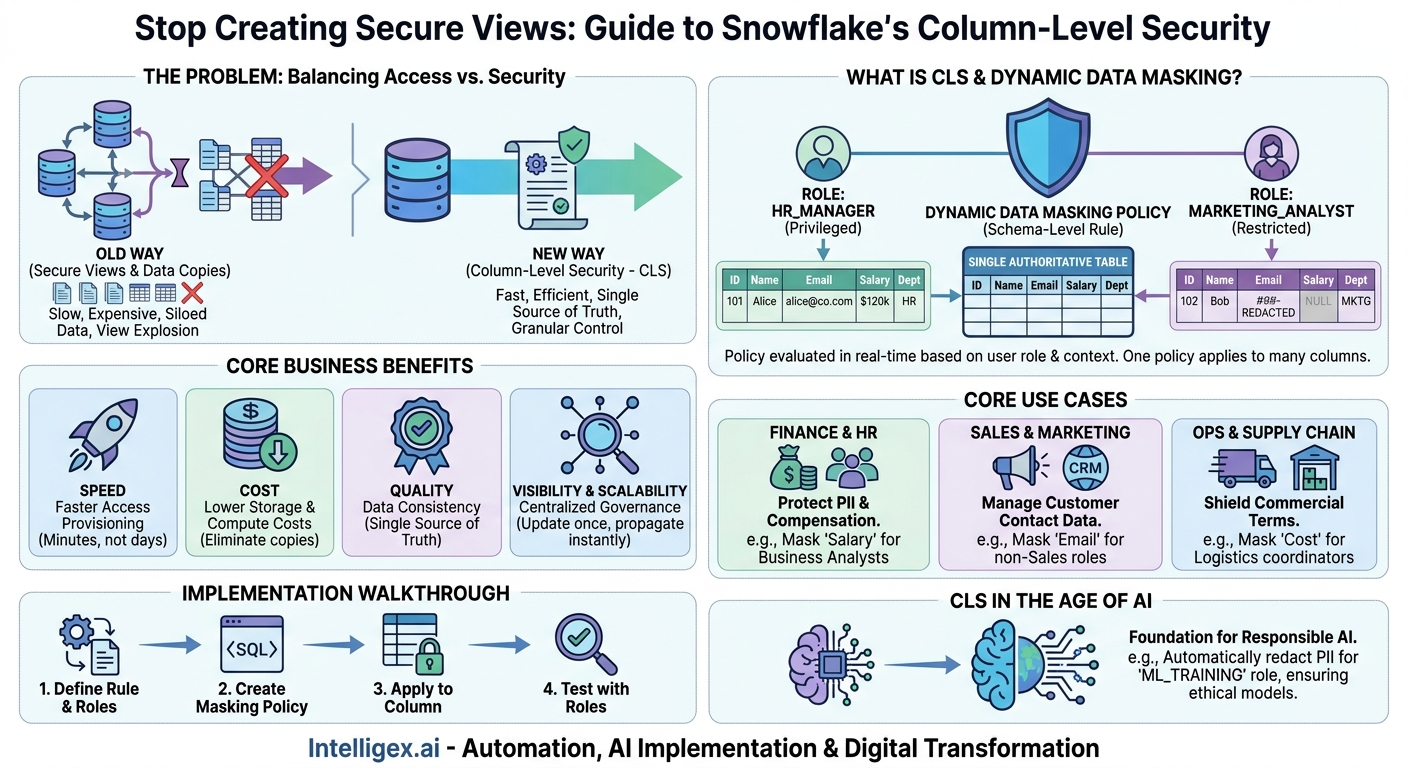
Your data is a strategic asset, but controlling access to it can feel like a constant battle. Business teams need fast, self-service access to analytics, while IT and security teams are tasked with protecting sensitive information. The traditional approach often involves creating dozens, or even hundreds, of separate views or data copies for each specific use case. This method is not only slow and expensive but also creates a maze of data silos that are nearly impossible to govern effectively.
This creates a significant business bottleneck. A marketing analyst waits days for a sanitized list of customer data, a finance team works from a stale data export, and a new hire waits weeks for the right permissions. The core problem is a lack of granularity. You need a way to share a single, authoritative dataset while ensuring individuals only see the specific columns they are authorized to view. This is precisely the problem Snowflake’s Column-Level Security (CLS) is designed to solve.
What is Column-Level Security and Why Does It Matter?
Column-Level Security is a data governance feature that restricts access to specific columns within a table based on a user’s role. Instead of deciding if a user can see an entire table or not, you can decide if they can see the email_address column, the salary column, or the social_security_number column. The user queries the exact same table as a privileged user, but the sensitive data is dynamically masked or hidden from their results.
Snowflake primarily implements this through a feature called Dynamic Data Masking. A masking policy is a schema-level object that you write once and can apply to hundreds of columns across your entire data cloud. When a user queries a column protected by a policy, Snowflake evaluates the policy logic against the user’s role and session context in real-time, deciding whether to return the original data, a masked version (e.g., ‘XXX-XX-XXXX’), or a null value.
This is a fundamental shift from older, more brittle methods:
- The Old Way (Secure Views): For every unique access requirement, a database administrator would create a new view of a table that omits the sensitive columns (e.g., `V_SALES_DATA_FOR_MARKETING`). This leads to “view explosion,” a scenario with an unmanageable number of database objects, each needing separate maintenance and documentation.
- The Old Way (Data Duplication): Even worse, teams might create entirely separate, sanitized copies of tables. This doubles storage costs, introduces data latency, and shatters the concept of a single source of truth. When the source data updates, which copy is correct?
The business value of moving to a centralized, policy-based approach is immediate and measurable. It directly impacts your organization’s operational efficiency and ability to scale.
- Speed: Data access provisioning is drastically accelerated. Instead of a multi-day ticketing process to create a new view, granting access becomes as simple as assigning a user to a pre-defined role. Business teams get the data they need faster, shortening the time from question to insight.
- Cost: You reduce expenses in multiple areas. Storage costs decrease by eliminating redundant data copies. Compute costs can be lowered by avoiding complex joins across multiple views. Most importantly, the operational overhead on your data engineering and IT teams is significantly reduced, freeing them to work on higher-value initiatives.
- Quality: By allowing all users to query a single, authoritative table, you maintain a single source of truth. This improves data consistency and trust across the organization, ensuring everyone is making decisions based on the same underlying information.
- Visibility & Scalability: Governance is centralized and scalable. Instead of hunting through hundreds of views to understand who sees what, you can review a concise list of masking policies. As your company grows and data regulations change, you can update a single policy and have it instantly propagate to every column it protects.
Core Use Cases: When to Deploy Column-Level Security
The need for granular data control exists in every department. Column-Level Security is not just an IT tool; it is a business enabler that solves real-world operational challenges. Here are a few concrete scenarios where it delivers significant value.
Finance and HR: Protecting PII and Compensation Data
Human Resources and Finance departments handle some of the most sensitive data in any organization, including Personally Identifiable Information (PII) and compensation details. Consider a master `employees` table containing names, hire dates, departments, salaries, and home addresses.
A business analyst might need to analyze workforce trends, like average tenure by department. With Column-Level Security, this analyst can be granted a ‘BUSINESS_ANALYST’ role. A masking policy would allow them to see columns like `employee_id`, `hire_date`, and `department`, but would completely mask sensitive columns like `salary`, `date_of_birth`, and `street_address`. Meanwhile, a user with the ‘COMPENSATION_ADMIN’ role can query the exact same table and see the `salary` column, but perhaps not the employee’s home address. Both roles work from one source of truth, but see different slices of the data, all managed by a central policy.
Sales and Marketing: Managing Customer and Prospect Data
In a typical CRM or sales database, you have a wealth of customer information. A marketing team needs to perform segmentation and analysis based on geography, purchase history, and firmographics. However, they should not have access to sensitive contact information or confidential notes entered by the sales team.
Using a masking policy on a `customers` table, a ‘MARKETING_ANALYST’ role can be given full access to columns like `city`, `state`, `industry`, and `last_purchase_date`. The policy would then mask columns like `phone_number` and `email_address`, returning a generic value like ‘REDACTED’. The sales team, with a ‘SALES_REP’ role, would see the full, unmasked contact information for their assigned accounts, enabling them to do their jobs without exposing the entire customer list to other departments.
Operations and Supply Chain: Shielding Commercial Agreements
Imagine a `suppliers` table that contains logistics information alongside sensitive commercial terms. A warehouse manager needs to see `supplier_name`, `next_shipment_date`, and `product_id` to manage inventory. However, exposing columns like `cost_per_unit` or `contract_renewal_date` to the entire logistics team could compromise negotiating leverage.
A masking policy can be applied to these commercial columns. A user with the ‘LOGISTICS_COORDINATOR’ role would query the table and see all the operational data they need, while the financial columns would appear as null or masked. A procurement manager with the ‘PROCUREMENT_LEAD’ role could access the same table and view the unmasked cost data to perform their analysis. This prevents accidental exposure of sensitive financial data while still providing a unified view of supplier information.
A Practical Walkthrough: Implementing Dynamic Data Masking
Implementing Column-Level Security in Snowflake is a straightforward process centered on creating and applying masking policies. While the SQL can become complex for advanced use cases, the basic structure is easy to understand. Here is a simplified, step-by-step process for masking an email address column.
- Define the Business Rule and Roles: First, articulate the rule in plain language. For example: “Only users with the PII_ACCESS role can view the full email address in the `customers` table. All other users should see a masked version.” This requires that you have already set up roles like `PII_ACCESS` in your Snowflake environment.
- Create a Masking Policy: Next, you write a small function in SQL that contains the logic for the rule. The function takes the original column value as an input and, based on the user’s current role, returns either the original value or a masked version.
A simple policy might look like this:
CREATE MASKING POLICY email_mask AS (val string) RETURNS string ->
CASE WHEN CURRENT_ROLE() = 'PII_ACCESS' THEN val ELSE '##-REDACTED-##' END;
This policy checks the user’s active role. If it is ‘PII_ACCESS’, it returns the original value (`val`). Otherwise, it returns a fixed redacted string.
- Apply the Policy to a Column: With the policy created, you apply it to the desired table column. You only need to do this once.
ALTER TABLE customers MODIFY COLUMN email SET MASKING POLICY email_mask;Now, the `email` column in the `customers` table is protected by this policy.
- Test with Different Roles: This is the most critical step. Use the `USE ROLE` command to switch between a privileged role (like `PII_ACCESS`) and a less-privileged role. Query the `customers` table with each role to verify that the masking policy is behaving exactly as you intended. The privileged user should see the real email, while the other user sees ‘##-REDACTED-##’.
By following these steps, you create a reusable, centrally managed security control that scales effortlessly across your entire platform.
Getting Started Checklist: Are You Ready for Column-Level Security?
Before you begin applying masking policies, a small amount of preparation can ensure a smooth and successful implementation. Use this checklist to assess your organization’s readiness.
- Have you defined your user roles and responsibilities? Column-Level Security is role-based, so a well-defined role-based access control (RBAC) model is a prerequisite. Your roles should reflect job functions, not individual people (e.g., ‘FINANCE_ANALYST’, not ‘JANE_DOE_ROLE’).
- Have you identified and classified your sensitive data? You cannot protect what you do not know you have. Run a data discovery and classification exercise to tag columns containing PII, PHI, financial data, or other sensitive information. Common classifications include Public, Internal, Confidential, and Restricted.
- Is there a clear owner for each data asset? A data owner (usually a business leader) is responsible for deciding who should have access to their data. They are the ones who should approve the business rules that your masking policies will enforce.
- Do you have a process for handling access requests? Users will inevitably need access to data that is masked for their role. Ensure you have a clear, documented process for them to request elevated privileges and for data owners to approve or deny those requests.
- Have you communicated the plan to data consumers? Avoid surprises. Inform your analysts and business users about the upcoming changes. Explain why data is being masked and show them the new process for requesting access. This builds trust and reduces confusion.
Measuring the Impact: Metrics That Matter
Implementing a new governance framework should produce tangible business results. It is important to establish a baseline before you start and track key metrics to demonstrate the value of your efforts. Focus on measurements tied to speed, cost, quality, and risk.
- Time to Fulfill Data Access Requests: Measure the average time from when a user submits a request for data to when they are granted access. Compare the time it took when creating custom views versus the time it now takes to simply assign a user to an existing role. A significant reduction here is a major win for business agility.
- Reduction in Custom Database Objects: Track the number of secure views or redundant tables you are able to decommission after implementing masking policies. This directly translates to reduced maintenance overhead for your data team and simplifies your data architecture.
- Data Storage Costs: If you were previously duplicating large tables to provide sanitized data, decommissioning those copies should lead to a measurable decrease in your monthly storage bills.
- Number of Data Access Incidents: Monitor the number of reported incidents where users had access to data they should not have seen. A well-designed CLS strategy should drive this number down over time, demonstrating a stronger security posture.
Column-Level Security in the Age of AI
As organizations increasingly use AI and machine learning models, the need for robust data governance becomes even more critical. AI models are trained on vast datasets, and if that data contains sensitive or biased information, the model can perpetuate those issues and create significant privacy and ethical risks.
Column-Level Security is a foundational tool for responsible AI development. Consider a data science team building a model to predict customer churn. The model needs access to transactional history, product usage, and support ticket data. However, it absolutely does not need, and should not have, access to PII like customer names, email addresses, or phone numbers. Including this PII in the training data is a major privacy violation and adds no predictive value.
By creating a specific ‘ML_TRAINING’ role in Snowflake, you can apply masking policies that automatically redact all PII columns. The service account used by the AI training pipeline is assigned this role. This ensures, by default, that your models are built safely and ethically, adhering to the principle of least privilege. The raw data remains secure in one place, while the AI platform is only fed the specific, anonymized features it requires. This automated governance is essential for scaling AI initiatives responsibly.
Your Next Steps: A Simple Action Plan
Adopting Column-Level Security does not require a massive, all-at-once project. A phased, iterative approach is the most effective way to build momentum and demonstrate value quickly. Here is a simple plan to get started.
- Start with a Pilot Project: Choose one high-impact, low-risk dataset. A table with internal operational data that contains a few sensitive columns is often a perfect candidate. Work with the data owner to define a simple masking policy for one or two user roles. Success here will build confidence and provide a template for future work.
- Document Your Policies: Create a central, accessible repository for your data masking policies. This could be a wiki page or a document in a shared drive. For each policy, document its purpose in plain language, the columns it applies to, and the roles it affects. This documentation is invaluable for auditing and for onboarding new team members.
- Educate Your Data Users: Host a brief workshop or office hours session for your data analysts. Show them how queries will behave with the new policies in place. More importantly, explain the “why” behind the change, focusing on the shared responsibility of protecting company data.
- Establish a Review Cadence: Data governance is not a one-time setup. Business needs change, new regulations appear, and roles evolve. Schedule a quarterly or semi-annual review of your masking policies with data owners to ensure they remain accurate and relevant.
By implementing a robust Column-Level Security strategy, you can break down the conflict between data accessibility and data security. You can empower your teams with the data they need to innovate while building a scalable, automated, and defensible governance foundation for your entire organization. To learn more about Snowflake’s specific capabilities, you can explore their platform at https://www.snowflake.com/ or review their extensive documentation at https://docs.snowflake.com/.
Your Next Read:
Category:
Get a FREE
Proof of Concept
& Consultation
No Cost, No Commitment!
