

A critical production server just went down. A key supplier suddenly ceased operations. Your sales team needs a specialized analytics tool to close a make-or-break deal, and the window of opportunity is closing in hours, not weeks. These are not everyday procurement requests. They are emergencies that pit the need for speed against the mandate for financial control. For most organizations, this is a losing battle. Either you bypass the rules and create a wake of untracked “maverick spending,” or you follow a rigid process and accept crippling operational delays. But this is a false choice. With a modern, integrated approach, you can design an emergency purchase workflow that delivers both velocity and visibility.
The goal is not to replace your standard procurement process, which is optimized for planned, strategic sourcing. Instead, the objective is to build a parallel, “fast-track” lane for legitimate, time-sensitive needs. This lane has its own lightweight rules, automated guardrails, and clear audit trails, ensuring that when you need to move fast, you can do so without losing control.
Why Standard Procurement Fails in an Emergency
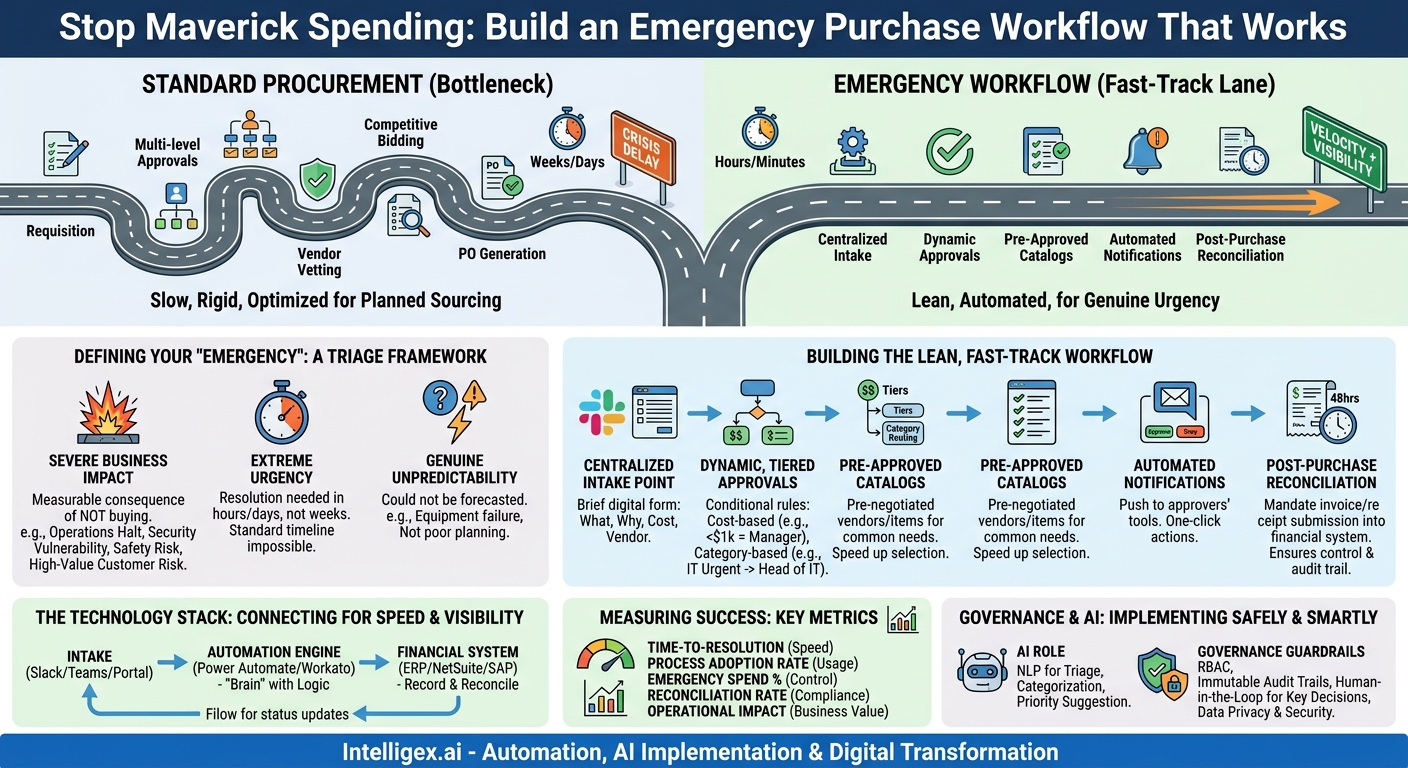
Traditional procurement workflows are masterpieces of control and cost optimization. They involve multiple stages: requisition, multi-level approvals, vendor vetting, competitive bidding, and purchase order (PO) generation. This process is intentionally deliberate. It is designed to prevent fraud, consolidate spend, and leverage buying power. While perfect for ordering new laptops for the entire department, it becomes an organizational bottleneck during a crisis.
When an urgent need arises, teams face a difficult decision. Following the standard procedure could mean days or weeks of delay, leading to tangible business damage: lost revenue, missed deadlines, damaged customer trust, or even safety and compliance risks. The alternative is to circumvent the system entirely. An employee might use a personal credit card or a departmental P-card with little oversight, creating a cascade of problems:
- Lack of Visibility: Finance has no idea the purchase was made until an expense report appears weeks later, making budget forecasting impossible.
- Compliance Risk: The purchase may be from an unvetted vendor, potentially violating security policies, data privacy regulations, or industry standards.
- Wasted Spend: Without central oversight, the company might buy a duplicate software license it already owns or pay a premium price that could have been negotiated.
- Audit Nightmares: A pattern of undocumented, urgent purchases creates a significant headache during financial audits, requiring a massive effort to retroactively justify spending.
An effective emergency workflow acknowledges the inadequacy of the standard process for true exceptions. It provides a structured, sanctioned, and traceable alternative that empowers employees to solve problems quickly while giving leadership the oversight it needs.
Defining Your “Emergency”: A Triage Framework
The first step toward control is defining what truly constitutes an emergency. Without clear criteria, a “fast-track” process quickly becomes the default process, defeating its purpose. A simple triage framework helps teams distinguish between genuine urgency and poor planning. Before initiating an emergency request, the requester should be able to answer “yes” to most of these questions.
The Three Pillars of an Emergency Request
1. Severe Business Impact: What is the direct and immediate consequence of not making this purchase right now? The impact should be measurable and significant. Examples include:
- A halt in revenue-generating operations (e.g., a broken point-of-sale terminal).
- A critical security vulnerability that requires an immediate software patch or service.
- A direct risk to employee safety or regulatory compliance.
- A high-value customer relationship at risk due to a service failure.
2. Extreme Urgency: Is the timeline for resolution measured in hours or a few days, not weeks? The need must be so pressing that the standard procurement timeline is functionally impossible. For example, securing a last-minute sponsorship for a major industry event that presents a unique marketing opportunity qualifies; buying promotional materials for a trade show planned three months from now does not.
3. Genuine Unpredictability: Could this need have been reasonably forecasted? An equipment failure is often unpredictable. Running out of standard office supplies is a failure of inventory management, not an emergency. This criterion encourages teams to improve their planning while providing an outlet for genuinely unforeseen events.
By establishing this framework, you empower employees to make smart decisions. It shifts the conversation from “I need this now” to “The business will suffer this specific harm if we wait.”
Building a Lean, Fast-Track Approval Workflow
Once you’ve defined an emergency, the next step is to build a process that can handle it. A lean workflow prioritizes speed and communication while ensuring essential data is captured for post-purchase reconciliation. It can be broken down into a few logical steps.
- Establish a Centralized Digital Intake Point: The process must start in one place. This could be a dedicated channel in Slack or Microsoft Teams, a simple form in a service desk tool like Jira Service Management, or a purpose-built application. The intake form should be brief, capturing only the essentials: what is needed, the business justification (referencing the triage framework), the estimated cost, and a suggested vendor if known.
- Implement Dynamic, Tiered Approvals: A rigid, five-person approval chain is a death knell for speed. Instead, create simple, conditional rules. For example:
- Cost-Based Tiers: Purchases under $1,000 might require only the requester’s direct manager. Purchases between $1,001 and $10,000 might require the manager and the department head.
- Category-Based Routing: Emergency IT hardware requests can be routed directly to the Head of IT, bypassing general finance queues. Urgent legal services can go straight to the General Counsel.
- Leverage Pre-Approved Vendor and Item Catalogs: The biggest time sinks in procurement are often vendor vetting and price negotiation. For common emergency categories (e.g., IT peripherals, specific cloud services, facilities repair), maintain a list of pre-approved vendors with negotiated terms. This allows the requester to simply select a vendor, confident that they are compliant and fairly priced.
- Automate Notifications and Approvals: Do not rely on approvers logging into a procurement system. The approval request, containing all necessary information, must be pushed to them where they already work. An automated message in Slack or an email with “Approve” and “Deny” buttons can turn a day-long approval process into a five-minute task.
- Prioritize Post-Purchase Reconciliation: This is the key to maintaining financial control. The workflow grants permission to buy now, but it mandates that the invoice and receipt are submitted into the system within a short, defined period (e.g., 48 hours). This ensures the purchase is immediately logged in the financial system of record, providing the visibility that is missing from traditional maverick spending.
The Technology Stack: Connecting Tools for Speed and Visibility
You do not need to buy a monolithic, all-in-one “emergency procurement” platform. The most effective solution often involves integrating the tools you already use. The goal is to create a seamless flow of information from request to reconciliation.
A typical modern stack might look like this:
- Intake & Communication: A tool like Slack, Microsoft Teams, or a simple company portal form acts as the front door. This is where the user experience is critical; it must be easier to use the official process than to go around it.
- Workflow Automation & Logic: An integration platform or workflow engine like Microsoft Power Automate or Workato sits in the middle. This is the “brain” of the operation. It reads the intake form, applies the dynamic approval logic (based on cost, category, or department), and sends the notifications.
- Financial System of Record: The workflow must connect to your ERP or accounting software (e.g., NetSuite, SAP, QuickBooks). Once a purchase is approved, the engine can create a placeholder record. When the final invoice is submitted, it automatically matches it to the approval, closing the loop and providing a complete audit trail.
Imagine a sales leader needing an urgent data enrichment tool to qualify a list of high-value leads. They submit a request via a Salesforce form, which triggers a Power Automate flow. Since the cost is under $5,000, it sends a single approval notification to the VP of Sales on Teams. The VP approves with one click, and the system automatically generates a virtual credit card number for the purchase while creating a PO record in the finance system. The entire process takes less than 15 minutes.
Measuring Success: Metrics That Matter
To justify and refine your emergency workflow, you need to measure its impact. Tracking the right metrics will prove its value and highlight areas for improvement.
Key Performance Indicators for an Emergency Workflow:
- Time-to-Resolution: The total time from the initial request submission to the vendor receiving a PO or payment. This is your primary measure of speed. The goal is to reduce this from days to hours or even minutes.
- Process Adoption Rate: What percentage of eligible urgent purchases are going through the defined workflow versus unmanaged P-card or expense report submissions? High adoption indicates the process is effective and user-friendly.
- Emergency Spend as a Percentage of Total Spend: This is a critical control metric. A healthy emergency workflow should account for a small, stable percentage of overall procurement. A sudden spike could indicate that the process is being abused or that there are larger issues with operational planning.
- Post-Purchase Reconciliation Rate: What percentage of emergency purchases are fully documented with an invoice and receipt within the mandated timeframe (e.g., 48 hours)? A high rate demonstrates that you are maintaining financial control despite the initial speed.
- Operational Impact: Where possible, tie the purchase to a business outcome. For example, link the emergency replacement of a server to the “hours of website downtime avoided.” This translates the workflow’s efficiency into direct business value.
Governance and AI: Implementing Safely and Smartly
Introducing automation and, potentially, artificial intelligence into a financial process requires a thoughtful approach to governance. The goal is to use technology to accelerate human decision-making, not replace it entirely.
AI can play a practical role in optimizing the workflow. For instance, a natural language processing (NLP) model can analyze the text in a request’s justification field. It could automatically categorize the request (IT, Facilities, Marketing), suggest a priority level, or even flag it as a likely non-emergency for human review if it contains keywords related to routine operational needs. This pre-triage step can save valuable time for the procurement or finance team.
However, this power must be balanced with strong governance. Here are the essential guardrails to implement:
- Role-Based Access Control (RBAC): Strictly define who can submit, approve, and view emergency requests. An engineer should not be able to approve a marketing purchase, and approval thresholds must be strictly enforced by the system.
- Immutable Audit Trails: Every action in the workflow, from the initial submission to the final comment and approval, must be logged with a user identity and a timestamp. This non-editable record is essential for compliance and resolving any future disputes.
- Human-in-the-Loop for Key Decisions: While AI can suggest a vendor or categorize a request, the final approval to spend company money must remain with an accountable human. This is especially true for high-value or high-risk purchases.
- Data Privacy and Security: Ensure that any sensitive information included in a purchase request (such as project details or personal information) is handled in accordance with your company’s security policies. Access to this data should be restricted on a need-to-know basis.
Your Next Steps: From Chaos to Control
Implementing a robust emergency purchase workflow is a project of digital transformation that delivers immediate, tangible results. It replaces chaos with a controlled, visible, and fast process that serves the business without sacrificing financial discipline. Here is how you can get started.
1. Define Your “Emergency.” Schedule a 90-minute meeting with key stakeholders from Finance, IT, and a core business operations unit. Your only goal is to agree on a draft of the triage criteria. Don’t let perfection be the enemy of progress; a simple checklist is a great starting point.
2. Map the Ideal Workflow. On a whiteboard or in a virtual collaboration tool, sketch out the simplest possible fast-track process. Who needs to approve what? At what dollar amounts? How will they be notified? How will the purchase be reconciled?
3. Conduct a Tech Stack Audit. Identify the tools you already have. Do you use Slack or Teams? Do you have access to a workflow automation tool? What is your financial system of record? Understanding your existing capabilities is the first step to designing an integration strategy.
4. Launch a Pilot Program. Don’t try to boil the ocean. Select one department that frequently experiences legitimate urgent needs, such as the IT or facilities team. Build and launch the workflow just for them. Use their experience and feedback to refine the process before rolling it out to the wider organization. This iterative approach allows you to demonstrate value quickly and build momentum for broader change.
Your Next Read:
Get a FREE
Proof of Concept
& Consultation
No Cost, No Commitment!
