

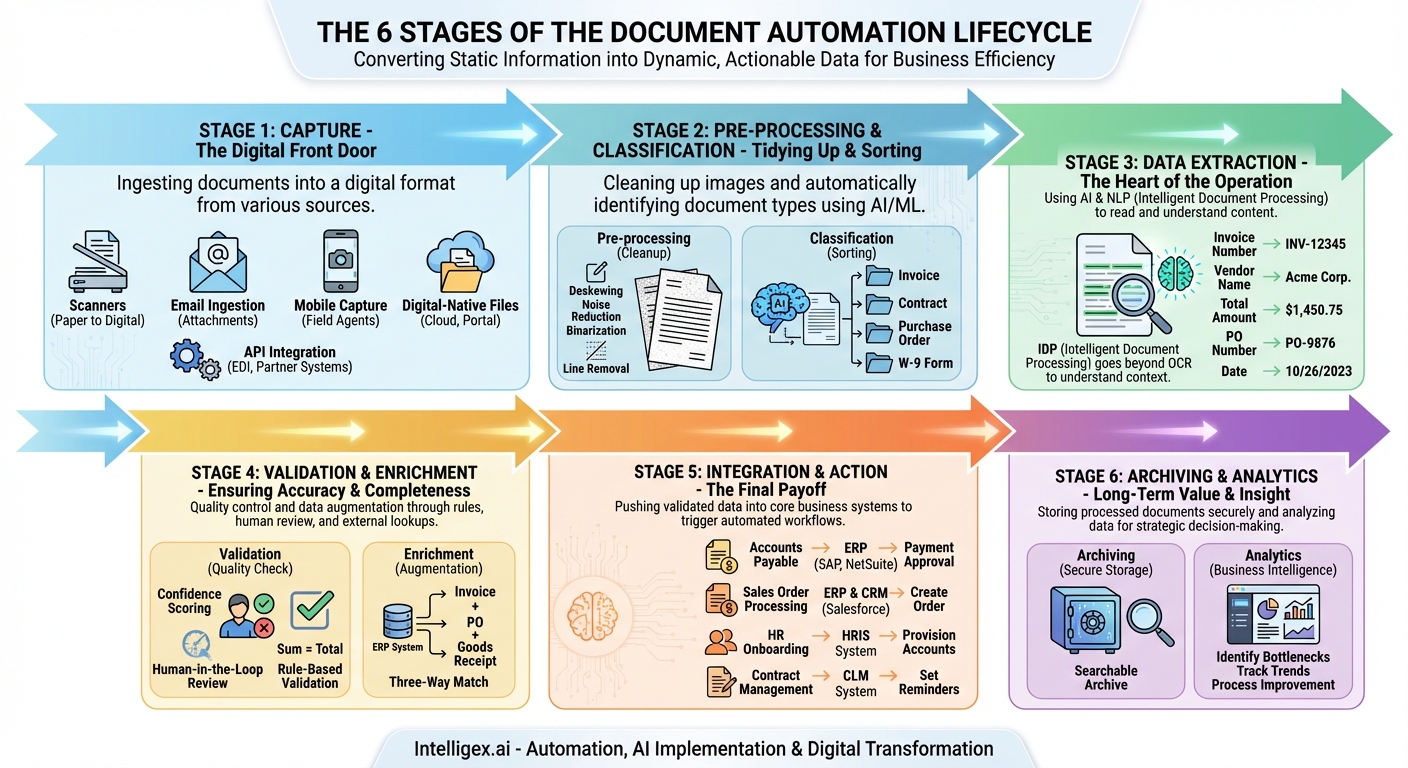
In today’s digital-first world, businesses are drowning in a sea of documents. From invoices and contracts to purchase orders and employee onboarding forms, the sheer volume of information can be overwhelming. For decades, the standard response was manual processing: printing, sorting, keying data into systems, and filing. This approach is not only slow and mind-numbingly tedious but also a breeding ground for costly errors and operational bottlenecks. The solution lies not just in going paperless, but in making the documents themselves intelligent and active participants in your business processes. This is the promise of document automation, a transformative technology that follows a distinct lifecycle, guiding a document from its raw, unstructured state to a trigger for meaningful business action.
Understanding this lifecycle—from Capture to Action—is crucial for any organization looking to unlock new levels of efficiency, accuracy, and strategic insight. It’s a journey that converts static information into dynamic, actionable data that fuels your core systems and empowers your teams. Let’s break down each stage of this powerful process.
Stage 1: Capture – The Digital Front Door
Every document automation journey begins with a single step: getting the document into a digital format. The Capture stage is the “on-ramp” to the entire system, and the quality of this initial step has a significant downstream impact. Think of it as “garbage in, garbage out”; a poor-quality scan or a corrupted digital file will compromise the accuracy of every subsequent stage. Modern automation platforms are versatile, supporting a multitude of capture methods to meet businesses where they work.
- Scanners: The traditional method for digitizing paper documents. High-speed batch scanners are used in mailrooms and centralized processing centers to handle large volumes of physical mail like invoices or claims.
- Email Ingestion: A vast number of business documents now arrive as email attachments. Automation systems can monitor specific inboxes (e.g., [email protected]), automatically retrieving attachments like PDFs, Word files, or even image files for processing.
- Mobile Capture: With the rise of remote work and field agents, the smartphone has become a powerful business tool. Employees can use a dedicated app to snap a photo of a receipt, a signed delivery confirmation, or a new client form, instantly submitting it into the automation workflow.
- Digital-Native Files: Many documents are “born digital” and never touch paper. These can be ingested directly from network folders, cloud storage services like Dropbox or Google Drive, or through direct user uploads to a web portal.
- API Integration: For seamless system-to-system communication, documents can be received via an Application Programming Interface (API). This is common for receiving electronic data interchange (EDI) files or documents from a partner’s platform.
The goal of the Capture stage is to create a clean, high-fidelity digital image or file that serves as the raw material for the rest of the lifecycle.
Stage 2: Pre-processing and Classification – Tidying Up and Sorting
Once a document is captured, it rarely arrives in perfect condition. A scanned page might be skewed, a photo taken in poor lighting could have “noise,” or a multi-page PDF might contain several different document types. The Pre-processing and Classification stage is the essential cleanup and sorting phase that prepares the document for accurate data extraction.
Pre-processing involves a series of automated image enhancement techniques:
- Deskewing: Straightening a crookedly scanned image.
- Noise Reduction: Removing random speckles or “salt and pepper” dots from an image.
- Binarization: Converting a grayscale image to pure black and white to make text stand out more clearly for the extraction engine.
- Line Removal: Erasing lines from tables or forms so they don’t interfere with character recognition.
Immediately following this cleanup, Classification takes over. This is where the system uses Artificial Intelligence (AI) and Machine Learning (ML) to automatically identify what the document is. Is it an invoice? A contract? A purchase order? A W-9 form? By analyzing the layout, keywords, and overall structure, the system sorts the document into its correct category. This is critical because an invoice requires different data points to be extracted than a shipping manifest. Classification ensures the document is sent down the correct processing path, applying the right rules and logic for its type.
Stage 3: Data Extraction – The Heart of the Operation
This is where the true “magic” of document automation happens. With a clean, classified document, the system now needs to read it and pull out the valuable information locked within. This process has evolved significantly over the years.
At its foundation is Optical Character Recognition (OCR), the technology that converts images of text into machine-readable text data. Early OCR was effective but brittle. Modern solutions employ a far more sophisticated approach often called Intelligent Document Processing (IDP). IDP leverages AI and Natural Language Processing (NLP) not just to *read* the characters, but to *understand* their context and meaning.
Instead of just seeing “123 Main Street,” an IDP system recognizes it as a shipping address. It doesn’t just extract the number “$1,450.75”; it identifies it as the “Total Amount Due.” Key data fields are intelligently located and extracted, regardless of where they appear on the page. For an invoice, this could include:
- Invoice Number
- Vendor Name and Address
- Purchase Order (PO) Number
- Invoice Date and Due Date
- Line-item details (description, quantity, unit price, total)
- Subtotal, Tax, and Grand Total
Advanced IDP models can handle high variability in document layouts without needing pre-built templates for every single vendor, dramatically reducing setup time and increasing flexibility.
Stage 4: Validation and Enrichment – Ensuring Accuracy and Completeness
Extracted data is only useful if it’s accurate. The Validation stage serves as a crucial quality control checkpoint. No system is 100% perfect, so robust validation rules are applied to check the integrity of the extracted information.
This can involve:
- Confidence Scoring: The AI assigns a confidence score to each piece of extracted data. If a number is smudged or a word is ambiguous, it might be flagged with a low score.
- Human-in-the-Loop Review: Documents or specific fields with low confidence scores are automatically routed to a human operator for quick verification. The user simply confirms or corrects the data in a simple interface. This not only ensures accuracy for the current document but also provides feedback that helps the AI model learn and improve over time.
- Rule-Based Validation: The system can perform automatic checks. For example, it can verify that the sum of the line items plus tax equals the grand total on an invoice. It can check if a date is in a valid format or if a PO number matches the expected pattern.
Beyond just validating, this stage is also an opportunity for Data Enrichment. The system can take a piece of extracted data and use it to pull in additional information from other business systems. For instance, it could take an extracted PO number, look it up in the Enterprise Resource Planning (ERP) system, and perform a “three-way match” by comparing the invoice details against the PO and the goods receipt note, automatically flagging any discrepancies.
Stage 5: Integration and Action – The Final Payoff
This is the ultimate goal of the entire lifecycle: turning the processed document into a concrete business action. With clean, validated, and enriched data, the automation platform doesn’t just stop. It pushes this data into the downstream systems that run your business, triggering workflows and eliminating the need for manual data entry entirely.
This is the “Action” phase, and the possibilities are vast:
- Accounts Payable: A validated invoice’s data is pushed directly into the accounting or ERP system (like NetSuite, SAP, or QuickBooks), creating a bill record and scheduling it for payment approval.
- Sales Order Processing: Customer details and order information from a new purchase order are used to automatically create a sales order in the ERP and a new customer record in the CRM (like Salesforce).
- HR Onboarding: Information from a new hire’s forms is used to create their profile in the HRIS system, provision IT accounts, and schedule orientation sessions.
- Contract Management: Key data like effective dates, renewal terms, and obligations are extracted from a signed contract and used to populate a contract lifecycle management (CLM) system, automatically setting up future renewal reminders.
By integrating seamlessly with your existing technology stack, the automation system acts as a bridge, ensuring that the right information gets to the right place at the right time, without human intervention.
Stage 6: Archiving and Analytics – Long-Term Value and Insight
The lifecycle doesn’t end once the action is taken. The final stage provides long-term value. Once processed, the original document and its associated data are stored in a secure, searchable digital archive. This eliminates the need for physical filing cabinets and makes retrieval for audits, customer service inquiries, or legal discovery a matter of seconds, not hours or days.
Furthermore, the data collected over thousands of documents becomes a treasure trove for Analytics. You can now analyze processing times to identify bottlenecks, track spending trends with specific vendors, or measure the efficiency of your procurement process. This high-level business intelligence, derived from the aggregation of once-inaccessible document data, allows for more informed strategic decision-making and continuous process improvement.
The Transformative Impact of the Lifecycle
By embracing the full document automation lifecycle, organizations move beyond simple digitization. They create an intelligent, self-optimizing engine for handling one of their most critical assets: information. The benefits are profound, touching every corner of the business by boosting efficiency, reducing operational costs, minimizing human error, strengthening compliance and security, and, most importantly, freeing up valuable employees from tedious, repetitive tasks to focus on higher-value work that requires their uniquely human skills of creativity, critical thinking, and customer engagement.
Your Next Read:
Get a FREE
Proof of Concept
& Consultation
No Cost, No Commitment!
